Problem
With so many security changes in SQL Server 2005, how did the security changes affect SQL Server Agent? I have heard about SQL Server Agent Proxies, but I am not too familiar with them. How do I set them up? What dependencies do they have? What is the security benefit?
Solution
In SQL Server 2000, a single configuration was available for the SQL Server Agent Proxy account. With SQL Server 2005, now 11 different proxies are available (see #1 below) for each of the SQL Server Agent subsystems. This offers a great deal of flexibility and greater security for each of these subsystems for logins and roles that do not have administrative rights to SQL Server, but need to manage SQL Server Jobs.
In order to setup the SQL Server Agent Proxy, it depends on an existing credential at the SQL Server level that maps to a Windows domain login in SQL Server. By default SQL Server does not ship with any predefined credentials, so to set one up in Management Studio for the purposes of SQL Server Agent Proxies, navigate to the root folder| Security folder | Credentials folder | right click on the Credentials folder | select the New Credential option and then enter the name, identity (Windows domain login in SQL Server) and password.
Once the credential is setup, then the SQL Server Agent Proxy must be setup. This can be achieved by the following steps:
| ID | Description | Screen Shot |
| 1 | In Management Studio, navigate to the Proxies folder and right click to select the New Proxy option. |
|
| 2 | General Tab – Specify the following items:
|  |
| 3 | Principals Tab – From the drop down list, select the Principal type (SQL Login, MSDB role, Server role) and the associated login or role for the Proxy. |
|
| 4 | Principal Tab – This will reflect the selections from step 3. |  |
| 5 | References Tab – Initially, this tab will not have any data until the Proxy account is specified for specific Job Steps. Once the proxy account is used in 1 or more Job Steps, this interface can become very handy to see where the Proxy account is used across all Job Steps on a single SQL Server instance. | 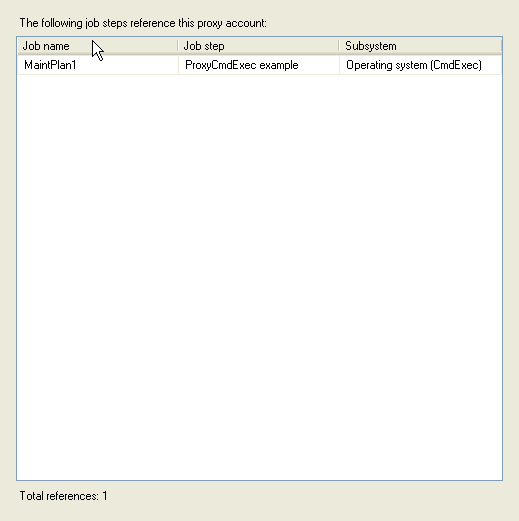 |
| 6 | Job Step – To specify a Proxy account for a Job Step, simply change the ‘Run as’ parameter to the new Proxy account i.e. ProxyCmdExec as opposed to the ‘SQL Agent Service Account’ default value. |  |


Next Steps
- As you begin to work with SQL Server 2005, do not overlook this native functionality to improve the overall security of your SQL Server.
- Depending on your application or overall production environment, the proxies may enable you to significantly change how SQL Server jobs are managed from your SQL Server 2000 world.
- Check out these additional MSSQLTips on SQL Server Agent:

Jeremy Kadlec is a Founder, Editor and Author at MSSQLTips.com with more than 300 contributions and 25+ years of SQL Server experience. Jeremy leads a team of more than 300 authors helping millions of SQL Server professionals around the globe every second of the day for the last 20 years. He is also the CTO @ Edgewood Solutions and a six-time SQL Server MVP based on his community contributions. Jeremy brings 25+ years of SQL Server DBA and Developer knowledge to the community and holds a bachelor’s degree from SSU and master’s degree from UMBC.


