Problem
Managing database security should be part of every DBAs job. With SQL Server you have the ability to use either SQL Server and Windows or Windows only security. The advantage of using Windows security for your SQL Servers is that you can take advantage of the Windows security model and security policies that have been setup on your domain. Another advantage is that you can manage security at the domain level instead of at the SQL Server instance level.
In addition you can use use Windows groups to manage the security buckets. Based on the groups that are setup you can put specific Windows users in these groups and then give SQL Server access to this Windows group instead of having to create logins for every single windows user.
The disadvantage to this is that the specific people within these groups is masked at the SQL Server level. In your logins you can see the groups that have access, but you have no idea what users are in what groups. So how can you get this information from within SQL Server?
Solution
SQL Server offers some insight into this issue with the xp_logininfo extended stored procedure.
This xp takes the following parameters:
- @acctname – the windows account name or group
- @option – information to display
- ‘all’ – display information for all permission paths
- ‘members’ – display list of members in a group
- @privelege – this is an output variable from this command and returns ‘admin’, ‘user’ or ‘null
Following is T-SQL code that loops through your logins and wherever there is a Windows Group the xp_logininfo XP is called to return information about the Windows group.
SQL Server 2005, 2008, 2008R2, 2014, 2016, 2017, 2019, 2022
For this example we are querying from the sys.server_principals catalog view where type = ‘G’.
DECLARE @LoginName sysname
DECLARE @sql NVARCHAR (2000)
BEGIN
   DECLARE cur_Loginfetch CURSOR FOR

   SELECT [name] FROM master.sys.server_principals WHERE TYPE = 'G'

   OPEN cur_Loginfetch

   FETCH NEXT FROM cur_Loginfetch INTO @LoginName
   WHILE @@FETCH_STATUS = 0
       BEGIN
           EXEC xp_logininfo @LoginName , 'members'
           FETCH NEXT FROM cur_Loginfetch INTO @LoginName
       END
   CLOSE cur_Loginfetch
   DEALLOCATE cur_Loginfetch
   RETURN
END
Here is the output from running the above code. Here we can see the Windows users that are part of the BUILTIN\Administrators group.
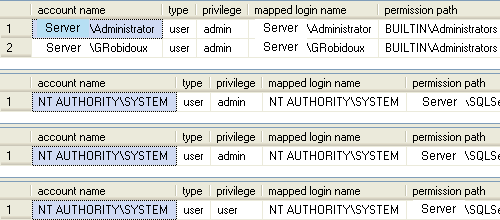
This is a pretty straightforward process to get the information. On your production servers you should be able to see a lot more information then what is provided in these examples.
Next Steps
- Use these scripts to get information about your Windows groups that have access to SQL Server.
- Add these scripts to your auditing procedures to keep on top of any potential security risks
- Write a process that captures this data on a daily basis and alerts you when there are changes. You may not need to do this for all groups, but it would be good to monitor any group that has sysadmin rights such as the BUILTIN\Administrators account.
- Take a look at these other security related tips:

Amit Watwe’s bio is coming soon…

Insightful Amit.