Problem
There are times when I find myself needing to run a SQL command against each database on one of my SQL Server instances. SQL Server has a handy undocumented stored procedure to loop over databases without a cursor. Use sp_MSforeachdb to run the same command in all databases.
Solution
The sp_MSforeachdb procedure is an undocumented procedure that allows you to run the same command against all databases. There are several ways to get creative with using this command and we will cover these in the examples below. The sp_MSforeachdb procedure can select data, update data and create database objects.
General sp_MSforeachdb Syntax
This is the general syntax, where @command is a variable-length string that contains the query you want to run.
EXEC sp_MSforeachdb @commandThe “?” Placeholder
In addition to using a straight command, we will see in the examples below how to use ? placeholder which substitutes the database name which allows us to change the context of which database the command is running in.
Example 1: Query Information From All Databases On A SQL Instance
Here is a simple example of where we query a system table from all databases including the system databases.
--Example 1
--This query will return a listing of all tables in all databases on a SQL instance:
DECLARE @command varchar(1000)
SELECT @command = 'USE ? SELECT name FROM sysobjects WHERE xtype = ''U'' ORDER BY name'
EXEC sp_MSforeachdb @command
You can alternately omit the process of declaring and setting the @command variable. The T-SQL command below is identical to the one above and condensed to a single line of code:
--This query will return a listing of all tables in all databases on a SQL instance:
EXEC sp_MSforeachdb 'USE ? SELECT name FROM sysobjects WHERE xtype = ''U'' ORDER BY name'
Example 2: Execute A DDL Query Against All User Databases On A SQL Instance
In this example we will create stored procedure spNewProcedure1 in all databases except for the databases we exclude in the IF statement.
--Example 2
--This statement creates a stored procedure in each user database that will return a listing of all users in a database, sorted by their modification date
DECLARE @command varchar(1000)
SELECT @command = 'IF ''?'' NOT IN(''master'', ''model'', ''msdb'', ''tempdb'') BEGIN USE ?
   EXEC(''CREATE PROCEDURE spNewProcedure1 AS SELECT name, createdate, updatedate FROM sys.sysusers ORDER BY updatedate DESC'') END'
EXEC sp_MSforeachdb @command
As you may notice, there are additional items to take into consideration when limiting the scope of the sp_MSforeachdb stored procedure, particularly when creating or modifying objects. You must also set the code to execute if the IF statement is true by using the T-SQL keywords BEGIN and END.
You should take note that the USE ? statement is contained within the BEGIN…END block. It is important to remember key T-SQL rules and account for them. In this case the rule that when creating a procedure, the CREATE PROCEDURE phrase must be the first line of code to be executed. To accomplish this you can encapsulate the CREATE PROCEDURE code within an explicit EXEC() function.
Example 3: Query File Information From All Databases On A SQL Instance
Throughout the examples provided above you saw the use of the question mark as a placeholder for the database name. To reference the database name as a string to be returned in a query, it needs to be embed between a double set of single quotation marks. To treat it as a reference to the database object simply use it by itself.
It is necessary to set the database for the query to run against, by using the USE ? statement, otherwise the code will execute in the context of the current database, for each database in your SQL instance. If you have 5 databases hosted in the current instance and you were to run the stored procedure code above while in the context of DBx it would execute the T-SQL text of the @command 5 times in DBx.
So, in example 3 we get the correct output since we are using USE ? and then we use ”?” to return the actual database name in the query.
--Example 3
--This query will return a listing of all files in all databases on a SQL instance:
EXEC sp_MSforeachdb 'USE ? SELECT ''?'', SF.filename, SF.size FROM sys.sysfiles SF'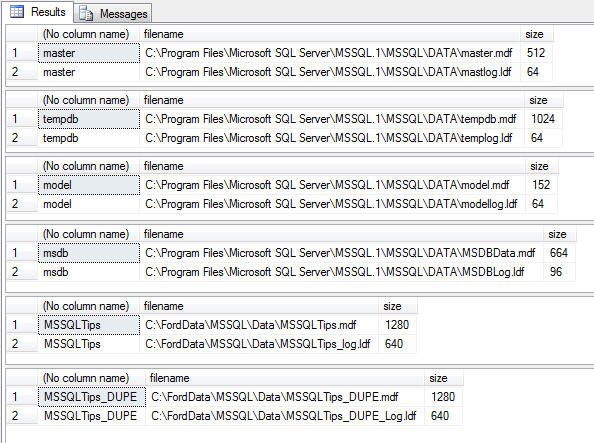
What happens though if we omit the USE ? clause, which sets the scope of the query? As you can see below, though it is apparent the code executed for each database, it never changed context. Pay particular interest to the filename column and you will see that the query executed from within the context of the master database (where I ran the query from) for each database in the SQL instance (as noted by the database name being returned via the use of the “?” placeholder).
--Example 3b
--Remove the USE ? clause and you end up executing the query repetitively within the context of the current database:
EXEC sp_MSforeachdb 'SELECT ''?'', SF.filename, SF.size FROM sys.sysfiles SF'
Why Not Just Use a Cursor?
Sure, a cursor can accomplish all that I’ve presented above. Let’s look at the code required to set up a cursor to execute the command used in Example 3:
DECLARE @DB_Name varchar(100)
DECLARE @Command nvarchar(200)
DECLARE database_cursor CURSOR FOR
SELECT name
FROM MASTER.sys.sysdatabases
OPEN database_cursor
FETCH NEXT FROM database_cursor INTO @DB_Name
WHILE @@FETCH_STATUS = 0
BEGIN
     SELECT @Command = 'USE ' + @DB_Name + '; SELECT ' + '''' + @DB_Name + '''' + ', SF.filename, SF.size FROM sys.sysfiles SF'
     EXEC sp_executesql @Command
     FETCH NEXT FROM database_cursor INTO @DB_Name
END
CLOSE database_cursor
DEALLOCATE database_cursor
Considering the behavior is similar I’d rather type and execute a single line of T-SQL code versus sixteen.
Next Steps
- sp_MSforeachdb is extremely useful for pulling together metadata about your various SQL databases. I use it quite frequently for reporting on such important metrics as database file sizes, amount of free space, and backup status.
- See how this can be used to help you manage SQL Server.
- Check out this related article Making a more reliable and flexible sp_MSforeachdb

Tim Ford is a Senior Database Administrator with MindBody in San Luis Obispo, California and is in the process of relocating west to the Pacific Northwest from Michigan. Since 2010 he’s produced Microsoft Data Platform training events branded as SQL Cruise from Alaska to the Caribbean and the Mediterranean at Tech Outbound, an events company specializing in technical training in unconventional locations. His SQL Cruise events take place on cruise ships in the Caribbean, Alaska, and the Mediterranean. Tim also is the Executive VP of Marketing for PASS, the global association for Microsoft data professionals. He also is a contributing author for itprotoday. Tim loves helping people find their true potential through education and building networks between Thought Leaders in various fields and those who are just starting on their careers or struggling to find their footing in established careers. If you’re looking for this sort of experience then check out the next SQL Cruise event taking place this August in Seattle.
- MSSQLTips Awards: Acheiver (75+ tips) – 2010
Try to put square brackets around the ? to see if that helps.
EXEC sp_MSforeachdb ‘USE [?] SELECT name FROM sysobjects WHERE xtype = ”U” ORDER BY name’
Take a look at this article too: https://www.mssqltips.com/sqlservertip/2201/making-a-more-reliable-and-flexible-spmsforeachdb/
Hi Tim, ic and useful post. When I execute
—
SELECT @command = ‘USE ? SELECT name FROM sysobjects WHERE xtype = ”U” ORDER BY name’
EXEC sp_MSforeachdb @command
—
It starts runninmg then it errors on databses which have log name (for example databases reate by sharepoint install)
sg 911, Level 16, State 1, Line 1
Database ‘SharePoint_AdminContent_f4d4485c’ does not exist. Make sure that the name is entered correctly.
The database name is
SharePoint_AdminContent_f4d4485c-e441-47ae-9540-49e34f0c26a6
so it is truncated Thanks for yor help
This article discusses a good utility but does not mention the notorious “skips databases” unresolved bug. (https://sqlblog.org/2020/08/04/reliable-flexible-replacement-sp_msforeachdb). I believe it is important for readers to be aware of this bug and to watch out for it should they use sp_MSforeachdb, or use an alternative approach that does not have an unresolved bug (cursor, sp_ineachdb, etc.).
Hi bludba.
I just tried with SQL Server 2022 and they are working.
Example 3b does not change the output because it does not include “USE ?”. The author was trying to show if the database context does not change it will query the same database.
I also added some code to the cursor since it was not changing databases.
Hi
the code in these demonstrations don’t actually run the queries against the selected databases. i.e. the databiles are all for the master database and not each database in the loop.