Problem
In SQL Server 2005 and later, users of a database that are only in the public role cannot see the definitions of an object while using sp_help, sp_helptext or the object_definition function. Sometimes this can be helpful to allow developers or other non-administrators to see the object definitions in a database, so they can create like objects in a test or development database. Instead of granting higher level database or server permissions, this can be done with GRANT VIEW Definition which is covered in this article.
Solution
When issuing sp_help, sp_helptext or using the object_definition() function the following errors in SQL 2005 will occur if the user does not have permissions to the see the object metadata. Here are a couple of examples of these errors.
EXEC sp_help CustomerReturns the following:
Msg 15009, Level 16, State 1, Procedure sp_help, Line 66
The object 'Customer' does not exist in database 'MSSQLTIPS' or is invalid for this operation.
A select against the OBJECT_DEFINITION function will return a value of NULL if the user does not have permissions to see the meta data.
SELECT object_definition (OBJECT_ID(N'dbo.vCustomer'))Returns the following:
NULLGRANT VIEW DEFINITION
By using VIEW DEFINITION it is possible to allow users that only have public access the ability to see object definitions.
Turn on this feature across the board for all databases and all users you can issue the following statement:
USE master
GO
GRANT VIEW ANY DEFINITION TO PUBLIC
To turn on this feature across the board for all databases for user “User1” you can issue the following statement:
USE master
GO
GRANT VIEW ANY DEFINITION TO User1
Turn this feature on for a database and for all users that have public access you can issue the following:
USE AdventureWorks
GO
GRANT VIEW Definition TO PUBLIC
If you want to grant access to only user “User1” of the database you can do the following:
USE AdventureWorks
GO
GRANT VIEW Definition TO User1
REVOKE VIEW Definition
To turn off this functionality you would issue the REVOKE command such as one of the following:
USE master
GO
REVOKE VIEW ANY DEFINITION TO User1
-- or
USE AdventureWorks
GO
REVOKE VIEW Definition TO User1
What Users Have VIEW Definition
If you want to see which users have this access you can issue the following in the database.
USE AdventureWorks
GO
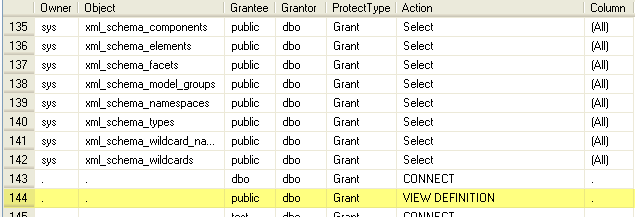
sp_helprotect
Here are two rows that show where the VIEW DEFINITION action has been granted. The first on a particular object and the second for all objects in the database.

Granting VIEW Definition on Database Objects
To take this a step further, if you do not want to grant this permission on all objects the following stored procedure can be used to grant this to all objects or particular objects in a database. This is currently setup for all object types, but this can be changed by including less object types in the WHERE clause.
WHERE type IN ('P', 'V', 'FN', 'TR', 'IF', 'TF', 'U')
/*
Included Object Types are:
P - Stored Procedure
V - View
FN - SQL scalar-function
TR - Trigger
IF - SQL inlined table-valued function
TF - SQL table-valued function
U - Table (user-defined)
*/
To use this, you can create this stored procedure in your user databases and then grant the permissions to the appropriate user instead of making things wide open for a user or all users. Just replace ChangeToYourDatabaseName for your database before creating.
USE ChangeToYourDatabaseName
GO

CREATE PROCEDURE usp_ExecGrantViewDefinition
(@login VARCHAR(30))
AS
/*
Included Object Types are:
P - Stored Procedure
V - View
FN - SQL scalar-function
TR - Trigger
IF - SQL inlined table-valued function
TF - SQL table-valued function
U - Table (user-defined)
*/

SET NOCOUNT ON
CREATE TABLE #runSQL
(runSQL VARCHAR(2000) NOT NULL)
--Declare @execSQL varchar(2000), @login varchar(30), @space char (1), @TO char (2)
DECLARE @execSQL VARCHAR(2000), @space CHAR (1), @TO CHAR (2)
SET @to = 'TO'
SET @execSQL = 'Grant View Definition ON '
SET @login = REPLACE(REPLACE (@login, '[', ''), ']', '')
SET @login = '[' + @login + ']'
SET @space = ' '
INSERT INTO #runSQL
SELECT @execSQL + schema_name(schema_id) + '.' + [name] + @space + @TO + @space + @login
FROM sys.all_objects s
WHERE type IN ('P', 'V', 'FN', 'TR', 'IF', 'TF', 'U')
AND is_ms_shipped = 0
ORDER BY s.type, s.name
SET @execSQL = ''
Execute_SQL:
SET ROWCOUNT 1
SELECT @execSQL = runSQL FROM #runSQL
PRINT @execSQL --Comment out if you don't want to see the output
EXEC (@execSQL)
DELETE FROM #runSQL WHERE runSQL = @execSQL
IF EXISTS (SELECT * FROM #runSQL)
   GOTO Execute_SQL
SET ROWCOUNT 0
DROP TABLE #runSQL
GO
Once this procedure has been created you can grant the permissions as follows. This example grants view definition to a user “userXYZ” in “MSSQLTIPS” Database for all object types that were selected.
USE MSSQLTIPS
GO
EXEC usp_ExecGrantViewDefinition 'userXYZ'
GO
Next Steps
For additional information on the topics discussed refer to these keywords in SQL Server Books Online:
- sp_helptext
- sp_help
- object_definition
- Object_Id
- Create Procedure
- Schema_Name
- Schema_ID
- Replace
- GRANT, DENY and REVOKE
- VIEW DEFINITION

Nitin is a Microsoft Certified Professional and currently has over 12 years of IT experience under his umbrella. He is currently working as SQL Architect at Wachovia Securities in New York City. Nitin has an extensive knowledge in maintaining VLDB (more than 3-4 TB) and is very proficient in SQL server core components such as Indexing, Performance Tuning, Partitioning and so on. He has worked at various pristine clients in the continental United States helping the clients to reach a stable stage in their database platform. Nitin also has extensive experience in ASP, Power Builder, SSAS, SSRS to name a few.