Problem
Microsoft provides a good set of basic queries into their system tables. However, some of these procedures lack some additional information that I’m interested in and I find myself constantly issuing queries to get this additional data. Is there a way I can run these queries like system procedures?
Solution
By creating a stored procedure in the SQL Server master database prefixed with sp_, you can take advantage of the engine’s stored procedure name resolution algorithm. If a stored procedure begins with sp_, the engine will search the master database first before checking the current database and ownership. As an aside, this name resolution is precisely why you should never prefix your application database stored procedures with sp_ as you will continually incur the overhead associated with an unnecessary search and a cache miss every time you attempt to execute these procedures.
When running an sp_ prefixed procedure from master, there are some subtleties as to which database context is used, which impacts what data is returned.
Consider the following example:
USE MASTER
GO

-- drop stored procedure if it exists
IF OBJECT_ID('SP_GETOBJECTS') IS NOT NULL
DROP PROCEDURE DBO.sp_GETOBJECTS
GO

-- create stored procedure
CREATE PROCEDURE DBO.sp_GETOBJECTS
AS
   SET NOCOUNT ON

   SELECT DB_NAME()

   -- ANSI view
   SELECT *
   FROM INFORMATION_SCHEMA.TABLES
   WHERE TABLE_NAME = 'Employee'

   -- SQL Server 2005 and later table
   SELECT *
   FROM sys.objects
   WHERE NAME = 'Employee'

   -- SQL Server 2000 table
   SELECT *
   FROM sysobjects
   WHERE NAME = 'Employee'

   SELECT TOP 1 *
   FROM HumanResources.Employee
GO

-- execute the stored procedure
USE AdventureWorks
GO

EXEC sp_GETOBJECTS
GO
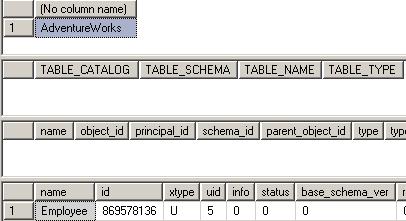
Examining the output, we can see that the DB_NAME() function ran under the context of the AdventureWorks2017 database as did the SQL Server 2000 statement to retrieve the Employee table metadata from sysobjects. However, the equivalent INFORMATION_SCHEMA and SQL Server 2005 and later statements did not work and the SELECT from the Employee table failed outright. These did not work because the statements actually ran under the context of the master database. While the procedure was found in master, it wasn’t smart enough to use the current database context for the SQL Server 2005 and later specific catalog information.

Marking Stored Procedure as System Object
There’s an undocumented system stored procedure named sp_ms_marksystemobject that can be used to flag the engine that the stored procedure should be run as though it were a Microsoft provided system stored procedure. Like any other of the undocumented commands, it could disappear in a future release and should be used at your own risk.
USE MASTER
GO

EXEC sp_ms_marksystemobject 'SP_GETOBJECTS'
GO

SELECT NAME, IS_MS_SHIPPED
FROM SYS.OBJECTS
WHERE NAME = 'SP_GETOBJECTS'
GO
Marking our procedure with sp_ms_marksystemobject shows that it has been registered with the engine as it were a Microsoft supplied procedure.

Re-running the procedure now shows that all statements are run under context of the AdventureWorks database.
USE AdventureWorks
GO

EXEC sp_GETOBJECTS
GO 
As you can see, this is a really effective way to centralize some of your frequently run queries so they’re available for use against multiple databases hosted on your server. It should be noted that adding objects to the master database is not generally considered a good practice, so I don’t make use of this feature on production servers. However, I do maintain several QA and Load Test servers and I make use of it in these cases.
Next Steps
- Read more about the master database
- Take caution if you’re considering adding objects to the master database on a production server

For 20+ years, MSSQLTips.com has been delivering comprehensive technical solutions on a daily basis for the Microsoft SQL Server platform. In that time, an innovative team of over 300 authors from around the globe have delivered over 7000 articles and 1000 webcasts ranging from beginner topics to advanced solutions. Our community prides itself on delivering human only generated content.