Problem
In my recent article Using Computed Columns in SQL Server with Persisted Values I discussed how to create computed columns to improve performance in specific scenarios. In order to achieve maximum performance through computed columns one very important aspect that can also be implemented is creating indexes on these computed columns. There are certain requirements for creating indexes on computed columns and this tip shows you want needs to be done.
Solution
First we will create a table with the required specifications, so that indexes may be created on the computed columns.
The following script#1 will create a UDF to be used for the computed column and a table named CCIndexTest with computed columns in it.
| Script # 1: Create UDF to use in computed column expression and create table with computed columns and insert sample data |
USE [AdventureWorks] — Create UDF to use in computed column expression
IF OBJECT_ID(‘CCIndexTest’, ‘U’) IS NOT NULL — Create table CCIndexTest with two computed columns — Insert sample data — Select data from dbo.CCIndexTest |
Now we have a sample table with two computed columns. Before going into the details of the different requirements or prohibited properties we will simply check our computed columns for index creation using COLUMNPROPERTY ISINDEXABLE
Script#2: Check computed columns for index creation |
SELECT GO |
Above script just mentions that either a given column is indexable or not.
Here are the results from the above query.

Both of our computed columns are indeaxble. Now we may discuss the properties that make a computed column indexable or not.
Indexes can be created on computed columns in SQL Server 2000 and onwards. In case of SQL Server 2000 there are no persisted computed columns, so some of the rules for creating indexes on computed columns in SQL Server 2000 differ slightly where persistence is involved. There are two important requirements that may need planning and analysis while creating indexes on computed columns in SQL Server
- Determinism requirements
- Precision requirements
Following we will elaborate these requirements while planning to create indexes on computed columns.
Determinism Requirements
Keeping in mind the main concept associated with the property DETERMINISTIC, we have to make sure that the expression of our computed column is always the same for specific inputs. This check can easily be performed by using the COLUMNPROPERTY function ISDETERMINISTIC on our computed columns as follows:
| Script#3: Check determinism for computed columns |
USE AdventureWorks; SELECT ( |
Here are the results from the above query.
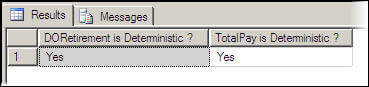
Both of these computed columns are deterministic.
Also we can check the UDF (udf_CalculatePay) used in the TotalPay computed column to see that this is also deterministic.
| Script#4: Check determinism for UDF |
USE adventureworks SELECT OBJECTPROPERTY(OBJECT_ID(‘[dbo].[udf_calculatePay]’), |
Result in this case is 1, indicating that the UDF is deterministic as well.
It is important to note that if your UDF does not return non-deterministic data and also it returns a precise data type, you still need to create it with SCHEMA BINDING to make it deterministic. In our case UDF is SCHEMABINDED hence it is deterministic and the computed column that is accessing it is also deterministic and indexable.
If the UDF is not SCHEMABINDED then it will be always non-deterministic and the computed column accessing it will not be deterministic hence it won’t be indexable. Also it is a good practice to make your UDFs schema bound when they are used by a omputed column. Also, note that a non-deterministic column can not be persisted.
Generally a computed column will be deterministic if it has one or more of the following properties:
- All user defined functions or built in functions referenced in computed column expression are deterministic and precise.
- Columns referenced in computed column expression come from the table containing computed column.
- Computed column does not pull data from multiple rows of a column. This may be the case when using aggregate functions in computed column expression.
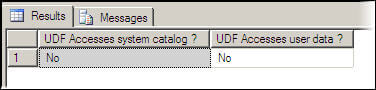
- Computed column has no system or user data access. It will be the case when you are using a system or user defined function. In our case we may verify this for our UDF [dbo].[udf_calculatePay]. This can be checked using the following script
| Script#5: Check that UDF access user data or system catalog |
Use AdventureWorks SELECT GO |
The properties SYSTEMDATAACCESS and USERDATAACCESS can be applied to views or functions. Result is negative for our both cases
Precision Requirements
Precision of a computed column depends upon the data types that are involved in the expression or UDF used for computed column. A computed column may be deterministic, but not precise. Like that of indexed views, you can use a non-precise data type (real, float) in a computed column, but not as a key. To check the precision property of a computed column you may use following script.
| Script#6: Check precision for computed column |
USE AdventureWorks; SELECT ( |
The property ISPRECISE can be applied to a computed column, function, user-defined type or views. Result in our case is as follows:
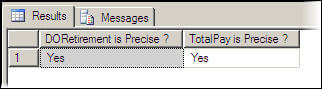
Both computed columns are precise. If the UDF used in computed column is created as non SCHEMA BINDED then it will be non-precise even if precise data types are used.
Now we have confirmed that two major requirements for creating indexes on computed columns are fulfilled. Hence let us create indexes on both of the computed columns. Both indexes will be non-unique and non-clustered. However you may create indexes with clustered and unique properties.
| Script#7: Create indexes on both computed columns |
USE AdventureWorks CREATE INDEX index_DORetirement_CCIndexTest CREATE INDEX index_TotalPay_CCIndexTest |
To check that the indexes were created we can look in SSMS.

Hopefully that explains how to create indexes on computed columns and what properties need to be set.
To cleanup and remove all of these sample objects you can run the following script.
| Script#8: Drop table and UDF |
USE AdventureWorks DROP TABLE [dbo].[CCIndexTest]
|
Next Steps
- Check out this recent article for creating computed columns
- Get data type requirements for creating indexes on computed columns
- Get SET option requirements for creating indexes on computed columns
- Get ownership requirements for creating indexes on computed columns
- Get list and description of deterministic and non deterministic functions
- Get list and description of precise and other data types

Atif Shehzad is a passionate DBA currently serving at Pakistan Revenue Automation Limited (PRAL). His main areas of interest are SQL Server database design, best practices, performance optimization, security/permissions and Reporting Services. He blogs his SQL Server notes on DBDigger. Find him on Twitter and LinkedIn.
- MSSQLTips Awards: Trendsetter (25+ tips) – 2013

