Problem
I am trying to create a stored procedure which creates a linked server connection, performs a query against the linked server, and then tears down that connection. I don’t want the connection to be up at all times, hence the reason I want to create the connection in the stored procedure. Based on a previous tip, I know how to create the linked server within the stored procedure, but I need to make a connection via a SQL Server login. However, I don’t want to store the credentials in the stored procedure as I’ll have to change the stored procedure every time the password changes. How can I store the credentials securely, but in a way which makes them easier to change?
Solution
If you are using SQL Server 2005 or above, you can use SQL Server’s built-in encryption to store the credentials in encrypted form and then decrypt them for use to establish the linked server connection. First, we’ll need to make sure we have the proper keys in place. We’re following the basic pattern of:
- Create a database master key for encryption.
- Create a certificate which is encrypted by the database master key.
- Create a symmetric key which is encrypted by the certificate.
We do that through the following code:
 USE MSSQLTips;
GO
CREATE MASTER KEY ENCRYPTION BY PASSWORD = 'P4ssw0rd!';
GO
CREATE CERTIFICATE EncryptPasswordCertificate
WITH SUBJECT = 'Asymmetric Encryption for Password via Certificate';
GO
CREATE SYMMETRIC KEY EncryptPasswordSymmKey
WITH ALGORITHM = AES_256
ENCRYPTION BY CERTIFICATE EncryptPasswordCertificate;
GO
Now we’ll need a table to store the credentials:
 CREATE TABLE ForLinkedServer (Username VARBINARY(128), UserPWD VARBINARY(128));
GO
And we’ll need the stored procedures to set the credentials and retrieve the credentials.
 CREATE PROC dbo.usp_UpdateLinkedServerCredentials
  @Username NVARCHAR(256),
  @UserPWD NVARCHAR(256)
AS
BEGIN
  SET NOCOUNT ON;

  OPEN SYMMETRIC KEY EncryptPasswordSymmKey
  DECRYPTION BY CERTIFICATE EncryptPasswordCertificate;
  DELETE FROM dbo.ForLinkedServer;
  INSERT INTO dbo.ForLinkedServer (Username, UserPWD)
  VALUES (ENCRYPTBYKEY(KEY_GUID('EncryptPasswordSymmKey'), @Username), ENCRYPTBYKEY(KEY_GUID('EncryptPasswordSymmKey'), @UserPWD));
  CLOSE SYMMETRIC KEY EncryptPasswordSymmKey;
END;
GO
CREATE PROC dbo.usp_GetLinkedServerCredentials
  @Username NVARCHAR(256) OUTPUT,
  @UserPWD NVARCHAR(256) OUTPUT
AS
BEGIN
  SELECT
    @Username = CONVERT(NVARCHAR, DECRYPTBYKEYAUTOCERT(CERT_ID('EncryptPasswordCertificate'),NULL, UserName)),
    @UserPWD = CONVERT(NVARCHAR, DECRYPTBYKEYAUTOCERT(CERT_ID('EncryptPasswordCertificate'),NULL, UserPWD))
  FROM dbo.ForLinkedServer;
END;
GO
Inserting the credentials and then verifying they were set properly:
 EXEC dbo.usp_UpdateLinkedServerCredentials @Username = 'LinkedServer',
@UserPWD = 'P4ssw0rd!';
GO
DECLARE @Username NVARCHAR(256);
DECLARE @UserPWD NVARCHAR(256);
EXEC dbo.usp_GetLinkedServerCredentials @Username OUTPUT, @UserPWD OUTPUT;
SELECT @Username [User], @UserPWD [Password];
GO
Once we do that, we’ll need to “prime the pump” with respect to the linked server connection, just as we did in that previous tip:
 EXEC sys.sp_addlinkedserver @server = 'LinkingServer',
@srvproduct = N'SQL Server';
GO
Once that is done, we can create the stored procedure. Note that I’ve added code to retrieve the credentials and then use sp_addlinkedsrvlogin to create the credential. In this case I’m associating this remote login with only the sa login locally. This will be something that will allow us to test and verify everything is working. One other point I’ll make is that I’ve now wrapped the query against the remote server into a statement being called by sp_executesql. For whatever reason, when we create the linked server connection credentials, they will not be used in the existing batch. We can cheat by forcing a separate batch after the credentials are stored in order to accomplish the same result.
 CREATE PROC dbo.usp_GetDatabasesFromRemoteServer
AS
BEGIN
  IF NOT EXISTS(SELECT name FROM sys.servers WHERE name = 'LinkingServer')
    BEGIN
      EXEC sys.sp_addlinkedserver @server = 'LinkingServer',
           @srvproduct = N'SQL Server';
    END

    DECLARE @Username NVARCHAR(256);
    DECLARE @UserPWD NVARCHAR(256);

    EXEC dbo.usp_GetLinkedServerCredentials @Username OUTPUT, @UserPWD OUTPUT;

    EXEC sys.sp_addlinkedsrvlogin @rmtsrvname = 'LinkingServer', @useself = 'FALSE',
         @locallogin = 'sa', @rmtuser = @Username, @rmtpassword = @UserPWD;

  EXEC sp_executesql N'SELECT [name] AS [Database]
       FROM [LinkingServer].master.sys.databases;'

  EXEC sys.sp_dropserver @server = 'LinkingServer', @droplogins = 'droplogins';
END;
GO
Now with the new stored procedure in place, we can execute as the sa login to verify that the credentials are working as expected:
 EXECUTE AS LOGIN = 'sa';
GO
EXEC dbo.usp_GetDatabasesFromRemoteServer;
GO
REVERT;
GO
And with the result set present, we know we successfully connected to the linked server.
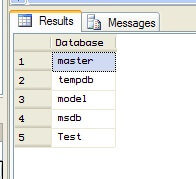
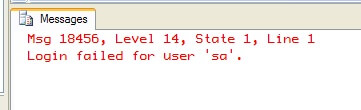
If you don’t wrap the query to the linked server using a dynamic SQL technique like through the use of sp_executesql, the fact that we’ve just told SQL Server to map the sa account to a different set of credentials won’t register. SQL Server will attempt to use the same credentials across the linked server connection. In my case, the sa login is disabled on the second server, so the query will fail. We can see this if we strip out the sp_executesql statement using a second stored procedure (you will need to prime the pump again with the linked server connection creation, as with the previous stored procedure):
 CREATE PROC dbo.usp_GetDatabasesFromRemoteServerNoDynamicSQL
AS
BEGIN
  IF NOT EXISTS(SELECT name FROM sys.servers WHERE name = 'LinkingServer')
    BEGIN
      EXEC sys.sp_addlinkedserver @server = 'LinkingServer', @srvproduct = N'SQL Server';
    END

    DECLARE @Username NVARCHAR(256);
    DECLARE @UserPWD NVARCHAR(256);

    EXEC dbo.usp_GetLinkedServerCredentials @Username OUTPUT, @UserPWD OUTPUT;

    EXEC sys.sp_addlinkedsrvlogin @rmtsrvname = 'LinkingServer', @useself = 'FALSE',
         @locallogin = 'sa', @rmtuser = @Username, @rmtpassword = @UserPWD;

  SELECT [name] AS [Database] FROM [LinkingServer].master.sys.databases;

  EXEC sys.sp_dropserver @server = 'LinkingServer', @droplogins = 'droplogins';
END;
GO
And let us execute that second stored procedure:
 EXECUTE AS LOGIN = 'sa';
GO
EXEC dbo.usp_GetDatabasesFromRemoteServerNoDynamicSQL;
GO
REVERT;
GO
And instead of a result set we get back an error indicating the sa login was attempted across the linked server connection. As a result, the linked server query failed:
So if you have to use a linked server connection with SQL Server-based authentication, make sure to wrap the query going to the linked server using sp_executesql.
Next Steps
- Check out the previous SQL Server Linked Server tip – On demand creation and destruction of a Linked Server for SQL Server.
- For more information on this topic, check out the following tips:

Brian Kelley is an author, columnist, Certified Information Systems Auditor (CISA), and former Microsoft Data Platform (SQL Server) MVP (2009-2016) focusing primarily on SQL Server and Windows security. Brian currently serves as a data architect as well as an independent infrastructure/security architect concentrating on Active Directory, SQL Server, and Windows Server. He has served in a myriad of other positions including senior database administrator, data warehouse architect, web developer, incident response team lead, and project manager. Brian has spoken at 24 Hours of PASS, IT/Dev Connections, SQLConnections, the Techno Security and Forensics Investigation Conference, the IT GRC Forum, SyntaxCon, and at various SQL Saturdays, Code Camps, and user groups.
- MSSQLTips Awards: Author of the Year Contender – 2015, 2017 | Champion (100+ tips) – 2014
