Problem
Frequently I find myself in situations where I need to insert records into a table in a set-based operation wrapped inside of a transaction where secondarily, and within the same transaction, I spawn-off subsequent inserts into related tables where I need to pass-in key values that were the outcome of the initial INSERT command. Thanks to a Transact/SQL enhancement in SQL Server, this just became much easier and can be done in a single statement… WITHOUT A TRIGGER!
Solution
One of the Transact/SQL enhancements in Microsoft SQL Server is the OUTPUT sub-clause of the INSERT statement. You can now capture the records inserted via an INSERT statement (think also being able to capture IDENTITY column values for the new rows) for subsequent use in an additional INSERT statement for a child table to persist referential integrity without the need for an INSERT trigger.
Why not just use a trigger? It’s a viable and proven construct of SQL Server, right?
The short answer is “Yes, it is.” However, triggers are one of those nasty little secrets that the database keeps. They don’t just jump right out at you and say “HERE I AM!” Take for example the troubleshooting process of deadlocks or tuning a poorly-performing query – a trigger sitting in the background performing as it’s been asked to may be causing your issues, but you’re going to go through many iterations of searching stored procedures, and ad-hoc T/SQL code before you probably even stop to consider there is a trigger firing off data modification language commands (DML) – INSERTS, UPDATES, or DELETES that are adjunct to what you’re trying to diagnose. I associate the use of triggers with the use of ad-hoc T/SQL code used in an application’s code stack and passed to a SQL Server instance for processing – practices to shy away from.
That is why I like what I see with the INSERT-OUTPUT construct. You get the benefits of being able to capture the inserted values that you can then pass to a secondary command – and you can wrap this all inside a single transaction for atomicity. The syntax for this construct is shown below and differs only slightly from the basic INSERT T/SQL command:
INSERT INTO <SOME_TABLE>
 (
 <column_list>
 )
OUTPUT INSERTED.<identity_column> –and other columns from SOME_TABLE if need be
INTO <SOME_OTHER_TABLE>
 (
 <column_list>
 )
SELECT
 (
 <column_list>
 )
FROM <source_table_OR_JOIN_of_multiple_tables>
WHERE <filtering_criteria>
The only difference between this and a standard INSERT statement is the inclusion on the OUTPUT…INTO statement. To make this easy think of it as simply a secondary INSERT statement inside of the original INSERT statement that captures the values in the virtualized INSERTED table – the same table that a trigger would use – to process a secondary INSERT to another table. In the example below, and in keeping with the holiday season, let’s say you’re responsible for doing a bit of hiring at the corporate AdventureWorks offices. A right-jolly old elf is being hired for some in-store promotions and in keeping with corporate policy you always perform a 90 day review for any new hires. We want to have the notfication recorded when the new hire is entered without any additional work on the part of Human Resources. The code below demonstates how we can use INSERT-OUTPUT to do this.
USE AdventureWorksGO

—Create Example Tables
/*
Note, this is not fully-normalized.  I would have included another table
for Notification Types if this was an actual solution.
I would also use an int NotificationTypeID column in Notifications table
instead of a varchar(xx) NotificationType column.
*/

CREATE SCHEMA [HR] AUTHORIZATION dboGO

CREATE TABLE [HR].[Staff]
 (
 [StaffID] [int] IDENTITY(1,1) NOT NULL,
 [FirstName] VARCHAR(30) NOT NULL,
 [LastName] VARCHAR(30) NOT NULL,

 CONSTRAINT [PK_StaffID] PRIMARY KEY CLUSTERED
 (
 [StaffID] ASC
 )ON [PRIMARY]
 ) ON [PRIMARY]
CREATE TABLE [HR].[Notification]
 (
 [NotificationID] [int] IDENTITY(1,1) NOT NULL,
 [StaffID] [int] NOT NULL,
 [NotificationDate] DATETIME NOT NULL,
 [NotificationType] VARCHAR(30) NOT NULL,

 CONSTRAINT [PK_NotificationID] PRIMARY KEY CLUSTERED
 (
 [NotificationID] ASC
 )ON [PRIMARY]
 ) ON [PRIMARY]
Now that we’ve built the objects for this little exercise we can look at the INSERT-OUTPUT construct in action…
/*
Demonstrate how you can insert the key values added to Staff.StaffID
into Notifications.StaffID in single transaction
*/

INSERT INTO HR.Staff ( FirstName, LastName )
OUTPUT INSERTED.StaffID, DATEADD(d,90,GETDATE()),’90-Day Review’
INTO HR.Notification
 (
 StaffID,
 NotificationDate,
 NotificationType
 )
VALUES ( ‘Santa’,‘Claus’
Selecting now from both the Staff and Notification tables you’ll see that the key values were successfully entered into both tables:
SELECT * FROM HR.StaffSELECT * FROM HR.Notification 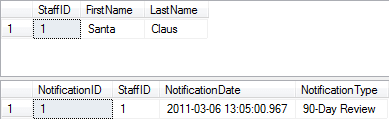
Now there is a very important – and quite limiting caveat to using INSERT-OUTPUT. The Output target can’t be part of any foreign key relationship. Even if there is no cascading relationship to any other object via that relationship in the database. Let’s look at what happens if it is. We’ll add a foreign key to Notification on StaffID, referencing the StaffID column in the Staff table and then try to add some additional holiday help:
–Add Foreign Key for StaffID column to Notifications table
ALTER TABLE HR.Notification ADD CONSTRAINT [FK_Notification_Staff]
 FOREIGN KEY
 (
 StaffID
 )
 REFERENCES HR.Staff
 (
 StaffID

/*
Demonstrate how you can insert the key values added to Staff.StaffID
into Notifications.StaffID in single transaction
*/

INSERT INTO HR.Staff ( FirstName, LastName )
OUTPUT INSERTED.StaffID, DATEADD(d,90,GETDATE()),’90-Day Review’
INTO HR.Notification
 (
 StaffID,
 NotificationDate,
 NotificationType
 )
VALUES ( ‘Frosty’,‘Snowman’
SELECT * FROM HR.StaffSELECT * FROM HR.Notification
The following error message is returned as expected:
Msg 332, LEVEL 16, State 1, Line 17
The target TABLE ‘HR.Notification’ OF the OUTPUT INTO clause cannot be ON either side OF a (PRIMARY KEY, FOREIGN KEY) relationship. Found reference CONSTRAINT ‘FK_Notification_Staff’.
This is probably good in this case since chances are good Mr. Snowman is not going to be around in 90 days.
Next Steps
- Read more about the OUTPUT clause
- Also read this previous tip about the OUTPUT clause
- More tips from the author are available via this link.

Tim Ford is a Senior Database Administrator with MindBody in San Luis Obispo, California and is in the process of relocating west to the Pacific Northwest from Michigan. Since 2010 he’s produced Microsoft Data Platform training events branded as SQL Cruise from Alaska to the Caribbean and the Mediterranean at Tech Outbound, an events company specializing in technical training in unconventional locations. His SQL Cruise events take place on cruise ships in the Caribbean, Alaska, and the Mediterranean. Tim also is the Executive VP of Marketing for PASS, the global association for Microsoft data professionals. He also is a contributing author for itprotoday. Tim loves helping people find their true potential through education and building networks between Thought Leaders in various fields and those who are just starting on their careers or struggling to find their footing in established careers. If you’re looking for this sort of experience then check out the next SQL Cruise event taking place this August in Seattle.
- MSSQLTips Awards: Acheiver (75+ tips) – 2010