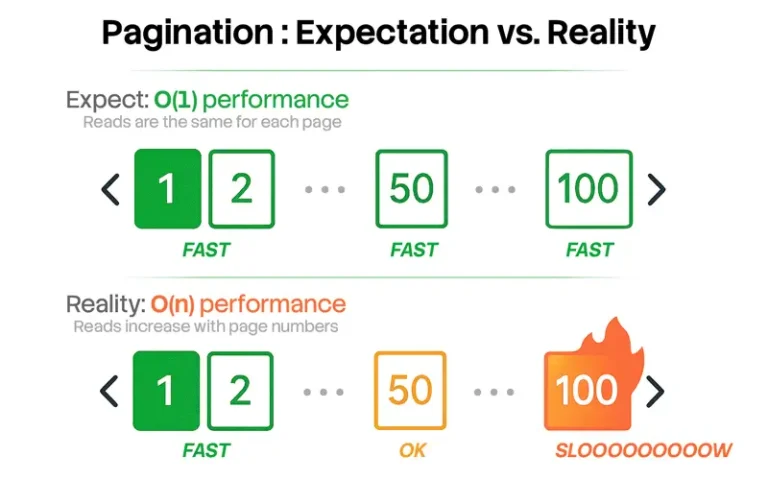
Problem
While looking through the new features in SQL Server 2012 I came across a new feature OFFSET and FETCH. The OFFSET and FETCH clause of SQL Server 2012 provides you an option to fetch only a page or a window of the results from the complete result set. In this tip we will take a look at an example which uses the OFFSET and FETCH feature of SQL Server 2012. Also, we will show how you can implement SQL Server Paging or SQL data page retrieval using this new feature.
Solution
Using this feature of SQL Server 2012 one can easily implement SQL Server Paging while displaying results to the client. We will take a look at simple example and then also how you could construct a stored procedure to implement SQL paging.
Let’s go through a simple example which demonstrates how to use the OFFSET and FETCH feature of SQL Server 2012. You can see below that the TSQL looks the same as what you write today except after the ORDER BY clause we have the OFFSET and FETCH commands. One thing to note is that you have to use an ORDER BY to use this feature. The OFFSET basically tells SQL to skip the first 100 rows and the FETCH will get the next 5 rows.
USE AdventureWorks2008R2

GO

SELECT

  BusinessEntityID

  ,PersonType

 ,FirstName + ‘ ‘ + MiddleName + ‘ ‘ + LastName

FROM Person.Person

 ORDER BY BusinessEntityID ASC

  OFFSET 100 ROWS

  FETCH NEXT 5 ROWS ONLY

GO
The below snippet shows the output when running the above commands. This shows that the first 100 rows were discarded and the query fetched the next 5 rows in the complete recordset.
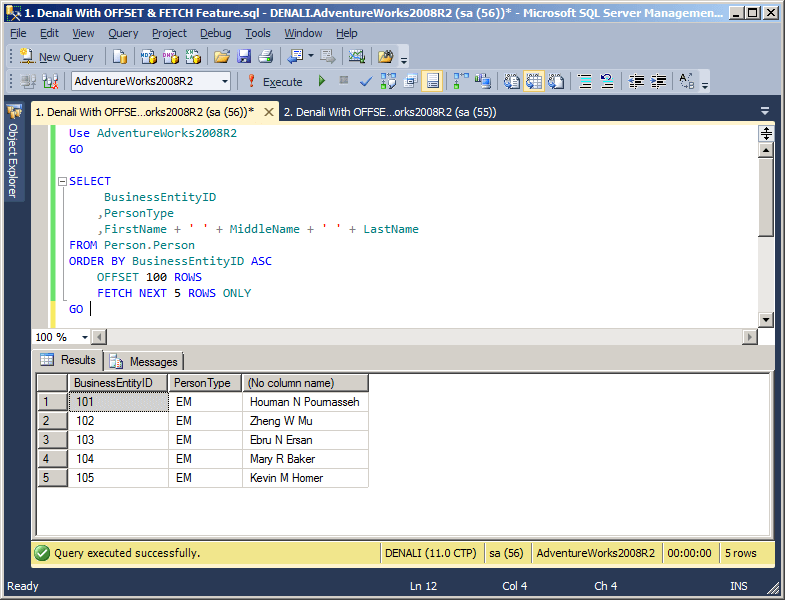
Let’s go through another example where we will create a stored procedure which will use the OFFSET and FETCH feature of SQL Server 2012 to achieve sql paging while displaying results to client machines. In this stored procedure we are passing in a page number and the number of rows to return. These values are then computed to get the correct page and number of rows.
USE AdventureWorks2008R2

GO

IF EXISTS (SELECT * FROM sys.objects WHERE object_id =

OBJECT_ID(N'[dbo].[ExampleUsageOfSQLServerDenaliPagingFeature]’) AND type in (N’P’, N’PC’))

DROP PROCEDURE [dbo].[ExampleUsageOfSQLServerDenaliPagingFeature]

GO

CREATE PROCEDURE ExampleUsageOfSQLServerDenaliPagingFeature

 (

  @PageNo INT,

 @RowCountPerPage INT

 )

AS

SELECT

  BusinessEntityID

 ,PersonType

 ,FirstName + ‘ ‘ + MiddleName + ‘ ‘ + LastName

FROM Person.Person

 ORDER BY BusinessEntityID

  OFFSET (@PageNo – 1) * @RowCountPerPage ROWS

  FETCH NEXT @RowCountPerPage ROWS ONLY

GO
Let’s go ahead and execute the stored procedure using the below command. This will give us five records starting at page 21 where the records are ordered by BusinessEntityID.
/* Display Records Between 101 AND 105 BusinessEntityID */

EXECUTE ExampleUsageOfSQLServerDenaliPagingFeature 21, 05

GO
The below snippet shows the output once the above stored procedure is executed successfully. You can see that first 100 (20 pages * 5 rows per page = 100) rows were discarded and the stored procedure fetched only the next 5 rows thereby limiting the number of rows sent to the client.

You have seen in this tip how easily you can achieve SQL Server Paging using the OFFSET and FETCH feature of SQL Server 2012. SQL paging is not as hard as it used to be with this new feature.
Next Steps

Ashish Kumar Mehta has been contributing to the MSSQLTips.com community since 2009 with over 60 tips.
- MSSQLTips Awards: Achiever (75+ tips) – 2013