Problem
In my previous tip, Use SQL Server’s UNPIVOT operator to help normalize output, I discussed how to use UNPIVOT to present columns as rows. The technique works well when you have a finite and known number of columns, but might not work so well if your schema is evolving or your non-normalized table is very wide. In cases like this, you may need to construct your UNPIVOT query dynamically. Check out how to do so in this tip.
Solution
Taking the previous sample data:
CREATE TABLE dbo.CustomerPhones ( CustomerID INT PRIMARY KEY, -- FK Phone1 VARCHAR(32), Phone2 VARCHAR(32), Phone3 VARCHAR(32) ); INSERT dbo.CustomerPhones (CustomerID, Phone1, Phone2, Phone3) VALUES (1,'705-491-1111', '705-491-1110', NULL), (2,'613-492-2222', NULL, NULL), (3,'416-493-3333', '416-493-3330', '416-493-3339');
We know that the query we want to end up with looks like this:
SELECT CustomerID, Phone FROM ( SELECT CustomerID, Phone1, Phone2, Phone3 FROM dbo.CustomerPhones ) AS cp UNPIVOT ( Phone FOR Phones IN (Phone1, Phone2, Phone3) ) AS up;
But what if we have 800 columns named PhoneN? What if we add a few new PhoneN columns every few days? What if we actually have 250 unrelated columns that don’t have a Phone prefix, but we still want to transpose into rows? Maintaining a query with a constantly moving underlying schema, or even just generating the text for a query that covers 800 columns, is not going to be fun (and again, we’ll ignore the fact that the schema was not designed for fun in the first place).
In order to generate such a query dynamically, we can look to sys.columns to derive the column names. Let’s say we know the table name and the key column(s), and a pattern the column name should match, then we can pull all of the other columns and build a comma-separated list. In this case, it would look like this:
-- incoming parameters DECLARE @table NVARCHAR(257) = N'dbo.CustomerPhones', @key_column SYSNAME = N'CustomerID', @name_pattern SYSNAME = N'Phone[0-9]%'; -- local variables DECLARE @sql NVARCHAR(MAX) = N'', @cols NVARCHAR(MAX) = N''; SELECT @cols += ', ' + QUOTENAME(name) FROM sys.columns WHERE [object_id] = OBJECT_ID(@table) AND name <> @key_column AND name LIKE @name_pattern; SELECT @sql = N'SELECT ' + @key_column + ', Phone FROM ( SELECT ' + @key_column + @cols + ' FROM ' + @table + ' ) AS cp UNPIVOT ( Phone FOR Phones IN (' + STUFF(@cols, 1, 1, '') + ') ) AS up;'; PRINT @sql; -- EXEC sp_executesql @sql;The output:
SELECT CustomerID, Phone FROM ( SELECT CustomerID, [Phone1], [Phone2], [Phone3] FROM dbo.CustomerPhones ) AS cp UNPIVOT ( Phone FOR Phones IN ( [Phone1], [Phone2], [Phone3]) ) AS up;
And of course, when we execute this instead of print it, we get the exact same results as in the previous tip:
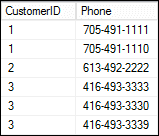
We can add 20 or 500 more columns named Phone4 -> PhoneWhatever, and we wouldn’t need to change this code (unless we got to a point where the query text was too large).
Another case – SQL Server UNPIVOT with Two Related Columns
Adapting this code to the case where we had two related columns that needed to be presented together requires very little modification. Assuming this sample data:
CREATE TABLE dbo.CustomerPhones2 ( CustomerID INT PRIMARY KEY, -- FK Phone1 VARCHAR(32), PhoneType1 CHAR(4), Phone2 VARCHAR(32), PhoneType2 CHAR(4), Phone3 VARCHAR(32), PhoneType3 CHAR(4) ); INSERT dbo.CustomerPhones2 VALUES (1,'705-491-1111', 'cell', '705-491-1110', 'home', NULL,NULL), (2,'613-492-2222', 'home', NULL, NULL, NULL, NULL), (3,'416-493-3333', 'work', '416-493-3330', 'cell', '416-493-3339', 'home'); GO
We just need a second variable to hold the related column names (and we make the assumption that you only ever add Phone4 and PhoneType4 together).
-- incoming parameters DECLARE @table NVARCHAR(257) = N'dbo.CustomerPhones2', @key_column SYSNAME = N'CustomerID', @name_pattern1 SYSNAME = N'Phone[0-9]%', @name_pattern2 SYSNAME = N'PhoneType[0-9]%'; -- local variables DECLARE @sql NVARCHAR(MAX) = N'', @cols1 NVARCHAR(MAX) = N'', @cols2 NVARCHAR(MAX) = N''; SELECT @cols1 += ', ' + QUOTENAME(name) FROM sys.columns WHERE [object_id] = OBJECT_ID(@table) AND name <> @key_column AND name LIKE @name_pattern1; SELECT @cols2 += ', ' + QUOTENAME(name) FROM sys.columns WHERE [object_id] = OBJECT_ID(@table) AND name <> @key_column AND name LIKE @name_pattern2; SELECT @sql = N'SELECT ' + @key_column + ', Phone, PhoneType FROM ( SELECT ' + @key_column + ', Phone, PhoneType, idp = SUBSTRING(Phones, LEN(Phones) - PATINDEX(''%[^0-9]%'', REVERSE(Phones)) + 2, 32), idpt = SUBSTRING(PhoneTypes, LEN(PhoneTypes) - PATINDEX(''%[^0-9]%'', REVERSE(PhoneTypes)) + 2, 32) FROM ( SELECT ' + @key_column + @cols1 + @cols2 + ' FROM ' + @table + ' ) AS cp UNPIVOT ( Phone FOR Phones IN (' + STUFF(@cols1, 1, 1, '') + ') ) AS p UNPIVOT ( PhoneType FOR PhoneTypes IN (' + STUFF(@cols2, 1, 1, '') + ') ) AS pt ) AS x WHERE idp = idpt;'; PRINT @sql; -- EXEC sp_executesql @sql;Output:
SELECT CustomerID, Phone, PhoneType FROM ( SELECT CustomerID, Phone, PhoneType, idp = SUBSTRING(Phones, LEN(Phones) - PATINDEX('%[^0-9]%', REVERSE(Phones)) + 2, 32), idpt = SUBSTRING(PhoneTypes, LEN(PhoneTypes) - PATINDEX('%[^0-9]%', REVERSE(PhoneTypes)) + 2, 32) FROM ( SELECT CustomerID, [Phone1], [Phone2], [Phone3], [PhoneType1], [PhoneType2], [PhoneType3] FROM dbo.CustomerPhones2 ) AS cp UNPIVOT ( Phone FOR Phones IN ( [Phone1], [Phone2], [Phone3]) ) AS p UNPIVOT ( PhoneType FOR PhoneTypes IN ( [PhoneType1], [PhoneType2], [PhoneType3]) ) AS pt ) AS x WHERE idp = idpt;And then when the dynamic SQL string is executed, the output is:
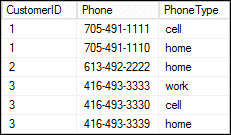
Yet another case – SQL Server UNPIVOT with Multiple Data Types
A complication is that all of the column values – as with UNION, INSERSECT and CASE – need to have compatible data types. So, you may need to actually perform some conversions in order to make all of the possible values compatible. Consider the following, equally questionable design and sample data:
DROP TABLE dbo.CustomerEAV; CREATE TABLE dbo.CustomerEAV ( CustomerID INT PRIMARY KEY, ShoeSize DECIMAL(3,1), Waist INT, Monogram VARCHAR(20), Email VARCHAR(320) ); INSERT dbo.CustomerEAV (CustomerID,ShoeSize,Waist,Monogram,Email) VALUES (1,12,36,'AMB','aaron@whatzit.com'), (2,11,34,'BRC','brad@whoknows.org'), (3, 9,28,'JRJ','jrj@somewhere.net');
And again imagine that we need to write our query such that it automatically accounts for any columns we might add to the table in the future. The ideal query would look something like this:
SELECT CustomerID, Property, Value FROM ( SELECT CustomerID, [Email] = CONVERT(VARCHAR(320), [Email]), [Monogram] = CONVERT(VARCHAR(320), [Monogram]), [ShoeSize] = CONVERT(VARCHAR(320), [ShoeSize]), [Waist] = CONVERT(VARCHAR(320), [Waist]) FROM dbo.CustomerEAV ) AS t UNPIVOT ( Value FOR Property IN ( [Email], [Monogram], [ShoeSize], [Waist]) ) AS up;
And to generate that dynamically:
DECLARE @table NVARCHAR(257) = N'dbo.CustomerEAV', @key_column SYSNAME = N'CustomerID'; DECLARE @colNames NVARCHAR(MAX) = N'', @colValues NVARCHAR(MAX) = N'', @sql NVARCHAR(MAX) = N''; SELECT @colNames += ', ' + QUOTENAME(name), @colValues += ', ' + QUOTENAME(name) + ' = CONVERT(VARCHAR(320), ' + QUOTENAME(name) + ')' FROM sys.columns WHERE [object_id] = OBJECT_ID(@table) AND name <> @key_column; SET @sql = N'SELECT CustomerID, Property, Value FROM ( SELECT ' + @key_column + @colValues + ' FROM ' + @table + ' ) AS t UNPIVOT ( Value FOR Property IN (' + STUFF(@colNames, 1, 1, '') + ') ) AS up;'; PRINT @sql; -- EXEC sp_executesql @sql;The output from the PRINT command is as above; and when we uncomment the EXEC, we get the following output:
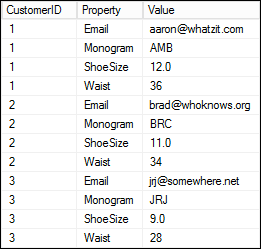
Note that I got some inspiration on this technique from StackExchange user bluefeet, who is the unofficial PIVOT and UNPIVOT queen, and gave this excellent answer in 2012.
Next Steps
- Review the following tips and other resources:

Aaron Bertrand (@AaronBertrand) is a passionate technologist with industry experience dating back to Classic ASP and SQL Server 6.5. He also blogs at sqlblog.org.
- MSSQLTips Awards: Author of the Year – 2016, 2023 | Leadership (200+ tips) – 2022

I’ve bookmarked this and come back to it often. I’ve used this to save countless hours. Thank you!