Problem
I have a SQL Server Integration Services (SSIS) package with a Foreach Loop container. Inside that container I have a task that sometimes can fail. If it fails, the loop should just continue, skip the current step and go to the next iteration. Is this possible in SSIS?
Solution
This tip will describe how we can implement such error handling in a Foreach loop within a SQL Server Integration Services Package. Two solutions will be presented: one using the ForceExecutionResult and MaximumErrorCount properties and one using the Propagate system variable.
SSIS Package Test Set-up
In this tip we’ll use a simple package with the following control flow:

The Foreach container loops over a fixed set of numbers, using the Foreach Item Enumerator.

At each iteration, the current value will be written to an integer variable. In the first Execute SQL Task, that variable will be used as a parameter in the following SQL statement:
DECLARE @denom INT = ?;

SELECT 1 / @denom;

WAITFOR DELAY ’00:00:05′; — wait 5 seconds so looping is better visible
The task will wait 5 seconds in each iteration, so that the looping is more apparent while debugging the package in Visual Studio. As you may have noticed, the third item of the set is the number zero, which will make the SQL statement fail with a divide by zero error. The goal of this tip is to make sure that the loop will do all 6 iterations of the loop.
The last Execute SQL Task is just a dummy task that doesn’t really do anything. It is connected to the first Execute SQL Task with an OnFailure constraint. This is done to study the effects of the solutions were going to implement in this tip.
When the package is executed without any changes, the first task will fail and the second task will be executed:

Notice that also the Foreach loop container fails (and the package as well), despite all tasks and containers having the properties FailPackageOnFailure and FailParentOnFailure are set to False. These properties don’t seem to have any effect at all, so we won’t bother with them in this tip.
ForceExecutionResult and MaximumErrorCount Options in SSIS
Let’s start the first solution by setting the task property ForceExecutionResult to Success.
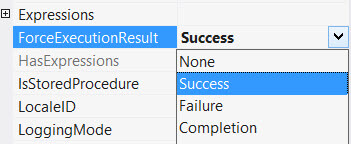
This property simply tells the task to succeed, no matter what it encounters. When we run the package, we get the following result:

The task itself didn’t fail, but everything else still fails. The Foreach loop container did not continue the loop as we wanted. To figure out why, we need to take a look at the logging.

There we can clearly see the container and the package failed because the maximum amount of errors was reached (even though the property FailParentOnFailure is set to false everywhere). This is because errors are propagated to higher levels in the package, which we’ll examine in more detail in the next section.
The default value of the MaximumErrorCount property is 1. If we change this property on the Foreach loop container to 0 - which basically means to ignore all errors - the following result is achieved:

In the logging we can clearly see that all iterations were performed.

However, the package still fails because the maximum amount of errors was reached. To avoid failure all together, the MaximumErrorCount on the package should also be changed.
Using the combination of ForceExecutionResult and MaximumErrorCount we can continue the loop when an error occurs. However, this makes the package and the container insensitive to other errors, which is not an ideal scenario. Arguably, you don’t even need the ForceExecutionResult property, you can just set MaximumErrorCount to 0 everywhere, but that’s not a good idea when it comes to decent error handling. Also notice that if you set ForceExecutionResult to Success, the OnFailure path is never called and the second Execute SQL Task is never executed.
The Propagate Variable in Integration Services
The second solution is a far more elegant solution to deal with errors in a loop. The problem with the first solution is that errors “bubble up” from the failing task to the higher levels (containers) right until the package level. When you check out the logging of SSIS packages, it’s possible that you see the same error message for each level in the package. This is because the error propagates through each level and each time a log message is sent. However, the propagation of the error can be stopped at the task level.
To do this, you need to add an error event handler to the first Execute SQL Task. You can do this by selecting the task and by going to the event handlers tab.

Click on the link to create the event handler. You can keep it empty. Go to the Variables pane and click on the Grid Options.

In the dialog, enable the system variables.

Look for the Propagate variable and set its value to False.

This will stop errors from bubbling up to higher levels in the package. As you can see, the container and the package succeed, while the first Execute SQL Task fails and the second task is executed.
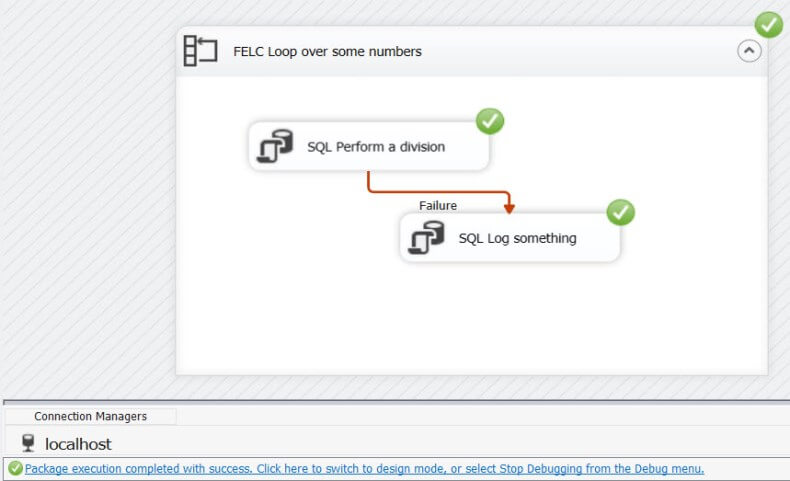
When we look at the logging, we can verify all iterations were executed.
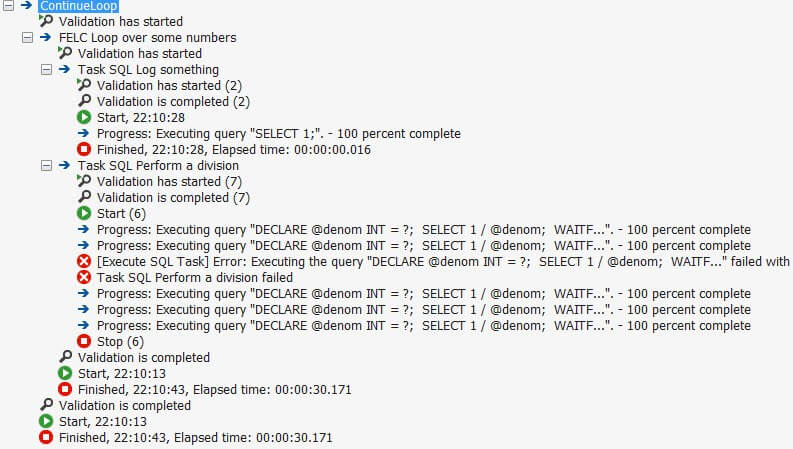
The third iteration still failed and an error is logged, it just didn’t crash the rest of the package.
Note that you could also put the second Execute SQL Task in the event handler, instead of using it in the control flow with the OnFailure constraint.
Conclusion
In this tip we presented two options to continue a loop in SQL Server Integration Services when an error occurs. You can either make the package insensitive to errors by using the properties MaximumErrorCount and ForceExecutionResult, or you could stop the propagation of errors to higher levels in the package by creating an empty event handler and setting the Propagate system variable to False. The last option is the preferred option for robust error handling.
Next Steps
- If you want to see the magic yourself, download the test package here.
- When working with parent-child packages, the solution with the Propagate variable doesn’t work. SQL Server MVP Joost van Rossum has a great blog post on how you can solve this.
- You can find more SQL Server Integration Services tips here.

Koen Verbeeck is a seasoned business intelligence consultant with over a decade of experience with the Microsoft Data Platform. He holds several certifications, including Azure Data Engineer. He’s a prolific writer, with over 375 articles on technologies such as Microsoft Fabric, SSIS, ADF, SSAS, SSRS, MDS, Power BI, Snowflake and Azure services. He has spoken at various events such as PASS, SQLBits, dataMinds Connect and many others. He frequently delivers educational webinars on MSSQLTips.com. For his efforts, Koen has been awarded the Microsoft MVP data platform award for many years.
- MSSQLTips Awards:
- Leadership Award (200+ Tips) – 2021
- Author of the Year – 2014/2020/2022
- Author Contender – 2024/2025
Hi Vinay,
so the package fails, but at the same time continues?
Did you change the value of the Propagate variable or did you leave everything to the default?
Koen
Hello,
My expected result is – Fail the package when any task fails.
My package structure is – Package > 1 Sequence container > 1 FOR Loop > 1 FOR Loop
My Problem is – if any task fails in the innermost FOR Loop, the package fails with Error but the loop continues & the OnError handler defined OnPackage is also not triggered
Can you please explain this behavior?
Hi Brent,
did you assign the event handler to the Execute SQL Task? An error is an error for SSIS, I don’t think it makes a difference which error you throw in the stored proc. You can always download the sample package to test it out and see if it works on your machine.
Regards,
Koen
I couldn’t get this to work. I set up the error handler, got it to show the system variables, clicked on grid, set the propagate variable to false, but the error is still propagating up. I am executing a stored procedure in a sql task. Inside the stored procedure is a nested stored procedure that does a quality check. If it fails the quality check, it raises an error and sends an email (all within the stored proc). However, I want it to go on to the next client instead of failing the package. Should it work for all errors? Do I need to raise a specific error in the stored proc? Any help would be appreciated.
Hi Kiran,
if you have 5 different files (each it’s own DFT), then you don’t need a for each loop. You can just start the package and each DFT will run in parallel at the same time. When one crashes, the other DFTs will continue until they’re finished. Then the package will crash.
Or do you mean you have 5 types of files, and each type has multiple source files over which you loop? That’s a different story.
Regards,
Koen
Is it possible to handle the below case with Propagate property?
If we have 5 files to process with SSIS for each loop and each has different DFT created. If we dont have any issues with the files all the files should process and package should be successful , But if we have any one of the file failed with some issue, 4 files should process and one DFT should fail and the over all package should fail , so that we will know some issue in one of the file.
Is this possible with SSIS please?