Problem
SQL Server AlwaysOn is a popular term mentioned in various sources, but what does SQL Server AlwaysOn really mean? This tip will explain the term SQL Server AlwaysOn and its two main technologies.
Solution
SQL Server AlwaysOn is a marketing term which refers to the high availability and disaster recovery solution introduced when SQL Server 2012 was launched.
To be more specific, SQL Server AlwaysOn consists of two technologies:
- AlwaysOn Failover Clustering Instances (AlwaysOn FCI)
- AlwaysOn Availability Groups (AlwaysOn AG)
Whilst both technologies have similarities such as requiring Windows Server Failover Clustering (WSFC) as the foundation for its implementation, each is a distinct technology under the AlwaysOn umbrella.
AlwaysOn Failover Clustering Instances (FCI)
AlwaysOn FCI needs shared storage like an iSCSI or Fibre Channel SAN that can be accessed by all of the nodes in the cluster. There is also the option to use third party data replication tools that can assist with the storage requirements if you don’t have shared storage or want to do this for virtual machines or in the cloud.
It supports multisite clustering across subnets which enables failover of SQL Server instances across data centers, but this requires replication of the data between the shared storage in each of the data centers.
AlwaysOn FCI is available on both SQL Server Standard and Enterprise Edition, but imposes restrictions on SQL Server Standard Edition such as a 2-node limit.
When you install SQL Server you select the “New SQL failover cluster installation” option.
An implementation of single site two node AlwaysOn FCI (using quorum mode Node and Disk Majority) is depicted below.

The quorum mode helps determine which nodes are available and which node should be the primary node. By having another machine/object involved it can determine if communication between machines is lost are therefore whether a failover should occur. Below are common examples of quorum mode that can be used in an AlwaysOn FCI configuration.
- Node Majority
- Node and Fileshare Majority
- Node and (symmetrical) Disk Majority
A symmetric storage means a cluster disk that is shared between all the WSFC nodes. This allows the shared disk storage to be available to all potential failover nodes in the WSFC cluster.
AlwaysOn Availability Groups
AlwaysOn AG does not require shared disk storage for the server hosting the SQL Server. This SQL Server high availability technology has been an Enterprise feature. This means you cannot configure SQL Server Standard Edition to use AlwaysOn AG with versions prior to SQL Server 2016. There is now an option to create a basic availability group with SQL Server 2016 Standard edition and later which I discuss below.
When you install SQL Server you select the “New SQL stand-alone installation…” option.
An implementation of AlwaysOn AG for HA and DR (using quorum mode Node Majority) is depicted below.

Below are several common examples of quorum mode used in an AlwaysOn AG configuration.
- Node Majority
- Node and Fileshare Majority
- Node and (Asymmetric) Disk Majority
An asymmetric storage means a cluster disk is shared only between a subset of the nodes. Asymmetric disk capability was first introduced on Windows Server 2008. It allows a disk witness to be configured and accessible only to nodes in one site, typically the primary site.
AlwaysOn Basic Availability Group (AlwaysOn BAG)
AlwaysOn feature is now an included in SQL Server 2016 Standard Edition and later, but it is referred to as AlwaysOn BAG. It is created and managed similarly to AG, but AlwaysOn BAG is capable to only use a subset of features compared to the more advanced AlwaysOn AG on SQL Server Enterprise Edition. An example limitation is BAG only allows to have two replicas (primary and secondary).
An AlwaysOn BAG provides failover support for a single database only, replacing the database mirroring which is deprecated.
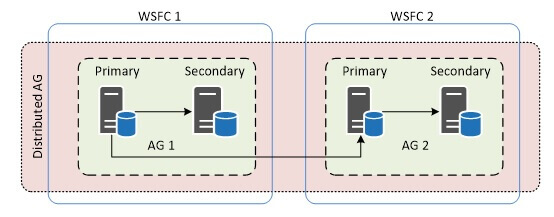
AlwaysOn Distributed Availability Group (AlwaysOn DAG)
Where, AlwaysOn DAG are loosely coupled groups of AGs. AlwaysOn DAG runs on top of two distinct AGs meaning that they reside on two distinct WSFCs with their own quorum and voting management.
This configuration allows secondary replicas of an AG to exist in a different geographical region than the primary. An example use case would be to enable read-only workloads for remote regions and at the same time avoid any potential network problem at the secondary site which can affect the primary site.
Characteristics of AlwaysOn FCI and AlwaysOn AG
Each of the two technologies differs in its purpose. It is possible to combine AlwaysOn FCI and AlwaysOn AG. Business requirements might require local high availability within a data center using AlwaysOn FCI, and cross data center disaster recovery using AlwaysOn AG. It just means the solution would then consist of a combination of shared storage and non-shared storage in the implementation.
If you’re wondering which solution to implement, the table below summarizes the similarity and differences in characteristics between SQL Server AlwaysOn FCI and AlwaysOn AG solutions as a guide when evaluating SQL Server AlwaysOn.
| AlwaysOn FCI for HA and DR | AlwaysOn AG for HA and DR |
|---|---|
| Shared Storage solution | Non-Shared Storage solution |
| Instance level HALogins, SQL Agent jobs, certificates and other SQL Server instance level objects are in-tact after failover | Database level HA (can be one or more databases)Manual adding logins, SQL Agent jobs, certificates and other SQL Server instance level objects to all secondary’s |
| Instance-level protection without data redundancy | Each group of secondary AG database(s) are redundant copy of primary |
| Have Active\Passive nodes. No concept of a secondary database. | DR replica can be Active Secondary for backup, read-only workload. |
| Application connects via virtual server name | Application connects via AG listener name |
| Does not maintain a redundant copy of the data hence does not protect against an I/O subsystem failure | Protection against an I/O subsystem failure, i.e. Automatic Page Repair |
| No special requirements with respect to database recovery models | Database(s) in AG must be in FULL recovery model |
Other things to note for both:
- Every single AlwaysOn deployment is a WSFC deployment
- Both FCIs and AGs can span multiple data centers but with different implementations
- Can be implemented on physical SQL Server systems or on SQL Server systems that are running as virtual machines
Summary
Whenever SQL Server AlwaysOn is mentioned, it is not specific. It can refer to either AlwaysOn FCI or AlwaysOn AG.
In nutshell:
- AlwaysOn = {SQL Server Failover Cluster Instances, Availability Groups}
- AlwaysOn != SQL Server Failover Cluster Instances != Availability Groups
- Availability Groups != Database Mirroring
- WSFC != SQL Server Failover Cluster Instances
Next Steps
- High Availability Solutions (SQL Server)
- WSFC Quorum Modes and Voting Configuration (SQL Server)
- Windows Server Failover Clustering Quorum Configuration Models Explained
- SQL Server AlwaysOn Availability Groups – Part 1 configuration
- Install SQL Server 2008 on a Windows Server 2008 Cluster Part 1
- SQL Server Clustering Tips
- SQL Server Availability Groups Tips

Simon Liew is an independent SQL Server Consultant in Sydney, Australia. He is a Microsoft Certified Master for SQL Server 2008 and holds a Master’s Degree in Distributed Computing.
- MSSQLTips Awards: Trendsetter (25+tips) – 2017 | Author of the Year Contender – 2016, 2017

I love your article! So simple to understand. I finally get this concept. Reaaly thank you for all the effort you put in write it. <3