Problem
You would like to find out if you have any SQL Server databases that are no longer in use and just taking up space. It happens. Databases get created, sometimes put in production, a project gets cancelled and the database is abandoned.
Solution
We’ll take a look a look at one simple method of looking for SQL Server databases that have not had any connections over a period of time.
Why do you need to find unused databases?
It’s really a matter of housekeeping. There is really no reason to perform maintenance on and consume disk space with a database that is unused.
Methodology to detect database connections
The method described here queries sys.databases and sysprocesses to look for database connections and write the output to a table.
Create table to hold connection information
To get started, I’ll create a database called dba and a table called ConnectionCounts to hold the connection information we’ll gather.
-- create database
USE [master];
GO
CREATE DATABASE [dba];
GO

-- create table
USE [dba];
GO
CREATE TABLE [dbo].[ConnectionCounts](
   [ServerName] [nvarchar](130) NOT NULL,
   [DatabaseName] [nvarchar](130) NOT NULL,
   [NumberOfConnections] [int] NOT NULL,
   [TimeStamp] [datetime] NOT NULL
);
GO
Populate Table
Select from sys.databases and sysprocesses and insert the results into the ConnectionCounts table.
USE [dba];
GO

-- populate table
INSERT INTO [dbo].[ConnectionCounts]
SELECT @@ServerName AS [ServerName]
             ,NAME AS DatabaseName
             ,COUNT(STATUS) AS [NumberOfConnections]
             ,GETDATE() AS [TimeStamp]
FROM sys.databases sd
LEFT JOIN master.dbo.sysprocesses sp ON sd.database_id = sp.dbid
WHERE database_id NOT BETWEEN 1 AND 4
GROUP BY NAME;
GO
Querying ConnectionCounts shows our initial data collection.
-- query ConnectionCounts
SELECT [ServerName], [DatabaseName], [NumberOfConnections], [TimeStamp]
FROM [dbo].[ConnectionCounts];
GO

The results are interpreted as we currently have connections in our database, dba; SSRS databases, ReportServer and ReportServerTempDB; and SSIS database, SSISDB. The user databases UserDatabase1, UserDatabase2, and UserDatabase3 currently have no connections.
To make what we have so far useful to us we’ll need to automate the table population.
Scheduling Job to Gather Connection Information and Populate Table with It
- Right click on SQL Server Agent
- New
- Job…

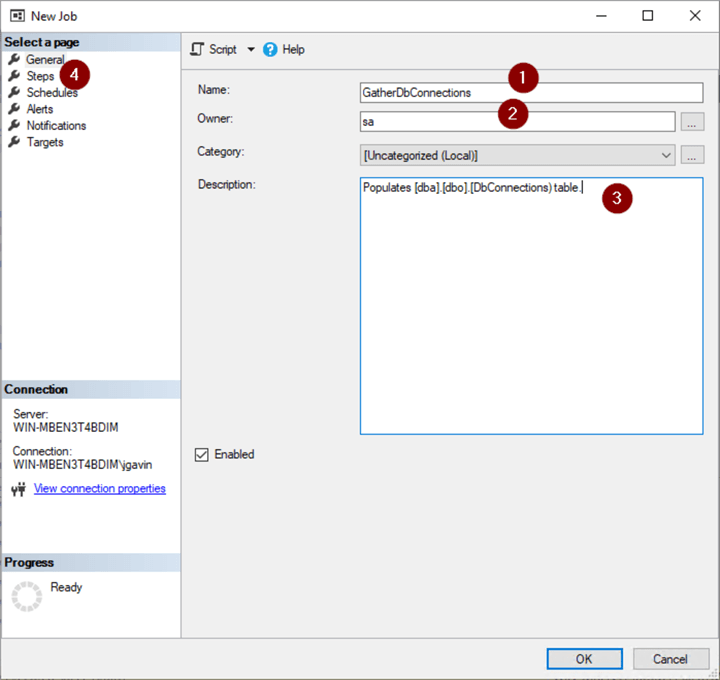
- Name Job
- Change Job owner
- Enter Description
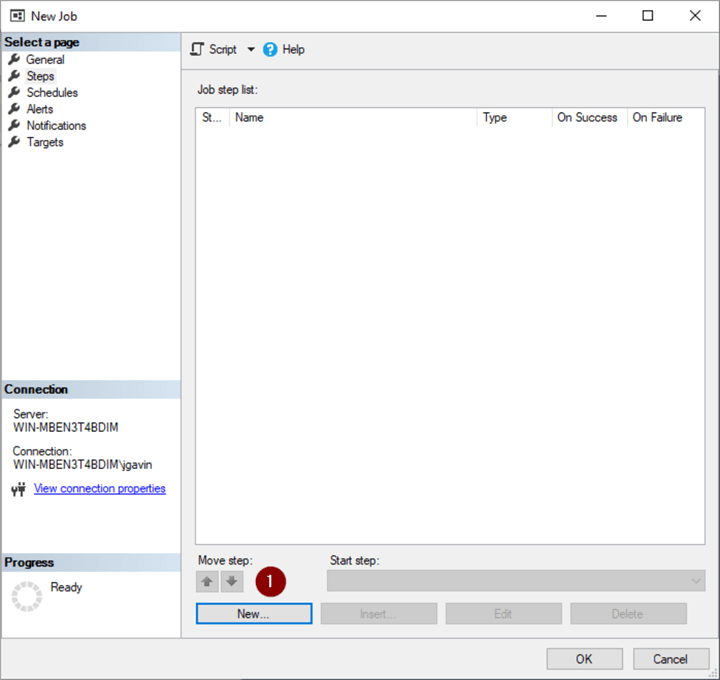
- Steps
- New
- Name Step
- Change database context

- Copy and paste the INSERT statement plus a DELETE statement to limit the records kept to a period of time – I chose 1 year, but it’s up to you.
USE [dba];
GO

-- populate table
INSERT INTO [dbo].[DbConnectionCounts]
SELECT @@ServerName AS [ServerName]
      ,NAME AS [DatabaseName]
      ,COUNT(STATUS) AS [NumberOfConnections]
      ,GETDATE() AS [TimeStamp]
FROM sys.databases sd
LEFT JOIN master.dbo.sysprocesses sp ON sd.database_id = sp.dbid
WHERE database_id NOT BETWEEN 1 AND 4 -- ignore system databases
                  AND state_desc LIKE 'ONLINE' -- ignore offline databases
GROUP BY NAME;
GO

-- delete records earlier than 1 year ago
DELETE [dbo].[ConnectionCounts]
WHERE [TimeStamp] < DATEADD(year,-1,GETDATE());
GO
- OK
Create schedule.
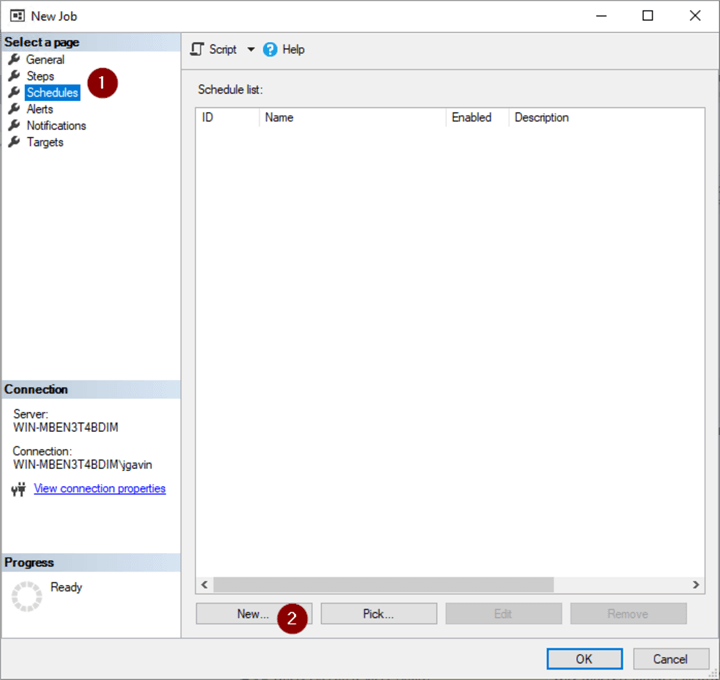
- Schedules
- New
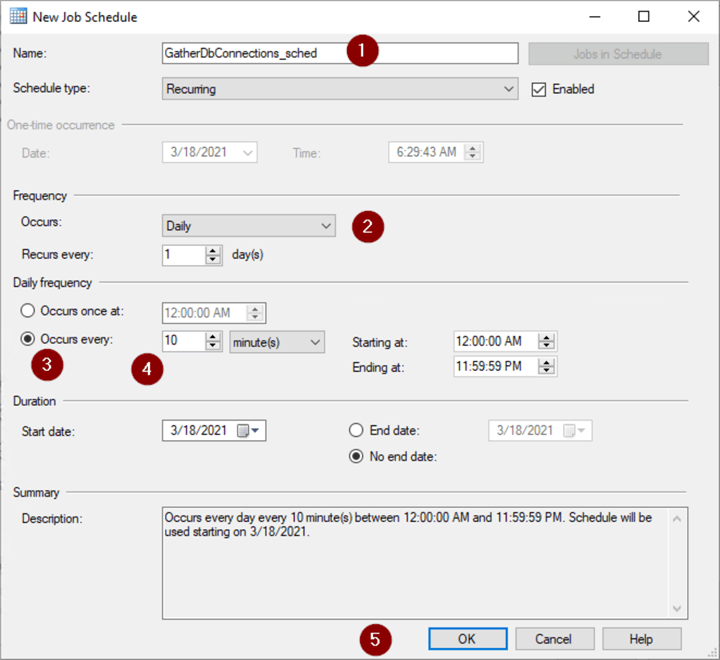
- Name Job Schedule
- Daily
- Occurs every:
- Set frequency (10 minutes is OK but if you want to populate the table more frequently choose a lower frequency)
- OK
- OK

Report on Connection Data
-- number of records in ConnectionCounts
SELECT COUNT(*) FROM [dba].[dbo].[ConnectionCounts];
GO

-- oldest record in ConnectionCounts
SELECT MIN([TimeStamp])
FROM [dba].[dbo].[ConnectionCounts];
GO

-- identify likely unused databases
SELECT [ServerName]
      ,[DatabaseName]
      ,MAX([NumberOfConnections]) AS [NumberOfConnections]
FROM [dba].[dbo].[ConnectionCounts]
GROUP BY [ServerName],[DatabaseName]
HAVING MAX([NumberOfConnections]) = 0
ORDER BY [ServerName],[DatabaseName];
GO

Optionally email unused database report periodically
There are a number of ways to automate reporting on the data we’ve collected. I prefer to keep thing simple and together so I decided to periodically email myself a simple report with a PowerShell script called by the SQL Agent.
- Right click on SQL Server Agent
- New
- Job…

- Name job
- Change owner
- Enter a description
- Steps

- New

- Name Step
- Choose PowerShell from the dropdown
- Paste the following into the Command box and configure $ServerInstance and $PSEmailServer variables
$ServerInstance = "WIN-MBEN3T4BDIM"
$PSEmailServer = "mymailserver.smtp.com"
$From = "$ServerInstance@mydomain.com"
$subject = "$ServerInstance Unused Database Report"
$To="name@domain.com"
$sql="SELECT [ServerName],[DatabaseName] ,CONCAT (MAX([NumberOfConnections]) , + ' connections since ' + CONVERT(VARCHAR ,MIN([TimeStamp]),1)) AS [Connections]
FROM [dba].[dbo].[ConnectionCounts]
GROUP BY [ServerName],[DatabaseName]
HAVING MAX([NumberOfConnections]) = 0
ORDER BY [ServerName],[DatabaseName];
"
$Body = Invoke-SqlCmd -ServerInstance $ServerInstance -Query $sql | Format-List | Out-String
If (! $Body) {$Body = "There are no unused databases detected on $ServerInstance."} # populates $Body with string so Send-MailMessage will not choke
Send-MailMessage -From $From -To $To -Subject $Subject -Body $Body
- OK

- Schedules
- New

- Name Schedule
- Choose frequency
- Choose time to run
- OK

- OK

- Right click on Job
- Start Job at Step…

Make sure you have a Status of Success

Now, you’ll get a scheduled email from your server@domain.com with the name of any databases that have not had any connections since you have been gathering data.
What to do if/when you discover likely unused databases
I follow this general pattern if I have a database that hasn’t had any connections in it for a number of months:
- Restore latest full backup of database(s) in question to another test database to validate backup
- Copy backup file to a location where any automated backup file deletion is not taking place, i.e. D:\DONOTDELETE
- Rename database to db_name_renamed_mmddyy
- Take database offline
- Right click on database
- Rename

- Append ‘_renamed_mmddyy’ to database name

- Right click on database again
- Tasks
- Take Offline

Or simply run this T-SQL:
ALTER DATABASE [UserDatabase3] MODIFY NAME = [UserDatabase3_renamed_0427421]; -- old name and new name
GO
ALTER DATABASE [UserDatabase3_renamed_0427421] SET  OFFLINE; -- new name
GO
In the event access to the database is needed, simply reverse the process.
- Right click on database
- Tasks
- Bring Online

- Right click on database again
- Rename

- Remove _renamed_mmddyy

Or simply run this T-SQL:
ALTER DATABASE [UserDatabase3_renamed_0427421] SET  ONLINE; -- renamed name
GO
ALTER DATABASE [UserDatabase3_renamed_0427421] MODIFY NAME = [UserDatabase3]; -- renamed name and original name
GO
If the database has been offline and no one has needed access to it for a period of time you’re comfortable with, go ahead and drop it.
- Right click on database
- Delete

- OK

Or simply run this T-SQL
DROP DATABASE [UserDatabase3_042721]; -- set database name
GO
Next Steps
We now have a simple yet effective way to look for unused databases. Here are some links with more information:
- Identify SQL Server databases that are no longer in use
- How to rename a SQL Server database
- Script to Drop and Delete Offline SQL Server Databases and Data Files

Joe Gavin is from Greater Boston and has worked in technology as a Field Service Engineer for an automotive dealer computer system vendor, a Technical Consultant and Operations Analyst with Sybase and SQL Server based database applications in financial services and now works as a SQL Server Database Administrator.
- MSSQLTips Awards:
- Achiever Award (75+ Tips) – 2024 | Author of the Year – 2021 | Author Contender – 2024 |
- Rookie Contender – 2018



Steve, there is a little more to auditing than just turning it on. This is just one method to look for unused databases that’s served me well.
Can’t turning on auditing yield essentially the same information?
Hi Joe, thanks for this useful post, everything works like a charm. Just maybe if possible updating the rporting with a nice html table and alternative colored lines would be great
@Joe, PowerShell is not working neither :(
By the way your article still helped me
Francesco, that’s exactly why I prefer Send-MailMessage. It’s nice and simple. You may find this tip helpful: https://www.mssqltips.com/sqlservertip/5533/anatomy-of-a-sql-agent-email-notification/.
@Joe Gavin, I’ve been trying to setup the SQL Server Database Mail account using T-SQL for days now and I’m done. It seems like it’s not working any more.
Is this the reason why you have opted for PowerShell?
Error: change [dbo].[DbConnectionCounts] to [dbo].[ConnectionCounts] in the Job step
I receive the error: The job failed. Unable to determine if the owner (DOMAIN\MyUser) of job GatherDbConnections has server access (reason: Could not obtain information about Windows NT group/user ‘DOMAIN\MyUser’, error code 0x54b. [SQLSTATE 42000] (Error 15404)).
Jeff, this method has not failed me finding unused database candidates on databases I’m still doing backups and index maintenance on. Thanks for the auto-close suggestion. Something I had not looked at.
Andrey, I’d think a cross database query would be more of an ad-hoc query rather than the database being used. That said, I’m merely looking for unused database candidates. I like your other suggestions too.
Just counting connections might be seriously misleading because things like index maintenance and backups all take connections. With that in mind, you should also capture the code that the connections are running so you can figure things like that out.
A better way might be to ensure that index and database maintenance/backup routines are specifically designed to on operate on Online databases and to set suspected unused databases to “Auto_Close”. Then, just monitor the log for starts of the database.
There could be cross-database queries. For example: being connected to master db query a table from msdb database.
So, it’s worth to combine such approach with buffer pool analysis at least – monitor cached data per database.
Also, in the default trace there are several types of events which could help to decide whether a db was used or not.
Glad you found this useful Francesco.
WOW, I was discussing exactly this topic yesterday with my colleagues.
I told them that the best way to find unused database was to monitor the connections for a few weeks but they keep saying that maybe there was some logs that we could look into.
Thank you for confirming that the best way is this.