Problem
When developing custom data engineering workloads, the data originates from one or many data sources. We also have a destination where the data must end up. As data engineers, our task is to figure out how to make the source data available in a structured and consistent way for downstream analytical purposes, such as BI reporting. We usually do this task using the ETL/ELT pattern. What are some helpful Python libraries to consider using when developing these pipelines? How can we best take advantage of them, considering some caveats?
Solution
This series will provide guidance and boilerplate code on six Python packages for creating scalable and robust data engineering pipelines. The goal is to provide overall guidance that can be easily adapted to your modular solutions. The packages included in the series are attrs, sqlalchemy, pandas, chardet, io, and logging. Each package will have a dedicated section in the article with the following structure: installation with pip, why to use it, examples, and caveats.
This article will examine the first three packages. Read on to discover everything about these packages based on my experience building data engineering workloads.
attrs in Python for Data Engineering
In larger codebases, we frequently resort to Object Oriented Programming (OOP) for structuring the project in a modular and expandable way. This is where attrs comes into play.
Installation
pip install attrsWhy Use the attrs Package?
attrs would not be the first library to come to mind when designing data engineering workloads. However, the library has the “ambitious goal of bringing back the joy to writing classes,” which will help you cleanly define your data or configuration models, interface classes, or any other object. In bigger projects, an OOP structure can benefit organization and readability.
Example
Here is an example where we construct a simple config class to create a sqlalchemy PostgreSQL engine:
# MSSQLTips.com (Python)
01: """
02: MSSQLTips.com General configuration class
03: """
04: import os
05: from attrs import define, field, validators
06: from dotenv import load_dotenv
07: from sqlalchemy.engine import Engine, create_engine, URL
08:
09: load_dotenv()
10:
11:
12: @define
13: class RDSConfig:
14:     DB_SERVER: str = field(
15:         factory=lambda: os.getenv("DB_SERVER", ""),
16:         validator=validators.instance_of(str)
17:     )
18:     DB_DATABASE: str = field(
19:         factory=lambda: os.getenv("DB_DATABASE", ""),
20:         validator=validators.instance_of(str)
21:     )
22:     DB_USERNAME: str = field(
23:         factory=lambda: os.getenv("DB_USERNAME", ""),
24:         validator=validators.instance_of(str)
25:     )
26:     DB_PASSWORD: str = field(
27:         factory=lambda: os.getenv("DB_PASSWORD", ""),
28:         validator=validators.instance_of(str)
29:     )
30:     DB_PORT: int = field(
31:         factory=lambda: int(os.getenv("DB_PORT", "5432")),
32:         converter=int,
33:         validator=validators.instance_of(int)
34:     )
35:     DB_DRIVER: str = field(
36:         factory=lambda: os.getenv("DB_DRIVER", "postgresql+psycopg2"),
37:         validator=validators.instance_of(str)
38:     )
39:
40:     @property
41:     def url(self) -> URL:
42:         return URL.create(
43:             drivername=self.DB_DRIVER,
44:             host=self.DB_SERVER,
45:             database=self.DB_DATABASE,
46:             username=self.DB_USERNAME,
47:             password=self.DB_PASSWORD,
48:             port=self.DB_PORT,
49:         )
50:
51:     def get_engine(self) -> Engine:
52:         return create_engine(self.url)
In this example, attrs helps define a database configuration class with the following features:
- 1–7: Import necessary packages
- 9: Load environment variables from a separate .env file
- 13: Define a class with automatic initialization. The
__init__constructor method is hidden, invoked by attrs. - 14 – 37: For each connection attribute, we have a class attribute: server, database, username, password, port, and driver that reads environment variables or uses a default value. We have customization and validation of the connection attributes by the
fieldfunction:- Using
factoryto define a default, and - Using a validator to validate the data type of the connection attributes.
- Using
The output highlighted in green above is the “engine” for the specific DB API. By importing this custom module elsewhere in the project, we can reuse the connection string throughout our code to read from or write to a PostgreSQL database. Overall, we have a straightforward config definition with improved readability.
Caveats
What about data classes? Indeed, data classes are lightweight versions of regular Python classes available out of the box. The purpose of data classes is to provide an easy definition of inherently non-OOP solutions, such as data engineering workloads. attrs helps by making class definition simple as data classes but powerful as regular ones.
sqlalchemy in Python for Data Engineering
The next package is the most popular, advanced, and efficient SQL toolkit and object-relational mapper (ORM) – sqlalchemy.
Installation
pip install SQLAlchemyWhy Use the sqlalchemy Package?
The package has a rich documentation base. Also, there are thorough guides on how to get started. Here, I want to focus on two of its core functionalities: defining data models and writing queries.
Example
Defining models
# MSSQLTips.com (Python)
01: from sqlalchemy import (
02:     MetaData,
03:     Table,
04:     Column,
05:     String,
06:     TIMESTAMP,
07:     Boolean,
08:     Index,
09:     )
10: from attrs import define, field
11:
12:
13: @define
14: class MyModel():
15:     metadata: MetaData = field(factory=MetaData)
16:     schema_name: str = field(default='bronze_schema')
17:     products: Table = field(init=False)
18:
19:     def __attrs_post_init__(self):
20:         """Initialize the tables with the given schema."""
21:         self.products = Table(
22:             'products',
23:             self.metadata,
24:             Column('id', String, primary_key=True),
25:             Column('product_name', String),
26:             Column('is_deleted', Boolean),
27:             Column('last_modified_date', TIMESTAMP),
28:             Index('ix_last_modified_date_products', 'last_modified_date'),
29:             schema=self.schema_name
30:         )
31:
32:
33: if __name__ == "__main__":
34:     source_model = MyModel()  # default schema
35:     destination_model = MyModel(schema_name='silver_schema')
36:
37:     for table in source_model.metadata.tables:
38:         print(table)
39:
40:     for table in destination_model.metadata.tables:
41:         print(table)
Here is what is happening in this example:
- 1 – 10: Import necessary packages
- 14: Define a custom class representing our model
- 15: Metadata attribute which is a container for database features and a collection of table objects
- 16: Schema name with a default value
- 17: products is a table we want to represent so we make it a class attribute
- 19 – 30:
__attrs_post_init__is automatically detected and runs after attrs finishes initializing the class instance. Here we use it to add a table products to the class instance. As a result, different instances of this class can represent different product tables in different databases or schemas. - 34: Create an instance for a source model
- 35: Create an instance for a destination model.
In the console output, we can see two different schemas with the same table.
Executing Queries
Another powerful feature of sqlalchemy is querying data models. You can use the select statement with where, group_by, and other SQL clauses. Sqlalchemy will internally parse those statements to the relevant SQL dialect according to your engine. Using the engine and our custom data model we defined in the previous example, here is an example of how to tie all this together:
# MSSQLTips.com (Python)
01: from sqlalchemy import insert, select
02: from sqlalchemy.orm import Session
03: from sqlalchemy.engine import Engine
04: from example_attrs import RDSConfig
05: from example_sqlaclhemy_models import MyModel
06:
07:
08: def load_products(source_engine: Engine,
09:                       destination_engine: Engine,
10:                       source_model: MyModel,
11:                       destination_model: MyModel) -> None:
12:     with Session(source_engine) as source_session, \
13:          Session(destination_engine) as dest_session:
14:         try:
15:             select_stmt = select(source_model.products)
16:
17:             source_products = source_session.execute(select_stmt).fetchall()
18:
19:             insert_stmt = insert(destination_model.products).from_select(source_products)
20:
21:             dest_session.execute(insert_stmt)
22:
23:             dest_session.commit()
24:
25:         except Exception as e:
26:             dest_session.rollback()
27:             raise e
28:
29:
30: source_engine = RDSConfig.get_engine()
31: destination_engine = RDSConfig.get_engine()  # with some other connection attributes
32: source_model = MyModel()  # default schema
33: destination_model = MyModel(schema_name='silver_schema')
34:
35: transfer_products(source_engine, destination_engine, source_model, destination_model)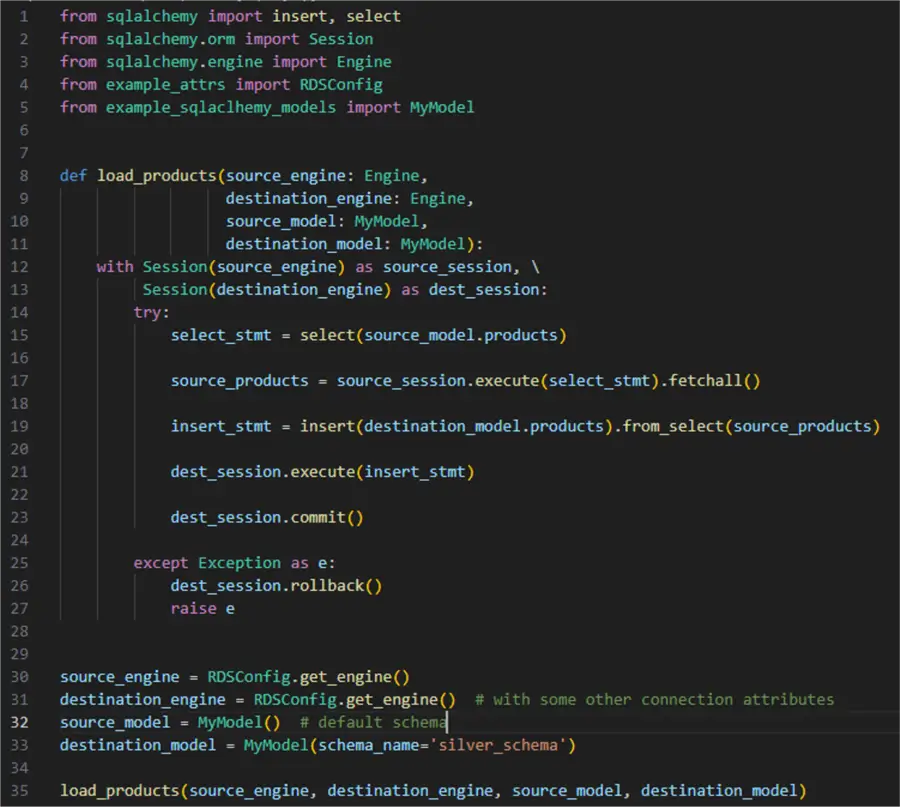
Breaking it down:
- 1 – 5: Import the necessary packages
- 8 – 11: Define a function that will accept four parameters: source engine, destination engine, source model, and destination model
- 15: Define a select statement to select from the source products table
- 17: Fetch the rows
- 19: Define an insert from select statement. Sqlalchemy will automatically map the columns from the source to the destination table if they have identical names
- 21 and 23: Execute the insert and commit everything
- 30 – 33: Using the custom classes from the previous examples, define the required function parameters
- 35: Finally, call the function
This simplified example aims to show the benefit of using custom classes to represent a database connection engine and your own data model objects. In a real scenario, you may have to consider selecting only certain columns via a more complex query or some sort of incremental loading.
Caveats
Extra complex queries may not be worth writing with sqlalchemy statements. Instead, you may wish to call an external .sql file and parse the output to a sqlalchemy Selectable data type.
pandas in Python for Data Engineering
Any list of handy data engineering modules would not be complete if we did not mention pandas by virtue of its (almost) ubiquitous presence in the data domain.
Installation
pip install pandasWhy You Shouldn’t Use pandas?
One of the core benefits of using pandas is just how easy it is to get started. Loading data from various sources into a dataframe is a function call away. Once you have a dataframe, you can apply transformations on it to prepare it for downstream consumption or save it in another data source. In fact, pandas abstracts the arduous work under its covers providing so many options to interact with and transform any of your data.
Example
To illustrate using pandas, I want to focus on loading a dataframe in a SQL table. I have prepared a synthetic CSV file with 10 million rows and three columns:


One of the quickest ways to do load this file to a PostgreSQL table is:
# MSSQLTips.com (Python)
source_data = pd.read_csv(r'\\product_transactions.csv',
                          names=['id', 'product', 'timestamp'],
                          header=0)
source_data.to_sql(
        name='product_transactions',
        con=engine,
        schema='public',
        if_exists='fail',
        index=True,
        chunksize=100000,
        method='multi'
    )
I wrapped this piece of code in a diagnostic wrapper tracking time, memory, and CPU usage. I got almost 12 minutes of execution time, using a bit over 157 MB of memory and a quite high CPU usage:
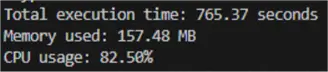
This straightforward approach does work for this or larger CSV files, given that you:
- Use chunksize to force pandas to work with n rows at a time, and
- Set the insert method to ‘multi’ to make pandas insert multiple rows per INSERT statement.
Overall, the to_sql is indeed a powerful tool. You can configure it to use an existing table or create a new table with assumed data types to append records, add an index (or not), among other options. The problem with this approach is mostly for someone else reading your code. For example, what is the table definition precisely? What constraints are there? Therefore, a better approach would be:
- Convert the dataframe to a list of dictionaries representing the rows:
list_of_rows = source_data.to_dict(orient='records')- Use the engine object to make a connection object and use your model:
engine = db_config.get_engine()
conn = engine.connect()
conn.execute(data_model.product_transactions.insert(), list_of_rows)
conn.commit()
The difference in execution time is noticeable although not that big. However, using your model and engine explicitly not only gives you more control over the process but drastically decreases memory and CPU usage:

In this way you can use a predefined model and load data to it more efficiently.
Caveats
A notable caveat is dataframe size in memory. A pandas dataframe can occupy memory exceeding 5 to 10 times the size on disk. This is not a general rule, but I have seen it frequently happening. As a result, a massive CSV file of 500 MB can end up requiring 2.5 GB of RAM. pandas have a dedicated page with recommendations on how to overcome this risk. For instance, one approach is to use chunking, i.e., load your data in smaller, sizeable parts.
Conclusion
In this article, we presented specific scenarios and caveats of three core modules for data engineering: attrs, sqlalchemy, and pandas. Using these modules in your solutions will facilitate the development of scalable, maintainable, and readable data pipelines.
Next Steps
- Check out these additional Python for data engineering resources:

Hristo Hristov is a seasoned data professional with 10+ years of experience spanning the intersection of data engineering and smart manufacturing solutions. Since 2017, he has specialized in implementing advanced analytics solutions for bridging the IT/OT gap.
A technical writer with over 80 published articles on data and AI technologies, Python development, and cloud solutions. Passionate about transforming complex data into business value through innovative applications of Azure Data Platform, Python, IoT solutions, databases, and other cloud technologies.
Currently applying Industry 4.0 best practices, focusing on IoT connectivity, and implementing data and AI systems in manufacturing. Hristo holds a degree in Data Science and several Microsoft certifications covering SQL Server, Power BI, and related technologies.
- MSSQLTips Awards
- Achiever Award (75+ tips) – 2026
- Rookie of the Year – 2021
- Author Contender – 2022/2023/2024/2025


Thank you, for your great assessment of Python’s data engineering landscape provides a solid foundation, but advancements in speed, scalability, and memory efficiency necessitate a shift away from traditional paradigms. Emerging technologies such as DuckDB, fireducks.pandas, PostgreSQL v17.4, SQLite3 (leveraging DuckDB’s in-memory attach), Pydantic v2, FastAPI, and pyodbc redefine high-performance data workflows. DuckDB’s vectorized execution and parallel query processing far surpass pandas for analytical workloads exceeding 100K rows, while fireducks.pandas maintains `pandas` compatibility with significant computational acceleration. More importantly, DuckDB’ s ability to attach and join PostgreSQL and SQLite3 in memory eliminates the need for legacy ETL pipelines or linked servers, enabling real-time analytics across heterogeneous data sources. This paradigm shift prioritizes direct SQL execution over ORM abstraction, emphasizing raw SQL skills as the foundation for efficient, transparent, and scalable data processing.
This underscores the necessity of a bottom-up, SQL-centric approach to data engineering that ensures students graduate with the foundational query optimization skills demanded in modern industry workflows. Direct execution using DuckDB, PostgreSQL v17.4, and SQLite3 in-memory processing significantly enhances throughput and eliminates ORM-related query overhead, ensuring low-latency cross-database querying. Complementing this, Pydantic v2’s lightweight data validation integrates seamlessly with FastAPI and pyodbc or any other database framework, fostering high-speed, asynchronous data workflows. To bridge theory with hands-on application, I am developing a course that immerses students in SQL-first data engineering, focusing on high-performance analytics, in-memory query execution, and real-world scaling strategies. This curriculum not only aligns with modern industry best practices but also equips students with deep technical proficiency in scalable data architectures, preparing them for leadership roles in data-intensive fields.