Problem
I have noticed new SQL Server database objects have been created and want to know how we can track down who created these objects. What options are available in SQL Server? In this article, learn how in SQL Server to check who created a table or other objects.
Solution
To capture this data, we can use the default SQL Server trace. SQL Server collects data about object creation as part of the default trace including a variety of other information about your SQL Server instance.
A new default trace file is created and stores the data each time SQL Server restarts or the file grows beyond 20MB. SQL Server keeps the current and the 4 previous trace files on disk before deleting the oldest and creating a new one when SQL Server restarts. For more information about the types of information you can retrieve from the default trace, review – Use SQL Server Default Trace to Find Errors.
Reading Data from Trace Files
Three options are available to retrieve data stored in trace files:
- SQL Server Management Studio (SSMS)
- T-SQL
- and SQL Profiler.
Identify Who Created a SQL Server Table Using SSMS
SQL Server has built-in reports and one of these reports is to show schema changes at the database level but not the instance level. There is no way to view all of the changes at the instance level using the reports in SSMS, it has to be done database by database.
To get to the reports, right click on a database in SSMS and select Reports > Standard Reports > Schema Changes History.

The example below shows three objects that were created: a table, a view, and an index. We can see the object name, type of object, the operation (create, drop, alter), the time it occurred, and the login and user that made the change.

In the following screenshot, we see a list of objects from the report. Note that the objects are not displayed in chronological order based on date but are displayed in alphabetical order.
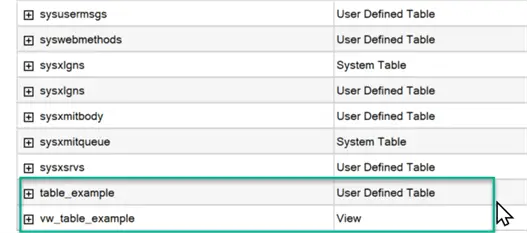
When we expand the display for one of these objects, we see additional information such as who acted and what operations were performed.

Identify Who Created a SQL Server Table Using T-SQL
Microsoft provides a function, fn_trace_gettable,, that reads any trace file and returns the results in tabular form. Read more about this function and how to configure the default trace on the Microsoft site. Unfortunately, there is little information about what is specifically gathered and how to review it.
To start, run this query against the default trace file to review the types of events that were captured.
--MSSQLTips.com
DECLARE @id INT

SELECT @id=id FROM sys.traces WHERE is_default = 1

SELECT DISTINCT eventid, [name] as EventName
FROM fn_trace_geteventinfo(@id) GI
JOIN sys.trace_events TE ON GI.eventid = TE.trace_event_id
We see that events 46 (created), 47 (deleted), and 164 (altered) track the information we are looking for. Feel free to review the other events.

Now that we know what events we want to capture let’s create a new table and see what data is captured in the trace.
--MSSQLTips.com
create table table_example (id int identity, col1 varchar(255), region varchar(5));
Run the following code to pull data from the active default trace file.
DECLARE @trace_path NVARCHAR(260)
SELECT @trace_path=path FROM sys.traces WHERE is_default = 1

SELECT LoginName, ObjectName, DatabaseName, ServerName, ApplicationName, StartTime,
  CASE EventClass
   when 164 then '164 - Altered'
   when 46 then '46 - Created'
   when 47 then '47 - Dropped'
  END as EventClass,
  EventSubClass,
  EventSequence
FROM sys.fn_trace_gettable(@trace_path, 0)
WHERE EventClass IN (46, 47, 164)
ORDER BY StartTime DESC
The results show the login of who created the table as well as other specifics. Note that there are two rows for a single table creation. If we look at the subclass column, we see a subclass of 0 and 1 when the table is created. Microsoft documentation on the default trace does not indicate what the EventSubClass means, leaving us to deduce that the two are separate events in the table creation process. We could use a WHERE clause in the above query to only pull for EventSubClass=1.

Next, let’s alter the table to verify we’re getting the most complete picture of the activity as well as the logins of those who created or altered the objects.
--MSSQLTips.com
alter table table_example add col2 nvarchar(500)
Below is the same script but modified for EventSubClass = 1.
--MSSQLTips.com
DECLARE @trace_path NVARCHAR(260)
SELECT @trace_path=path FROM sys.traces WHERE is_default = 1

SELECT LoginName, ObjectName, DatabaseName, ServerName, ApplicationName, StartTime,
CASE EventClass
   when 164 then '164 - Altered'
   when 46 then '46 - Created'
   when 47 then '47 - Dropped'
END as EventClass,
EventSubClass,
EventSequence
FROM sys.fn_trace_gettable(@trace_path, 3 )
WHERE EventClass IN (46, 47, 164) and EventSubClass = 1
ORDER BY StartTime DESC
Here we can see the CREATED and ALTERED commands.

Read Previous Trace Files
With the T-SQL code, we now have a way of getting to the data by reading the current trace file. Since the previous four are still on disk in a default configuration, we can also query the previous files to review them. The following example determines where the files are located, the previous file names and the hard coded file names.
--MSSQLTips.com
SELECT path FROM sys.traces WHERE is_default = 1
Navigate to the file system to see the file names on disk.
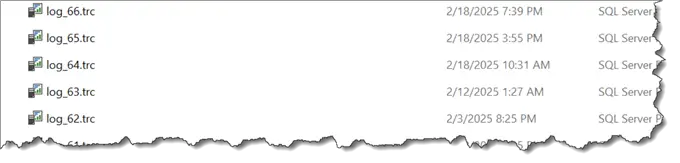
Edit the following script with the correct path and filename to retrieve information from a previous file.
--MSSQLTips.com
DECLARE @trace_path NVARCHAR(260)
/**Hard coding a previous file name and then retrieving the data.   Yours will be different **/
select @trace_path = 'C:\Program Files\Microsoft SQL Server\MSSQL16.MSSQLSERVER\MSSQL\Log\log_65.trc'

SELECT LoginName, ObjectName, DatabaseName, ServerName, ApplicationName, StartTime,
CASE EventClass
   when 164 then '164 - Altered'
   when 46 then '46 - Created'
   when 47 then '47 - Dropped'
END as EventClass,
EventSubClass,
EventSequence
FROM sys.fn_trace_gettable(@trace_path, 3 )
WHERE EventClass IN (46, 47, 164) and EventSubClass = 1
ORDER BY StartTime DESC
Identify Who Created a SQL Server Table Using SQL Profiler
Though deprecated, SQL Profiler remains available with the current version of SQL Server to read trace files. An introductory tutorial can be found on MSSQLTips.com: Introduction to SQL Server Profiler.
A nice Profiler feature when opening the trace files is the option to automatically open additional files found on disk. A message displays like the image below when it determines if there are other files to be read.
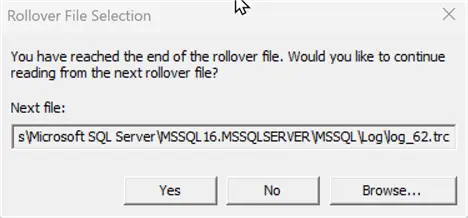
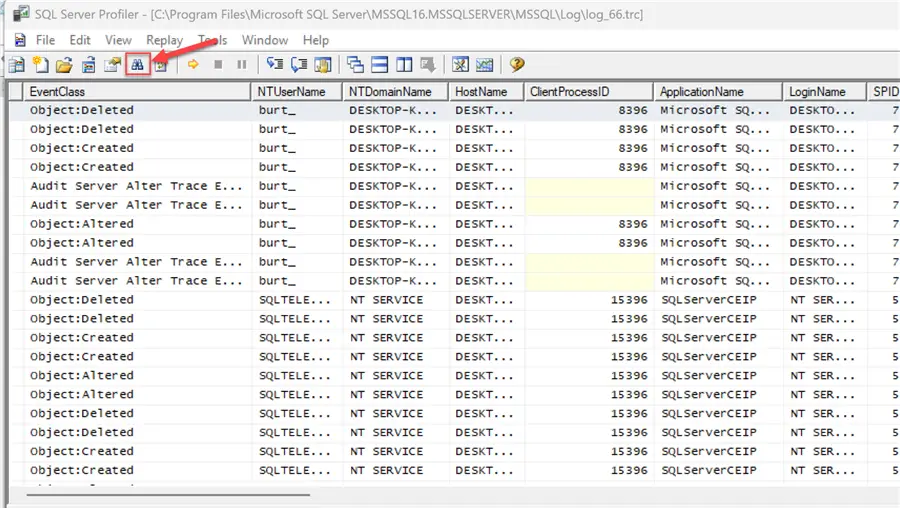
After selecting, the familiar Profiler interface appears. Note: The filter button allows you to search for strings and helps to find objects faster.
Solution Key Points
- SQL Trace is the only provided mechanism SQL Server uses to determine who and when objects were created.
- SSMS allows you to review items that have been created one database at a time.
- Offering more flexibility, create your own trace for this purpose. Since SQL trace is deprecated, be aware that it will be removed in the future. SSMS creates a report from the current trace file only. Consider using extended events as another option to accomplish this task.
- Reading trace files with T-SQL is probably the most practical solution. DBAs are familiar with the T-SQL syntax and filter the data with a where clause provides more flexibility plus the ability to review schema changes at the instance level.
Next Steps
- Review the Microsoft documentation on SQL Trace: default trace enabled (server configuration option)
- Look at the Microsoft documentation on fn_trace_gettable and how it’s used.
- Review these MSSQLTips
- Work with the scripts provided and decide if it’s worth adding a SQL Agent job to collect this data for the instance.

Burt King is an independent SQL Server consultant from Boston, Massachusetts. He has worked with SQL Server since 1997 and supported every version since SQL 6.5. Burt’s favorite projects are related to clustering, availability groups and performance tuning.