Overview
In almost all cases when we use the <> operator (or any other operator in conjunction with the NOT operator, i.e.. NOT IN) index seeks will not be performed and instead a table/index scan is required.
Explanation
For this example let’s make an update to one of our test tables to skew the data a little. We’ll also add an index to the table on the column that will be used in our WHERE clause.
UPDATE [dbo].[Child] SET IntDataColumn=60000
UPDATE [dbo].[Child] SET IntDataColumn=3423 WHERE ParentID=4788
UPDATE [dbo].[Child] SET IntDataColumn=87347 WHERE ParentID=34268
UPDATE [dbo].[Child] SET IntDataColumn=93423 WHERE ParentID=84938
UPDATE [dbo].[Child] SET IntDataColumn=5564 WHERE ParentID=74118

CREATE NONCLUSTERED INDEX idxChild_IntDataColumn
ON [dbo].[Child] ([IntDataColumn],[ParentID]) INCLUDE ([ChildID])

-- cleanup statements
--DROP INDEX Child.idxChild_IntDataColumn
Now let’s look at a simple query which would return all the records where IntDataColumn <> 60000. Here is what that would look like.
SELECT P.ParentID,C.ChildID,C.IntDataColumn
  FROM [dbo].[Parent] P INNER JOIN
       [dbo].[Child] C ON P.ParentID=C.ParentID
 WHERE C.IntDataColumn <> 60000
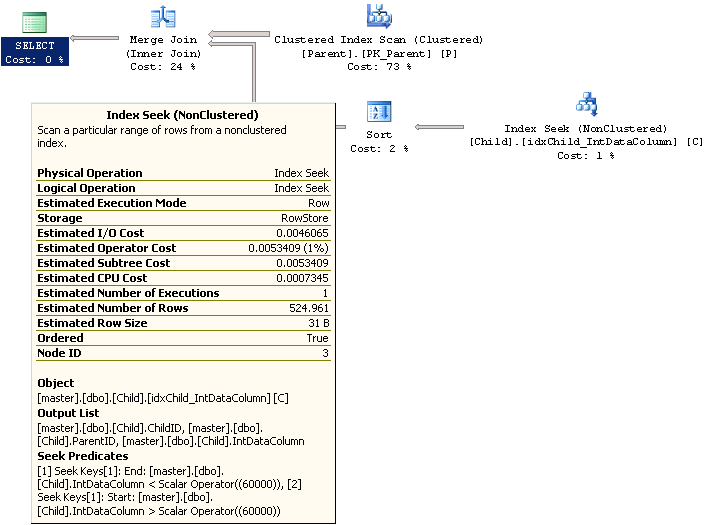
Looking at the explain plan for this query we see something really interesting. Since the optimizer has some statistics on the data in this column it has rewritten the query to use separate < and > clauses. We can see this in the details of the Index Seek under the Seek Predicate heading.
Now let’s see what happens if we have two <> clauses as follows.
SELECT P.ParentID,C.ChildID,C.IntDataColumn
  FROM [dbo].[Parent] P INNER JOIN
       [dbo].[Child] C ON P.ParentID=C.ParentID
 WHERE C.IntDataColumn <> 60000 and C.IntDataColumn <> 5564
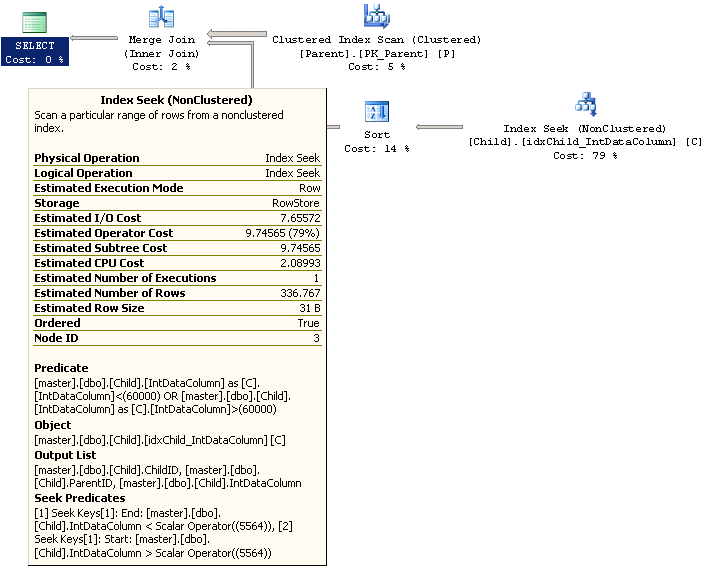
Looking at the explain plan for this query we also see that the optimizer has done some manipulation to the WHERE clause. It is now using the new value we added in the Seek Predicate and the original value as the other Predicate. Both have been changed to use separate < and > clauses.
Although the changes that the optimizer has made have certainly helped the query by avoiding an index scan it’s always best to use an equality operator, like = or IN, in you query if you want the best performance possible. One thing you should consider before making a change like is you want to make sure you have a good understanding of your data as changes in your table data can then affect your query results. With that said and given that we know our table has very few records that satisfy the WHERE condition let’s flip it to an equality operator and see the difference in performance. Here is the new query.
SELECT P.ParentID,C.ChildID,C.IntDataColumn
  FROM [dbo].[Parent] P INNER JOIN
       [dbo].[Child] C ON P.ParentID=C.ParentID
 WHERE C.IntDataColumn IN (3423,87347,93423)
Looking at the explain plan for this query we can see that it’s also doing an index seek but looking deeper into the Seek Predicate we can now see it’s using the equality operator which should be much faster given the number of records that satisfy the WHERE condition.

Now let’s take a look at the SQL Profiler results for these two queries. We can see below that the example using the equality operator runs faster and requires much less resources. Note: Both queries returned the same result set.
| Clause | CPU | Reads | Writes | Duration |
|---|---|---|---|---|
| Inequality | 250 | 110901 | 0 | 255 |
| Equality | 15 | 654 | 0 | 15 |
Additional Information

Ben Snaidero has been a Database Administrator for just over 10 years. Starting out working mainly with Oracle he got into SQL Server in 2005 and has worked primarily with SQL Server for the last 3 years. His main focus with both Oracle and SQL Server is in the area of performance tuning.
- MSSQLTips Awards: Achiever (75+ tips) – 2018 | Author of the Year Contender – 2016-2017