Overview
Monitoring the log file is very important, and SQL Server has made it fairly easy for us to do this. One way to find information about the log is in the catalog view sys.database_files. This view returns information about data and log files that include the type of file, name, location, state, size, growth, etc.
Explanation
Getting Log File Size Information
The following query will filter down to only the log file and displays some very useful information:
SELECT
   name AS [File Name],
   physical_name AS [Physical Name],
   size/128.0 AS [Total Size in MB],
   size/128.0 - CAST(FILEPROPERTY(name, 'SpaceUsed') AS int)/128.0 AS [Available Space In MB],
   [growth],
   [file_id]
FROM sys.database_files
WHERE type_desc = 'LOG'
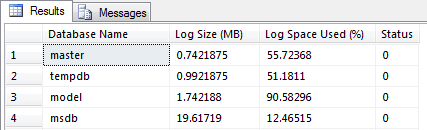
You can also use DBCC SQLPERF (‘logspace’), which has been around for a while. This command displays useful details such as DB name, Log Size (MB), and Log Space Used (%):

Brady has been in the IT industry for 10+ years. He has worked in administrative roles using MSSQL 2000 to 2012 as well as Sharepoint 2007 and 2010. He currently serves as a Database Administrator in Nashville, TN. You can view his blog @ http://www.sqlbrady.com.
- MSSQLTips Awards: Trendsetter (25+ tips) – 2013



What measurement does the growth column represent? Is it a % or MB?
If you run SELECT * FROM sys.database_files you can see a column named is_percent_growth (bit column) that shows if it is in percent otherwise it is MB.