Overview
When creating a SQL Statement by default, for example, SELECT * FROM HumanResources.Employee, SQL Server will run this statement and immediately return the results:

If you were to add BEGIN TRANSACTION (or BEGIN TRAN) before the statement, it automatically makes the transaction explicit and holds a lock on the table until the transaction is either committed or rolled back.
BEGIN TRANSACTION marks the starting point of an explicit, local transaction. – MS
Explanation
For example, when I issue a DELETE or UPDATE statement, I always explicitly use BEGIN TRAN to make sure my statement is correct and I get the correct number of results returned.
Let’s say I want to UPDATE the Employee table and set JobTitle equal to ‘DBA’ where LoginID is like ‘%barbara%’. I accidentally create my statement wrong and issue the statement below, which actually would make every JobTitle equal to ‘DBA’:
UPDATE HumanResources.Employee
SET JobTitle = ‘DBA’
WHERE LoginID IN (SELECT LoginID FROM HumanResources.Employee)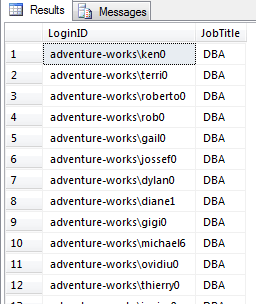
Oops! I didn’t mean to do that!! I accidentally made every record have a JobTitle of DBA.
If I had placed a BEGIN TRAN before my statement, I would have noticed that 290 results would be affected, and something is wrong with my statement:
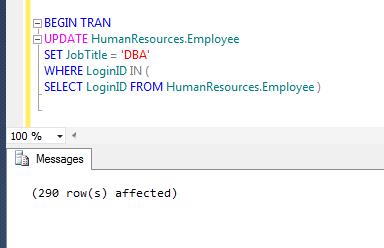
Since I specified a BEGIN TRAN, the transaction is now waiting on a ROLLBACK or COMMIT.
While the transaction is waiting, it has created a lock on the table and any other processes that are trying to access HumanResources.Employee are now being blocked. Be careful using BEGIN TRAN and make sure you immediately issue a ROLLBACK or COMMIT.
If we run sp_who2, we can see that there is a blocking process highlighted below.

As you can see, SPID 52 is getting blocked by 54.
Since I noticed something was terribly wrong with my UPDATE statement, I can issue a ROLLBACK TRAN statement to rollback the transaction, meaning that none of the data actually changed:
ROLLBACK TRANSACTION rolls back an explicit or implicit transaction to the beginning of the transaction, or to a savepoint inside the transaction. It also frees resources held by the transaction. – MS

If I had written my statement correctly the first time and noticed the right amount of results displayed, then I could issue a COMMIT TRAN and it would execute the statement and my changes would be committed to the database:
COMMIT TRANSACTION marks the end of a successful implicit or explicit transaction. If @@TRANCOUNT is 1, COMMIT TRANSACTION makes all data modifications performed since the start of the transaction a permanent part of the database, frees the resources held by the transaction, and decrements @@TRANCOUNT to 0. If @@TRANCOUNT is greater than 1, COMMIT TRANSACTION decrements @@TRANCOUNT only by 1 and the transaction stays active. – MS


Brady has been in the IT industry for 10+ years. He has worked in administrative roles using MSSQL 2000 to 2012 as well as Sharepoint 2007 and 2010. He currently serves as a Database Administrator in Nashville, TN. You can view his blog @ http://www.sqlbrady.com.
- MSSQLTips Awards: Trendsetter (25+ tips) – 2013



I was shown this technique many years ago by a SQL guru friend. I have used it since and has saved me many times.
How did you get to see the results in the picture above the line, “As you can see, SPID 52 is getting blocked by 54.”