Overview
At some point, all databases eventually need to be updated where new objects are added/dropped or database code requires modification.
Explanation
Our table has a primary key but it’s missing a UNIQUE constraint. Let’s go to the Schema View and add a UNIQUE constraint by ClubName and City to our FootBallClub table:
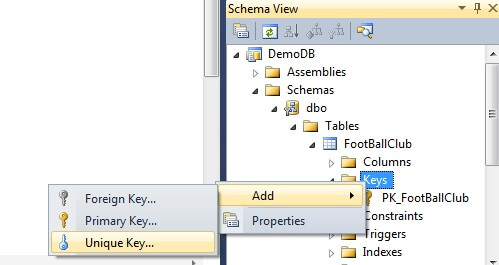
The familiar Add New Item screen appears and we name our constraint:

Once we click Add, we can modify the produced template as follows:
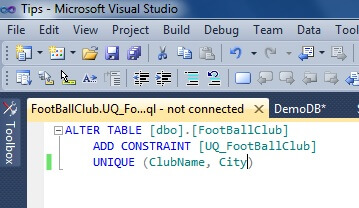
We re-build and re-deploy the database project:

The output window shows that our constraint was added successfully and that we didn’t suffer and seed data primary key violations because our post deployment script was made re-runnable:

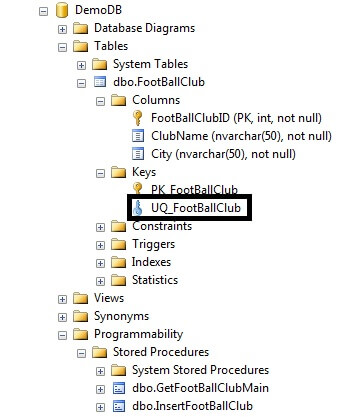
Examining SQL Server Management Studio again, we verify our UNIQUE constraint has been added to the database:

For 20+ years, MSSQLTips.com has been delivering comprehensive technical solutions on a daily basis for the Microsoft SQL Server platform. In that time, an innovative team of over 300 authors from around the globe have delivered over 7000 articles and 1000 webcasts ranging from beginner topics to advanced solutions. Our community prides itself on delivering human only generated content.