Overview
The DATEDIFF function returns the difference between two dates according to the datepart specified: such as year, day, month, etc.
Explanation
Syntax
DATEDIFF(datepart, date1, date2)Parameters
- datepart – This is the datepart to get the difference between the two dates. It can be a year (yy, yyyy), quarter (qq, q), month (mm, m), dayofyear(dy, y), day (dd, d), week (wk, ww), weekday (dw, w), hour (hh), minute (mi, n), second (ss, s), millisecond (ms), microsecond (mcs), nanosecond (ns). You can use the full name or the abbreviations in parenthesis.
- date1– Is the first date in the operation. This value can be a date or time.
- date2– Is the second date we want to use to compare with the first date. This value can be a date or time.
Simple DATEDIFF Example
The following example will show the number of years using the current date and March 11, 1979. If the dates were reversed, we would get a negative value.
SELECT DATEDIFF(year, '03-11-1979', CURRENT_TIMESTAMP) as yeardiff
Something to note is that DATEDIFF for year only takes the year part into consideration which was pointed out by one of the readers. So if we look at the example below this still returns 1, even though it has been less than 1 full year.
SELECT DATEDIFF(year, '02-01-2021', '01-01-2022') as yeardiffDATEDIFF with NULL Values
If a NULL parameter is used the result will be NULL.
SELECT DATEDIFF(s, NULL, CURRENT_TIMESTAMP) as datediff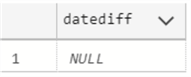
DATEDIFF Examples Using All Options
The next example will show the differences between two dates for each specific datapart and abbreviation. We will use the below date for the examples.
DECLARE @date  datetime2 = '2021-01-07 14:36:17.6222691'
DECLARE @date2 datetime2 = '2022-01-14 12:32:07.8494441'| DateGroup | DatePart | Query | Result |
|---|---|---|---|
| day | d | SELECT DATEDIFF(d, @date, @date2) | 372 |
| day | day | SELECT DATEDIFF(day, @date, @date2) | 372 |
| day | dd | SELECT DATEDIFF(dd, @date, @date2) | 372 |
| dayofyear | dayofyear | SELECT DATEDIFF(dayofyear, @date, @date2) | 372 |
| dayofyear | dy | SELECT DATEDIFF(dy, @date, @date2) | 372 |
| dayofyear | y | SELECT DATEDIFF(y, @date, @date2) | 372 |
| hour | hh | SELECT DATEDIFF(hh, @date, @date2) | 8926 |
| hour | hour | SELECT DATEDIFF(hour, @date, @date2) | 8926 |
| microsecond | microsecond | SELECT DATEDIFF(microsecond, @date, @date2) | |
| microsecond | mcs | SELECT DATEDIFF(mcs, @date, @date2) | |
| millisecond | millisecond | SELECT DATEDIFF(millisecond, @date, @date2) | |
| millisecond | ms | SELECT DATEDIFF(ms, @date, @date2) | |
| minute | mi | SELECT DATEDIFF(mi, @date, @date2) | 535556 |
| minute | minute | SELECT DATEDIFF(minute, @date, @date2) | 535556 |
| minute | n | SELECT DATEDIFF(n, @date, @date2) | 535556 |
| month | m | SELECT DATEDIFF(m, @date, @date2) | 12 |
| month | mm | SELECT DATEDIFF(mm, @date, @date2) | 12 |
| month | month | SELECT DATEDIFF(month, @date, @date2) | 12 |
| nanosecond | nanosecond | SELECT DATEDIFF(nanosecond, @date, @date2) | |
| nanosecond | ns | SELECT DATEDIFF(ns, @date, @date2) | |
| quarter | q | SELECT DATEDIFF(q, @date, @date2) | 4 |
| quarter | SELECT DATEDIFF(qq, @date, @date2) | 4 | |
| quarter | quarter | SELECT DATEDIFF(quarter, @date, @date2) | 4 |
| second | s | SELECT DATEDIFF(s, @date, @date2) | 32133350 |
| second | second | SELECT DATEDIFF(second, @date, @date2) | 32133350 |
| second | ss | SELECT DATEDIFF(ss, @date, @date2) | 32133350 |
| week | week | SELECT DATEDIFF(week, @date, @date2) | 53 |
| week | wk | SELECT DATEDIFF(wk, @date, @date2) | 53 |
| week | ww | SELECT DATEDIFF(ww, @date, @date2) | 53 |
| weekday | dw | SELECT DATEDIFF(dw, @date, @date2) | 372 |
| weekday | w | SELECT DATEDIFF(w, @date, @date2) | 372 |
| weekday | weekday | SELECT DATEDIFF(weekday, @date, @date2) | 372 |
| year | year | SELECT DATEDIFF(year, @date, @date2) | 1 |
| year | yy | SELECT DATEDIFF(yy, @date, @date2) | 1 |
| year | yyyy | SELECT DATEDIFF(yyyy, @date, @date2) | 1 |
Note: for the items that were left blank created an overflow error as shown below.
DATEDIFF Function Resulted in an Overflow
The following example will display an error message.
SELECT DATEDIFF(millisecond, '02-11-1972', CURRENT_TIMESTAMP) as datediff, 'millisecond' as unit The error message is the following:
The datediff function resulted in an overflow. The number of dateparts separating two date/time instances is too large. Try to use datediff with a less precise datepart.This error occurs because there are too many milliseconds between 1972 until the current date.
Working with Table Data
The following example will show the number of years that the employee worked in a company based on the HireDate and they have worked there at least 10 years.
SELECT DATEDIFF(yy, HireDate, GETDATE()) as YEARS, BusinessEntityID
FROM HumanResources.Employee
WHERE DATEDIFF(yy, HireDate, GETDATE()) > 10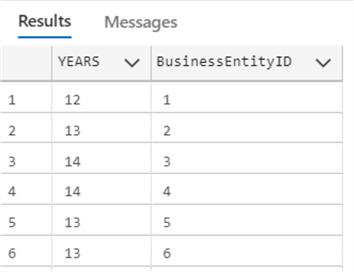
Additional Information
- SQL DATEADD
- How to Get Current Date in SQL Server
- Mimic timestamp behavior of other database platforms to store last modified date
- SQL Convert Date to YYYYMMDD

Daniel Calbimonte is a Microsoft Most Valuable Professional, Microsoft Certified Trainer and Microsoft Certified IT Professional for SQL Server. He is an accomplished SSIS author, teacher at IT Academies and has over 10 years of experience as a QE and developer for SQL Server related software. He has worked for the government, oil companies, web sites, magazines and universities around the world. Daniel also regularly speaks at SQL Servers conferences and blogs.
- MSSQLTips Awards: Author of the Year Contender – 2015-2018, 2022, 2023 | Champion (100+ tips) – 2018


Thanks Jeff for pointing that out. We have updated the article.
-Greg
This article is a simplified version of what is in “Books Online” and, because of the simplification, it’s missing one of the most important parts this is about the DATEDIFF() function. DATEDIFF() does NOT count the difference in “periods”. DATEDIFF() only counts clock and calendar BOUNDARIES. Without knowing that, then people end up doing the wrong calculations for determining things like age, as was also done at the beginning of this article.
In other words, if you don’t explain why the following code, which uses two date/times that are only 3 milliseconds apart, says that 1 year passed, the article misses one of the most important principles of DATEDIFF() there is.
SELECT DATEDIFF(yy,’31 Dec 2022 23:59:59.997′,’01 Jan 2023 00:00:00.000′);
RESULTS;
1