Overview
Developing an end to end data model with an appropriate volume of sample data is a time intensive process. Our focus is to come up to speed with major building blocks of the SSAS data model without spending lot of time in setting up a sample structure and data for the model. In order to work with SSAS Multidimensional as well as Tabular data model, we need a sample data model for each server mode so that we can explore different parts of the data model. In this chapter we will download sample Adventureworks databases for SSAS Multidimensional as well as Tabular models and install them on a SSAS instance.
Explanation
The first step is to download sample Adventureworks databases for Multidimensional and Tabular data models.
After downloading them, the next step is to restore these database backups on the Multidimensional and Tabular SSAS Instances. Although backup and restore are typically an administrator’s task, anyone working with SSAS needs to know a certain level of administration to independently accomplish routine tasks.
Starting with the multidimensional mode, restore the downloaded Adventureworks backup on the multidimensional instance of SSAS. Detailed steps to accomplish this can be read here. After successful restore, when you to connect to your SSAS Multidimensional instance using SSMS, you should be able to explore your restored database as shown below.
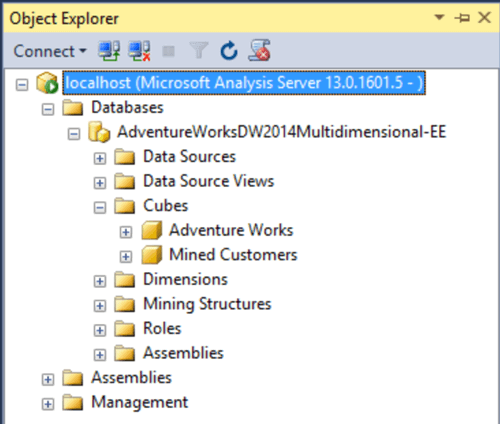
The next step is to restore the downloaded Adventureworks tabular database on the tabular instance of SSAS. The steps for this process are identical to the one for restoring a multidimensional database. Alternatively, you can also download a tabular SSAS solution and deploy it to create a sample tabular SSAS database. You can read about the steps for that here.

Additional Information
- You will find different database objects in your tabular and multidimensional databases after restoring. To understand the differences, consider reading this article on the comparison of Tabular and Multidimensional solutions.

Siddharth has more than 14 years of experience in the IT Industry, with more than a decade of experience in Business Intelligence and Analytics, for clients banking, logistics, government, Media Entertainment, products, life sciences and other domains. He has been a lead architect for a portfolio of 40+ apps, containing apps in web, mobile, BI, Analytics, data warehousing, reporting, collaboration, CMS, NoSQL and other technologies. He has several certifications and is a published author for online and print-media publications, as well as the MSDN Library.
In his present role, he remains responsible for architecture design, technology stack selection, infrastructure design, 3rd party products evaluation and procurement, and performance engineering. These applications use technologies like Elasticsearch / Lucene, MongoDB, SharePoint 2013 and 2010, jQuery-based framework like Highcharts and GoJS, SQL Server and the Microsoft Business Intelligence stack (SSIS, SSAS, SSRS, MDX, PowerPivot, PowerView), jQueryMobile, Bootstrap, iOS xCode framework, and many others.
- MSSQLTips Awards: Champion (100+ tips) – 2018 | Author of the Year – 2017 | Author Contender – 2016, 2018-2019