Problem
An advantage of using SQL Server stored procedures and functions is the ability to reuse code and logic to return consistent data output. Let’s see how this can be done and the various options to return data.
Solution
In this article, we will look at various methods that can be used to return data from stored procedures.
Note: The examples are developed and tested on AdventureWorks2017 database.
Returning SQL Data from Stored Procedures
Multiple methods for returning data from reusable code blocks are offered by SQL Server. You may use a table-valued function, a scalar stored procedure, or a stored procedure that returns result sets, depending on the situation. Each of these has unique benefits and drawbacks and fulfills distinct functions.
Scalar Stored Procedures
An output parameter allows a scalar stored procedure to optionally return a single value after performing an action. Tables and result sets are examples of datasets that scalar stored procedures are not intended to return. Calculations, updates, and inserts are common uses for these processes.
--MSSQLTIPS.com (SQL)
CREATE PROCEDURE GetEmployeeCount
    @Count INT OUTPUT
AS
BEGIN
    SELECT @Count = COUNT(*) FROM HumanResources.Employee;
END;
To call this procedure and retrieve the result, you should use the code below.
--MSSQLTIPS.com (SQL)
DECLARE @EmpCount INT;
EXEC GetEmployeeCount @Count = @EmpCount OUTPUT;
SELECT @EmpCount AS EmployeeCount;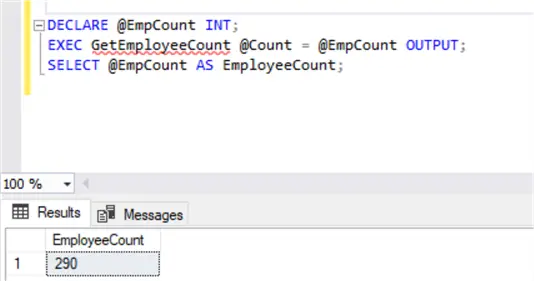
This is a straightforward approach when you need to obtain a single value, such as the number of departments in an organization.
Table-Valued Functions
Table-valued functions (TVF) can be used directly in queries and joins. They return data in the form of a table. They work best when you want to encapsulate query logic for later use.
--MSSQLtips.com (SQL)
CREATE FUNCTION fnGetEmployeesByDept (@DeptId INT)
RETURNS TABLE
AS
RETURN
(
    SELECT e.BusinessEntityID, p.FirstName, p.LastName, d.Name AS Department
    FROM HumanResources.Employee e
    JOIN HumanResources.EmployeeDepartmentHistory edh ON e.BusinessEntityID = edh.BusinessEntityID
    JOIN HumanResources.Department d ON edh.DepartmentID = d.DepartmentID
    JOIN Person.Person p ON e.BusinessEntityID = p.BusinessEntityID
    WHERE edh.DepartmentID = @DeptId AND edh.EndDate IS NULL
);
You can query the result like this:
--MSSQLtips.com (SQL)
SELECT * FROM fnGetEmployeesByDept(2);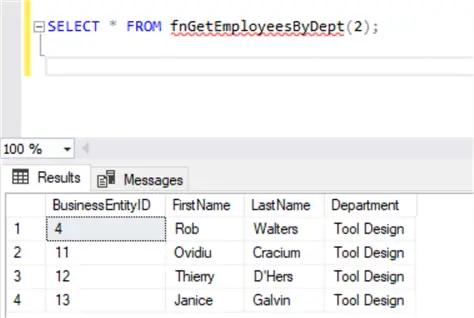
TVFs are especially useful for filtering or joining within larger queries, but they are limited in terms of functionality since they do not support procedural logic, like loops or error handling.
Table-Valued Stored Procedures
Table-valued stored procedures are not composable; they can’t be used directly in SELECT statements or joins.
--MSSQLTips.com (SQL)
CREATE PROCEDURE spGetEmployeesByDepartment
    @DeptId INT
AS
BEGIN
    SELECT e.BusinessEntityID, p.FirstName, p.LastName, d.Name AS Department, e.JobTitle
    FROM HumanResources.Employee e
    JOIN HumanResources.EmployeeDepartmentHistory edh ON e.BusinessEntityID = edh.BusinessEntityID
    JOIN HumanResources.Department d ON edh.DepartmentID = d.DepartmentID
    JOIN Person.Person p ON e.BusinessEntityID = p.BusinessEntityID
    WHERE edh.DepartmentID = @DeptId AND edh.EndDate IS NULL;
END;
To execute this stored procedure:
--MSSQLTips.com (SQL)
EXEC spGetEmployeesByDepartment @DeptId = 2;
This returns a result set of employees for the given department. This behavior is ideal for reporting or for use within application layers that consume datasets.
Procedures are powerful in terms of control flow. They support multiple result sets and dynamic SQL.
Stored Procedure with Multiple Result Sets
One of the key advantages of stored procedures is their ability to return multiple result sets. This feature could be valuable in reporting scenarios or when you need to return related but distinct datasets in a single call.
For example, the code below executes two distinct queries. As shown in the screenshot, two result sets are shown in the result tab.
--MSSQLTips.com (SQL)
CREATE PROCEDURE spGetDepartmentDetails
    @DeptId INT
AS
BEGIN
    -- First result set: Department info
    SELECT DepartmentID, Name, GroupName
    FROM HumanResources.Department
    WHERE DepartmentID = @DeptId;

    -- Second result set: Active employees in the department
    SELECT e.BusinessEntityID, p.FirstName, p.LastName, e.JobTitle
    FROM HumanResources.Employee e
    JOIN HumanResources.EmployeeDepartmentHistory edh ON e.BusinessEntityID = edh.BusinessEntityID
    JOIN Person.Person p ON e.BusinessEntityID = p.BusinessEntityID
    WHERE edh.DepartmentID = @DeptId AND edh.EndDate IS NULL;
END;
You should write the code below to execute the procedure.
--MSSQLTips.com (SQL)
EXEC spGetDepartmentDetails @DeptId = 2;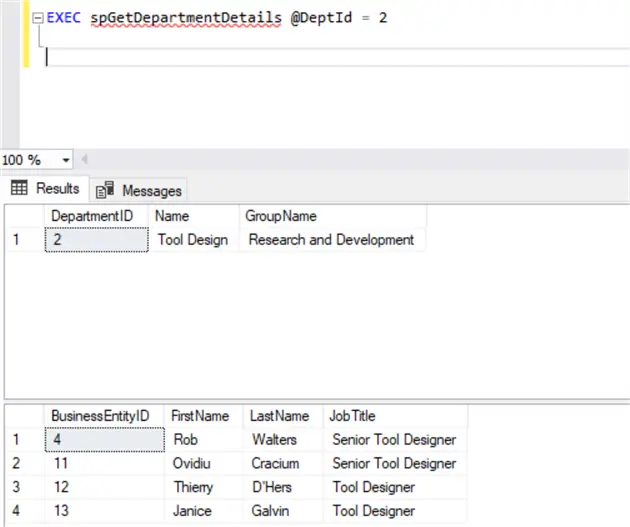
Tools like Power BI support consuming multiple result sets.
Change Column Names and Data Types Using WITH RESULT SETS
Based on the underlying queries, SQL Server determines the column names and types when a stored procedure returns a result set. That is acceptable in many situations. However, you can use the WITH RESULT SETS clause to override this behavior if you’re calling a procedure from an external application or if you only want to enforce a consistent schema.
--MSSQLTips.com (SQL)
EXEC spGetDepartmentDetails @DeptId = 2
WITH RESULT SETS
(
    (
        DeptID INT,
        DeptName NVARCHAR(100),
        GroupName NVARCHAR(100)
    ),
    (
        EmpID INT,
        FirstName NVARCHAR(50),
        LastName NVARCHAR(50),
        Title NVARCHAR(100)
    )
);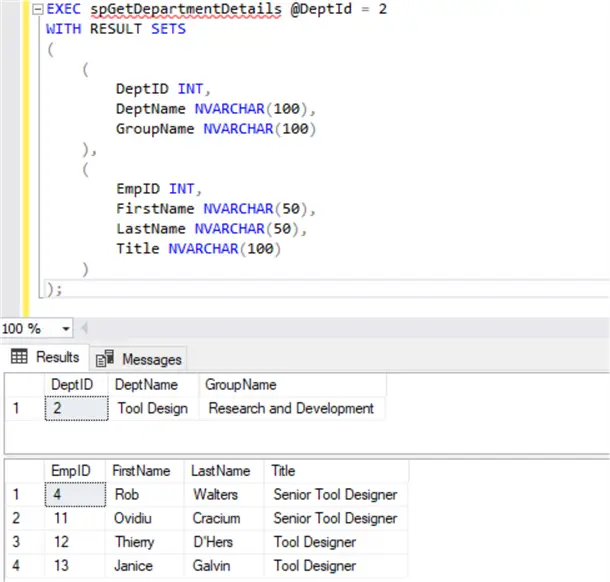
In the above example, we’re explicitly naming and typing the columns returned by the stored procedure using the WITH RESULT SETS clause.
Result Sets + Temporary Tables
In SQL Server, you may occasionally need to modify the data that a stored procedure returns. You can insert the result set into a temporary table even though stored procedures cannot be used directly in joins. Keep in mind that this method only applies to the initial set of results.
--MSSQLTips.com (SQL)
CREATE TABLE #TempEmployees (
    Id INT,
    FirstName NVARCHAR(100),
    LastName NVARCHAR(100),
    Department NVARCHAR(100),
    JobTitle NVARCHAR(100)
);

INSERT INTO #TempEmployees
EXEC spGetEmployeesByDepartment @DeptId = 2;

SELECT * FROM #TempEmployees WHERE JobTitle = 'Tool Designer';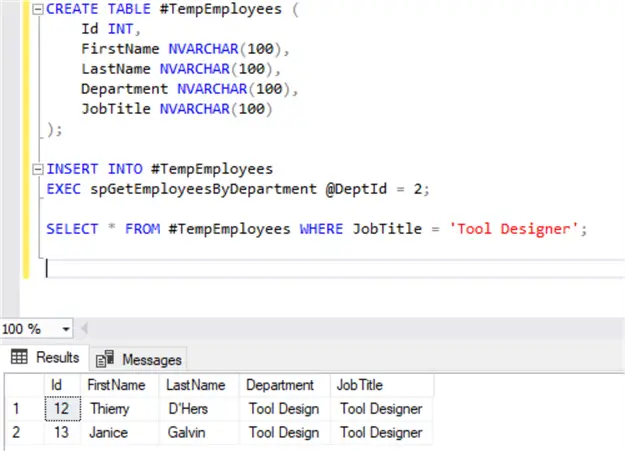
This approach is effective when you need to manipulate the result or integrate it with other datasets.
Final Thoughts
Each choice has a distinct function. For lightweight, reusable queries, TVFs are excellent. Simple outputs or actions are a good fit for scalar stored procedures. However, table-valued stored procedures excel in more complicated situations involving numerous datasets or sophisticated logic.
To keep your code effective and maintainable when using table-valued stored procedures, it’s crucial to adhere to a few useful rules:
- Due to their inherent composability, TVFs are typically a better option if you want to create a query that can be reused within joins or subqueries. However, stored procedures are the better choice if your logic calls for conditional branching, multiple result sets, or more procedural control.
- Consider defining a consistent and predictable output schema with the WITH RESULT SETS clause if your stored procedures are being used by external applications. This will help prevent confusion or inconsistencies later on.
- Remember that TVFs are designed for read-only, lightweight logic, so don’t make them too complicated.
Knowing when and how to use table-valued stored procedures can greatly increase the robustness and maintainability of your SQL code, whether you’re creating a data layer for an application, creating reports, or just structuring your queries.
Next Steps
- Read additional information on the WITH RESULT SETS Feature of SQL Server.
- You can read more about the performance comparison of SQL Server Stored Procedure Performance for Table Valued Parameters vs Multiple Variables.
- Read more about Table Valued Parameters (TVP) in SQL Server.

Hadi Fadlallah is an SQL Server professional with more than 10 years of experience. His main expertise is in data integration. He’s one of Stackoverflow.com’s top ETL and SQL Server Integration Services contributors. Also, he is a university lecturer and writes scientific and technical articles on several blogs. On the academic level, he holds a Ph.D. degree in data science focusing on context-aware big data quality and two master’s degrees in computer science and business computing.
- MSSQLTips Awards: Trendsetter (25+ tips) – 2025 | Author of the Year Contender – 2023 | Rookie of the Year – 2022

Thanks Dr. Fadlallah, this was concise, clear, and very helpful great breakdown of the different ways to return result sets in SQL Server!