Problem
Today’s organization are faced with multiple conflicts for their current cloud infrastructures and which approach to go with either opting for a microservice or monolith applications. However, there are numerous difficulties with standard hosting methods.
Every developer today deals with these challenges:
- Infrastructure Overhead: Teams tend to focus more resource provisioning, scaling, patching and maintaining virtual environments rather than writing codes and building projects.
- Integration Complexity: Developers are required to write multiple custom complex code for certain integrations that might require frequent updates.
- Cost and Stress in Scaling: Spending a lot on the server even if traffic in such server is low is a waste of money and resources. On the other hand, sudden spikes in traffic can cause disruptions since the infrastructure isn’t well-maintained.
Solution
Serverless, Event-Driven Compute
The introduction of Azure Functions which are sometime called FaaS – Function as a Service closes such gaps by offering developers serverless, event-driven computational models for quick and efficient response.
Section 1: Knowing Azure Functions
What Are Azure Functions?
Azure Functions is a premier serverless compute service offered by Microsoft Azure. It allows developers in the Azure Ecosystem to run small, autonomous code parts as “functions” in the cloud without worrying about configuration or maintenance. In simple terms, Azure takes care of all plumbing like server administration, OS updates, capacity planning and scaling while developers can solely concentrate on the code that carries the business logic.
The Big Question: Why Use Azure Functions?
Azure Functions offers developers multiple advantages when setting up the infrastructure:
- Cost-efficiency: Azure Functions allows developers to set a consumption-based strategy which basically means you pay for resources and actual time your code runs. You don’t get charged when a function is not being used.
- Automatic Scaling: Azure Functions have the ability to scale in and out depending on the number of events or incoming loads.
- Enhanced Productivity: Developers can focus more on code writing and business logic rather than maintaining infrastructure.
- Event-Driven Architecture: These are good for reactive and distributed systems designs, they are event-driven and built to respond to different types of events.
How Do Azure Functions Work? Triggers and Bindings
The core of Azure Functions revolves around Triggers and Bindings. Check Microsoft official documentation for all the Triggers and Bindings available in Azure Functions.
- Triggers (The “When”): Triggers are basically what activates or starts a flow process in Azure functions, triggers are the reason a function will run. Some examples are:
- HTTP Trigger: When HTTP request is received such as a POST request usually done by an API or Webhook.
- Timer Trigger: These are scheduled processes that run on a specific time interval.
- Blob Trigger: These are event driven triggers for Azure Blob storage
- Queue/Service Bus Trigger: Executed when a new message is placed on a queue.
- Cosmos DB trigger: These are executed when a document is added or modified in Cosmos DB database > Container > Partitions.
- Binding: This is a declarative method of connecting Azure Functions to other data sources or services by taking the logic of I/O operations.
- Input Binding: Before the function executes, they’re connected to external data sources.
- Output Binding: After the function executes, writes data to external sources.
Common Scenarios: “When” and “Where” to Use Azure Functions
Azure functions are great for microservice architecture and here are some of the real-world use cases:
- Building Serverless APIs and Webhooks: Using the HTTP Triggerin Azure Function you can create RESTful services or endpoints that response to external events examples are GitHub Webhook or Application Webhook.
- Processing Data in Real-Time: This involves ingesting, processing and analyzing a large volume of data from devices or application using resources like Event Hub or IoT Hub Triggers available in Azure Services.
- Automating Scheduled Tasks: Use the Timer Trigger to perform routine operations, such as removing out-of-date data, sending daily reports, or performing system maintenance at off-peak times.
- Implementing Backend Logic for Mobile/Web Apps: Managing different business logic execution such as Blob Trigger and Authentication processes.
- Responding to Database Changes: Event-Driven on Azure Cosmos DB when actions like data insertion, modification or delete occurs in the database custom logic. This process is known as a Cosmos DB Trigger.
Getting Started with Azure Functions
Azure Functions are easy to get started with and are available in different coding tools like VSCode and Visual Studio IDE and supports multiple programming languages.
- Supported Languages: Languages supported areC#, JavaScript, Python, Java, PowerShell, and TypeScript.
- Development Environments: Use local development tools such as Visual Studio or Visual Studio when building Azure Functions.
- Deployment: Azure DevOps or GitHub Actions CI/CD pipelines can be used for deployment.
Best Practices for Function Development
To ensure your solution performs at optimal levels, follow thes best practices:
- Create Brief, Targeted Functions (Single Responsibility): Azure Functions should be simple and carry out a simple, logical task.
- Use Key Vault to Protect Secrets: Keep all sensitive information in Azure Key Vault.
- Track Performance: Use Azure Application Insights to track failure rate, logs, and execution times in real time.
Section 2: Provisioning Multiple Environment Using IaC (Terraform)

Provision Resources with Terraform
Terraform in Azure provides an Infrastructure as Code (IaC) approach in setting up your Azure resources in the Azure portal.
Set Project Directory
Before getting started, let’s set a proper production-grade Terraform project directory with the different modules and environments.

The directory tree provides a breakdown of our various project directories.

Provision Azure Resource Group
The resource group will be used to house all Azure resources. We will be following the best practice of Azure naming convention: <service-prefix>-<environment>-<region>-<application-name>-<owner>-<instance>
Step 1: Create the Module Structure
We need to arrange the file format in our VSCode.
File Name: modules/resource-group/main.tf
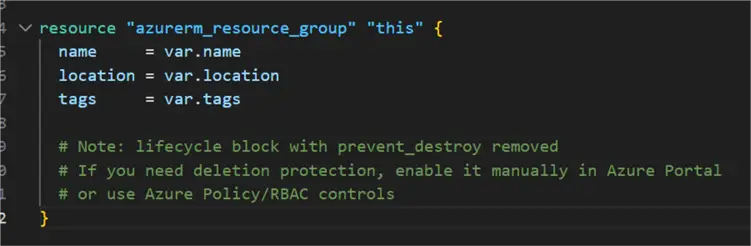
File Name: modules/resource-group/variables.tf
variable "name" {
  type        = string

  validation {
    condition     = can(regex("^[a-zA-Z0-9-_]+$", var.name))
  }
}

variable "location" {
  type        = string

  validation {
    condition = contains([
      "uksouth
    ], lower(var.location))
  }
}

variable "tags" {
  type        = map(string)
  default     = {}
}

variable "prevent_destroy" {
  type        = bool
  default     = false
}
File Name: modules/resource-group/outputs.tf
output "id" {
  value       = azurerm_resource_group.this.id
}

output "name" {
  value       = azurerm_resource_group.this.name
}

output "location" {
  value       = azurerm_resource_group.this.location
}

output "tags" {
  value       = azurerm_resource_group.this.tags
}
Step 2: Create Environment Configuration
File Name: envs/dev/main.tf
terraform {
  required_version = ">= 1.5.0"

  required_providers {
    azurerm = {
      source = "hashicorp/azurerm"
      version = "~> 3.0"
    }
  }
}

provider "azurerm" {
  features {
    resource_group {
      prevent_deletion_if_contains_resources = true
    }
  }
}

locals {
  project_code = "mssqltips"
  environment  = "dev"
  location     = "uksouth"
  workload     = "serverless"
  owner        = "andy"
  instance     = "001"

  resource_group_name = "${local.project_code}rg-${local.environment}-${local.location}-${local.workload}-${local.owner}-${local.instance}"

  common_tags = {
    Environment  = local.environment
    Project      = local.project_code
    ManagedBy    = "Terraform"
    Owner        = local.owner
    Workload     = local.workload
    Location     = local.location
    CostCenter   = var.cost_center
    CreatedDate = formatdate("YYYY-MM-DD", timestamp())
  }
}

module "resource_group" {
  source = "../../modules/resource-group"

  name            = local.resource_group_name
  location        = local.location
  tags            = local.common_tags
  prevent_destroy = var.enable_delete_protection
}
File Name: envs/dev/variables.tf
variable "cost_center" {
  type        = string
  default     = "IT-DEV-001"
}

variable "enable_delete_protection" {
  type        = bool
  default     = false
}
File Name: envs/dev/outputs.tf
output "resource_group_id" {
  value       = module.resource_group.id
}

output "resource_group_name" {
  value       = module.resource_group.name
}

output "resource_group_location" {
  value       = module.resource_group.location
}

output "resource_group_tags" {
  value       = module.resource_group.tags
}

# Summary output for easy reference
output "deployment_summary" {
  value = {
    resource_group_name = module.resource_group.name
    location            = module.resource_group.location
    environment         = "dev"
    managed_by          = "Terraform"
  }
}
File Name: envs/dev/terraform.tfvars
cost_center              = "IT-DEV-MSSQLTIPS"
enable_delete_protection = false
Step 3: Run Terraform in Terminal
Change Directory: Change directory and ensure you are in the right dev directory for the project
cd terraform-azure-infrastructure
cd envs/dev
terraform init: This initializes the Terraform working Directory. It downloads the provider plugins specified in your setup, such as those for AWS, Azure, and Google Cloud.
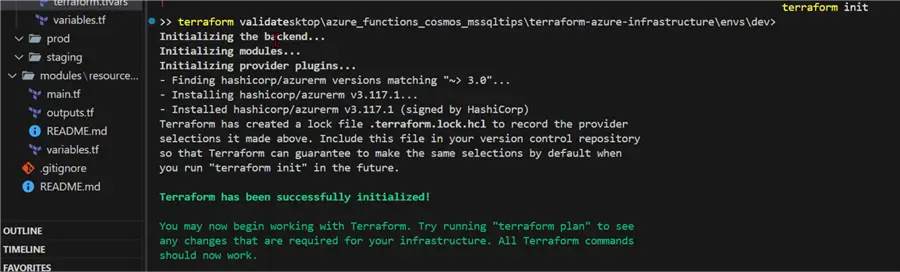
terraform validate: Checks the configuration files in the directory for correctness and internal consistency.

terraform plan: Generates an execution plan showing exactly what actions Terraform will take (create, update, or destroy resources) to match your desired state in the configuration files with the current state in the cloud (Azure).
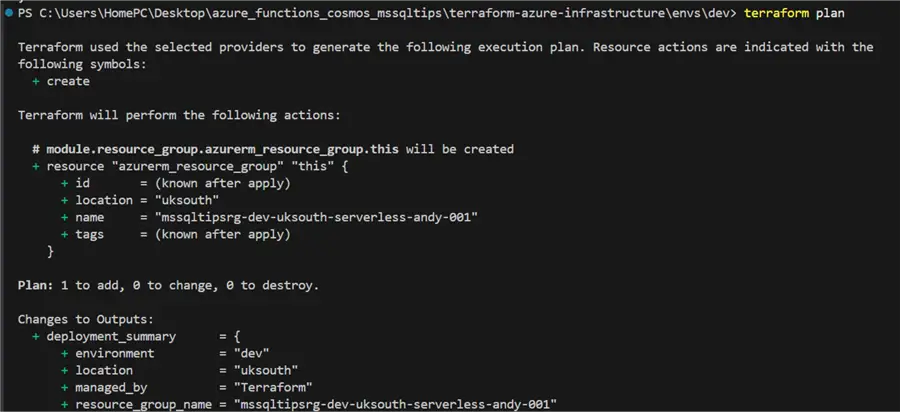
terraform apply: Executes the actions proposed in a plan (or generates a new plan and executes it, if no plan file is provided). By default, it requires confirmation (yes) to avoid unintentional changes.

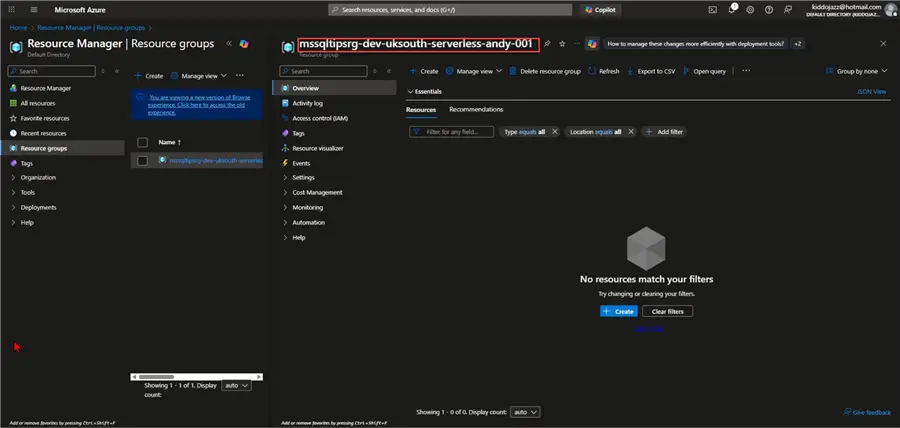
Confirm Resource Creation
After Terraform completion, head to your Azure Portal and confirm that provisioning was successful.
Provision Azure Functions
For the next step, we will be provisioning Azure Functions in the Resource Group we just created.
Directory Structure
We will need to update the directory structure and add the Azure Function to the module. The directory tree gives us an idea about this.

Step 1: Modules Update
We need to update and create some new modules to support the creation of an Azure Functions App.
Module 1: Storage Account
File Name: modules/storage-account/main.tf
resource "azurerm_storage_account" "this" {
  name                     = var.name
  resource_group_name      = var.resource_group_name
  location                 = var.location
  account_tier             = var.account_tier
  account_replication_type = var.account_replication_type
  account_kind             = var.account_kind
  min_tls_version          = "TLS1_2"

  https_traffic_only_enabled      = true
  allow_nested_items_to_be_public = false

  tags = var.tags
}
File Name: modules/storage-account/variables.tf
variable "name" {
  type        = string

  validation {
    condition     = can(regex("^[a-z0-9]{3,24}$", var.name))
  }
}

variable "resource_group_name" {
  type        = string
}

variable "location" {
  type        = string
}

variable "account_tier" {
  type        = string
  default     = "Standard"

  validation {
    condition     = contains(["Standard", "Premium"], var.account_tier)
  }
}

variable "account_replication_type" {
  type        = string
  default     = "LRS"

  validation {
    condition     = contains(["LRS", "GRS", "RAGRS", "ZRS", "GZRS", "RAGZRS"], var.account_replication_type)
  }
}

variable "account_kind" {
  description = "Storage account kind"
  type        = string
  default     = "StorageV2"

  validation {
    condition     = contains(["StorageV2", "BlobStorage", "BlockBlobStorage", "FileStorage", "Storage"], var.account_kind)
  }
}

variable "tags" {
  type        = map(string)
  default     = {}
}
File Name: modules/storage-account/outputs.tf
output "id" {
  value       = azurerm_storage_account.this.id
}

  value       = azurerm_storage_account.this.name
}

output "primary_connection_string" {
  value       = azurerm_storage_account.this.primary_connection_string
  sensitive   = true
}

output "primary_access_key" {
  description = "Primary access key"
  value       = azurerm_storage_account.this.primary_access_key
  sensitive   = true
}

output "primary_blob_endpoint" {
  description = "Primary blob endpoint"
  value       = azurerm_storage_account.this.primary_blob_endpoint
}
Module 2: App Service Plan
File: modules/app-service-plan/main.tf
resource "azurerm_service_plan" "this" {
  name                = var.name
  resource_group_name = var.resource_group_name
  location            = var.location
  os_type             = var.os_type
  sku_name            = var.sku_name

  tags = var.tags
}
File Name: modules/app-service-plan/variables.tf
variable "name" {
  type        = string
}

variable "resource_group_name" {
  type        = string
}

variable "location" {
  type        = string
}

variable "os_type" {
  type        = string
  default     = "Linux"

  validation {
    condition     = contains(["Linux", "Windows"], var.os_type)
  }
}

variable "sku_name" {
  type        = string
  default     = "Y1"

  validation {
    condition     = can(regex("^(Y1|EP1|EP2|EP3|P1v2|P2v2|P3v2|P1v3|P2v3|P3v3|S1|S2|S3|B1|B2|B3)$", var.sku_name))
  }
}

variable "tags" {
  type        = map(string)
  default     = {}
}
File Name: modules/app-service-plan/outputs.tf
output "id" {
  value       = azurerm_service_plan.this.id
}

output "name" {
  value       = azurerm_service_plan.this.name
}

output "kind" {
  value       = azurerm_service_plan.this.kind
}
Module 3: Function App
File Name: modules/function-app/main.tf
resource "azurerm_linux_function_app" "this" {
  name                       = var.name
  resource_group_name        = var.resource_group_name
  location                   = var.location
  service_plan_id            = var.service_plan_id
  storage_account_name       = var.storage_account_name
  storage_account_access_key = var.storage_account_access_key

  site_config {
    application_stack {
      python_version = var.python_version
    }
    cors {
      allowed_origins = var.cors_allowed_origins
    }

    always_on = var.always_on
  }

  app_settings = merge(
    {
      "FUNCTIONS_WORKER_RUNTIME" = "python"
      "ENVIRONMENT"              = var.environment
    },
    var.additional_app_settings
  )

  identity {
    type = "SystemAssigned"
  }

  tags = var.tags
}
File Name: modules/function-app/variables.tf
variable "name" {
  type        = string

  validation {
    condition     = can(regex("^[a-z0-9-]{2,60}$", var.name))
  }
}

variable "resource_group_name" {
  type        = string
}

variable "location" {
  type        = string
}

variable "service_plan_id" {
  type        = string
}

variable "storage_account_name" {
  type        = string
}

variable "storage_account_access_key" {
  type        = string
  sensitive   = true
}

variable "python_version" {
  type        = string
  default     = "3.11"

  validation {
    condition     = contains(["3.11"], var.python_version)
  }
}

variable "environment" {
  type        = string
}

variable "cors_allowed_origins" {
  type        = list(string)
  default     = ["*"]
}

variable "always_on" {
  type        = bool
  default     = false
}

variable "additional_app_settings" {
  type        = map(string)
  default     = {}
}

variable "tags" {
  type        = map(string)
  default     = {}
}
File Name: modules/function-app/outputs.tf
output "id" {
  value       = azurerm_linux_function_app.this.id
}

output "name" {
  value       = azurerm_linux_function_app.this.name
}

output "default_hostname" {
  value       = azurerm_linux_function_app.this.default_hostname
}

output "outbound_ip_addresses" {
  value       = azurerm_linux_function_app.this.outbound_ip_addresses
}

output "identity_principal_id" {
  value       = azurerm_linux_function_app.this.identity[0].principal_id
}

output "identity_tenant_id" {
  value       = azurerm_linux_function_app.this.identity[0].tenant_id
}
Updated Dev Environment Configuration
With the new modules, we need to update our existing environment to capture all these changes
File Name: envs/dev/main.tf (UPDATED VERSION)
terraform {
  required_version = ">= 1.5.0"

  required_providers {
    azurerm = {
      source  = "hashicorp/azurerm"
      version = "~> 3.0"
    }
  }
}

provider "azurerm" {
  features {
    resource_group {
      prevent_deletion_if_contains_resources = true
    }
  }
}

locals {
  # Naming components
  project_code = "mssqltips"
  environment  = "dev"
  location     = "uksouth"
  workload     = "serverless"
  owner        = "andy"
  instance     = "001"

  resource_group_name   = "${local.project_code}rg-${local.environment}-${local.location}-${local.workload}-${local.owner}-${local.instance}"
  storage_account_name  = "${local.project_code}sa${local.environment}${local.instance}"  # Must be globally unique, lowercase, no hyphens
  app_service_plan_name = "${local.project_code}asp-${local.environment}-${local.location}-${local.workload}-${local.owner}-${local.instance}"
  function_app_name     = "${local.project_code}function-${local.environment}-${local.location}-${local.workload}-${local.owner}-01"  # Note: 01 not 001 to keep under 60 chars

  common_tags = {
    Environment = local.environment
    Project     = local.project_code
    ManagedBy   = "Terraform"
    Owner       = local.owner
    Workload    = local.workload
    Location    = local.location
    CostCenter  = var.cost_center
  }
}

# Resource Group
module "resource_group" {
  source = "../../modules/resource-group"

  name     = local.resource_group_name
  location = local.location
  tags     = local.common_tags
}

# Storage Account
module "storage_account" {
  source = "../../modules/storage-account"

  name                     = local.storage_account_name
  resource_group_name      = module.resource_group.name
  location                 = local.location
  account_tier             = "Standard"
  account_replication_type = "LRS"
  account_kind             = "StorageV2"
  tags                     = local.common_tags

  depends_on = [module.resource_group]
}

# App Service Plan (Consumption)
module "app_service_plan" {
  source = "../../modules/app-service-plan"

  name                = local.app_service_plan_name
  resource_group_name = module.resource_group.name
  location            = local.location
  os_type             = "Linux"
  sku_name            = "Y1"  # Consumption plan
  tags                = local.common_tags

  depends_on = [module.resource_group]
}

# Function App
module "function_app" {
  source = "../../modules/function-app"

  name                       = local.function_app_name
  resource_group_name        = module.resource_group.name
  location                   = local.location
  service_plan_id            = module.app_service_plan.id
  storage_account_name       = module.storage_account.name
  storage_account_access_key = module.storage_account.primary_access_key
  python_version             = "3.11"
  environment                = local.environment

  cors_allowed_origins = ["*"]

  always_on = false

  additional_app_settings = {
    "AZURE_FUNCTIONS_ENVIRONMENT" = local.environment
    "PROJECT_NAME"                = local.project_code
  }

  tags = local.common_tags

  depends_on = [
    module.resource_group,
    module.storage_account,
    module.app_service_plan
  ]
}
File Name: envs/dev/outputs.tf
# Resource Group Outputs
output "resource_group_id" {
  value       = module.resource_group.id
}

output "resource_group_name" {
  value       = module.resource_group.name
}

output "resource_group_location" {
  value       = module.resource_group.location
}

# Storage Account Outputs
output "storage_account_id" {
  value       = module.storage_account.id
}

output "storage_account_name" {
  value       = module.storage_account.name
}

output "storage_account_primary_blob_endpoint" {
  value       = module.storage_account.primary_blob_endpoint
}

# App Service Plan Outputs
output "app_service_plan_id" {
  value       = module.app_service_plan.id
}

output "app_service_plan_name" {
  value       = module.app_service_plan.name
}

# Function App Outputs
output "function_app_id" {
  value       = module.function_app.id
}

output "function_app_name" {
  value       = module.function_app.name
}

output "function_app_default_hostname" {
  value       = module.function_app.default_hostname
}

output "function_app_url" {
  value       = "https://${module.function_app.default_hostname}"
}

output "function_app_identity_principal_id" {
  value       = module.function_app.identity_principal_id
}

# Summary Output
output "deployment_summary" {
  value = {
    resource_group = {
      name     = module.resource_group.name
      location = module.resource_group.location
    }
    storage_account = {
      name = module.storage_account.name
    }
    app_service_plan = {
      name = module.app_service_plan.name
      sku  = "Y1 (Consumption)"
    }
    function_app = {
      name     = module.function_app.name
      url      = "https://${module.function_app.default_hostname}"
      runtime  = "Python 3.11"
    }
    environment = local.environment
    managed_by  = "Terraform"
    }
}
Deploying New Updates
With all the updates made and files created, we need to redeploy the entire process again.
terraform init or terraform init -upgrade: Reinitialize to download new modules.

terraform validate: Validate all new modules.

Terraform Plan
You should see that it will create the following resources.
- Storage Account: `mssqltipsdev001`
- App Service Plan: `mssqltipsasp-dev-uksouth-serverless-andy-001`
- Function App: `mssqltipsfunction-dev-uksouth-serverless-andy-01`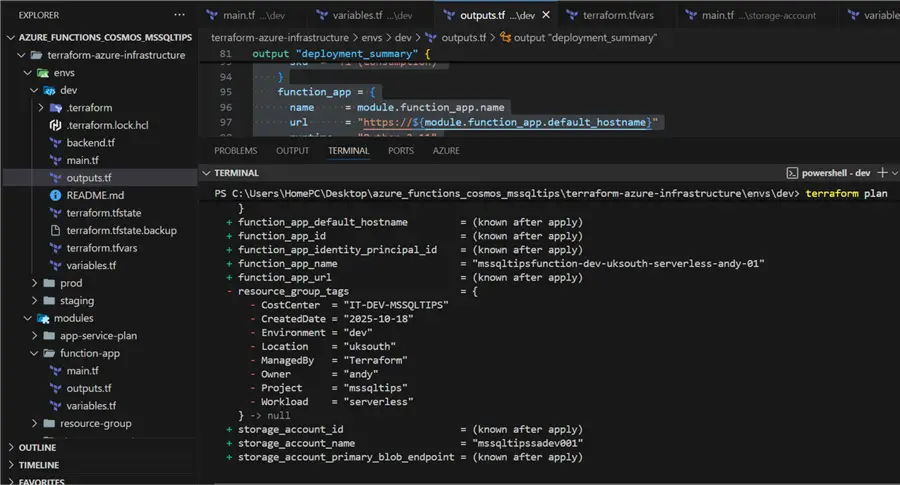
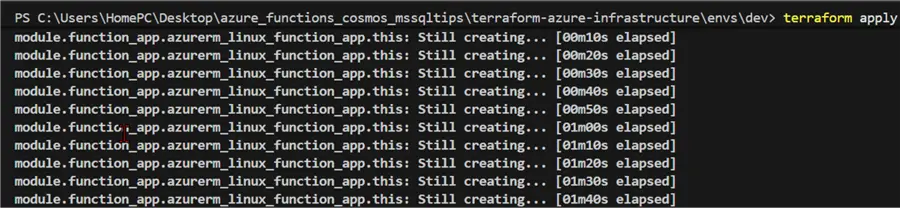
terraform apply: Create all new modules and update previous resources.
Confirm Deployment
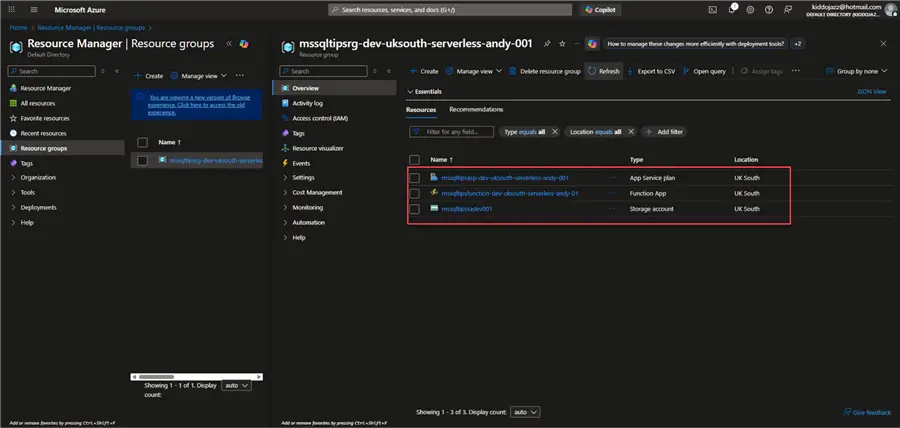
In your Azure portal, you will see that the 3 resources in the dev resource group are already created.
Deploy to Production
Now that we have the dev environment working as expected, we need to deploy to production. We are skipping the staging environment for now for this article, in the real world, we will have dev, staging, and production environments.

What Needs to Change for Production
With the multi-environment template, what needs to change are the following in the table below.
| Setting | Dev | Prod |
|---|---|---|
| Environment | dev | prod |
| Storage Replication | LRS (Local) | GRS (Geo-redundant) |
| App Service Plan SKU | Y1 (consumption) | EP1 or P1v2 (Premium) |
| Resource Names | -dev- | -prod- |
| Cost Center | IT-DEV-001 | IT-PROD-001 |
The following steps are needed to create the production environment:
Create Prod Directory
>> cd C:\Users\HomePC\Desktop\azure_functions_cosmos_mssqltips\terraform-azure-infrastructure\envs\
>> mkdir prod
>> cd prod
File Name: main.tf
# Main Terraform configuration for PROD environment
# Project: MSSQLTips Serverless Infrastructure
# Environment: Production
# Region: UK South
# Owner: Andy
terraform {
required_version = ">= 1.5.0"
required_providers {
azurerm = {
  source  = "hashicorp/azurerm"
  version = "~> 3.0"
}
}
}
provider "azurerm" {
features {
resource_group {
  prevent_deletion_if_contains_resources = true
}
}
}
locals {
# Naming components
project_code = "mssqltips"
environment  = "prod"
location     = "uksouth"
workload     = "serverless"
owner        = "andy"
instance     = "001"
resource_group_name   = "${local.project_code}rg-${local.environment}-${local.location}-${local.workload}-${local.owner}-${local.instance}"
storage_account_name  = "${local.project_code}sa${local.environment}${local.instance}"
app_service_plan_name = "${local.project_code}asp-${local.environment}-${local.location}-${local.workload}-${local.owner}-${local.instance}"
function_app_name     = "${local.project_code}function-${local.environment}-${local.location}-${local.workload}-${local.owner}-01"
common_tags = {
Environment = local.environment
Project     = local.project_code
ManagedBy   = "Terraform"
Owner       = local.owner
Workload    = local.workload
Location    = local.location
CostCenter  = var.cost_center
}
}
# Resource Group
module "resource_group" {
source = "../../modules/resource-group"
name     = local.resource_group_name
location = local.location
tags     = local.common_tags
}
# Storage Account
module "storage_account" {
source = "../../modules/storage-account"
name                     = local.storage_account_name
resource_group_name      = module.resource_group.name
location                 = local.location
account_tier             = "Standard"
account_replication_type = "GRS"
account_kind             = "StorageV2"
tags                     = local.common_tags
depends_on = [module.resource_group]
}
# App Service Plan
module "app_service_plan" {
source = "../../modules/app-service-plan"
name                = local.app_service_plan_name
resource_group_name = module.resource_group.name
location            = local.location
os_type             = "Linux"
sku_name            = "EP1"
tags                = local.common_tags
depends_on = [module.resource_group]
}
# Function App
module "function_app" {
source = "../../modules/function-app"
name                       = local.function_app_name
resource_group_name        = module.resource_group.name
location                   = local.location
service_plan_id            = module.app_service_plan.id
storage_account_name       = module.storage_account.name
storage_account_access_key = module.storage_account.primary_access_key
python_version             = "3.11"
environment                = local.environment
# CORS configuration - more restrictive in prod
cors_allowed_origins = ["https://yourdomain.com"]
always_on = true
# Additional app settings
additional_app_settings = {
"AZURE_FUNCTIONS_ENVIRONMENT" = local.environment
"PROJECT_NAME"                = local.project_code
}
tags = local.common_tags
depends_on = [
module.resource_group,
module.storage_account,
module.app_service_plan
]
}
File Name: variables.tf
variable "cost_center" {
  description = "Cost center code for billing and tracking purposes"
  type        = string
  default     = "IT-PROD-001"   # << CHANGED from "IT-DEV-001"
}
File Name: outputs.tf
# Copy the entire content from envs/dev/outputs.tf
# No changes needed
File Name: terraform.tfvars
cost_center = "IT-PROD-MSSQLTIPS"Deploy to Production
Deploying to production involves following the normal commands
terraform init

terraform validate

terraform plan

terraform apply
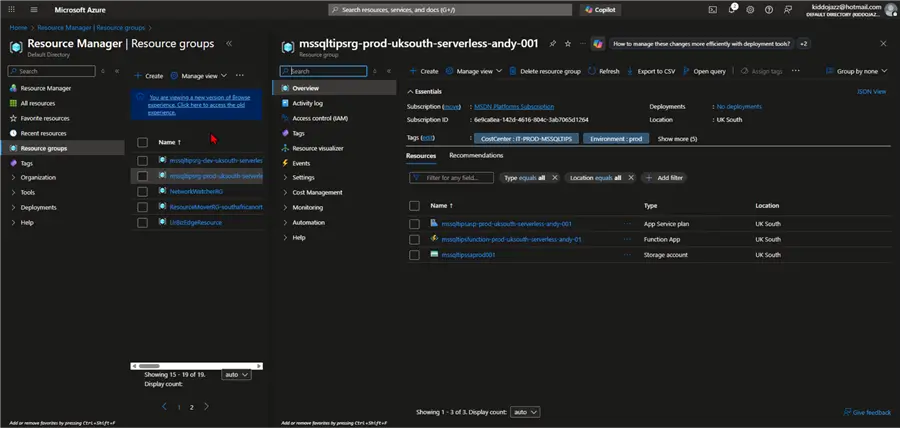
Now that we can confirm the successful deployment to production our next part is creating an event driven application with Cosmos DB and Azure Function which will be done in our next part.
Conclusion
This article covers all we need to know on Azure Functions and the creation of multiple environments for our Azure Project. We broke down the concept of Serverless technology, why use Azure Functions and when to use Azure Functions.
The article also covers production readiness configuration of Azure Functions working in different environments from dev, staging and prod, this provides reader with real world experience how Azure Functions should be provisioned and setup using Terraform IaC.
Next Steps
- Understanding Azure Functions for Microservice Architecture
- Azure Function Event Grid Trigger Example and HTTP Post Request
- Build a CI / CD Pipeline for Azure Functions using GitHub Actions
- Download scripts for this article

Temidayo Omoniyi is a Microsoft Certified Data Analyst, Microsoft Certified Trainer, Power Platform Developer, Azure Data Engineer, Content Creator, and Technical writer with over three years of experience.
Currently, he works as a data and business intelligence analyst for a training and consulting company in Lagos, Nigeria.
Temidayo enjoys creating educative content on YouTube, LinkedIn, Twitter, and other online platforms. He loves sharing his knowledge and writing about systems, applications, tools, and processes.
Apart from training, writing, and coding, you will find him watching and reading Anime. He is a big fan of DC Comics.
- MSSQLTips Awards: Trendsetter (25+ tips) – 2025 | Author of the Year – 2023, 2024


Love your very thorough review and step through of Azure Function app deployment. You can alternatively use the native Azure tool Bicep rather than Terraform. Azure Function Apps are very cool!!