Problem
Have you ever used a SELECT TOP SQL clause and seen SQL Server return results instantly, only to find that in a different query, execution time slowed down? What’s going on? A good way to think about TOP isn’t as a performance hack but as a row-limiting tool. It speeds up a query only when SQL Server can stop early by quickly accessing the needed row.
Solution
This article explores the question: Why does the TOP clause sometimes return records quickly and other times slowly?
First, I’ll explain what TOP is and why developers often use it. Next, we’ll look at the mechanisms that can slow your query, namely, a missing index. We’ll uncover these by examining the execution plan and query statistics. By the end, you’ll know when TOP helps, when it doesn’t, and how to identify which spot you’re in.
Exploring TOP
If you’ve read any of my other articles, you know I like to define terms, so let’s start by defining the TOP clause. What better place than Microsoft Learn? Microsoft describes TOP as a clause that limits the number of rows returned in a query result set to a specified number or a percentage in SQL Server. I can’t recall a version of SQL Server that didn’t include TOP, so it’s been around for a while. It’s also specific to SQL Server, but most database platforms I’ve used have some version of it.
Many data professionals, including me, often use TOP to sample data. Sometimes you want to look at what you are dealing with before you write the real query. I use the Top 1000 Rows feature in SQL Server Management Studio, which you can access by right-clicking a table and selecting it. And yes, you can modify this default setting to a smaller value.
We can also include TOP with INSERT, UPDATE, and DELETE statements. Unfortunately, you can’t specify ORDER BY directly, but you can use a subquery or common table expression (CTE) pattern. The only time I’ve used it for deletion is in batches on huge tables. Aaron Bertrand wrote an excellent article on this topic that I’ve used to great success.
Basic TOP Syntax
Back to the topic, the basic syntax for TOP is shown below:
/* MSSQLTips.com */
SELECT TOP (1) *
FROM dbo.TableA;
The statement above is fine if all you are doing is sampling data. However, if you want a specific order in SQL’s results, it’s missing one key element. Do you see what it is? That’s right, an ORDER BY clause.
Sorting With an ORDER BY when using TOP
If you are not sampling data, you likely want your TOP records in a specific order, and that’s where the ORDER BY clause comes into play. Microsoft says an ORDER BY clause orders the result set of a query by the specified column list and, optionally, limits the rows returned to a specified range. Keep in mind that the order of rows in a result set isn’t guaranteed unless an ORDER BY clause is specified. To add to that, if you want the result to be absolutely deterministic, the ORDER BY needs to be unique.
So, building on our query above, we could add something like this:
/* MSSQLTips.com */
SELECT TOP (1) *
FROM dbo.TableA
ORDER BY dbo.Colum2;
Now we aren’t grabbing any old rows; we’re grabbing the first row based on Column2. If you don’t specify a sort order (ASC or DESC), the default is ascending. Since we’ve looked at a couple of key elements, let’s build a demo dataset to illustrate the problem.
Build our Demo Database
To understand the pain this problem can cause, let’s build a dataset with one table, five columns, and ten million rows, my favorite row count.
/* MSSQLTips.com */
USE [master];
GO
IF DB_ID('TOPDemo') IS NOT NULL
BEGIN
    ALTER DATABASE TOPDemo SET SINGLE_USER WITH ROLLBACK IMMEDIATE;
    DROP DATABASE TOPDemo;
END;
GO
CREATE DATABASE TOPDemo;
GO
ALTER DATABASE TOPDemo SET RECOVERY SIMPLE;
GO
USE TOPDemo;
GO
CREATE TABLE dbo.SalesData
(
    Id INT IDENTITY(1,1) CONSTRAINT PK_SalesData PRIMARY KEY NOT NULL,
    ProductName VARCHAR(100) NOT NULL,
    Quantity INT NOT NULL,
    ProductDescription VARCHAR(500) NOT NULL,
    Notes VARCHAR(500) NOT NULL
);
GO
INSERT INTO dbo.SalesData (ProductName, Quantity, ProductDescription, Notes)
SELECT
    'Product_' + CAST(value AS VARCHAR(100)) AS ProductName,
    (ABS(CHECKSUM(NEWID())) % 10000) + 1 AS Quantity,
    REPLICATE('This is a sample description for product ', 5) + CAST(value AS VARCHAR(100)) AS ProductDescription,
    REPLICATE('Additional notes and details for this product ', 10) AS Notes
FROM GENERATE_SERIES(1, 10000000);
GO
SELECT COUNT(*) AS TotalRows
FROM dbo.SalesData;
GO
After a few seconds (about 45 in my environment), the last statement confirms we have ten million rows.

How to Find the Problem
The first step is to identify the problem, and we’ll examine the actual execution plan along with STATISTICS TIME and IO.
First, let’s run the query without an ORDER BY clause.
If you are following along, ensure you enable the actual execution plan (CTRL+M).

/* MSSQLTips.com */
SET STATISTICS IO ON;
SET STATISTICS TIME ON;
GO
SELECT TOP 100
    ID,
    ProductName,
    Quantity
FROM dbo.SalesData;
GO
SET STATISTICS IO OFF;
SET STATISTICS TIME OFF;
GO
Results:
(100 rows affected)
Table 'SalesData'. Scan count 1, logical reads 32, physical reads 0, page server reads 0, read-ahead reads 0, page server read-ahead reads 0, lob logical reads 0, lob physical reads 0, lob page server reads 0, lob read-ahead reads 0, lob page server read-ahead reads 0.
(1 row affected)
 SQL Server Execution Times:
   CPU time = 0 ms,  elapsed time = 0 ms.
SQL Server parse and compile time:
   CPU time = 0 ms, elapsed time = 0 ms.
It’s easy to see from the plan and statistics that this query executed fast. However, we don’t have any guarantee of row order here. We are simply saying, “Give me the first 100 rows you come by.” Now this isn’t to say they are random, just not deterministic.
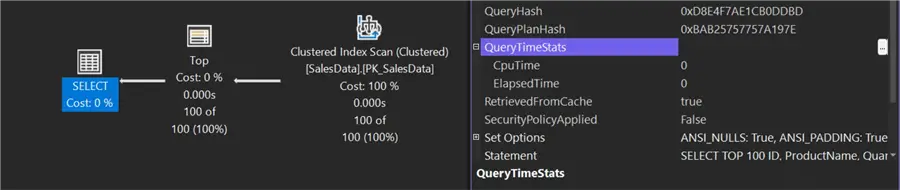
Now, let’s run another query, but change one major thing. With this query, we are adding an ORDER BY clause to ensure the results are returned in the desired order.
/* MSSQLTips.com */
SET STATISTICS IO ON;
SET STATISTICS TIME ON;
GO
SELECT TOP 100
    ID,
    ProductName,
    Quantity
FROM dbo.SalesData
ORDER BY Quantity DESC;
GO
SET STATISTICS IO OFF;
SET STATISTICS TIME OFF;
GO
Results:
(100 rows affected)
Table 'SalesData'. Scan count 9, logical reads 929388, physical reads 0, page server reads 0, read-ahead reads 0, page server read-ahead reads 0, lob logical reads 0, lob physical reads 0, lob page server reads 0, lob read-ahead reads 0, lob page server read-ahead reads 0.
(1 row affected)
 SQL Server Execution Times:
   CPU time = 2733 ms,  elapsed time = 351 ms.
SQL Server parse and compile time:
   CPU time = 0 ms, elapsed time = 0 ms.
You’ll notice below how thick the line is coming from the clustered index scan. We also had a Top N Sort operator, and the execution time increased. The Top N Sort is excellent because, without it, we would have had to sort the entire result set, which would have taken much longer. But, how do we eliminate the sort? By sorting the data beforehand with a nonclustered index on the quantity.

Create the Index
Let’s use the code below to create a nonclustered index where Quantity is the key in descending order and include the ProductName column since it’s part of the SELECT list.
/* MSSQLTips.com */
DROP INDEX IF EXISTS IX_SalesData_Quantity ON dbo.SalesData;
GO
CREATE NONCLUSTERED INDEX IX_SalesData_Quantity
ON dbo.SalesData (Quantity DESC)
INCLUDE (ProductName);
GO
Now, let’s rerun the second query with the ORDER BY clause and look at the stats and execution plan.
/* MSSQLTips.com */
SET STATISTICS IO ON;
SET STATISTICS TIME ON;
GO
SELECT TOP 100
    ID,
    ProductName,
    Quantity
FROM dbo.SalesData
ORDER BY Quantity DESC;
GO
SET STATISTICS IO OFF;
SET STATISTICS TIME OFF;
Results:
(100 rows affected)
Table 'SalesData'. Scan count 1, logical reads 3, physical reads 0, page server reads 0, read-ahead reads 0, page server read-ahead reads 0, lob logical reads 0, lob physical reads 0, lob page server reads 0, lob read-ahead reads 0, lob page server read-ahead reads 0.
(1 row affected)
 SQL Server Execution Times:
   CPU time = 1 ms,  elapsed time = 4 ms.
SQL Server parse and compile time:
   CPU time = 0 ms, elapsed time = 0 ms.
That’s more like it. We’re back to just a few reads and minimal completion time.
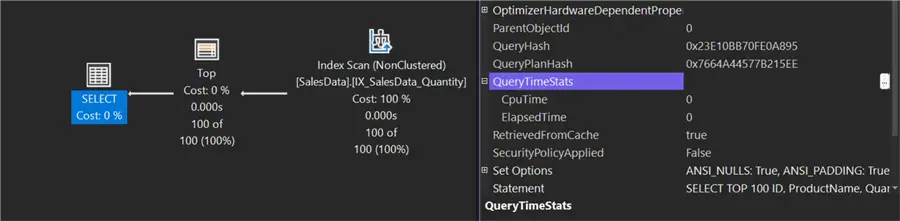
SELECT TOP (1)
A pattern I’ve seen with the TOP (1) is developers using it in a SELECT statement that already includes a unique ID column and a filter predicate, hoping SQL will return the data faster. Let’s take a look at an example.
/* MSSQLTips.com */
SET STATISTICS IO ON;
SET STATISTICS TIME ON;
GO
SELECT TOP (1) *
FROM dbo.SalesData
WHERE Id = 15000;
GO
SET STATISTICS IO OFF;
SET STATISTICS TIME OFF;
GO
Results:
(1 row affected)
Table 'SalesData'. Scan count 0, logical reads 4, physical reads 0, page server reads 0, read-ahead reads 0, page server read-ahead reads 0, lob logical reads 0, lob physical reads 0, lob page server reads 0, lob read-ahead reads 0, lob page server read-ahead reads 0.
(1 row affected)
 SQL Server Execution Times:
   CPU time = 0 ms,  elapsed time = 0 ms.
SQL Server parse and compile time:
   CPU time = 0 ms, elapsed time = 0 ms.
Query plan includes TOP opertaror.

Exclude TOP(1) Clause
Now let’s run it without the TOP clause.
/* MSSQLTips.com */
SET STATISTICS IO ON;
SET STATISTICS TIME ON;
GO
SELECT *
FROM dbo.SalesData
WHERE Id = 15000;
GO
SET STATISTICS IO OFF;
SET STATISTICS TIME OFF;
GO
Results:
(1 row affected)
Table 'SalesData'. Scan count 0, logical reads 4, physical reads 0, page server reads 0, read-ahead reads 0, page server read-ahead reads 0, lob logical reads 0, lob physical reads 0, lob page server reads 0, lob read-ahead reads 0, lob page server read-ahead reads 0.
(1 row affected)
 SQL Server Execution Times:
   CPU time = 1 ms,  elapsed time = 0 ms.
SQL Server parse and compile time:
   CPU time = 0 ms, elapsed time = 0 ms.
Query plan does not nclude TOP opertaror.

In the first plan, SQL adds a TOP operator, but the reads and times are nearly identical. Therefore, we can conclude that the TOP doesn’t improve performance in this instance.
Clean Up
Once you are done with this demo, don’t forget to DROP the database.
/* MSSQLTips.com */
USE [master];
GO
IF DB_ID('TOPDemo') IS NOT NULL
BEGIN
    ALTER DATABASE TOPDemo SET SINGLE_USER WITH ROLLBACK IMMEDIATE;
    DROP DATABASE TOPDemo;
END;
GO
Conclusion
In this article, we examined how TOP can limit the results of a SELECT statement to a specific number (for example, TOP (10)). TOP helps sample data. However, when an ORDER BY clause is included, SQL Server may still need to sort rows if there isn’t a supporting index. Although a Top N Sort is often cheaper than sorting the entire result set, TOP by itself is not a guaranteed performance improvement; its benefits depend on the execution plan and supporting indexes.
Key Takeaways
- The SELECT TOP SQL clause limits rows, but performance varies depending on whether indexes exist.
- Adding an ORDER BY clause prevents random results, but can slow queries without the right indexes.
- TOP does not guarantee faster execution; understanding execution plans is essential.
- Creating appropriate indexes can enhance performance significantly when using SELECT TOP SQL.
- This article emphasizes that to optimize queries, leverage both TOP and indexing effectively.

Next Steps
- If you would like further reading on TOP, Joe Gavin wrote the informative article, “ SELECT TOP 10 SQL Examples.”
- One of the benefits of using a TOP is the query optimizer’s ability to set row goals. Paul White has written several articles on the topic, and a good one to start with is “Setting and Identifying Row Goals in Execution Plans.”
- A relative of the TOP clause is the OFFSET and FETCH options in the ORDER BY clause. Greg Larsen wrote an article titled “Paging Data in T-SQL” about using those options for paging data.

Jared Westover is a SQL Server specialist with two decades of industry experience covering T-SQL development, performance tuning, administration and Microsoft Fabric. He is currently a software architect at Crowe, an author at Pluralsight and primary contributor at sqlhabits.com. On MSSQLTips.com, Jared is a respected award-winning author for his clever T-SQL solutions and bringing to light new real-world solutions to age-old development problems.
- MSSQLTips Awards
- Achiever Award (75+ tips) – 2026
- Author of the Year – 2023
- Author Contender – 2024/2025
![SQL IS [NOT] DISTINCT FROM predicate in SQL Server 2022](https://www.mssqltips.com/wp-content/uploads/8195_s.webp)

First, my hat’s off to Jared for building a decent size test table with some Random Constrained data (Quantity column) to prove a performance point with instead of just duplicating 6 rows of data 10,000 times and ending up with a cardinality of 6 for a relatively tiny table of just 60,000 rows.
I have to provide a little bit of a warning here, though. While the MDF file will only grow to just a little of 7GB (depending on initial size and growth settings), the code provided does FULL Logging even though the database is in the SIMPLE Recovery Model and the log file will “explode” to more than 19GB.
Even if that’s not a problem for disk size for you, it is a huge waste and it takes about twice as long to do all that logging.
If we make 2 small tweaks to Jared’s great code, we’ll achieve Minimal Logging and the log file (again, depending on the initial default database setting) will grow as little as only 150MB instead of more than 19GB…
The first tweak is to change this…
INSERT INTO dbo.SalesData (ProductName, Quantity, ProductDescription, Notes)
… to this…
INSERT INTO dbo.SalesData WITH (TABLOCK)
(ProductName, Quantity, ProductDescription, Notes)
The second tweak is to make the code a bit more bullet proof. I you use a runtime variable anywhere in the INSERT/SELECT code, SQL Server will sometimes lose it’s mind and decide to NOT do Minimal Logging because of it. With that, you need to add OPTION (RECOMPILE) to the end of the INSERT/SELECT code.
The other major benefit that you’ll see when using such code to quickly rebuild test tables is that the Minimal Logging causes the run duration to be cut in half. The original code here took about 34 seconds. The Minimally Logged version only takes about 17 seconds.
Minimal Logging is also extremely useful when you’re loading hundreds of CSV, TSV, Fixed Field files into SQL Server. It can also help with “unstructured data” and XML and JSON files with a little help from some additional code.
Again, though… Hat’s off to Jared for making a decent sized test table along with some Random Constrained data instead of the INSERT GO 10000 method, which usually doesn’t create sufficient quality data to more closely mimic real life.