Problem
SQL Server AlwaysOn Availability Groups is a disaster-recovery solution that was introduced in SQL Server 2012. There is a great AlwaysOn Dashboard available in SQL Server Management Studio that allows you to monitor Availability Groups, but we do not have the time to constantly monitor the dashboard. DBAs need to be proactively notified about critical thresholds. In this tip we will show how to create SQL Server Alerts to monitor some of the data loss related metrics in AlwaysOn Availability Groups. These alerts can be based on your SLAs (service-level agreements) as well.
Solution
In this tip we will show how to create an alert using Policy Based Management (PBM) when data loss exceeds specific threshold.
If you are new to the PBM you can start by reading this tip: “Using Policy Based Management in SQL Server 2008”.
Create Policy Based Management Conditions for AlwaysOn
First we will create the new condition for our policy:
- In SQL Server Management Studio (SSMS) go to the Management->Policy Management->Conditions
- Right click “Conditions”, then click “New Condition…”:

- Enter the name for the condition: “_Demo_cond: Data Loss less than 60 sec”
- Select “Database Replica State” facet
- Enter the following expression:
- @EstimatedDataLoss < 60

- Click “OK”.
Create Policy for AlwaysOn Availability Groups
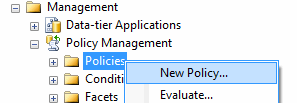
- In SSMS go to the Management->Policy Management->Policies:
- Right click “Policies”, then click “New Policy…”:
- Enter the name for the policy: “_Demo_Policy: AlwaysOn Data Loss”
- Select condition “_Demo_cond: Data Loss less than 60 sec” under “Check Condition”
- Enable Policy
- Select “On schedule” evaluation mode
- Create the new schedule to run the policy check every 30 seconds:

- Click “OK” to save the policy.
Note: You may need to adjust the job’s schedule for your needs as if the replica stopped synchronizing next second after the policy was checked you will get the e-mail in about 90 seconds.
Create a SQL Server Agent Alert for AlwaysOn Data Loss
Create SQL a Server Agent alert for the PBM error number 34052 as described in this tip. If you want to have a separate alert just for this specific policy then update the alert with message text “Policy ‘_Demo_Policy: AlwaysOn Data Loss’ has been violated”:

Configure alert to send e-mails to the DBA Team.
Next time when the AlwayOn replicas synchronization is 60 seconds behind you will get an e-mail with this message: “Policy ‘_Demo_Policy: AlwaysOn Data Loss’ has been violated”.
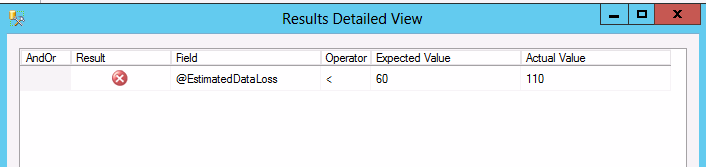
Run the policy evaluation manually:

Review the failed replica details:
Note that this solution was tested with SQL Server 2012, but should work with SQL Server 2014 as well.
The following article from Microsoft describes how to use this and other metrics together with PBM to calculate and monitor for RTO (recovery time objective) and RPO (recovery point objective) for your SLAs.
Next Steps
- Review other metrics under “Database Replica State” PBM facet.
- Test “Synchronization State” condition for the “Availability Database” facet.
- Review other available conditions related to the AlwaysOn Groups.
- Review this tip to learn how to configure other AlwaysOn Availability Groups alerts.
- Read more about disaster-recovery and take an action if you need to update your disaster-recovery strategy.

Svetlana has been working in IT for more than 17 years. Most of her career has focused on Database Administration (both SQL Server and Oracle) and Database Development. Databases are Svetlana’s passion, but she also has fun helping co-workers and friends in troubleshooting non-database related issues. Svetlana tries to explore and learn as many SQL Server features as possible. Her favorite SQL Server features are Policy Based Management, SSIS, SSRS and Master Data Services. One of Svetlana’s areas of expertize is cross systems / database integration. Svetlana is currently a hands-on Database Team Lead in Calgary, Canada where she promotes SQL Server.
Svetlana likes to share her knowledge with others and enjoys learning herself. Her hobby is photography, but now she spends her free time away from Database Administration with her little girl who proudly wears her MSSQLTips shirt. Svetlana blogs at http://databaserefresh.com and posts her pictures to https://plus.google.com/u/0/111115767149899859037/posts. Her Twitter account is @magasvs.
- MSSQLTips Awards: Rising Star (50+ tips) – 2018 | Author of the Year Contender – 2015-2017