Problem
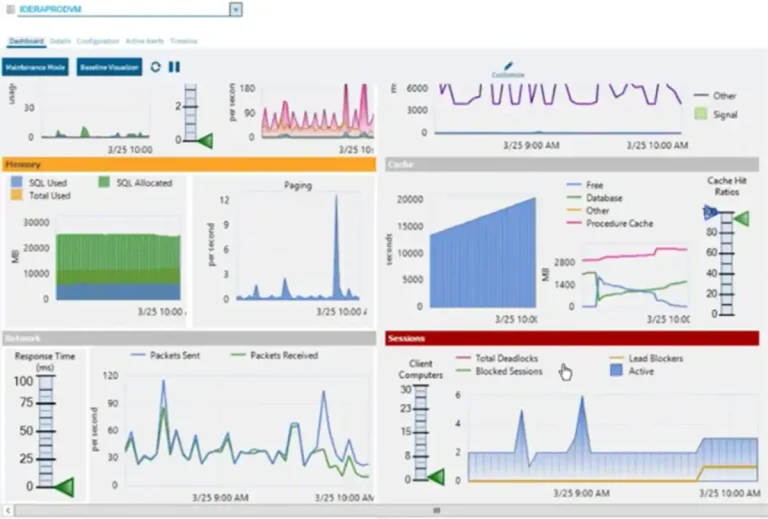
You may relate to this scenario: a user calls-in reporting slowness in the SQL Server database and you hurry up to your monitoring software/custom stored procedures, only to find out there have not been issues at all and the SQL Server queries are returning quickly, so you’re left wondering where did the slowness occur?
And what about the following error messages that are reported in the error log?
- A significant part of SQL Server process memory has been paged out link.
- SQL Server has encountered x occurrence(s) of I/O requests taking longer than 15 seconds to complete link.
As you may already know, there are multiple hardware components that can fail or be misconfigured, and that could be the reason for the slowness, so you need to include them as part of your monitoring strategy as suggested here and here.
But is there a way to know if there are issues right now, without having to install monitoring software that you have not tested yet, and without having to install/configure it in all your database instances when you have a lot?
Solution
You can create a multi-server job that you can deploy quickly in all the servers in your farm, but you need to be aware that the command “Get-Counter” is unavailable from SQLPS.exe when you run a PowerShell type job step, so you need to use the solution described here to be able to get the performance counters information.
Note that there is a lot of advice about what counters you need to measure and various thresholds (i.e. this link), so in the script below is a list of the counters and thresholds that make more sense to me.
Also, note that this will only help you determine if there’s any trend, in no way this will be a substitute for a monitoring tool that is more comprehensive.
The script works as follows:
- The SQL Server Agent job is scheduled to run every 15 minutes. At that moment, the script will gather the performance counters every second for 15 seconds, which can be modified in the variables
$sampleIntervaland$maxSamples. The results are averaged and rounded to 2 decimals. - There are exclusion lists maintained at the script level (so we don’t need to maintain an exclusion list locally on each instance). This is to prevent your email from being flooded with never-ending alerts if there’s a known issue that is still being addressed. This can be modified in the variables
$perfMonExclusions, $perfMonExclusionsProcessor, $perfMonExclusionsMemory, $perfMonExclusionsDisk and $perfMonExclusionsNetwork. - The performance counters are:
- VM-related: As suggested in this link, and we search in the available perf counters if these are available so it won’t throw an error if they don’t.
- \VM Processor(_Total)\% Processor Time: must be lower than 80%
- \VM Processor(_Total)\CPU Stolen Time: must be lower than 40 milliseconds
- \VM Memory\Memory Ballooned in MB: this memory can’t be used
- \VM Memory\Memory Swapped in MB: this memory can’t be used
- SQL Server specific: Because they vary from SQL Server version as suggested in this link, we search if these are available so it won’t throw an error if they don’t.
- \SQLServer:Buffer Manager\total pages: used to get the memory used by SQL Server (prior to 2012)
- \SQLServer:Memory Node(000)\Total Node Memory (KB): used to get the memory used by SQL Server
- \SQLServer:Buffer Manager\Page life expectancy
- The ratio between the memory used by SQL Server and page life expectancy as must be lower than 20 MB/sec.
- Processor
- \System\Processor Queue Length: must be lower than the number of cores
- \Processor(_Total)\% Processor Time: must be lower than 80%
- \Processor(_Total)\% Privileged Time: must be lower than 80%
- \Process(*)\% Processor Time: used to display the process consuming most CPU
- Memory
- \Memory\Available Bytes: must be greater than 10% of total memory
- \Process(*)\Working Set: used to display the process consuming most memory
- \Memory\Cache Bytes
- \Memory\Pool Nonpaged Bytes
- The sum of the 4 above is the total memory
- \Paging File(_Total)\% Usage: must be lower than 90%
- \Memory\Pages/sec: must be lower than 25
- Disk: as suggested in this link
- \PhysicalDisk(*)\Avg. Disk sec/Read: must be lower than 15 milliseconds
- \PhysicalDisk(*)\Avg. Disk sec/Write: must be lower than 15 milliseconds
- \PhysicalDisk(*)\Disk Bytes/sec: must be greater than 200 MB
- \PhysicalDisk(*)\Current Disk Queue Length
- Network
- \Network Interface(*)\Current Bandwidth
- \Network Interface(*)\Bytes Received/sec: must be lower than 80% bandwidth
- \Network Interface(*)\Bytes Sent/sec: must be lower than 80% bandwidth
- \Network Interface(*)\Output Queue Length: must be lower than 2
- \Network Interface(*)\Packet Outbound Errors: must be zero
- \Network Interface(*)\Packet Received Errors: must be zero
- I/O (file, network and device)
- \Process(*)\IO Data Bytes/sec: used to display the process consuming most I/O
- VM-related: As suggested in this link, and we search in the available perf counters if these are available so it won’t throw an error if they don’t.
- The results are sent by email. The parameters can be modified in the variables
$reportBody,$mailServer,$mailFrom,$mailTo,$mailSubjectand$reportHeader.
Script
Here is the complete script that must be placed in a SQL Server Agent job step of type PowerShell:
$ErrorActionPreference = "Stop"
$server = "$(ESCAPE_DQUOTE(SRVR))"
$sampleInterval = 1
$maxSamples = 15
$numberOfHeaderRowsToSkip = 1
$date = Get-Date
$reportBody = "<h4>Report as of $date</h4>"
$mailServer = "YOURSMTPSERVER"
$mailFrom = "from@domain.com"
$mailTo = "to@domain.com"
$mailSubject = "$(ESCAPE_DQUOTE(SRVR)) email subject"
$reportHeader = "<style>
th {border:solid black 1px; border-collapse:collapse; padding-left:5px; padding-right:5px; padding-top:1px; padding-bottom:1px; background-color:white;}
td {border:solid black 1px; border-collapse:collapse; padding-left:5px; padding-right:5px; padding-top:1px; padding-bottom:1px; color:black; vertical-align: top;}
tr.even {background-color: #lightgray}</style>"
$perfMonExclusions = @("SERVERDEV01")
$perfMonExclusionsProcessor = @()
$perfMonExclusionsMemory = @()
$perfMonExclusionsDisk = @()
$perfMonExclusionsNetwork = @()
if (-Not ($perfMonExclusions -contains $server)) {
   $list = New-Object System.Collections.Generic.List[System.Object]
   $computerName = $server
   if ($computerName.Contains("\")) {
      $computerName = $computerName.Substring(0, $computerName.IndexOf("\"))
   }
   $result2 = New-Object System.Data.DataTable
   $result2.Columns.Add("LogDate", "System.DateTime") | Out-Null
   $result2.Columns.Add("Text", "System.String") | Out-Null
   $curDate = (Get-Date).ToString()
   [System.Collections.ArrayList]$counters = @()
   $counters += "\\$computerName\VM Processor(_Total)\% Processor Time"
   $counters += "\\$computerName\VM Processor(_Total)\CPU Stolen Time"
   $counters += "\\$computerName\VM Memory\Memory Ballooned in MB"
   $counters += "\\$computerName\VM Memory\Memory Swapped in MB"
   $prefix = ""
   if (!$server.contains("\")) {
      $prefix = "\\$computerName\SQLServer"
   }
   else {
      $prefix = "\\$computerName\MSSQL$" + $server.Substring($server.IndexOf("\") + 1)
   }
   $counters += ($prefix + ":Buffer Manager\total pages")
   $counters += ($prefix + ":Buffer Manager\Page life expectancy")
   $counters += ($prefix + ":Memory Node(000)\Total Node Memory (KB)")
   try {
      # counters that may vary: VM-related, buffer manager, etc.
      $availCounters = powershell.exe -command "Get-Counter -ComputerName$computerName -ListSet * | select -expand Counter"
      $availCounters = $availCounters | foreach {if ($_ -inotmatch [RegEx]::Escape("Memory Node(*)")) {$_.replace('(*)', '(_Total)')} else {$_.replace('(*)', '(000)')}} | where {$counters -contains $_} | foreach {"'$_'"}
      if (-Not ($availCounters -contains ("'" + $prefix + ":Buffer Manager\Page life expectancy'"))) {
         throw "Some SQL Server perf counters are unavailable, exiting"
      }
      $availCounters = $availCounters -join ","
      # counters that must exist
      $availCounters += ",'\\$computerName\System\Processor Queue Length'"
      $availCounters += ",'\\$computerName\Processor(_Total)\% Processor Time'"
      $availCounters += ",'\\$computerName\Processor(_Total)\% Privileged Time'"
      $availCounters += ",'\\$computerName\Process(*)\% Processor Time'"
      $availCounters += ",'\\$computerName\Memory\Available Bytes'"
      $availCounters += ",'\\$computerName\Process(*)\Working Set'"
      $availCounters += ",'\\$computerName\Memory\Cache Bytes'"
      $availCounters += ",'\\$computerName\Memory\Pool Nonpaged Bytes'"
      $availCounters += ",'\\$computerName\Paging File(_Total)\% Usage'"
      $availCounters += ",'\\$computerName\Memory\Pages/sec'"
      $availCounters += ",'\\$computerName\PhysicalDisk(*)\Avg. Disk sec/Read'"
      $availCounters += ",'\\$computerName\PhysicalDisk(*)\Avg. Disk sec/Write'"
      $availCounters += ",'\\$computerName\PhysicalDisk(*)\Disk Bytes/sec'"
      $availCounters += ",'\\$computerName\PhysicalDisk(*)\Current Disk Queue Length'"
      $availCounters += ",'\\$computerName\Network Interface(*)\Bytes Received/sec'"
      $availCounters += ",'\\$computerName\Network Interface(*)\Bytes Sent/sec'"
      $availCounters += ",'\\$computerName\Network Interface(*)\Current Bandwidth'"
      $availCounters += ",'\\$computerName\Network Interface(*)\Output Queue Length'"
      $availCounters += ",'\\$computerName\Network Interface(*)\Packets Outbound Errors'"
      $availCounters += ",'\\$computerName\Network Interface(*)\Packets Received Errors'"
      $availCounters += ",'\\$computerName\Process(*)\IO Data Bytes/sec'"
      $results = powershell.exe -command "`$Host.UI.RawUI.BufferSize = New-Object Management.Automation.Host.Size(500,300); Get-Counter -ComputerName$computerName -Counter @($availCounters) -SampleInterval$sampleInterval -MaxSamples$maxSamples -ErrorAction SilentlyContinue | select -ExpandProperty CounterSamples | select Path, '|', CookedValue | Format-Table -Property * -AutoSize | Out-String -Width 500"
      if ($results[0].Contains("The specified counter path could not be interpreted")) {
         throw "Some perf counters are unavailable, exiting"
      }
      $pos = $results[1].IndexOf("|")
      $results2 = $results | where {$_.StartsWith("\\")} | select @{l="Path"={$_.Substring(0, $pos).Trim()}}, @{l="CookedValue"={$_.Substring($pos, $_.length - $pos).Trim()}}
      $results = @{}
      foreach ($result in $results2) {
         if (!$results.ContainsKey($result.Path)) {
            $results.($result.Path) = [math]::Round(($results2 | where {$_.Path -eq $result.Path} | Measure-Object -Property CookedValue -Average).Average, 2)
         }
      }
      # Processor
      if (-Not ($perfMonExclusionsProcessor -contains $server)) {
         $cores = (Get-WmiObject Win32_Processor -computer $computerName | select SocketDesignation | Measure-Object).Count
         if ($results["\\$computerName\System\Processor Queue Length"] -gt $cores) {
            if ($results["\\$computerName\Processor(_Total)\% Processor Time"] -gt 80 `
            -Or $results["\\$computerName\Processor(_Total)\% Privileged Time"] -gt 80 `
            -Or $results["\\$computerName\VM Processor(_Total)\% Processor Time"] -gt 80) {
               $ProcessorQueueLength = $results["\\$computerName\System\Processor Queue Length"]
               $newRow = $result2.NewRow()
               $newRow.LogDate = $curDate
               $newRow.Text = "Processor Queue Length$ProcessorQueueLength >$cores cores and Processor/Privileged Time > 80%"
               $result2.Rows.Add($newRow)
               $TopCPUKey = ""
               $TopCPUValue = 0
               foreach ($r2 in ($results.Keys | where {$_.EndsWith("% processor time")})) {
                  if ($results[$r2] -gt $TopCPUValue -And !$r2.Contains("(_total)") -And !$r2.Contains("(idle)")) {
                     $TopCPUKey = $r2
                     $TopCPUValue = $results[$r2]
                  }
               }
               $TopCPUKey = [regex]::match($TopCPUKey,'\(([^\)]+)\)').Groups[1].Value
               $TopCPUValue = [math]::Round($TopCPUValue, 2)
               $newRow = $result2.NewRow()
               $newRow.LogDate = $curDate
               $newRow.Text = "Top CPU consumer: '$TopCPUKey' with$TopCPUValue %"
               $result2.Rows.Add($newRow)
            }
         }
         if ($results["\\$computerName\VM Processor(_Total)\CPU Stolen Time"] -gt 40) {
            $CPUStolenTime = $results["\\$computerName\VM Processor(_Total)\CPU Stolen Time"]
            $newRow = $result2.NewRow()
            $newRow.LogDate = $curDate
            $newRow.Text = "VM CPU Stolen Time$CPUStolenTime > 40 ms"
            $result2.Rows.Add($newRow)
         }
      }
      # Memory
      if (-Not ($perfMonExclusionsMemory -contains $server)) {
         $MemUsage = 0
         if (!$results["\\$computerName\Memory\Available Bytes"] -Or !$results["\\$computerName\Process(_Total)\Working Set"] -Or !$results["\\$computerName\Memory\Cache Bytes"] -Or !$results["\\$computerName\Memory\Pool Nonpaged Bytes"]) {
            $MemUsage = 91
         }
         else {
            $MemUsage = 100 - ($results["\\$computerName\Memory\Available Bytes"] / ($results["\\$computerName\Memory\Available Bytes"] + $results["\\$computerName\Process(_Total)\Working Set"] + $results["\\$computerName\Memory\Cache Bytes"] + $results["\\$computerName\Memory\Pool Nonpaged Bytes"]) * 100)
         }
         if ($MemUsage -gt 90 `
         -And $results["\\$computerName\Paging File(_Total)\% Usage"] -gt 90 `
         -And $results["\\$computerName\Memory\Pages/sec"] -gt 25) {
            $PagingFile = $results["\\$computerName\Paging File(_Total)\% Usage"]
            $PagesSec = $results["\\$computerName\Memory\Pages/sec"]
            $newRow = $result2.NewRow()
            $newRow.LogDate = $curDate
            $newRow.Text = "RAM Utilization is$MemUsage % and Page File Utilization is$PagingFile % and Memory Pages Per Second$PagesSec > 25 pps"
            $result2.Rows.Add($newRow)
            $TopMemKey = ""
            $TopMemValue = 0
            foreach ($r2 in ($results.Keys | where {$_.EndsWith("working set")})) {
               if ($results[$r2] -gt $TopMemValue -And !$r2.Contains("(_total)") -And !$r2.Contains("(idle)")) {
                  $TopMemKey = $r2
                  $TopMemValue = $results[$r2]
               }
            }
            $TopMemKey = [regex]::match($TopMemKey,'\(([^\)]+)\)').Groups[1].Value
            $TopMemValue = [math]::Round($TopMemValue, 2)
            $newRow = $result2.NewRow()
            $newRow.LogDate = $curDate
            $newRow.Text = "Top memory consumer: '$TopMemKey' with$TopMemValue bytes"
            $result2.Rows.Add($newRow)
         }
         if ($results["\\$computerName\VM Memory\Memory Ballooned in MB"] -gt 512) {
            $MemBallooned = $results["\\$computerName\VM Memory\Memory Ballooned in MB"]
            $newRow = $result2.NewRow()
            $newRow.LogDate = $curDate
            $newRow.Text = "VM Memory Ballooned is " + $MemBallooned + " MB and can't be used"
            $result2.Rows.Add($newRow)
         }
         if ($results["\\$computerName\VM Memory\Memory Swapped in MB"] -gt 512) {
            $MemSwapped = $results["\\$computerName\VM Memory\Memory Swapped in MB"]
            $newRow = $result2.NewRow()
            $newRow.LogDate = $curDate
            $newRow.Text = "VM Memory Swapped is " + $MemSwapped + "MB and can't be used"
            $result2.Rows.Add($newRow)
         }
         $TotalMemoryMB = $results[$prefix + ":Memory Node(000)\Total Node Memory (KB)"] / 1000
         if (!$TotalMemoryMB) {
            $TotalMemoryMB = $results[$prefix + ":Buffer Manager\total pages"] / 128
         }
         $PageLifeExpectancy = $results[$prefix + ":Buffer Manager\Page life expectancy"]
         if ($TotalMemoryMB -And $PageLifeExpectancy) {
            $TotalMemoryMB = [math]::Round($TotalMemoryMB, 2)
            $BufferPoolRate = [math]::Round($TotalMemoryMB / $PageLifeExpectancy, 2)
            if ($BufferPoolRate -gt 20) {
               $newRow = $result2.NewRow()
               $newRow.LogDate = $curDate
               $newRow.Text = "Buffer Pool Rate$BufferPoolRate > 20 MB/sec. Memory:$TotalMemoryMB PLE:$PageLifeExpectancy"
               $result2.Rows.Add($newRow)
            }
         }
      }
      $IOissuesFound = 0
      # Disk
      if (-Not ($perfMonExclusionsDisk -contains $server)) {
         foreach ($r in ($results.Keys | where {($_.EndsWith("avg. disk sec/read") -Or $_.EndsWith("avg. disk sec/write")) -And !$_.Contains("(_total)")})) {
            $counter = $r.Substring($r.LastIndexOf("\") + 1)
            if ($results[$r] -gt 0.015) {
               $IOissuesFound = 1
               $drive = [regex]::match($r,'\(([^\)]+)\)').Groups[1].Value
               $val = $results[$r]
               $newRow = $result2.NewRow()
               $newRow.LogDate = $curDate
               $newRow.Text = "'$drive'$counter$val > 0.015 sec"
               $result2.Rows.Add($newRow)
               $complement = $r
               if ($counter.EndsWith("read")) {
                  $complement = $complement.Replace("read", "write")
               }
               else {
                  $complement = $complement.Replace("write", "read")
               }
               if ($results[$complement] -gt 0.015) {
                  $counter2 = $complement.Substring($complement.LastIndexOf("\") + 1)
                  $val = $results[$complement]
                  $newRow = $result2.NewRow()
                  $newRow.LogDate = $curDate
                  $newRow.Text = "'$drive'$counter2$val > 0.015 sec"
                  $result2.Rows.Add($newRow)
                  $results[$complement] = 0
               }
               $DiskBytesSec = $results["\\$computerName\PhysicalDisk($drive)\Disk Bytes/sec"]
               if ($DiskBytesSec -lt 204800) {
                  $newRow = $result2.NewRow()
                  $newRow.LogDate = $curDate
                  $newRow.Text = "'$drive' bytes/sec$DiskBytesSec < 204800"
                  $result2.Rows.Add($newRow)
               }
               $CurDiskQueueLength = $results["\\$computerName\PhysicalDisk($drive)\Current Disk Queue Length"]
               $newRow = $result2.NewRow()
               $newRow.LogDate = $curDate
               $newRow.Text = "'$drive' current queue length$CurDiskQueueLength"
               $result2.Rows.Add($newRow)
            }
         }
      }
      # Network
      if (-Not ($perfMonExclusionsNetwork -contains $server)) {
         foreach ($r in ($results.Keys | where {$_.EndsWith("current bandwidth") -And !$_.Contains("(_total)")})) {
            $interface = [regex]::match($r,'\(([^\)]+)\)').Groups[1].Value
            $bandwidth = $results[$r]/8
            $val = $results[$r.Replace("current bandwidth", "bytes received/sec")]
            $NetworkIssuesFound = 0
            if ($val -gt $bandwidth*0.8) {
               $NetworkIssuesFound = 1
               $IOIssuesFound = 1
               $newRow = $result2.NewRow()
               $newRow.LogDate = $curDate
               $newRow.Text = "'$interface' bytes received/sec$val > 80% bandwidth"
               $result2.Rows.Add($newRow)
            }
            $val = $results[$r.Replace("current bandwidth", "bytes sent/sec")]
            if ($val -gt $bandwidth*0.8) {
               $NetworkIssuesFound = 1
               $IOIssuesFound = 1
               $newRow = $result2.NewRow()
               $newRow.LogDate = $curDate
               $newRow.Text = "'$interface' bytes sent/sec$val > 80% bandwidth"
               $result2.Rows.Add($newRow)
            }
            if ($NetworkIssuesFound) {
               $val = $results[$r.Replace("current bandwidth", "output queue length")]
               if ($val -gt 2) {
                  $newRow = $result2.NewRow()
                  $newRow.LogDate = $curDate
                  $newRow.Text = "'$interface' output queue length$val > 2"
                  $result2.Rows.Add($newRow)
               }
               $val = $results[$r.Replace("current bandwidth", "packets outbound errors")]
               if ($val -gt 0) {
                  $newRow = $result2.NewRow()
                  $newRow.LogDate = $curDate
                  $newRow.Text = "'$interface' packets outbound errors$val"
                  $result2.Rows.Add($newRow)
               }
               $val = $results[$r.Replace("current bandwidth", "packets received errors")]
               if ($val -gt 0) {
                  $newRow = $result2.NewRow()
                  $newRow.LogDate = $curDate
                  $newRow.Text = "'$interface' packets received errors$val"
                  $result2.Rows.Add($newRow)
               }
            }
         }
      }
      # Disk / Network
      if (-Not ($perfMonExclusionsDisk -contains $server -And $perfMonExclusionsNetwork -contains $server)) {
         if ($IOissuesFound) {
            $TopIOKey = ""
            $TopIOValue = 0
            foreach ($r2 in ($results.Keys | where {$_.EndsWith("io data bytes/sec")})) {
               if ($results[$r2] -gt $TopIOValue -And !$r2.Contains("(_total)")) {
                  $TopIOKey = $r2
                  $TopIOValue = $results[$r2]
               }
            }
            $TopIOKey = [regex]::match($TopIOKey,'\(([^\)]+)\)').Groups[1].Value
            $TopIOValue = [math]::Round($TopIOValue, 2)
            $newRow = $result2.NewRow()
            $newRow.LogDate = $curDate
            $newRow.Text = "Top I/O consumer (file, network and device): '$TopIOKey' with$TopIOValue bytes/sec"
            $result2.Rows.Add($newRow)
         }
      }
   }
   catch {
      $newRow = $result2.NewRow()
      $newRow.LogDate = $curDate
      $newRow.Text = " at line " + $_.InvocationInfo.ScriptLineNumber + " " + $_.Exception.Message
      $result2.Rows.Add($newRow)
   }
   if ($result2.Rows.Count -gt 0) {
      foreach ($r in ($result2 | select LogDate, Text)) { $list.add($r) }
   }
}
if ($list -eq $NULL -or $list.count -eq 0) {
  exit
}
[string]$result = $list | ConvertTo-HTML -Fragment | Out-String
[xml]$result = $result.Replace("`0", "")
for ($i = 0-lt $result.table.tr.count - $numberOfHeaderRowsToSkip; $i++) {
  $class = $result.CreateAttribute("class")
  $class.value = if($i % 2 -eq 0) {"even"} else {"odd"}
  $result.table.tr[$i+$numberOfHeaderRowsToSkip].attributes.append($class) | Out-Null
}
$reportBody += $result.InnerXml
$message = New-Object System.Net.Mail.MailMessage $mailFrom, $mailTo
$message.Subject = $mailSubject
$message.IsBodyHTML = $true
$message.Body = ConvertTo-HTML -head $reportHeader -body $reportBody
$smtp = New-Object Net.Mail.SmtpClient($mailServer)
$smtp.Send($message)
$message.Dispose()
Results
Here are some of the results I could get with the script above:
- At line 57 Some SQL Server perf counters are unavailable, exiting
- You can solve this in some cases as suggested in this link, but if they still don’t show, you need to apply the latest patch/cumulative update, and in the meantime you will need to exclude the server from the monitoring.
- Processor Queue Length 41.4 > 2 cores and Processor/Privileged Time > 80%
- Top CPU consumer: ‘wmiprvse#5’ with 46.35 %
- If this happens, you need to determine if there is a process consuming the CPU, if there’s a query that needs tuning, or if you need to increase the number of CPU’s
- RAM Utilization is 96.04 % and Page File Utilization is 90.36 % and Memory Pages Per Second 433.96 > 25 pps
- If this happens, you need to determine if there is a process consuming the memory, if there’s a query that needs tuning, or if you need to increase the RAM.
- VM Memory Ballooned is 3879 MB and can’t be used
- This happened in one of the servers, it was assigned 8 GB but only 4 GB was available. After reporting the issue, it was confirmed the VM was limited to only 4 GB, and it got fixed.
- Buffer Pool Rate 100 > 20 MB/sec. Memory: 2560 PLE: 25.6
- Basically, the server got assigned 2.5 GB of memory and every hour, it gets hit by a process that consumes more memory than is available, decreasing the page life expectancy. This needs troubleshooting to resolve.
- ‘2 d:’ avg. disk sec/write 0.03 > 0.015 sec
- ‘2 d:’ bytes/sec 76475.23 < 204800
- ‘2 d:’ current queue length 0.2
- Top I/O consumer: ‘sqlservr’ with 118668.9 bytes/sec
- This just means there is a lot of activity, but if it gets constant or bad numbers, there are hard disk failures.
- ‘intel[r]’ bytes received/sec 1154198.21 > 80% bandwidth
- ‘hp’ bytes sent/sec 100693920.58 > 80% bandwidth
- ‘hp’ packets outbound errors 16
- This just means there is a lot of activity, but if it gets constant or bad numbers, there are network adapter failures.
Next Steps
- Download the complete script.
- Let us know in the comments if you have other counters and thresholds in your monitoring process.
- Let us know in the comments if this script helped you find a performance issue in your servers.
- This script can be easily integrated with the one that reads the error log to have a more complete and robust solution.
- You can learn more about performance monitor in this link.
- You can learn more about collecting performance data into a database in this link.
- You can view all the tips related to performance monitor in this link, in the section named “Perfmon”.

Pablo Echeverria has worked for more than 10 years as a software programmer and analyst, during which time I studied parallel programming and became a senior programmer specialist. Afterward, he switched to a DBA position implementing new processes and creating better monitoring tools, while growing his data scientist skills to improve my customer’s businesses. Check out Pablo’s most recent book, “Hands-on Data Virtualization with Polybase“. This book brings exciting coverage on establishing and managing data virtualization using Polybase. It teaches how to configure Polybase on almost all relational and nonrelational databases, to setup a test environment for any tool or software instantly without any hassle, and to rapidly design and build high performing data warehousing solutions.
- MSSQLTips Awards: Rising Star (50+ tips) – 2024 | Author Contender – 2018, 2022, 2023 | Rookie Contender – 2017