Overview
Describing every feature in Snowflake is impossible in the scope of this tutorial. But in this part, we’ll highlight some of the features – or interesting SQL syntax – which might be useful to you, especially if there’s no counterpart in SQL Server. We will take a look at how to use a Snowflake regular expression, Snowflake alias and Snowflake ILIKE.
Explanation
Here are some additional features of Snowflake you should know how to use.
Re-using Aliases
The first feature is a bit of convenient SQL syntax, which is not available in SQL Server at the moment. When you write a query, you can assign a column alias to an expression. In Snowflake, you can re-use that alias in the same query. Let’s illustrate with an example. Using the sample table from the time travel part of the tutorial, we can write the following SELECT statement:
SELECT
     MyString
    ,MyString || ' - This is an alias test!' AS MyAlias
    ,RIGHT(Myalias,20) AS AnotherAlias
FROM dbo.TimeTravel
WHERE LENGTH(MyAlias) > 30;
In this SQL query, the MyAlias query is re-used in another column expression and in the WHERE clause. In Snowflake, you can re-use an alias in the GROUP BY and HAVING clause as well. There are some restrictions though: you cannot re-use an alias in a window function, there mustn’t be conflicts with an original column of one of the tables and the alias has to be defined before you re-use it somewhere else. Regarding the last point, the following SQL statement will give an error:

If you want a similar feature in SQL Server, you can vote for the idea.
ILIKE and Regular Expressions
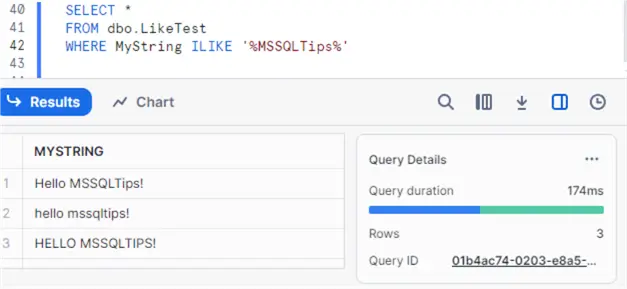
By default, Snowflake is case sensitive. When you write a SELECT statement using LIKE in the WHERE clause, this is something you need to consider. Otherwise, you might not get the result you want. Luckily there’s the ILIKE clause, which has the exact same functionality as LIKE, but it ignores any casing. Let’s create a sample table to illustrate.
CREATE OR REPLACE TABLE dbo.LikeTest AS
SELECT 'Hello MSSQLTips!' AS MyString
UNION ALL
SELECT 'hello mssqltips!'
UNION ALL
SELECT 'HELLO MSSQLTIPS!';
Using the normal LIKE clause, we only get one row returned when we search for MSSQLTips:

When we use ILIKE instead, all three rows are returned:
Snowflake also has built-in support for regular expressions. In SQL Server, you have the (limited) LIKE clause, but true regular expression support in T-SQL is not present – at the time of writing – in the on-premises product, but regex support has been announced in preview in Azure SQL DB.
In Snowflake, we can for example use the function RLIKE, which is similar to LIKE but with regular expressions. Suppose we want to search in our sample table only strings that are uppercase only (including spaces and the exclamation mark). We can write the following SELECT statement:
SELECT *
FROM dbo.LikeTest
WHERE RLIKE(MyString,'[A-Z !]+');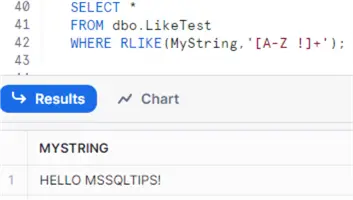
Other support for regular expressions can be found in the functions REGEXP, REGEXP_COUNT, REGEXP_INSTR, REGEXP_SUBSTR and REGEXP_REPLACE.
Finding the Previous Non-NULL Value
Suppose we have a table with a nullable column. For each row, we want to find the previous value. This can easily be accomplished with LAG. However, suppose that if the value returned is NULL, we want the value of the row before and if that one is NULL, the row before and so on until we find a value that is not NULL. Suppose we have the following table:
CREATE OR REPLACE TABLE dbo.TestWindow
(ID INT IDENTITY(1,1) NOT NULL
,ColA INT NULL);

INSERT INTO dbo.TestWindow(ColA)
 VALUES  (8)
        ,(NULL)
        ,(-10)
        ,(15)
        ,(NULL)
        ,(NULL)
        ,(NULL)
        ,(NULL)
        ,(3)
        ,(37);

SELECT *
FROM dbo.TestWindow;
We want to retrieve the following result set:

The PREVIOUSNULL column is the result we get with using the standard LAG function. The PREVIOUSNONNULL column holds the values we want to calculate. There are no NULL values, except for the first row because there are no previous rows. In older versions of SQL Server, the solution is not so straight forward. Itzik Ben-Gan gives a solution in this article.
In Snowflake however, the solution is quite easy. The LAG function supports the optional clause IGNORE NULLS (which is part of the SQL standard). The solution becomes:
SELECT
     ID
    ,ColA
    ,LAG(ColA) OVER (ORDER BY ID) previousnull
    ,LAG(ColA) IGNORE NULLS OVER (ORDER BY ID) previousnonnull
FROM dbo.TestWindow;
In SQL Server 2022, this functionality was introduced into the database engine. You can read more about it in the tip How To Retrieve the Last Non-NULL Value in SQL Server.
Other
To round up, here are some other features that might deserve your attention:
- Data Sharing, which can be used to share data between Snowflake accounts.
- External Tables, which are similar to the external tables (with Polybase) in Azure SQL DW.
- The GENERATOR function, which can be used to generate tally tables (aka number tables). Here’s the alternative in SQL Server for older versions. In SQL Server 2022, the GENERATE_SERIES function was introduced.
- The SPLIT and FLATTEN functions, to handle array data for example.
- Tasks and table streams, for streaming data from one table to other tables. You can read more about these features here and here.
- Dynamic tables are a new preview feature where you can declaratively define your data pipelines.
- Snowflakes also provides robust AI services. It also has Snowflake Cortex, a managed service for machine learning, LLM and AI.
Additional Information
- Some tips about Regular Expressions in SQL Server:
- An example of LEAD and LAG, out of the window functions tutorial.

Koen Verbeeck is a seasoned business intelligence consultant with over a decade of experience with the Microsoft Data Platform. He holds several certifications, including Azure Data Engineer. He’s a prolific writer, with over 375 articles on technologies such as Microsoft Fabric, SSIS, ADF, SSAS, SSRS, MDS, Power BI, Snowflake and Azure services. He has spoken at various events such as PASS, SQLBits, dataMinds Connect and many others. He frequently delivers educational webinars on MSSQLTips.com. For his efforts, Koen has been awarded the Microsoft MVP data platform award for many years.
- MSSQLTips Awards:
- Leadership Award (200+ Tips) – 2021
- Author of the Year – 2014/2020/2022
- Author Contender – 2024/2025