Overview
We learned earlier that Data Mining Extensions (DMX) can be used to query a data mining model. Once the data mining model is deployed, reporting tools will need to query data from this model to report data. DMX contains data definition statements and data manipulation statements as well. For the purpose of querying, our focus is the data manipulation statements in DMX.
Explanation
Below are some of features and capabilities available in DMX data manipulation statements.
1) Train a mining model by using the INSERT INTO statement. This does not insert the actual source data into a data mining model object, but instead creates an abstraction that describes the mining model that the algorithm creates.
2) Extend the SELECT statement to browse the information that is calculated during model training and stored in the data mining model, such as statistics of the source data. Following are the different types of SELECT queries typically used while querying a data mining model.
- SELECT DISTINCT FROM < model >
- SELECT FROM <model>.CONTENT
- SELECT FROM <model>.CASES
- SELECT FROM <model>.SAMPLE_CASES
- SELECT FROM <model>.DIMENSION_CONTENT
3) Create predictions that are based on an existing mining model by using the PREDICTION JOIN clause of the SELECT statement.
4) Remove all the trained data from a model or a structure by using the DELETE (DMX) statement.
Let’s look at a simple example of querying the Data Mining model we just created in the last chapter by using a DMX query. Open SSMS, open a new DMX query window and type the query as mentioned in the below screenshot to query the data mining model.
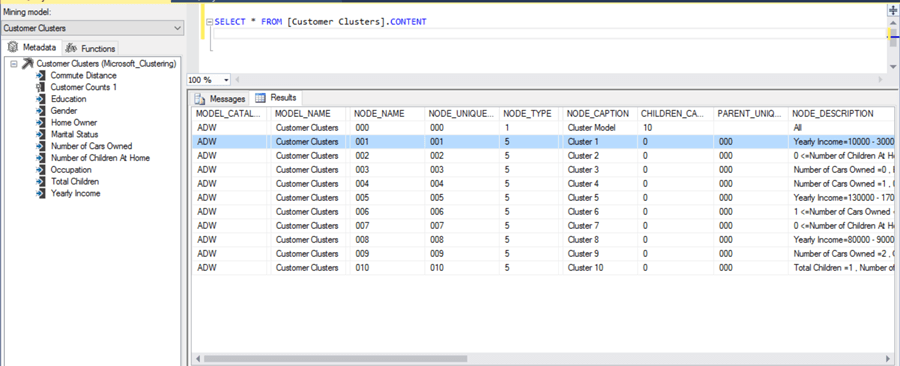
This query result shows the content of the Customer Clusters model that we built in the last chapter. Using different functions and clauses with the select query you can query a data mining model and use the results in your reports.
Additional Information
- Consider learning more about DMX from here.

Siddharth has more than 14 years of experience in the IT Industry, with more than a decade of experience in Business Intelligence and Analytics, for clients banking, logistics, government, Media Entertainment, products, life sciences and other domains. He has been a lead architect for a portfolio of 40+ apps, containing apps in web, mobile, BI, Analytics, data warehousing, reporting, collaboration, CMS, NoSQL and other technologies. He has several certifications and is a published author for online and print-media publications, as well as the MSDN Library.
In his present role, he remains responsible for architecture design, technology stack selection, infrastructure design, 3rd party products evaluation and procurement, and performance engineering. These applications use technologies like Elasticsearch / Lucene, MongoDB, SharePoint 2013 and 2010, jQuery-based framework like Highcharts and GoJS, SQL Server and the Microsoft Business Intelligence stack (SSIS, SSAS, SSRS, MDX, PowerPivot, PowerView), jQueryMobile, Bootstrap, iOS xCode framework, and many others.
- MSSQLTips Awards: Champion (100+ tips) – 2018 | Author of the Year – 2017 | Author Contender – 2016, 2018-2019