Overview
Once you are satisfied with the accuracy of the model, you can start using the data mining model for prediction. The Mining Model Prediction view helps you perform predictions and save the results. We are now ready to use this view and start predictive analysis on the dataset we have at hand.
Explanation
Click on the Mining Model Prediction view to start building the prediction query.
1) In the Select Input Tables section of the Mining Model Prediction view, click the Select Case Table button. In the Select Table dialog, select the source table vTargetMail which will act as the source dataset for the prediction query.
2) Select the CustomerKey, FirstName, LastName, and EmailAddress columns from the input table vTargetMail. Select the Bike Buyer predictable column from the decision trees data mining model. This is similar to building the select query in T-SQL where we specify the fields we intend to query.
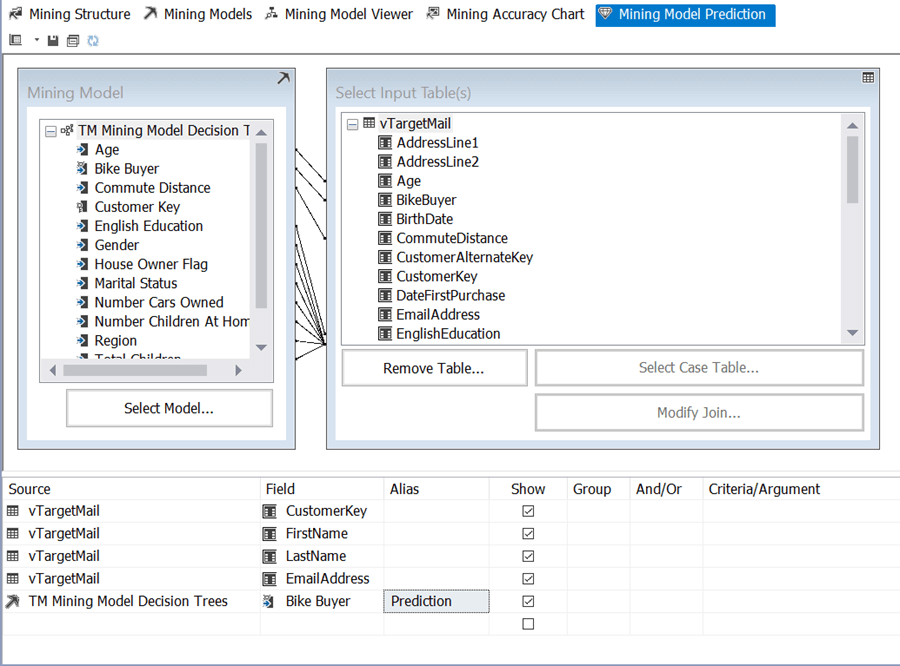
3) Click the Switch to Query Result View button to retrieve the results. The designer creates a query that retrieves the predicted data from SSAS. The query language used to retrieve predicted results from mining models is called Data Mining Extensions (DMX).

5) You can query the vTargetMail view in SSMS, and compare the Bike Buyer field value in the view against the value predicted by the data mining model.
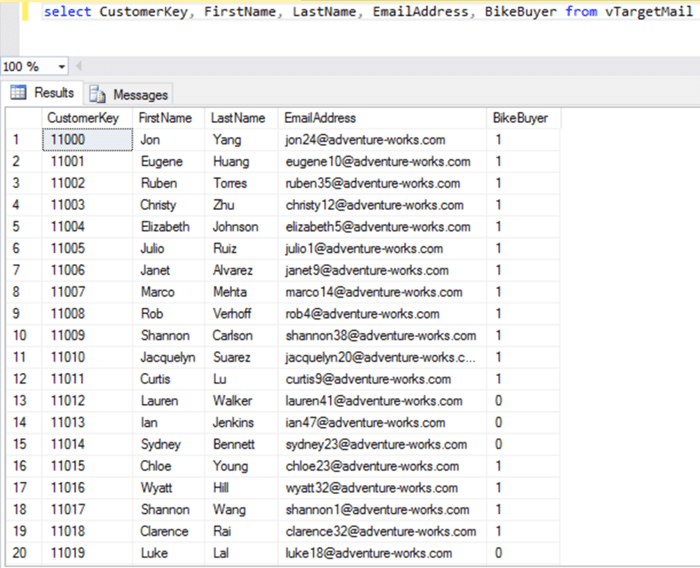
This way you will be able to query the prediction model using the base dataset and assess the predictions made by the algorithm. The more you train the model with relevant data, the more the model will become accurate in making predictions.
Additional Information
- Consider reading more about DMX from here.

Siddharth has more than 14 years of experience in the IT Industry, with more than a decade of experience in Business Intelligence and Analytics, for clients banking, logistics, government, Media Entertainment, products, life sciences and other domains. He has been a lead architect for a portfolio of 40+ apps, containing apps in web, mobile, BI, Analytics, data warehousing, reporting, collaboration, CMS, NoSQL and other technologies. He has several certifications and is a published author for online and print-media publications, as well as the MSDN Library.
In his present role, he remains responsible for architecture design, technology stack selection, infrastructure design, 3rd party products evaluation and procurement, and performance engineering. These applications use technologies like Elasticsearch / Lucene, MongoDB, SharePoint 2013 and 2010, jQuery-based framework like Highcharts and GoJS, SQL Server and the Microsoft Business Intelligence stack (SSIS, SSAS, SSRS, MDX, PowerPivot, PowerView), jQueryMobile, Bootstrap, iOS xCode framework, and many others.
- MSSQLTips Awards: Champion (100+ tips) – 2018 | Author of the Year – 2017 | Author Contender – 2016, 2018-2019