Overview
When restoring a database, one of the things you need to do is ensure that you have exclusive access to the database. If any other users are in the database the restore will fail.
Explanation
When trying to do a restore, if any other user is in the database you will see these types of error messages:
T-SQL
Exclusive access could not be obtained because the database is in use.
Msg 3013, Level 16, State 1, Line 1
RESTORE DATABASE is terminating abnormally.
SSMS
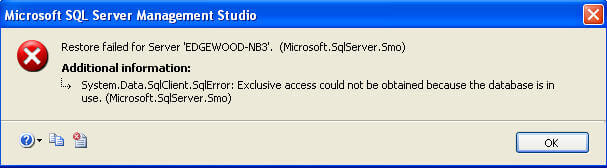
Getting Exclusive Access
To get exclusive access, all other connections need to be dropped or the database that they are in needs to be changed so they are not using the database you are trying to restore. You can use sp_who2 or SSMS to see what connections are using the database you are trying to restore.
Using KILL
One option to get exclusive access is to use the KILL command to kill each connection that is using the database., but be aware of what connections you are killing and the rollback issues that may need to occur. See this tip for more information on how to do this.
Using ALTER DATABASE
Another option is to put the database in single user mode and then do the restore. This also does a rollback depending on the option you use, but will do all connections at once. See this tip for more information on how to do this.
ALTER DATABASE AdventureWorks SET SINGLE_USER WITH ROLLBACK IMMEDIATE
GO

RESTORE DATABASE AdventureWorks FROM DISK = 'C:\AdventureWorks.BAK'
GO
Greg Robidoux has been working with databases for 35+ years with extensive hands on SQL Server experience from version 6.5 to 2025. He has authored over 250 technical articles and delivered several presentations online and at various conventions. Greg is also the President and founder of Edgewood Solutions, a technology services company delivering services and solutions for Microsoft SQL Server.



Hi Vijay,
You could either drop the database like you did or restore over the existing secondary database using the REPLACE option.
-Greg
Hi Greg, while setting up fresh log shipping configuration. I delete database from secondary server then it works.is there any other way plz suggest.
Hi Vijay, are you just setting up log shipping or is log shipping already in place and you are getting this error?
-Greg
I am also facing this issue on configuring Log shipping to secondary database
Hi David, can you provide any additional details? That doesn’t make sense if the database doesn’t already exist. Also, just check the names of the database files (data and log) to make sure the file names that are trying to be restored do not exist.
-Greg
I’m getting that error when restoring a backup to a new database. The database doesn’t exist yet so how can someone be accessing it?