Overview
SQL Server 2017 introduced the concept of scale out clusters, where a master node can orchestrate the execution of packages on several worker nodes.
Explanation
What is a Scale Out Cluster?
The SSIS Scale Out cluster resembles the distributed computing concepts that are nowadays typically found in Big Data processing frameworks such as Spark or Synapse Dedicated SQL Pools. There’s a master node that accepts work (executing SSIS packages) and it orchestrates the execution of those packages amongst the worker nodes.
The architecture looks like this:
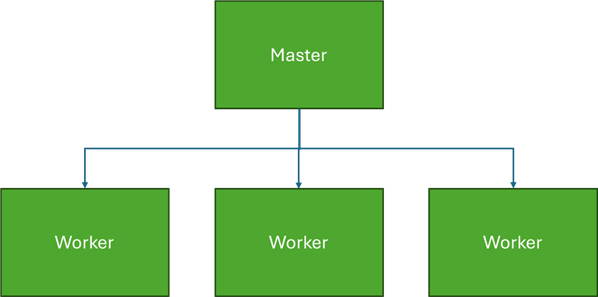
The diagram depicts 3 workers, but it is possible to add or drop workers.
With a Scale Out cluster, you can scale SSIS horizontally instead of only vertically. Scaling vertically means that if you want to get more work done with SSIS, you install a better and faster (and more expensive) server. By scaling horizontally, you can use multiple cheaper servers to get to the same goal. Keep in mind though that it is possible to install all nodes on the same machine if you desire so.
Configuring a Scale Out Cluster
The detailed set up of a SSIS Scale Out Cluster is out of scope for this tutorial. However, the following tips are excellent guidelines to get you started:

Koen Verbeeck is a seasoned business intelligence consultant with over a decade of experience with the Microsoft Data Platform. He holds several certifications, including Azure Data Engineer. He’s a prolific writer, with over 375 articles on technologies such as Microsoft Fabric, SSIS, ADF, SSAS, SSRS, MDS, Power BI, Snowflake and Azure services. He has spoken at various events such as PASS, SQLBits, dataMinds Connect and many others. He frequently delivers educational webinars on MSSQLTips.com. For his efforts, Koen has been awarded the Microsoft MVP data platform award for many years.
- MSSQLTips Awards:
- Leadership Award (200+ Tips) – 2021
- Author of the Year – 2014/2020/2022
- Author Contender – 2024/2025