Problem
Have you ever faced the issue of queries running slower after upgrading the SQL Server version? Except for the version of SQL Server, nothing else has changed; however, the queries are running slower. Recently, I faced this issue and I want to explain the issue and how to resolve in case you run into the same situation.
Solution
Before getting into the fix, I restored a database from SQL Server 2016 to a 2022 instance and the client reported the application was slow when running one of the reports. Unfortunately, I cannot show the original query, but I will simulate the problem in this tip.
Before we dive into the issue, I want to explain three concepts:
- Parallelism
- Cost Threshold for Parallelism
- Compatibility Level
Parallelism occurs when SQL Server runs a query using more than one CPU core. This let’s SQL Server offload processing to multiple CPUs in the effort to decrease the overall duration of the query.
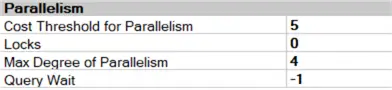
Cost Threshold for Parallelism option specifies the threshold at which SQL Server creates and runs parallel plans for queries. The default value of the Cost Threshold for Parallelism is 5. This value is really low, but it does not affect our examples so I will not adjust this value. You can find more information about this option on the Microsoft website: Server Configuration: Cost Threshold for Parallelism.
If you right-click on a SQL Server instance name in SQL Server Management Studio (SSMS) and go to Properties > Advanced settings, you get an option to set Cost Threshold for Parallelism at the server level as well as the Max Degree of Parallelism.
Compatibility Level is a database-level setting, and it can be set separately for each database. When a new SQL Server version is released, the newest features are only available in the latest compatibility levels. This means that if you want to use the newest features in the new SQL Server version, you have to change the compatibility level. If you want your database to have the same behavior as the old version, do not change the compatibility level.
Set Up Test Environment
For this article, I am using SQL Server 2022 CU18 and the StackOverflow database, and have set its compatibility level to 130:
Use master
GO
Alter Database StackOverflow Set Compatibility_Level = 130
GO
The StackOverflow database has a table called Users, which holds user information, like DisplayName, Location, Reputation, etc. To simulate the production environment, let’s compress it:
Use StackOverflow
GO
Alter Table dbo.Users Rebuild With (Data_Compression = Page)
GO
If you run a query like this in SQL Server 2016:
Use [StackOverflow]
GO
Create Table #Reputation (Reputation Int)
GO
Insert Into #Reputation Values (2), (15)
GO
Select u.* From dbo.Users u
Inner Join #Reputation r
 On u.Reputation = r.Reputation
GO
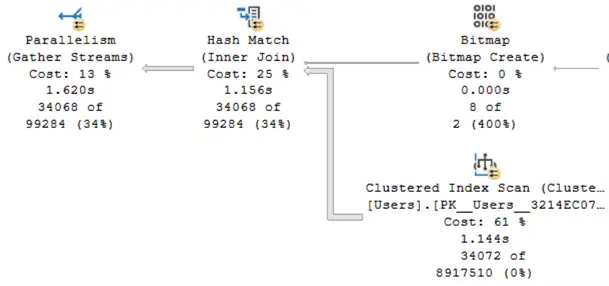
SQL Server scans the entire table and executes the query in parallel mode:
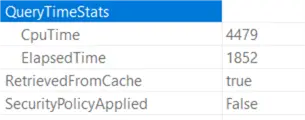
The CPU time is 2.5 times more than the elapsed time:
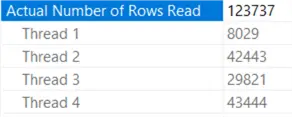
SQL Server executed the query with four threads:
If I change the compatibility level to 160 and run the query again:
USE [master]
GO
Alter Database [StackOverflow] Set Compatibility_Level = 160
GO
Use [StackOverflow]
GO
Drop Table If Exists #Reputation
GO
Create Table #Reputation (Reputation Int)
GO
Insert Into #Reputation Values (2), (15)
GO
Select u.* From dbo.Users u
Inner Join #Reputation r
 On u.Reputation = r.Reputation
GO
SQL Server scanned the entire table as before, but ran the query in serial mode:
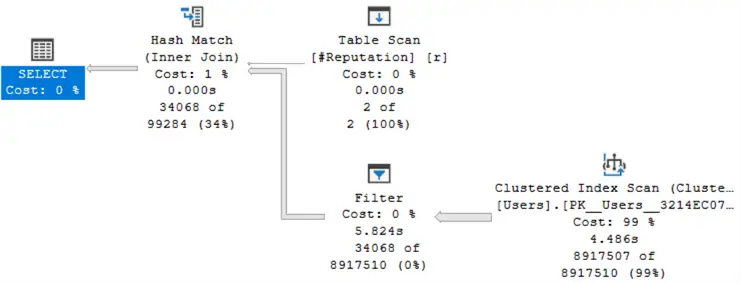
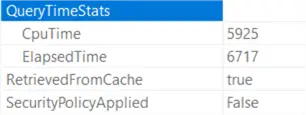
The CPU time is less than the query elapsed time, and the query execution time has increased to nearly 7 seconds:
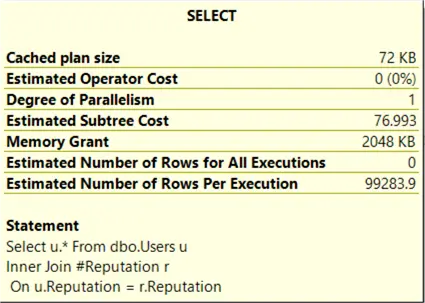
The Estimated Subtree Cost for this query is 76.993, which is much higher than the Cost Threshold for Parallelism, but the query did not run in parallel mode:
Dear Readers: Creating a nonclustered index on the Reputation column does not fix the issue because the query optimizer will ignore the index. However, a perfect solution to the problem is to reduce the number of columns in the SELECT list and use a covering index. (Unfortunately, for business reasons, we could not reduce the number of columns in the SELECT list, and using a covered index did not make sense.)
For more information, see: Improve Query Performance when SQL Server Ignores Nonclustered Index.
What is the Solution?
To address the problem, we have two solutions:
- If you can, leave the database at the old compatibility level. (Fortunately, you can change the compatibility level for each database instantly).
- Otherwise, to improve the query performance, use the query hint
OPTION (USE HINT('ENABLE_PARALLEL_PLAN_PREFERENCE')). Learn more : How to Force a Parallel Execution Plan in SQL Server 2016.
Let’s use this query hint:
Drop Table If Exists #Reputation
GO
Create Table #Reputation (Reputation Int)
GO
Insert Into #Reputation Values (2), (15)
GO
Select u.* From dbo.Users u
Inner Join #Reputation r
 On u.Reputation = r.Reputation
OPTION(USE HINT('ENABLE_PARALLEL_PLAN_PREFERENCE'))
GO
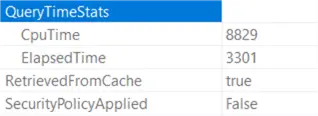
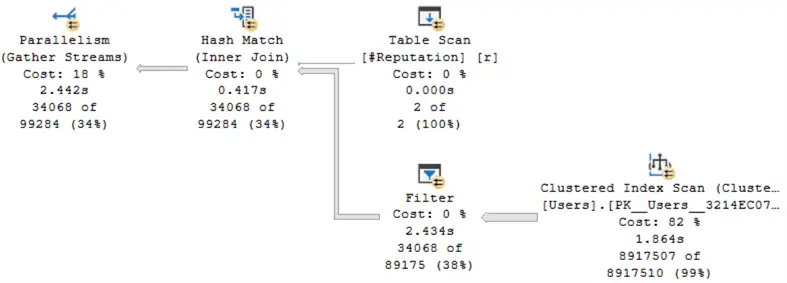
After adding the hint to the query, SQL Server ran it in parallel mode, and as you can see, the query execution time was reduced to 3300 milliseconds:
You can see the actual query plan in the image below:
Summary
Changing the compatibility level to the latest when upgrading SQL Server versions is a risk to query performance.
If the performance of the queries is satisfactory with the latest compatibility level, that is great.
When clients begin complaining about the performance of their application after changing the compatibility level, set it back to the old compatibility level.
If there is a new feature that is only available with the latest compatibility level and you need to use it, change the compatibility level to the latest. However, be aware that your database is at risk, and you may need to modify some queries for better performance.
Next Steps
- ALTER DATABASE (Transact-SQL) compatibility level.
- Supported version and edition upgrades (SQL Server 2022).
- Server configuration: max degree of parallelism.
- Parallelism in SQL Server Execution Plan
- SQL Server Parallelism Overview

Mehdi Ghapanvari is an SQL Server database administrator with 6+ years of experience. His main area of expertise is improving database performance. He is skilled at managing high-performance servers that can handle several terabytes of data and hundreds of queries per second, ensuring their availability and reliability. To enhance the performance of the database, he has implemented various performance-tuning techniques, including query optimization and index tuning. He has also developed backup and recovery strategies to protect critical data in case of disasters. Mehdi currently manages the SQL Server databases for a large organization. Mehdi is actively seeking new opportunities to apply his expertise and contribute to impactful projects. You can reach him at SQLDBA.Mehdi@Gmail.com.
- MSSQLTips Awards: Rookie of the Year – 2023
- MSSQLTips Trendsetter Award: 2026