Problem
In all of my ASP applications I need to have at least basic security, how can I do so in simple manner? The reality is that in the majority of my applications I need membership, profiles, role management and personalization, are any applications available directly from Microsoft to handle this need? If so, where can I find them? Do they integrate with the .NET 2.0 framework? If so, how do you set this up? Where can I find more information?
Solution
With the .NET 2.0 framework, it ships with the ASP.NET SQL Server Setup Wizard. This wizard will go through the process of setting up tables, views, stored procedures, roles, etc. in order to manage membership, profiles, role management and personalization in a standardized manner. These objects can be installed on a SQL Server instance and database you specify during the installation. This wizard can be found at – C:\WINDOWS\Microsoft.NET\Framework\v2.0.50727\aspnet_regsql.exe.
Installation Process
Below are the steps to install the ASP.NET SQL Server Setup Wizard. In order to initiate this process, double click on C:\WINDOWS\Microsoft.NET\Framework\v2.0.50727\aspnet_regsql.exe which will start the wizard.
| ID | Description | Screen Shot |
| 1 | Intro Screen – Overview of the application and installation process. Press the ‘Next’ button to continue the process. | 
|
| 2 | Setup Option – Select the ‘Configure SQL Server for application services’ to install the product. Press the ‘Next’ button to continue the process. | 
|
| 3 | SQL Server Instance – Select the SQL Server instance, authentication means and database. Press the ‘Next’ button to continue the process. | 
|
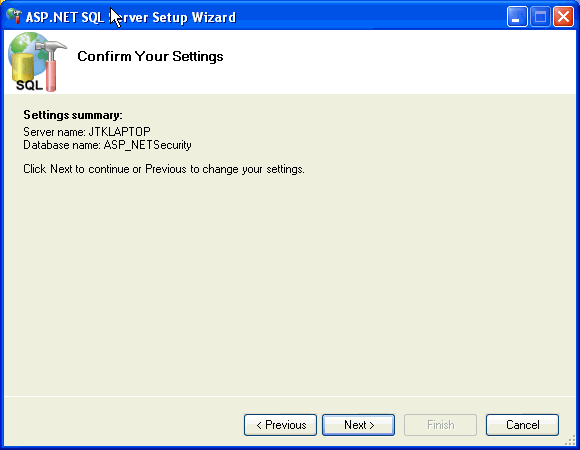
| 4 | Settings Summary – Review the installation summary before installing the database objects. Press the ‘Next’ button to continue the process.
| 
|
| 5 | Close the wizard – Press the ‘Finish’ button to end the process. | 
|
Installed Objects
| ID | Description | Objects |
| 1 | Tables |
|
| 2 | Views |
|
| 3 | Stored Procedures |
|
| 4 | Database Roles |
|
Next Steps
- Check out the ASP.NET SQL Server Setup Wizard in a development environment and see how this application handles security relative to your needs and/or your current techniques.
- If this application offers additional functionality, then consider integrating this application in your environment.
- With all of the code in an unencrypted manner, you have the opportunity to customize the code as needed or see how techniques implemented by this solution can be customized and incorporated into your applications

Jeremy Kadlec is a Founder, Editor and Author at MSSQLTips.com with more than 300 contributions and 25+ years of SQL Server experience. Jeremy leads a team of more than 300 authors helping millions of SQL Server professionals around the globe every second of the day for the last 20 years. He is also the CTO @ Edgewood Solutions and a six-time SQL Server MVP based on his community contributions. Jeremy brings 25+ years of SQL Server DBA and Developer knowledge to the community and holds a bachelor’s degree from SSU and master’s degree from UMBC.