Problem
One of the functions of a DBA is to keep an eye on free space within the database and database files. The auto grow feature is great as a last resort, but proactively managing the database files is a better approach. Also, this information can be used to shrink data files as needed if there is a lot of free space in the files.
In this tip we take a look at a few ways to find the current free space within a database, so you can better manage your database files.
Solution
There are a few ways to find out how much free space there is in your database. (Note that the size values go up and down, because of creating transactions, doing backups and shrinking files, so the exact same numbers are not in every example.)
To begin with we need to select a database and then get some information about the files.
USE Test5
GO
sp_helpdb Test5
GO
If we run the above we will get the following output. Here we can see the total size for the database and also the current size of the data files, but this does not tell us how much free space there is.

The next thing that we need to do is get information about each file that makes up the database. In the above result set we can see we have two names “Test5” and “Test5_log”, which will be used for later steps. These are the logical names for the two files that make up the Test5 database. If the database had more than two files they would all be listed here.
1 – Using sp_spaceused to check free space in SQL Server
One option is to use sp_spaceused. If we run the following command we can see how much free space there is in the database, but this shows us total free space including the transaction log free space which may be totally misleading.
USE Test5
GO
sp_spaceused

2 – Using DBCC SQLPERF to check free space for a SQL Server database
Another option is to use the DBCC SQLPERF(logspace) command. This will give you output on just the log files for each database. Also, this gives you cumulative information, so if you have multiple log files this will show you the total free space across all log files for each database.
USE master
GO
DBCC SQLPERF(logspace)

3 – Using DBCC SRHINKFILE to check free space for a SQL database
Another option is to use DBCC SHRINKFILE.
Important Note: the problem with this command is if you run this it will still shrink the files and this can take time and might not be something you want to do. There is no way to run this command to just get informational messages only.
USE Test5
GO
DBCC SHRINKFILE (test5)
DBCC SHRINKFILE (test5_log)
The result set for these two commands is shown below. The output is in 8K pages, so a simple way to calculate MB is to take the value and divide by 128. This would give us 393MB for the CurrentSize for FileId =1.
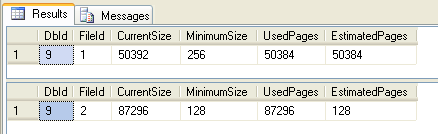
Here is the description of the output. One column that is helpful is the MinimumSize. This tells you how big you initially made the file when it was created. This is also the minimum value you could use if you want to use this information to shrink one of your files.
| Column name | Description |
|---|---|
| DbId | Database identification number of the file the Database Engine tried to shrink. |
| FileId | The file identification number of the file the Database Engine tried to shrink. |
| CurrentSize | Number of 8-KB pages the file currently occupies. |
| MinimumSize | Number of 8-KB pages the file could occupy, at minimum. This corresponds to the minimum size of originally created size of a file. |
| UsedPages | Number of 8-KB pages currently used by the file. |
| EstimatedPages | Number of 8-KB pages that the Database Engine estimates the file could be shrunk down to. |
(source SQL Books Online)
As I mentioned, the downside is if there is free space in the file it will shrink the file even if we run the command with a much higher value for the file size. In this example, are log file is 682MB, but we are specifying a value of 10,000MB.
DBCC SHRINKFILE (test5_log, 10000)
4 – Using FILEPROPERTY to check for free space in a database
Another option is to use the SpaceUsed property of the FILEPROPERTY function which will tell us how much space is used and then we can calculate free space based on the current size and what is being used.
USE Test5
GO
SELECT DB_NAME() AS DbName,
name AS FileName,
size/128.0 AS CurrentSizeMB,
size/128.0 - CAST(FILEPROPERTY(name, 'SpaceUsed') AS INT)/128.0 AS FreeSpaceMB
FROM sys.database_files;
Here we can see the output from the above for the Test5 database.

Summary
As you can see there is no option that gives you all of the information you may want. The FILEPROPERTY option is probably the best, but the MinimumSize value from the DBCC SHRINKFILE would be nice to have as well. Now you have a few options for getting this information, so use the option that works best for your environment and the current issue you are dealing with.
Next Steps
- Take a look at these related tips about free space
- If the space values do not seem to be correct look at using DBCC UPDATEUSAGE

Greg Robidoux has been working with databases for 35+ years with extensive hands on SQL Server experience from version 6.5 to 2025. He has authored over 250 technical articles and delivered several presentations online and at various conventions. Greg is also the President and founder of Edgewood Solutions, a technology services company delivering services and solutions for Microsoft SQL Server.


Excellent article. Thank you so much for the summary and information!