Problem
While investigating performance issues as a DBA I’m often asked to profile a SQL system and provide the trace files to the requestor ASAP. The requestor could be a developer, tester or 3rd party vendor or the information could be useful to the DBA. I need a secure, consistent, reliable and quick way to deliver on the request without going through the hassle of starting a new Profiler session and configuring all the properties for a new trace. The trace files generated need to be clearly labeled and in a location where the requestor can access them. Also, I would like the option on some servers of having a profiler trace running 24×7 in the background. I could then access and read these trace files to investigate issues after the fact – much like the default trace that came out with SQL 2005.
Solution
I create a job that is scheduled to run a pre-configured server side Profiler trace. This job will execute every hour and on each execution will label and timestamp the current trace file and move it to a shared area for analysis as well as re-start a new server-side trace. The trace file will be labeled using convention SERVER_YYYYMMDDHHMMSS.trc. The server side trace should capture enough events and columns that will make it meaningful when reviews to see what SQL was happening on the server during the capture time.
Prerequisites
You will need the following in place on the server you intend profiling for this Profiler job to work:
- xp_cmdshell enabled
- forfiles.exe – This handy executable is included on Windows Server 2003 and 2008 but if you’re still running Server 2000 then you’ll need to download this and copy it to Windows\System32 directory
- A directory on the server to hold the current live trace file and the archived trace files i.e. C:\MSSQL\trace
- A subdirectory to hold the archived trace files i.e. C:\MSSQL\trace\archive
The Job
The job consists of 5 steps:
- delete old trace files – uses forfiles.exe to delete all trace files over a certain number of days
- stop current trace – stops the current trace and deletes the definition from the server
- rename trace and move to \archive folder – timestamps the trace file and moves it to the shared area
- start trace again – starts collecting trace data once again
- stop trace completely – this is a stand-alone step that can be run on its own and will stop the current trace and copy the final trace file to the \archive folder

The Script
USE
[msdb]GO
/****** Object: Job [_MSSQLTIPS Profiler Trace] Script Date: 09/11/2009 11:19:00 ******/
BEGIN
TRANSACTIONDECLARE
@ReturnCode INTSELECT
@ReturnCode = 0/****** Object: JobCategory [[Uncategorized (Local)]]] Script Date: 09/11/2009 11:19:00 ******/
IF
NOT EXISTS (SELECT name FROM msdb.dbo.syscategories WHERE name=N‘[Uncategorized (Local)]’ AND category_class=1)BEGIN
EXEC
@ReturnCode = msdb.dbo.sp_add_category @class=N‘JOB’, @type=N‘LOCAL’, @name=N‘[Uncategorized (Local)]’IF
(@@ERROR <> 0 OR @ReturnCode <> 0) GOTO QuitWithRollbackEND
DECLARE
@jobId BINARY(16)EXEC
@ReturnCode = msdb.dbo.sp_add_job @job_name=N‘_MSSQLTIPS Profiler Trace’,@enabled
=1,@notify_level_eventlog
=0,@notify_level_email
=0,@notify_level_netsend
=0,@notify_level_page
=0,@delete_level
=0,@description
=N‘Descrition: Trace to provide TSQL_Replay data for analysisAuthor: Alan Cranfield – MSSQLTIPS.com’
,@category_name
=N‘[Uncategorized (Local)]’,@owner_login_name
=N‘sa’, @job_id = @jobId OUTPUTIF
(@@ERROR <> 0 OR @ReturnCode <> 0) GOTO QuitWithRollback/****** Object: Step [delete old trace files] Script Date: 09/11/2009 11:19:00 ******/
EXEC
@ReturnCode = msdb.dbo.sp_add_jobstep @job_id=@jobId, @step_name=N‘delete old trace files’,@step_id
=1,@cmdexec_success_code
=0,@on_success_action
=3,@on_success_step_id
=0,@on_fail_action
=3,@on_fail_step_id
=0,@retry_attempts
=0,@retry_interval
=0,@os_run_priority
=0, @subsystem=N‘TSQL’,@command
=N‘xp_cmdshell ”forfiles /P c:\mssql\trace\archive /M *.* /D -2 /C “cmd /C echo @FILE|DEL @FILE”’,@database_name
=N‘master’,@flags
=0IF
(@@ERROR <> 0 OR @ReturnCode <> 0) GOTO QuitWithRollback/****** Object: Step [stop current trace] Script Date: 09/11/2009 11:19:00 ******/
EXEC
@ReturnCode = msdb.dbo.sp_add_jobstep @job_id=@jobId, @step_name=N‘stop current trace’,@step_id
=2,@cmdexec_success_code
=0,@on_success_action
=3,@on_success_step_id
=0,@on_fail_action
=2,@on_fail_step_id
=0,@retry_attempts
=0,@retry_interval
=0,@os_run_priority
=0, @subsystem=N‘TSQL’,@command
=N‘– get trace_iddeclare @trace_id INT
select @trace_id = 0
select @trace_id = traceid
from ::fn_trace_getinfo (NULL)
where value = ”c:\MSSQL\trace\Profiler.trc”
IF @trace_id <> 0
BEGIN
— Stops the specified trace.
EXEC master..sp_trace_setstatus @traceid = @trace_id ,@status = 0
— Closes the specified trace and deletes its definition from the server.
EXEC master..sp_trace_setstatus @traceid = @trace_id ,@status = 2
END’
,@database_name
=N‘master’,@flags
=0IF
(@@ERROR <> 0 OR @ReturnCode <> 0) GOTO QuitWithRollback/****** Object: Step [rename trace file and move to \archive folder] Script Date: 09/11/2009 11:19:00 ******/
EXEC
@ReturnCode = msdb.dbo.sp_add_jobstep @job_id=@jobId, @step_name=N‘rename trace file and move to \archive folder’,@step_id
=3,@cmdexec_success_code
=0,@on_success_action
=3,@on_success_step_id
=0,@on_fail_action
=2,@on_fail_step_id
=0,@retry_attempts
=0,@retry_interval
=0,@os_run_priority
=0, @subsystem=N‘TSQL’,@command
=N‘– declare variablesdeclare @server varchar(30), @date char(14), @file char(100), @cmd varchar(250)
select @server = REPLACE(UPPER(@@servername),”\”,”_”)
select @date = replace(replace(replace(convert(char(19),getdate(),120),”:”,””),”-”,””),” ”,””)
select @file = @server+”_”+@date+”.trc”
— change trace file name
select @cmd = ”RENAME c:\MSSQL\Trace\Profiler.trc ”+ @file
exec master..xp_cmdshell @cmd
— move trace file to \archive
select @cmd = ”MOVE c:\MSSQL\Trace\”+@file+” c:\MSSQL\Trace\archive”
exec master..xp_cmdshell @cmd’
,@database_name
=N‘master’,@flags
=0IF
(@@ERROR <> 0 OR @ReturnCode <> 0) GOTO QuitWithRollback/****** Object: Step [start trace again] Script Date: 09/11/2009 11:19:00 ******/
EXEC
@ReturnCode = msdb.dbo.sp_add_jobstep @job_id=@jobId, @step_name=N‘start trace again’,@step_id
=4,@cmdexec_success_code
=0,@on_success_action
=1,@on_success_step_id
=0,@on_fail_action
=3,@on_fail_step_id
=0,@retry_attempts
=0,@retry_interval
=0,@os_run_priority
=0, @subsystem=N‘TSQL’,@command
=N‘– this code generated by Profiler GUI— Create a Queue
declare @rc int ,@TraceID int ,@maxfilesize bigint
,@filecount bigint
set @maxfilesize = 5000 — Mbytes
set @filecount = 10 — max number of file rollovers
exec @rc = sp_trace_create @TraceID output, 2,
N”c:\MSSQL\trace\Profiler”,
@maxfilesize,
NULL
if (@rc != 0) goto error
— Set the events
— 1) Stored Procedure – RPC:Completed 2) TSQL – SQL:BatchCompleted
declare @on bit
set @on = 1
exec sp_trace_setevent @TraceID, 10, 15, @on
exec sp_trace_setevent @TraceID, 10, 16, @on
exec sp_trace_setevent @TraceID, 10, 1, @on
exec sp_trace_setevent @TraceID, 10, 17, @on
exec sp_trace_setevent @TraceID, 10, 10, @on
exec sp_trace_setevent @TraceID, 10, 18, @on
exec sp_trace_setevent @TraceID, 10, 11, @on
exec sp_trace_setevent @TraceID, 10, 12, @on
exec sp_trace_setevent @TraceID, 10, 13, @on
exec sp_trace_setevent @TraceID, 10, 14, @on
exec sp_trace_setevent @TraceID, 12, 15, @on
exec sp_trace_setevent @TraceID, 12, 16, @on
exec sp_trace_setevent @TraceID, 12, 1, @on
exec sp_trace_setevent @TraceID, 12, 17, @on
exec sp_trace_setevent @TraceID, 12, 10, @on
exec sp_trace_setevent @TraceID, 12, 14, @on
exec sp_trace_setevent @TraceID, 12, 18, @on
exec sp_trace_setevent @TraceID, 12, 11, @on
exec sp_trace_setevent @TraceID, 12, 12, @on
exec sp_trace_setevent @TraceID, 12, 13, @on
— Set the Filters
declare @intfilter int
declare @bigintfilter bigint
exec sp_trace_setfilter @TraceID, 10, 0, 7, N”SQL Server Profiler%”
exec sp_trace_setstatus @TraceID, 1
select TraceID=@TraceID
goto finish
error:
select ErrorCode=@rc
finish:
go
‘
,@database_name
=N‘master’,@flags
=0IF
(@@ERROR <> 0 OR @ReturnCode <> 0) GOTO QuitWithRollback/****** Object: Step [stop trace COMPLETELY] Script Date: 09/11/2009 11:19:00 ******/
EXEC
@ReturnCode = msdb.dbo.sp_add_jobstep @job_id=@jobId, @step_name=N‘stop trace COMPLETELY’,@step_id
=5,@cmdexec_success_code
=0,@on_success_action
=1,@on_success_step_id
=0,@on_fail_action
=2,@on_fail_step_id
=0,@retry_attempts
=0,@retry_interval
=0,@os_run_priority
=0, @subsystem=N‘TSQL’,@command
=N‘– get traceiddeclare @trace_id INT
select @trace_id = 0
select @trace_id = traceid
from ::fn_trace_getinfo (NULL)
where value = ”c:\MSSQL\trace\Profiler.trc”
IF @trace_id <> 0
BEGIN
— Stops the specified trace.
EXEC master..sp_trace_setstatus @traceid = @trace_id ,@status = 0
— Closes the specified trace and deletes its definition from the server.
EXEC master..sp_trace_setstatus @traceid = @trace_id ,@status = 2
END
— declare variables
declare @server varchar(12), @date char(14), @file char(100), @cmd varchar(250)
select @server = UPPER(@@servername)
select @date = replace(replace(replace(convert(char(19),getdate(),120),”:”,””),”-”,””),” ”,””)
select @file = @server+”_”+@date+”.trc”
— change trace file name
select @cmd = ”RENAME c:\MSSQL\Trace\Profiler.trc ”+ @file
exec master..xp_cmdshell @cmd
— move file to \archive
select @cmd = ”MOVE c:\MSSQL\Trace\”+@file+” c:\MSSQL\Trace\archive”
exec master..xp_cmdshell @cmd’
,@database_name
=N‘master’,@flags
=0IF
(@@ERROR <> 0 OR @ReturnCode <> 0) GOTO QuitWithRollbackEXEC
@ReturnCode = msdb.dbo.sp_update_job @job_id = @jobId, @start_step_id = 1IF
(@@ERROR <> 0 OR @ReturnCode <> 0) GOTO QuitWithRollbackEXEC
@ReturnCode = msdb.dbo.sp_add_jobschedule @job_id=@jobId, @name=N‘every 1 hours’,@enabled
=1,@freq_type
=4,@freq_interval
=1,@freq_subday_type
=4,@freq_subday_interval
=10,@freq_relative_interval
=0,@freq_recurrence_factor
=0,@active_start_date
=20080815,@active_end_date
=99991231,@active_start_time
=0,@active_end_time
=235959IF
(@@ERROR <> 0 OR @ReturnCode <> 0) GOTO QuitWithRollbackEXEC
@ReturnCode = msdb.dbo.sp_add_jobserver @job_id = @jobId, @server_name = N‘(local)’IF
(@@ERROR <> 0 OR @ReturnCode <> 0) GOTO QuitWithRollbackCOMMIT
TRANSACTIONGOTO
EndSaveQuitWithRollback
:IF (@@TRANCOUNT > 0) ROLLBACK TRANSACTION
EndSave
:Practice
Once this job is enabled and successfully running every hour it will start collecting Profiler data and send the hourly profiler trace files to the \archive folder to be read and analyzed by those who need it.
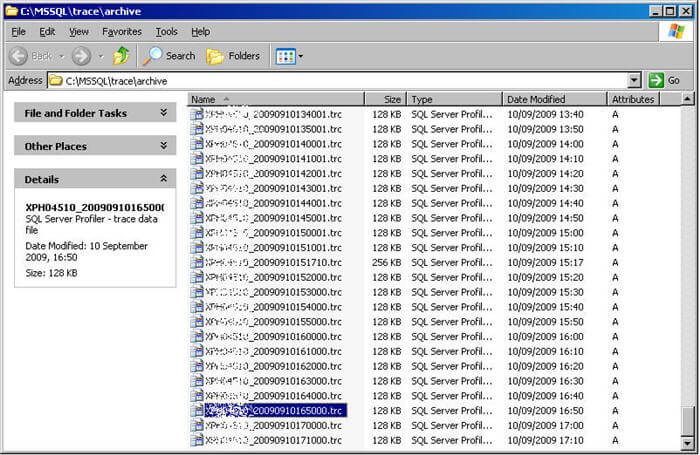
Locate the trace file for the hour that you are concerned with and open with Profiler to review the information provided:

Next Steps
- Use Profiler GUI to define the exact trace events that you want and then export the trace definition and update the job steps
- Capture a Performance Monitor log at the same time and then correlate the data
- Analyze the trace data in greater detail by using the fn_trace_gettable function to query the .trc file using SQL
- This job can be customized to provide Sarbanes-Oxley type audit trail information
- Use sp_start_job in a startup proc to ensure the trace starts again automatically should SQL service be restarted or server rebooted.
- This job has been successfully tested on SQL 2005 and 2008.
- Additional related tips

Versatile SQL SERVER DBA with over 10 years’ experience managing critical production systems in large distributed enterprise environments. Specialise in SQL Server database administration and configuration on a large scale and the design of robust strategies for the maintenance and management of Very Large Databases primarily within the financial services industry. Have undertaken DBA work in 4 continents in the Banking, Gaming and Insurance sectors as well as 3 years with NYSE in London where I was the Lead SQL Server DBA for NYSE LIFFE™, the global derivatives business of the NYSE Euronext group. Currently living in Shanghai where I was recently asked by Microsoft to assist with the transition of an eCommerce operations team from US to China.