Problem
I have SQL Server databases with top secret, secret and unclassified data. How can we establish custom SQL Server data classification schemes for implementing “need to know” access to data in specific tables? Check out this tip to learn more.
Solution
With current regulations such as SOX, HIPAA, etc., protecting sensitive data is a must in the enterprise. In this tip, we will see how to implement Row Level Security (RLS) and Cell Level Security (CLS) with the help of SQL Server Label Security Toolkit.
What is a security label in SQL Server?
A security label is a marking that describes the sensitivity of an item, in this case, information. It consists of a string containing defined security categories of the information available.
ID | Name | CreditCardNo | Classification |
|---|---|---|---|
| 1 | Ken Sánchez | 1010101 | SECRET |
| 2 | Terri Duffy | 8498489 | TOP SECRET |
| 3 | Rob Walters | 4884556 | UNCLASSIFIED |
In order to access the information the users need to have a clearance defined.
User | Clearance |
|---|---|
| Alice | TOP SECRET |
| Bob | SECRET |
| David | UNCLASSIFIED |
So, in this case, assuming a hierarchical security scheme, if Alice performs a SELECT * FROM Table1 he will get all of the three records, because she has TOP SECRET clearance and that includes SECRET and UNCLASSIFIED clearances. And if Bob is the one who performs the previous query, he will get only the records 1 and 3.
How does the SQL Server Label Security toolkit work?
This toolkit consists of a framework composed by:
- Metadata tables used to define the security labels.
- Helper stored procedures and functions to manipulate the labels.
- A view, vwVisibleLabels that contains the list of all the security labels present in the database to which the current logged user have access (I will expand this topic below).
- A GUI to develop the security schema.
It is important to note that the approach used by this Toolkit makes the assumption that applications using the database will connect by using a specific identity for each end user. This identity could be either a Windows account or a SQL Server login. That’s because the security labels are associated to database roles or Windows groups. On SQL Server 2012 you can use the Contained Database feature to create a user without a login.
SQL Server Security Label Toolkit Functions
Here I made a selection of the functions used in this sample. For the complete list please check the toolkit Developers Reference.
Function Name | Description | Arguments |
|---|---|---|
| usp_EnableCellVisibility (Stored Procedure) | Opens all the symmetric keys that are mapped to security labels to which the current user has access. | N/A |
| usp_DisableCellVisibility (Stored Procedure) | Closes all the symmetric keys that were previously opened by calling usp_EnableCellVisibility. | N/A |
| usp_GetSecLabelID (Stored Procedure) | Gets or generates the security label identifier for the specified label. | Label (xml (dbo.SecurityLabel)) The security label for which an ID is needed.UniqueLabelID (int OUTPUT) Output parameter populated with the security label identifier. |
| usp_GetCurrentUserLabel (Stored Procedure) | Retrieves a SecurityLabel instance describing the subject label of the current database user. | Label (xml (dbo.SecurityLabel) OUTPUT) Output parameter populated with the current database user’s label. |
| fn_Dominates (Function) | Compares two labels and determines whether label A dominates label B. | A (xml (SecurityLabel)) First security label to compare. B (xml (SecurityLabel)) Second security label to compare.Return Value An int value: 1 if A dominates B 0 if A does not dominate B NULL if A and/or B are NULL |
| usp_GetSecLabelDetails (Stored Procedure) | Gets or generates the security label identifier and encryption objects for the specified label. | Label (xml (dbo.SecurityLabel)) The security label for which an ID is needed.UniqueLabelID (int OUTPUT) Output parameter populated with the security label identifier. KeyName (nvarchar(256) OUTPUT) CertName (nvarchar(256) OUTPUT) KeyGUID (uniqueidentifier OUTPUT) |
The vwVisibleLabels view in the SQL Server Security Toolkit
The purpose of this view is to enforce the row security by joining it with the base table. Here is the definition of the view:
Column Name | Data Type | Description |
|---|---|---|
| ID | INT | The ID of the available labels. |
| Label | XML | The XML String that defines the label. |
| KeyName | NVARCHAR(256) | The encryption key name, to implement Cell Level Security. |
| CertName | NVARCHAR(256) | The security certificate name, to implement Cell Level Security. |
For instance, suppose that you have a Customer table and you want to apply row level security on it. You just have to add a column to Customer table that will hold the security label id and JOIN this column with the labels id which the user has permission on the vwVisibleLabels view. Additionally, you may want to rename the Customer table and create a Customer view to implement the join, in order to make the implementation transparent. See the image below.
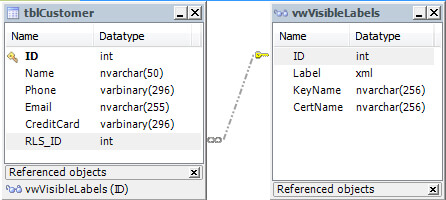
You may notice that the Phone and CreditCard columns are of type VARBINARY. This is to implement Cell Level Security on those columns by encrypting the data with the built-in function ENCRYPTBYKEY(). As you may know, this function returns VARBINARY.
If you implement a view, then you have to use instead-of triggers to handle DELETE events because you cannot delete a row if the view references more than one base table. In this example, I have implemented an instead-of trigger to handle all DML events. So keep on reading for that information.
SQL Server Cell Level Security Considerations
As I said before, CLS is implemented by encrypting/decrypting cell data with ENCRYPTBYKEY() and DECRYPTBYKEY() functions respectively. Therefore, in order for CLS to properly work, the symmetric key has to be opened in the current session. To do so, a call to usp_EnableCellVisibility stored procedure at session start is mandatory to view, insert or modify encrypted data.
How does the SQL Server Security Label Toolkit Policy Designer Application Work?
Here are a screenshot of the Label Policy Designer window.

When the Label Policy node is selected, the properties grid on the right side of the window displays editable attributes of the label policy. The attributes of a label policy are described in the following table.
Attribute | Description |
|---|---|
| Name | The name of the label policy. This serves as an identifier for the label policy. |
| Schema | Designates the schema in which the label policy objects will be created. Multiple label policies can be created in a database by targeting different schemas. |
| Root Element Name | The name of the root element in XML/string representation of a label instance from this policy. For example: ‘<Label> … </Label>’. The XML/string format is used to pass labels as arguments to stored procedures, functions, etc. Markings on the label are specified by interior elements; names for these elements are defined by the Abbreviation property on each Category. |
| Use Cell-Level Security | If this is True, support for cell-level security is included in the label policy. If false, the parts of the label policy that are specific to cell-level security are omitted. |
| Cell Encryption Algorithm | The symmetric key encryption algorithm used to encrypt cell values. This attribute is only relevant if the Use Cell Level Security attribute is True. |
The starting point is to add a category by right-click on the root label policy node. You are prompted for the name and an abbreviation for the category. Then a new node is added beneath the root label policy node as shown on the next image.

Here is the explanation of the attributes on the properties grid.
Attribute | Values | Description |
|---|---|---|
| ID | – | Ordinal identifier for the category. Determined by the position in the tree view. Not directly editable. |
| Name | – | Name of the category |
| Abbreviation | – | An abbreviation for the category. This will be used in the XML string representation of labels. |
| Required | True / False | Whether a label instance requires at least one marking from this category to be valid. |
| Cardinality | One / Many | The maximum markings on a valid label instance. |
| Comparison Rule | Any / All | How markings in this category are compared to determine access. Any: subject must have at least one of the markings on the object. All: The subject must have all of the markings on the object |
| Hierarchical | True / False | Hierarchical categories have an ordering among markings that allows a marking at one level to satisfy markings at all levels below it. Non-hierarchical categories are simply flat sets of markings in which each marking satisfies only that marking. |
| No Marking Behavior | NoRestriction / NoAccess | Controls how labels are compared when there are no markings from this category. NoRestriction: The absence of markings means the category imposes no restrictions on visibility, i.e., it can be ignored. This is the more common scenario. NoAccess: The absence of markings means no one is granted access. This attribute is only relevant if the Required attribute is False for the category. |
But, in order to define markings, right-click on the category node and select Add Marking on the context menu. After prompting for the marking name, the designer will add a node for the new marking.

In the next table you will see the properties grid attributes explanation.
Attribute | Values | Description |
|---|---|---|
| Marking String | – | The actual marking that will appear in labels. The marking string is also referred to as the marking name. Must be unique across all categories in the label policy. |
| Role Name | – | The name of a SQL Server database role or Windows group that will represent the permission defined by this marking. Essentially, adding a user to this role or group adds this marking to their subject label. Windows groups should be named using the DOMAIN\GroupName or MACHINE\GroupName format. |
| Role Type | SQLDatabaseRole / WindowsGroup | Indicates whether the value in the Role Name attribute is a database role or Windows group. The practical effect of this setting is:
|
| Description | – | Optional free form description of this marking. |
After policy design, you can save the policy into an XML file for further editing.
Deploying the SQL Server Row and Cell Security Policy
To deploy the policy you have two options, to apply it directly or to generate a script to a file, which is the one I have used in this tip. In both cases a wizard is opened to guide you through the process.
Let’s see the Roles and Permissions page of the wizard.

Here are the options with this interface:
- The Auto Create Database Roles check box enables or disables the automatic creation of SQL Server database roles for markings in the label policy.
- The Grant/Deny Permissions on Label Policy Objects check box enables or disables permission grants on the label policy metadata tables, the vwVisibleLabels view and the helper functions and procedures.
- The role you specify will be the SQL Server principal to which permissions on label policy objects will be granted or denied. The assumption is that this role will include all valid users of the application, like the public role.
The next wizard window will show only if the Use Cell Level Security attribute on the label policy is set to True, like in this example.
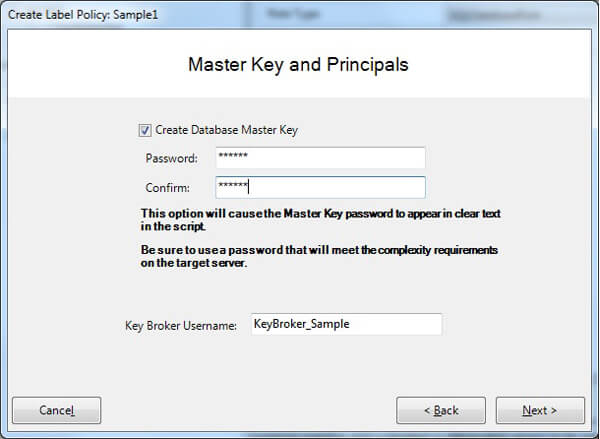
To support cell-level security, a database master key must exist in the target database. If the database already has a master key, the Create Master Key check box can be unselected. Otherwise, it should be selected, and a password provided for the database master key. Keep in mind that if you are generating the script, the password will be stored unencrypted on the file.
The Key Broker Username is the name of a database principal that will be created to control access to symmetric keys in the label policy. This field is only provided as an override in the unlikely event of a naming conflict with an existing user account. The Key Broker Username should never be the name of a pre-existing database principal and of course cannot be the public role.
Sample code for the SQL Server Label Security Toolkit
I made this sample to show the very basic usage of this framework. You can run the scripts in the following order, but remember to set the proper database in the USE statement on each script.
NOTE: You can download the sample files via the attached .zip file which you can unzip and use to execute the sample code that will be presented in this tip.
1 – SQL Server Database Creation
USE [master]
GO
CREATE DATABASE [sample]
 CONTAINMENT = NONE
 ON  PRIMARY
( NAME = N'sample', FILENAME = N'E:\MSSQL\sample.mdf' , SIZE = 102400KB , MAXSIZE = UNLIMITED,
  FILEGROWTH = 1024KB )
 LOG ON
( NAME = N'sample_log', FILENAME = N'E:\MSSQL\sample_log.ldf' , SIZE = 10240KB , MAXSIZE = 2048GB ,
  FILEGROWTH = 10%)
GO
2 – SQL Server Security Toolkit Label and Role Definition
This script creates all the helper tables, functions and stored procedures used by this toolkit. Also, keep in mind that this script creates a database master key if it does not exist. The script is generated by Label Policy Designer application. You can find this script in the attached zip file or recreate it by opening the following XML file into the application and selecting “Generate Script” on the “Tools” menu.
<?xml version="1.0" encoding="utf-8"?>
<LabelPolicy xmlns_xsi="http://www.w3.org/2001/XMLSchema-instance" xmlns_xsd="http://www.w3.org/2001/XMLSchema">
  <Name>Sample Policy</Name>
  <Categories>
    <Category ID="1" Name="Classification" Abbreviation="CI" Hierarchical="true" CompareRule="Any" Cardinality="One" Required="true" NoMarkingBehavior="NoAccess" CreateDatabaseRoles="true">
      <Markings>
        <Marking>
          <MarkingString>TOPSECRET</MarkingString>
          <RoleName>ciTOPSECRET</RoleName>
          <CategoryID>1</CategoryID>
          <Description />
          <RoleType>SQLDatabaseRole</RoleType>
        </Marking>
        <Marking>
          <MarkingString>SECRET</MarkingString>
          <RoleName>ciSECRET</RoleName>
          <CategoryID>1</CategoryID>
          <Description />
          <RoleType>SQLDatabaseRole</RoleType>
          <ParentRoleName>ciTOPSECRET</ParentRoleName>
        </Marking>
        <Marking>
          <MarkingString>CONFIDENTIAL</MarkingString>
          <RoleName>ciCONFIDENTIAL</RoleName>
          <CategoryID>1</CategoryID>
          <Description />
          <RoleType>SQLDatabaseRole</RoleType>
          <ParentRoleName>ciSECRET</ParentRoleName>
        </Marking>
        <Marking>
          <MarkingString>UNCLASSIFIED</MarkingString>
          <RoleName>ciUNCLASSIFIED</RoleName>
          <CategoryID>1</CategoryID>
          <Description />
          <RoleType>SQLDatabaseRole</RoleType>
          <ParentRoleName>ciCONFIDENTIAL</ParentRoleName>
        </Marking>
      </Markings>
    </Category>
  </Categories>
  <LabelToolVersion>1.5.1.0</LabelToolVersion>
  <UseCellLevelSecurity>true</UseCellLevelSecurity>
  <CellEncryptionAlgorithm>AES_128</CellEncryptionAlgorithm>
  <Schema>DBO</Schema>
  <KeyBrokerName>KeyBroker</KeyBrokerName>
  <LabelRootElementName>Label</LabelRootElementName>
</LabelPolicy>
3 – SQL Server User Creation
This script creates the users with the password “1234” for testing the code and performs the role assignment. Be aware that the creation of the server principal is commented. If you have the SQL Server 2012 you can take advantage of the Contained Database feature to create a user without a server login.
USE sample
GO
/* CREATE Alice */
if not exists(select * from sys.server_principals where name = 'Alice' AND type = 'S')
 CREATE LOGIN Alice WITH PASSWORD ='1234'
if not exists(select * from sys.database_principals where name = 'Alice' AND type = 'S')
 CREATE USER Alice
GO
/* CREATE Bob */
if not exists(select * from sys.server_principals where name = 'Bob' AND type = 'S')
 CREATE LOGIN Bob WITH PASSWORD ='1234'
if not exists(select * from sys.database_principals where name = 'Bob' AND type = 'S')
 CREATE USER Bob
GO
/* CREATE Charlie */
if not exists(select * from sys.server_principals where name = 'Charlie' AND type = 'S')
 CREATE LOGIN Charlie WITH PASSWORD ='1234'
if not exists(select * from sys.database_principals where name = 'Charlie' AND type = 'S')
 CREATE USER Charlie
GO
/* CREATE David */
if not exists(select * from sys.server_principals where name = 'David' AND type = 'S')
 CREATE LOGIN David WITH PASSWORD ='1234'
if not exists(select * from sys.database_principals where name = 'David' AND type = 'S')
 CREATE USER David
GO
/* Assign subject label to each user */
--Alice: TOPSECRET
exec sp_addrolemember 'ciTOPSECRET', 'Alice'
--Bob: SECRET
exec sp_addrolemember 'ciSECRET', 'Bob'
--Charlie: CONFIDENTIAL
exec sp_addrolemember 'ciCONFIDENTIAL', 'Charlie'
--David: UNCLASSIFIED
exec sp_addrolemember 'ciUNCLASSIFIED', 'David'
GO
4 – SQL Server tblCustomer Table Creation
USE sample
GO
IF OBJECT_ID('dbo.tblCustomer', 'U') IS NOT NULL
  DROP TABLE dbo.tblCustomer
GO
CREATE TABLE tblCustomer
(ID int IDENTITY NOT NULL,
 Name nvarchar(50) NOT NULL,
 Phone varbinary(296),
 Email nvarchar(255),
 CreditCard varbinary(296),
 RLS_ID int NOT NULL, --Row Level Securiry ID
 PRIMARY KEY (ID))
GO
5 – Sample SQL Server Data Insert for the tblCustomer Table
USE sample
GO
DECLARE @UNCLAS int, @SECRET int, @TOPSECRET int, @SECRET_A int, @SECRET_B int, @SECRET_AB int
DECLARE @KeyName nvarchar(512)
DECLARE @CertName nvarchar(512)
DECLARE @KeyGUID_SECRET uniqueidentifier
DECLARE @KeyGUID_TOPSECRET uniqueidentifier
DECLARE @KeyGUID_UNCLAS uniqueidentifier
exec usp_GetSecLabelDetails 'Label><CI>SECRET</CI></Label>', @SECRET OUTPUT, @KeyName OUTPUT, @CertName OUTPUT, @KeyGUID_SECRET OUTPUT
exec ('OPEN SYMMETRIC KEY ' + @KeyName + ' DECRYPTION BY CERTIFICATE ' + @CertName)
exec usp_GetSecLabelDetails '<Label><CI>TOPSECRET</CI></Label>', @TOPSECRET OUTPUT, @KeyName OUTPUT, @CertName OUTPUT, @KeyGUID_TOPSECRET OUTPUT
exec ('OPEN SYMMETRIC KEY ' + @KeyName + ' DECRYPTION BY CERTIFICATE ' + @CertName)
exec usp_GetSecLabelDetails '<Label><CI>UNCLASSIFIED</CI></Label>', @UNCLAS OUTPUT, @KeyName OUTPUT, @CertName OUTPUT, @KeyGUID_UNCLAS OUTPUT
exec ('OPEN SYMMETRIC KEY ' + @KeyName + ' DECRYPTION BY CERTIFICATE ' + @CertName)
INSERT INTO tblCustomer (Name, Phone, Email, CreditCard, RLS_ID)
VALUES ('Ken Sánchez', EncryptByKey(@KeyGUID_SECRET, N'697-555-0142'), 'Ken@mail.com',  EncryptByKey(@KeyGUID_TOPSECRET, N'6975550142'), @UNCLAS)
INSERT INTO tblCustomer (Name, Phone, Email, CreditCard, RLS_ID)
VALUES ('Terri Duffy', EncryptByKey(@KeyGUID_SECRET, N'819-555-0175'), 'Terri@mail.com',  EncryptByKey(@KeyGUID_TOPSECRET, N'8195550175'), @UNCLAS)
INSERT INTO tblCustomer (Name, Phone, Email, CreditCard, RLS_ID)
VALUES ('Roberto Tamburello', EncryptByKey(@KeyGUID_SECRET, N'212-555-0187'), 'Roberto@mail.com',  EncryptByKey(@KeyGUID_TOPSECRET, N'2125550187'), @UNCLAS)
INSERT INTO tblCustomer (Name, Phone, Email, CreditCard, RLS_ID)
VALUES ('Rob Walters', EncryptByKey(@KeyGUID_SECRET, N'612-555-0100'), 'Rob@mail.com',  EncryptByKey(@KeyGUID_TOPSECRET, N'6125550100'), @UNCLAS)
INSERT INTO tblCustomer (Name, Phone, Email, CreditCard, RLS_ID)
VALUES ('Gail Erickson', EncryptByKey(@KeyGUID_SECRET, N'849-555-0139'), 'Gail@mail.com',  EncryptByKey(@KeyGUID_TOPSECRET, N'8495550139'), @UNCLAS)
INSERT INTO tblCustomer (Name, Phone, Email, CreditCard, RLS_ID)
VALUES ('Jossef Goldberg', EncryptByKey(@KeyGUID_SECRET, N'122-555-0189'), 'Jossef@mail.com',  EncryptByKey(@KeyGUID_TOPSECRET, N'1225550189'), @UNCLAS)
INSERT INTO tblCustomer (Name, Phone, Email, CreditCard, RLS_ID)
VALUES ('Dylan Miller', EncryptByKey(@KeyGUID_SECRET, N'181-555-0156'), 'Dylan@mail.com',  EncryptByKey(@KeyGUID_TOPSECRET, N'1815550156'), @UNCLAS)
INSERT INTO tblCustomer (Name, Phone, Email, CreditCard, RLS_ID)
VALUES ('Diane Margheim', EncryptByKey(@KeyGUID_SECRET, N'815-555-0138'), 'Diane@mail.com',  EncryptByKey(@KeyGUID_TOPSECRET, N'8155550138'), @UNCLAS)
CLOSE ALL SYMMETRIC KEYS
GO
6 – Customer SQL Server View Creation
This script creates the Customer view and also grants and revokes permissions to the view and the table respectively.
USE sample
GO
IF OBJECT_ID('Customer', 'V') IS NOT NULL
  DROP VIEW dbo.Customer
GO
CREATE VIEW Customer
WITH ENCRYPTION, VIEW_METADATA
AS
 SELECT tblCustomer.ID,
   Name,
   CONVERT(nvarchar(256), DecryptByKey(Phone)) AS Phone,
   Email,
   CONVERT(nvarchar(20), DecryptByKey(CreditCard)) AS CreditCard
 FROM tblCustomer WITH (READCOMMITTED) INNER JOIN vwVisibleLabels
  ON tblCustomer.RLS_ID = vwVisibleLabels.ID
GO
GRANT SELECT, INSERT, UPDATE, DELETE ON Customer TO public
REVOKE SELECT, INSERT, UPDATE, DELETE ON tblCustomer TO public
GO
7 – Create the SQL Server Instead-Of INSERT Trigger for the Customer View
USE sample
GO
IF OBJECT_ID ('dbo.TR_Customer_Insert', 'TR') IS NOT NULL
   DROP TRIGGER dbo.TR_Customer_Insert
GO
CREATE TRIGGER dbo.TR_Customer_Insert  ON dbo.Customer
   WITH ENCRYPTION
   INSTEAD OF INSERT
AS
 DECLARE @UNCLAS  INT
 DECLARE @SECRET  INT
 DECLARE @TOPSECRET INT
 DECLARE @KeyName NVARCHAR(512)
 DECLARE @CertName NVARCHAR(512)
 DECLARE @KeyGUID_SECRET UNIQUEIDENTIFIER
 DECLARE @KeyGUID_TOPSECRET UNIQUEIDENTIFIER
 DECLARE @KeyGUID_UNCLAS UNIQUEIDENTIFIER
 exec usp_GetSecLabelID '<Label><CI>UNCLASSIFIED</CI></Label>', @UNCLAS OUTPUT
 EXEC usp_GetSecLabelDetails'<Label><CI>SECRET</CI></Label>', @SECRET OUTPUT, @KeyName OUTPUT, @CertName OUTPUT, @KeyGUID_SECRET OUTPUT
 EXEC usp_GetSecLabelDetails '<Label><CI>TOPSECRET</CI></Label>', @TOPSECRET OUTPUT, @KeyName OUTPUT, @CertName OUTPUT, @KeyGUID_TOPSECRET OUTPUT
 BEGIN TRANSACTION Customer_Insert
 INSERT INTO  dbo.tblCustomer (Name, Phone, Email, CreditCard, RLS_ID)
    SELECT  i.name,
     EncryptByKey(@KeyGUID_SECRET, i.Phone),
     i.Email,
     EncryptByKey(@KeyGUID_TOPSECRET, i.CreditCard),
     @UNCLAS
    FROM inserted i
  IF @@ERROR <> 0
  BEGIN
  ROLLBACK TRANSACTION Customer_Insert
  END ELSE BEGIN
  COMMIT TRANSACTION Customer_Insert
  END
GO
8 – Create the SQL Server Instead-Of UPDATE Trigger for the Customer View
USE sample
GO
IF OBJECT_ID ('dbo.TR_Customer_Update', 'TR') IS NOT NULL
   DROP TRIGGER dbo.TR_Customer_Update
GO
CREATE TRIGGER dbo.TR_Customer_Update  ON dbo.Customer
   WITH ENCRYPTION
   INSTEAD OF UPDATE
AS
 DECLARE @SECRET INT
 DECLARE @TOPSECRET INT
DECLARE @KeyName NVARCHAR(512)
DECLARE @CertName NVARCHAR(512)
DECLARE @KeyGUID_SECRET UNIQUEIDENTIFIER
DECLARE @KeyGUID_TOPSECRET UNIQUEIDENTIFIER
DECLARE @SecretLabel xml (dbo.SecurityLabel)
DECLARE @TopSecretLabel xml (dbo.SecurityLabel)
DECLARE @UserLabel xml (dbo.SecurityLabel)
SET @SecretLabel = ‘<Label><CI>SECRET</CI></Label>’
SET @TopSecretLabel = ‘<Label><CI>TOPSECRET</CI></Label>’
— Get the clearence level of the current user
exec usp_GetCurrentUserLabel @UserLabel OUTPUT
EXEC usp_GetSecLabelDetails @SecretLabel, @SECRET OUTPUT, @KeyName OUTPUT, @CertName OUTPUT, @KeyGUID_SECRET OUTPUT
EXEC usp_GetSecLabelDetails @TopSecretLabel, @TOPSECRET OUTPUT, @KeyName OUTPUT, @CertName OUTPUT, @KeyGUID_TOPSECRET OUTPUT
IF UPDATE(phone)
BEGIN
IF dbo.fn_Dominates(@UserLabel, @SecretLabel) <> 1
BEGIN
RAISERROR(‘User rights not sufficient to write this data’, 16, 1)
RETURN
END ELSE BEGIN
UPDATE dbo.tblCustomer
SET Phone = EncryptByKey (@KeyGUID_SECRET, i.Phone)
FROM inserted i
WHERE i.ID = dbo.tblCustomer.ID
END
END
IF UPDATE(CreditCard)
BEGIN
IF dbo.fn_Dominates(@UserLabel, @TopSecretLabel) <> 1
BEGIN
RAISERROR(‘User rights not sufficient to write this data’, 16, 1)
RETURN
END ELSE BEGIN
UPDATE dbo.tblCustomer
SET CreditCard = EncryptByKey (@KeyGUID_TOPSECRET, i.CreditCard)
FROM inserted i
WHERE i.ID = dbo.tblCustomer.ID
END
END
UPDATE dbo.tblCustomer
SET Name = i.Name,
Email = i.Email
FROM inserted i
WHERE i.ID = dbo.tblCustomer.ID
GO
9 – Create the SQL Server Instead-Of DELETE Trigger for the Customer View
USE sample
GO
IF OBJECT_ID ('dbo.TR_Customer_Delete', 'TR') IS NOT NULL
   DROP TRIGGER dbo.TR_Customer_Delete
GO
CREATE TRIGGER dbo.TR_Customer_Delete  ON dbo.Customer
   WITH ENCRYPTION
   INSTEAD OF DELETE
AS
 BEGIN TRANSACTION Customer_Delete
 DELETE dbo.tblCustomer
  FROM dbo.tblCustomer T
  INNER JOIN deleted D
    ON  T.ID = D.ID
IF @@ERROR <> 0
BEGIN
ROLLBACK TRANSACTION Customer_Delete
END ELSE BEGIN
COMMIT TRANSACTION Customer_Delete
END
GO
10 – SQL Server Stored Procedure to open the symmetric keys and execute the SELECT against Customer view
USE sample
GO
IF OBJECT_ID ('dbo.show_customer', 'P') IS NOT NULL
   DROP PROCEDURE dbo.show_customer
GO
CREATE PROCEDURE [dbo].[show_customer]
AS
 EXEC usp_EnableCellVisibility
 SELECT  ID,
    Name,
    Phone,
    Email,
    CreditCard
   FROM customer
 EXEC usp_DisableCellVisibility
GO
GRANT EXECUTE ON [dbo].[show_customer] TO [public]
GO
11 – Execute all of the SQL Server Code
USE sample
GO
EXECUTE AS USER  = 'Alice';
EXECUTE dbo.show_customer
REVERT;
GO
EXECUTE AS USER  = 'Bob';
EXECUTE dbo.show_customer
REVERT;
GO
EXECUTE AS USER  = 'David';
EXECUTE dbo.show_customer
REVERT;
GO
EXECUTE dbo.show_customer
GO
Here is a screen capture showing the execution.

Next Steps
- Learn more about SQL Server Symmetric Encryption: Understanding the SQL Server Symmetric Encryption Algorithms.
- Read this Cell Level Security implementation tip: SQL Server Column Level Encryption Example using Symmetric Keys.
- See how to manage Master Keys: Managing SQL Server 2005 Master Keys for Encryption.
- This is a key concept when talking about hierarchical security models: Nesting Database Roles in SQL Server.
- Read this tip to refresh concepts of object level security: Understanding GRANT, DENY, and REVOKE in SQL Server.
- Read this: Giving and removing permissions in SQL Server.
- Use this tip to verify the active permissions on the public role: How to find out what SQL Server rights have been granted to the Public role.
- Check this tip and evaluate the pro and cons of contained databases and server login mapping: Understanding How A User Gets Database Access in SQL Server.
- Check out all of the tips on views.
- Check out all of the tips on Contained Databases.
- Download the scripts here.

Daniel Farina was born in Buenos Aires, Argentina. Self-educated, since childhood he showed a passion for learning. He studied at Universidad de Buenos Aires. Daniel started working as a programmer at a young age. Over the years he specialized in databases, particularly SQL Server and Oracle. Now with 30 years of age, his work experience includes working with various technologies like VB, C, .NET, web development, Windows and Linux systems. He likes to read about science, psychology, philosophy and many other things. In his spare time, he trains powerlifting aiming to compete.
- MSSQLTips Awards: Author of the Year – 2018 | Champion (100+ tips) – 2018 | Author Contender – 2015-2017, 2019