Problem
Everybody would agree that passwords should be secure, so users should consider these points when they choose passwords. Such as using a mix of characters and special symbols, not using simple words, using a combination of special symbols, letters and numbers, etc. But all these considerations are not enough if passwords are stored in an unsecure way.
In database applications, passwords are usually stored in the database, so storing passwords in the database should be implemented very carefully. It is obvious that storing passwords in the table with plain text is very vulnerable, because if an attacker accesses the database, he/she can steal users’ passwords. It is indisputable that passwords in a database should be encrypted and made undecipherable as much as possible.
Solution
Let’s see how to encrypt and store passwords in a SQL Server database.
Encryption
For encrypting passwords, we’ll use one-way hashing algorithms. These algorithms map the input value to encrypted output and for the same input it generates the same output text. Also, there is no decryption algorithm. It means that it’s impossible to revert to the original value using encrypted output.
The HASHBYTES function in SQL Server returns a hash for the input value generated with a given algorithm. Possible algorithms for this function are MD2, MD4, MD5, SHA, SHA1 and starting with SQL Server 2012 also include SHA2_256 and SHA2_512. We will choose the strongest – SHA2_512 – for our example (it generates a 130 symbol hash and uses 64 bytes). We should also consider the fact that the stronger algorithm, the more time that is needed for hashing than for weaker algorithms.
Let’s assume that we need to create table which stores user’s data such as:
CREATE TABLE dbo.[User]
(
    UserID INT IDENTITY(1,1) NOT NULL,
    LoginName NVARCHAR(40) NOT NULL,
    PasswordHash BINARY(64) NOT NULL,
    FirstName NVARCHAR(40) NULL,
    LastName NVARCHAR(40) NULL,
    CONSTRAINT [PK_User_UserID] PRIMARY KEY CLUSTERED (UserID ASC)
)
Also we will create a stored procedure to insert user’s data (we developed this stored procedure in the simplest way to illustrate this example, but in reality these kind of procedures contain more complicated code):
CREATE PROCEDURE dbo.uspAddUser
    @pLogin NVARCHAR(50),
    @pPassword NVARCHAR(50),
    @pFirstName NVARCHAR(40) = NULL,
    @pLastName NVARCHAR(40) = NULL,
    @responseMessage NVARCHAR(250) OUTPUT
AS
BEGIN
    SET NOCOUNT ON
    BEGIN TRY
        INSERT INTO dbo.[User] (LoginName, PasswordHash, FirstName, LastName)
        VALUES(@pLogin, HASHBYTES('SHA2_512', @pPassword), @pFirstName, @pLastName)
        SET @responseMessage='Success'
    END TRY
    BEGIN CATCH
        SET @responseMessage=ERROR_MESSAGE()
    END CATCH
END
As we can see, the stored procedure takes the password as an input parameter and inserts it into the database in an encrypted form – HASHBYTES(‘SHA2_512’, @pPassword). We can run the stored procedure as follows:
DECLARE @responseMessage NVARCHAR(250)
EXEC dbo.uspAddUser
          @pLogin = N'Admin',
          @pPassword = N'123',
          @pFirstName = N'Admin',
          @pLastName = N'Administrator',
          @responseMessage=@responseMessage OUTPUT
SELECT *
FROM [dbo].[User]

As we can see, the password’s text is unreadable. However, encrypting passwords is not a 100% guarantee that passwords can’t be cracked. They can be vulnerable to some attacks (dictionary, rainbow tables, etc.). One of the simple examples of this sort of cracking is that attackers can generate hashes for the group of simple, common passwords and store this “password-hash” mapping in the table. Thus, using this table, they can try to crack users’ passwords by comparing hashes from that mapping table with the password hashes of users in case users’ data becomes available for the attacker. The weaker the password (simple, small, etc.), the easier it is to crack. So, using strong passwords and using the strongest encryption algorithm will minimize the risks.
Stronger Hash with Salt
There is also a way to make a stronger hash, even if the user chooses a weak password. It is a hash generated from the combination of a password and randomly generated text. This randomly generated text is called a salt in cryptography. In this case the attacker should spend incomparably more time, because he/she should also consider the salt for cracking. Salt should be unique for each user, otherwise if two different users have the same password, their password hashes also will be the same and if their salts are the same, it means that the hashed password string for these users will be the same, which is risky because after cracking one of the passwords the attacker will know the other password too. By using different salts for each user, we can avoid these kinds of situations.
Let’s alter our table and the stored procedure to use a salt in the password encryption. We use UNIQUEIDENTIFIER for a salt because it generates randomly and is a unique string.
ALTER TABLE dbo.[User] ADD Salt UNIQUEIDENTIFIER
GO
ALTER PROCEDURE dbo.uspAddUser
    @pLogin NVARCHAR(50),
    @pPassword NVARCHAR(50),
    @pFirstName NVARCHAR(40) = NULL,
    @pLastName NVARCHAR(40) = NULL,
    @responseMessage NVARCHAR(250) OUTPUT
AS
BEGIN
    SET NOCOUNT ON
    DECLARE @salt UNIQUEIDENTIFIER=NEWID()
    BEGIN TRY
        INSERT INTO dbo.[User] (LoginName, PasswordHash, Salt, FirstName, LastName)
        VALUES(@pLogin, HASHBYTES('SHA2_512', @pPassword+CAST(@salt AS NVARCHAR(36))), @salt, @pFirstName, @pLastName)
       SET @responseMessage='Success'
    END TRY
    BEGIN CATCH
        SET @responseMessage=ERROR_MESSAGE()
    END CATCH
END
Then we truncate the table and run the procedure again:
TRUNCATE TABLE [dbo].[User]
DECLARE @responseMessage NVARCHAR(250)
EXEC dbo.uspAddUser
          @pLogin = N'Admin',
          @pPassword = N'123',
          @pFirstName = N'Admin',
          @pLastName = N'Administrator',
          @responseMessage=@responseMessage OUTPUT
SELECT UserID, LoginName, PasswordHash, Salt, FirstName, LastName
FROM [dbo].[User]
And the result will be as follows:

Please note: SQL Server stores salt in the table with plain text; there is no reason to encrypt it.
Encrypted Password with Salt
Now let’s create a simple procedure to authenticate the user using an encrypted password with the salt:
CREATE PROCEDURE dbo.uspLogin
    @pLoginName NVARCHAR(254),
    @pPassword NVARCHAR(50),
    @responseMessage NVARCHAR(250)='' OUTPUT
AS
BEGIN
    SET NOCOUNT ON
    DECLARE @userID INT
    IF EXISTS (SELECT TOP 1 UserID FROM [dbo].[User] WHERE LoginName=@pLoginName)
    BEGIN
        SET @userID=(SELECT UserID FROM [dbo].[User] WHERE LoginName=@pLoginName AND PasswordHash=HASHBYTES('SHA2_512', @pPassword+CAST(Salt AS NVARCHAR(36))))
       IF(@userID IS NULL)
           SET @responseMessage='Incorrect password'
       ELSE
           SET @responseMessage='User successfully logged in'
    END
    ELSE
       SET @responseMessage='Invalid login'
END
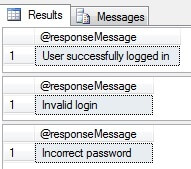
And we can test it as follows:
DECLARE@responseMessage nvarchar(250)
--Correct login and password
EXECdbo.uspLogin
@pLoginName = N'Admin',
@pPassword = N'123',
@responseMessage = @responseMessage OUTPUT
SELECT@responseMessage as N'@responseMessage'
--Incorrect login
EXECdbo.uspLogin
@pLoginName = N'Admin1',
@pPassword = N'123',
@responseMessage = @responseMessage OUTPUT
SELECT@responseMessage as N'@responseMessage'
--Incorrect password
EXECdbo.uspLogin
@pLoginName = N'Admin',
@pPassword = N'1234',
@responseMessage = @responseMessage OUTPUT
SELECT@responseMessage as N'@responseMessage'
Conclusion
The risk of cracking passwords decreases when you store passwords in an encrypted way in the database and use unique salts for those passwords. The SQL Server UNIQUEIDENTIFIER data type is a good candidate for a salt taking into consideration its uniqueness and randomness.
Next Steps
- Read more tips and articles:

Sergey Gigoyan (LinkedIn) is a Senior Technical Architect specializing in data and databases with more than 15 years of experience. Sergey focuses on modern data architectures, database design and development, performance tuning and optimization, high availability solutions, BI development and DW design. He has worked with SQL Server, Oracle, and PostgreSQL databases, as well as cloud-based data solutions (AWS and Azure). Sergey also has extensive experience with modern data stacks such as Snowflake and dbt.
Sergey’s experience spans various industries. He had the privilege of working with IT giants such as Oracle as a Principal Data Engineer and BlackBerry as well as innovative startups. He helped deliver complex database solutions and advanced data strategies.
Sergey is also the author of “Building a Successful Career in IT – How I Did It” where he provides actionable advice on thriving in the ever-evolving IT industry.
- MSSQLTips Awards: Champion (100+ tips) – 2024 | Author of the Year – 2020


Wow, how cool… Very good
To make the database password more secure in the event of a database hack, we can create several columns with the email address and password (the email address should also be encrypted in my opinion), e.g.: columns from email_1 to email_7 and columns from password_1 to password_7. The password can be stored in one of the email columns and the email address in one of the password columns. In the remaining six we can store an encrypted random string of characters. Secondly, when hashing, we can use various hashing functions, e.g. our password = $password,
$password = hash(‘sha384’, $password);
$password = hash(‘sha256’, $password);
$password = hash(‘sha512’, $password);
$password = hash(‘guest’, $password);
$h1 = hash(‘md5’, $password);
$h2 = hash(‘md5’, $h1);
$h3 = hash(‘md5’, $h2);
$h4 = hash(‘md5’, $h3);
$hash_db = $h1 . $h2 . $h3 . $h4;
We store $hash_db in the database. The hash is 128 characters long, it looks like the sha512 algorithm is used.