Problem
Differential backups play an important role in the backup policy for SQL Server, especially for large databases. Sometimes we observe that differential backups take a lot of time and it is almost equal in time and size as the full backup. We cannot determine how much data has changed since the last full backup to determine if we should take a Full or Differential backup. In this tip, we will see how SQL Server 2017 solves this problem.
Solution
Before we start with the changes in SQL Server 2017 for differential backups, let me first give a brief introduction to SQL Server pages and extent allocations. This will help with understanding how differential backups work.
- Page: A page is the most basic element of storage in SQL Server. The size of a page is 8KB.
- Extent: An extent is a set of 8 contiguous data pages, so it is 8 * 8KB = 64KB in size.
SQL Server Differential Backup Background
Differential backups backup all extents that have changed since the last full backup. Each time any data has changed a flag is turned on to let SQL Server know that if a “Differential” backup is created it should include the data from this extent. When a “Full” backup is taken these flags are reset. The Differential Change Map (DCM) is used by SQL Server to backup only these extents during a differential backup. If the bit for a particular extent is on in its DCM page, at least one page within that extent has changed since the last full backup.
Creating a SQL Server Differential Backup
Let’s create a database and table then insert some records into the table.
 CREATE DATABASE MSSQLTIPS
GO
USE MSSQLTIPS
GO
CREATE TABLE [dbo].[TestTable]
   (
   [ID] [int] NULL,
   [Name] [nchar](10) NULL
   ) ON [PRIMARY]
GO
INSERT INTO TestTable VALUES(1,'A')
INSERT INTO TestTable VALUES(2,'B')
GO
Now let’s perform a full backup, so we can then create differential backups.
 BACKUP DATABASE [MSSQLTIPS]
TO DISK = N'C:\Program Files\Microsoft SQL Server\MSSQL14.SQLVNEXT\MSSQL\Backup\MSSQLTIPS.bak'
WITH NOFORMAT, NOINIT, NAME = N'MSSQLTIPS-Full Database Backup', SKIP, NOREWIND, NOUNLOAD, STATS = 10
GO

Now we will enable trace flag 3604 and review the DBCC page output to see what extents have changed. If we run sp_helpdb we can see the database id or dbid for all databases. In our case, the MSSQLTIPS database id is 5, which we will use for DBCC PAGE. Here is more information about DBCC PAGE and the parameters.
So for the DBCC PAGE command we are looking at:
- database id 5
- file number 1
- page number 6 – this will show us the DCM page
- with output option 3.
 DBCC TRACEON(3604)--after full backup
DBCC PAGE(5,1,6,3)
In the output, we can see some of the extents show as CHANGED. We will not find a time when all extents have a status as NOT CHANGED since SQL Server writes backup history and other information in the extents.

Now let’s apply a few changes (inserts) to the table.
 INSERT INTO TestTable VALUES(3,'C')
GO 100000
Let’s review the DBCC page output again.

Due to our insert operation after the Full backup, there are many new extents allocated showing a status as “Changed.”
Let’s take the first differential backup now.
 BACKUP DATABASE [MSSQLTIPS]
TO DISK = N'C:\Program Files\Microsoft SQL Server\MSSQL14.SQLVNEXT\MSSQL\Backup\MSSQL_Diff.bak'
WITH DIFFERENTIAL, NOFORMAT, NOINIT, NAME = N'MSSQLTIPS-Full Database Backup', SKIP, NOREWIND,
NOUNLOAD, STATS = 10
GO
We can check the differential backup LSN with the below query. The differential backup LSN changes when we execute a full backup.
 SELECT
   d.name as DatabaseName,
   mf.name as DatabaseFileName,
   mf.differential_base_lsn,
   mf.differential_base_guid,
   mf.differential_base_time
FROM sys.master_files mf
JOIN sys.databases d on mf.database_id = d.database_id
WHERE mf.database_id = 5 -- just use the MSSQLTIPS databases.
AND mf.file_id <> '2' -- Exclude log files.

Now we will make more changes to the data in the database and look at the DBCC page output again.
 UPDATE TestTable SET [name]='CCCC' WHERE [ID]=3
GO
DBCC TRACEON(3604)
GO
DBCC PAGE(5,1,6,3)
Below is the DBCC page output which shows new extents as well as some old extents with a status of “Changed”.

The differential backup LSN is still the same as shown below and in the image above.

As we have seen, we can get information from the DCM pages to see which database pages have changed for the differential backup. However it is difficult to use the information in automated scripts for earlier versions of SQL Server.
Changes in SQL Server 2017 Differential Backups
The SQL Server 2017 DMV sys.dm_db_file_space_usage has a new field i.e. modified_extent_page_count. This new field tells us how many pages were changed since the last full backup. The modified page count can be used to track differential changes in the database since the last full backup to decide if a differential backup is beneficial.
Now let’s run the DMV to see how many pages have been modified in our example.
 SELECT
   file_id,total_page_count,
   modified_extent_page_count
FROM sys.dm_db_file_space_usage

We see out of total page count of 1024 that 592 have been modified.
We can also include the percentage change to the database as shown below.
 SELECT
   file_id,total_page_count,
   modified_extent_page_count,
   (100 * modified_extent_page_count)/total_page_count [percent_changed]
FROM sys.dm_db_file_space_usage

Now let’s perform some more changes to the database.
 UPDATE TestTable SET [name]='EEE' WHERE [ID]=3
UPDATE TestTable SET [name]='EEE' WHERE [ID]=1
UPDATE TestTable SET [name]='FFF' WHERE [ID]=2
INSERT INTO TestTable VALUES(4,'F')
GO 10000

Now we can see that the database changes are 61%. We can use this information to see if we want a Differential backup or a Full database backup. Previously we didn’t have this much control over the differential backup.
Now we can check this and determine if it makes sense to create a differential backup. For a large database it is actually very beneficial where we sometimes observe that a differential backup is taking very long or almost as much time as a full backup.
Suppose I want to take a full database backup if changes are more than 50% otherwise a differential backup. We can use the following query.
 CREATE or ALTER PROCEDURE DBbackup @threshold int
as
DECLARE @DBchanges Numeric(10,0)
SELECT @DBchanges = ( 100 * Sum(modified_extent_page_count) / Sum(total_page_count) )
FROM sys.dm_db_file_space_usage
IF @DBchanges > @threshold
  BEGIN
     --Threshold exceeded, take a full backup
     Print 'Threshold exceeded, take a full backup'
     BACKUP DATABASE MSSQLTIPS TO DISK='C:\mssqltips\Linux\Differential Backup Changes SQL Server 2017\MSSQLTIPS.bak'
  END
  ELSE
  BEGIN
      -- Threshold not exceeded, take a full backup , do a differential backup
      Print 'Threshold not exceeded, take a Differential backup'
      BACKUP DATABASE MSSQLTIPS TO DISK='C:\mssqltips\Linux\Differential Backup Changes SQL Server 2017\MSSQLTIPS_Diff.bak'
      WITH differential
   END

To run the stored procedure, pass the threshold value. A value greater than this will create a Full backup otherwise a Differential backup will be created.
EXEC DBbackup @threshold= 50
For our database, a full backup is created since the percentage is 61% as shown in the above screenshot.

After a full backup the DCM is reset, so if we observe the output of the DMV again we can see the DCM value is now down to 3%. Please note that after every backup, SQL Server stores information about that backup in the database which causes some pages to change right away, so we will never see a completely empty DCM.

Since we have a percentage changed of only 3 which below the threshold we are using, the stored procedure should execute a differential backup.
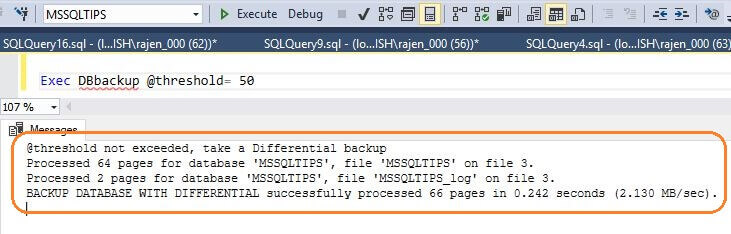
This is a very interesting and useful enhancement to SQL Server differential backups. Explore this and make use of it in your environment once SQL Server 2017 is launched.
Next Steps
- Read more about differential backup SQL Server
- Get overview of SQL Server backups
- Explore the SQL Server 2017 preview
- Read SQL Server vNext Linux Tips

Hi! I am Rajendra Gupta, Database Specialist and Architect, helping organizations implement Microsoft SQL Server, Azure, Couchbase, AWS solutions fast and efficiently, fix related issues, and Performance Tuning with over 14 years of experience.
I am the author of the book “DP-300 Administering Relational Database on Microsoft Azure.” I can be reached at: Rajendra.gupta16@gmail.com for any consulting help.
- MSSQLTips Awards:
- Author of the Year – 2022 | Author Contender – 2021/2023/2024 | Champion Award (100+ tips) – 2020
Hi, i have SQL Server 2017 Enterprise Edition in Allways On config.
I have a scheduled job every day to make a full backup at 3am and differential backups every hour.
In one database, the diff backup is almost the same size (27gb) as the full backup, even if a full backup has been made the same day an hour before.
I have been making tests making a full backup and immediatly making the differential backup and the size of the backups remains the same.
This only happens with one database, the other databases diff backups are small comparing to the full backup.