Problem
Long PDF documents of 20, 30, or more pages can be time-consuming to read, examine, or extract important points. The latest large language models (LLM) support summarization from their chat interface. However, longer documents must be fed into the model in chunks due to token limit constraints. Additionally, the summary may take several minutes to generate. How do you design a document summarization pipeline customized for such documents?
Solution
Using the Azure OpenAI API and a custom Python class, we can design a custom summarization pipeline that takes a PDF file and produces a summary of it. We can trigger the pipeline from an upstream data process or use it as a standalone piece of software.
Project Namespace
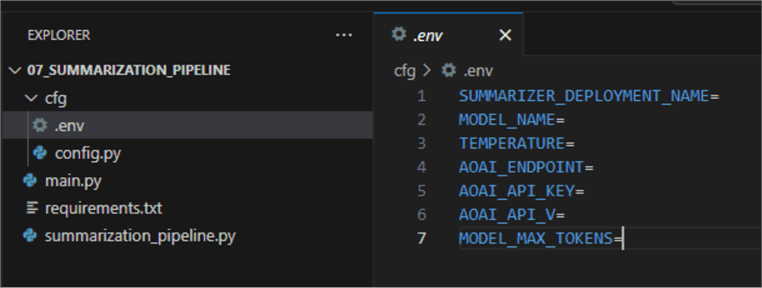
Let us begin by creating a project namespace and the required files. In the root project folder, create:
Subfolder cfg with two files:
- .env: contains environment variables:
- config.py: contains a class that will read from the environment variables file:
01: import os
02: from attrs import define, field
03: from dotenv import load_dotenv
04:
05: load_dotenv()
06:
07: @define
08: class AzureOpenAIConfig:
09:     SUMMARIZER_DEPLOYMENT_NAME: str = field(default=os.getenv('SUMMARIZER_DEPLOYMENT_NAME')) # summarizer'
10:     MODEL_NAME: str = field(default=os.getenv('MODEL_NAME')) # 'gpt-4-32k'
11:     TEMPERATURE: float = field(default=os.getenv('TEMPERATURE')) # 0.3
12:     AOAI_ENDPOINT: str = field(default=os.getenv('AOAI_ENDPOINT'))
13:     AOAI_API_KEY: str = field(default=os.getenv('AOAI_API_KEY'))
14:     AOAI_API_V: str = field(default=os.getenv('AOAI_API_V'))
15:     MODEL_MAX_TOKENS: int = field(default=os.getenv('MODEL_MAX_TOKENS'))

- file main.py: from where we will invoke our pipeline.
- file summarization_pipeline.py: contains the core summarization logic.
- Do not forget the requirements.txt file. Copy and paste the following lines into it:
attrs==23.2.0
langchain==0.1.16
langchain-community==0.0.34
langchain-core==0.1.45
langchain-openai==0.1.3
langchain-text-splitters==0.0.1
langsmith==0.1.50
pdfplumber==0.11.0
python-dotenv==1.0.1
tiktoken==0.6.0
Next, create the virtual environment. Hit Ctrl+Shift+P, select Python: Create environment, select venv, then your global Python interpreter. Check the requirements file for installing the required packages:
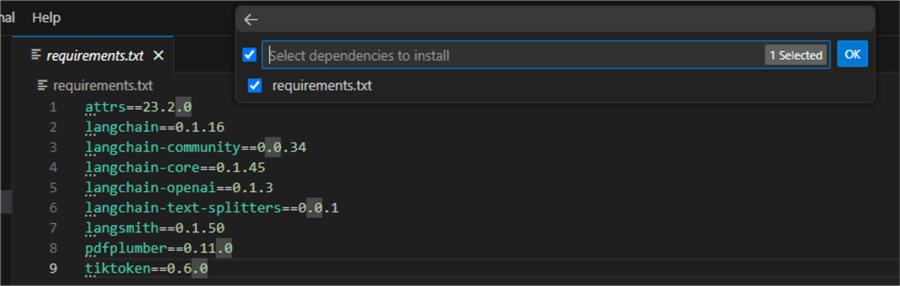
Wait until the VS code has been created and selected your environment.
Summarization Pipeline
Let us now focus on the core logic for solving the problem. Open the file summarization_pipeline.py and paste the following code:
001: import logging
002: from io import BytesIO
003: from time import monotonic
004: import pdfplumber
005: import textwrap
006: import tiktoken as t
007: from langchain.chains.summarize import load_summarize_chain
008: from langchain.docstore.document import Document
009: from langchain.prompts import PromptTemplate
010: from langchain.text_splitter import RecursiveCharacterTextSplitter
011: from langchain_openai import AzureChatOpenAI
012:
013: class SummaryGenerator:
014:
015:     def __init__(self, aoai_deployment: str, aoai_model_name: str, model_temp: float,
016:                  aoai_endpoint: str, aoai_api_key: str, aoai_api_v: str, max_tokens: int):
017:         self.llm = AzureChatOpenAI(deployment_name=aoai_deployment,
018:                                     model_name=aoai_model_name,
019:                                     temperature=model_temp,
020:                                     azure_endpoint=aoai_endpoint,
021:                                     api_key=aoai_api_key,
022:                                     api_version=aoai_api_v)
023:         self.max_tokens = max_tokens
024:         self.chunk_size_tokens = max_tokens // 4
025:         self.chunk_overlap_size_tokens = int(0.1 * self.chunk_size_tokens)
026:         self.prompt_template = """Write a comprehensive bullet point summary of the following.
027:         {text}
028:
029:         SUMMARY IN BULLET POINTS:"""
030:
031:     @staticmethod
032:     def extract_text_from_pdf(pdf: BytesIO) -> str:
033:         """Extracts plain text from df file.
034:         Args: pdf_path (string): path to the file.
035:         Returns: string: single plain string containing the text.
036:         """
037:         try:
038:             with pdfplumber.open(pdf) as pdf:
039:                 text = ''
040:                 for page in pdf.pages:
041:                     text += page.extract_text() or ''
042:                     table = page.extract_table(table_settings={'min_words_horizontal': 16,
043:                                                             'horizontal_strategy': 'text'})
044:                     if table:
045:                         text += '\n'.join(
046:                             ' '.join(cell for cell in row if cell)
047:                             for row in table if row
048:                         )
049:             return text.encode('utf-8', errors='ignore').decode('utf-8')
050:         except Exception as e:
051:             logging.error(f'Error extracting text from PDF: {e}')
052:             return False
053:
054:     def extract_summary_from_text(self,
055:                                   parsed_text_from_pdf: str) -> textwrap.TextWrapper:
056:         """Generates a bullet point summary from the extracted text."""
057:         encoding = t.get_encoding('cl100k_base')
058:         num_tokens = len(encoding.encode(parsed_text_from_pdf))
059:
060:         prompt = PromptTemplate(template=self.prompt_template,
061:                                             input_variables=['text'])
062:
063:         if num_tokens < self.max_tokens:
064:             chain = load_summarize_chain(self.llm,
065:                                         chain_type="stuff",
066:                                         prompt=prompt,
067:                                         verbose=False)
068:
069:         else:
070:             chain = load_summarize_chain(self.llm,
071:                                         chain_type="map_reduce",
072:                                         map_prompt=prompt,
073:                                         combine_prompt=prompt,
074:                                         verbose=False)
075:             self.chunk_size_tokens*=2
076:             self.chunk_overlap_size_tokens*=2
077:
078:         try:
079:             text_splitter = RecursiveCharacterTextSplitter.from_tiktoken_encoder(model_name='gpt-4',
080:                                                                                 chunk_size=self.chunk_size_tokens,
081:                                                                                 chunk_overlap=self.chunk_overlap_size_tokens)
082:             texts = text_splitter.split_text(parsed_text_from_pdf)
083:             docs = [Document(page_content=t) for t in texts]
084:
085:             extra = {'custom_dimensions': {'chunks': len(docs), 'tokens': num_tokens}}
086:             logging.info(f"Successfuly split text. Length: {extra['custom_dimensions']['chunks']} chunks; {extra['custom_dimensions']['tokens']} tokens.",
087:                           extra=extra)
088:             start_time = monotonic()
089:             output_summary = chain.invoke(docs)
090:             logging.info(f'Summary extracted successuflly. Run time {int(monotonic() - start_time)}s.')
091:         except Exception as e:
092:             logging.error(f'Failed to extract summary.')
093:             return False
094:
095:         wrapped_text = textwrap.fill(output_summary['output_text'],
096:                                     width=100,
097:                                     break_long_words=False,
098:                                     replace_whitespace=False)
099:
100:         return wrapped_text

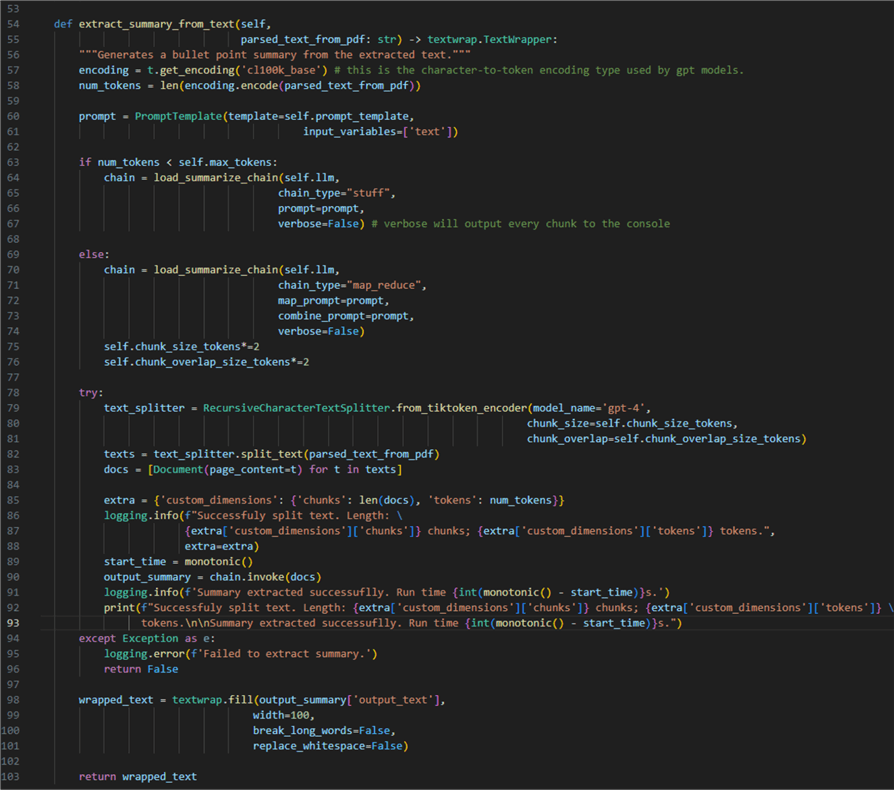
Let us break it down:
- 01 – 11: Import the required external modules.
- 13: Declare a new class
SummaryGenerator. - 15 – 29: Define an initialize method. To initialize an instance of the class, we need to pass the listed variables. Their values will later come from an instance of the
AzureOpenAIConfigclass. - 17 – 22: Make an instance of Open AI LLM using the variables mentioned earlier.
- 23 – 29: The hyperparameters for document summarization:
- 23: Maximum number of tokens. This value will define the threshold beyond which we must split the documents into chunks.
- 24: Chunk size in tokens. This value defines how big the individual chunks are. Set to depend on the max token value.
- 25: Chunk overlap size in tokens. This value defines the overlap between the adjacent chunks. Set to depend on the chunk size.
- 26 – 29: Prompt template. Instructs the LLM on how we want the summary to be extracted.
- 31 – 52: Declare a static method (one that does not require an instance of its parent class). This method takes care of one task: extracting text from a PDF file using the
pdfplumberlibrary. There are other libraries out there (e.g., PyPDF), but I have found this one to be dependable and straightforward to work with. Essentially:- 38: Open a new context manager using the binary representation of the PDF file.
- 40: For every parsed page, add the page to a string variable.
- 42 – 44: In case
pdfplumberfinds a table on a page, extract the table, but only if it has 16 words across horizontal rows, thus ensuring we skip tiny reference tables with low information value. - 45: Then append the content of the table to the text of the current page.
- 49: Finally, return the text as utf-8 decoded string.
- 54: Declare an instance method (one that requires an instance of its parent class). This method takes care of defining and running the summarization pipeline using the previously parsed text as input.
- 57 and 58: Using the GPT models encoder, we can find out how long our text is in tokens.
- 60: Define an instance of
PromptTemplateto be used as instruction for the model. - 63 – 67: If the document is shorter than the token threshold, use the
stuffchain type. This type of chain feeds the whole document to the LLM in a single round or API call. - 69 – 76: If the document is beyond the token threshold, we will use a
map_reducechain type. This type of chain feeds document chunks one by one to the model. In such a case, we also increase the chunk size and overlap so we get longer chunks. How you do this will affect the quality of the summary. Therefore, I consider the chunk size to be a hyperparameter with values that depend on the type of target documents. - 78 – 93: Run the summarization pipeline:
- 79 – 82: Instantiate a Langchain
RecursiveCharacterTextSplitter, which needs to know the type of model used (gpt-4) and the criteria for splitting the input (chunk size and overlap). - 82 and 83: After splitting the text, we append every chunk of type
Documentto a list. - 85 – 90: Using the logging package, we can log some useful info, such as how many chunks we got, what was the length of the document, and the time it took to generate the summary.
- 79 – 82: Instantiate a Langchain
- 91: Throw an exception in case the pipeline fails.
- 95: Return the output as wrapped text, a shorthand for
"\n".join(wrap(text, ...)). - 100: Return the text.
Implementing the Pipeline
Open the empty file main.py and paste the following code:
01: from summarization_pipeline import SummaryGenerator
02: from cfg.config import AzureOpenAIConfig
03: from io import BytesIO
04: import os
05:
06: aoai_cfg = AzureOpenAIConfig()
07:
08: sm = SummaryGenerator(aoai_cfg.SUMMARIZER_DEPLOYMENT_NAME,
08:                         aoai_cfg.MODEL_NAME,
10:                         aoai_cfg.TEMPERATURE,
11:                         aoai_cfg.AOAI_ENDPOINT,
12:                         aoai_cfg.AOAI_API_KEY,
13:                         aoai_cfg.AOAI_API_V,
14:                         int(aoai_cfg.MODEL_MAX_TOKENS))
15:
16: path_to_file = r'..\..\data\SQL_Server_Mission_Critical_Performance_TDM_White_Paper.pdf'
17: file_name = os.path.basename(path_to_file)
18:
19: with open(path_to_file, "rb") as fh:
20:     data = BytesIO(fh.read())
21:     text = SummaryGenerator.extract_text_from_pdf(data)
22:     extracted_summary = sm.extract_summary_from_text(text)
23:
24:     with open(rf'..\..\data\{file_name}', 'w') as f:
25:         f.write(extracted_summary)
26:     print(extracted_summary)

Here is what is happening here:
- 01 – 04: Import the custom
SummaryGeneratorclass, theconfigclass, and other required modules. - 06: Make an instance of the config class so we can use its member-attributes.
- 08 – 15: Make an instance of the
SummaryGeneratorclass. - 16: Reference a target file for summarization from a subfolder in the project namespace.
- 19: Open a context manager for the target file in binary mode.
- 20: Read the file into a
BytesIOobject. - 21: Extract text content from the file.
- 22: Extract the summary from the file.
- 24 – 26: Finally, save the summary to a TXT file and print it in the console.
Testing the Pipeline
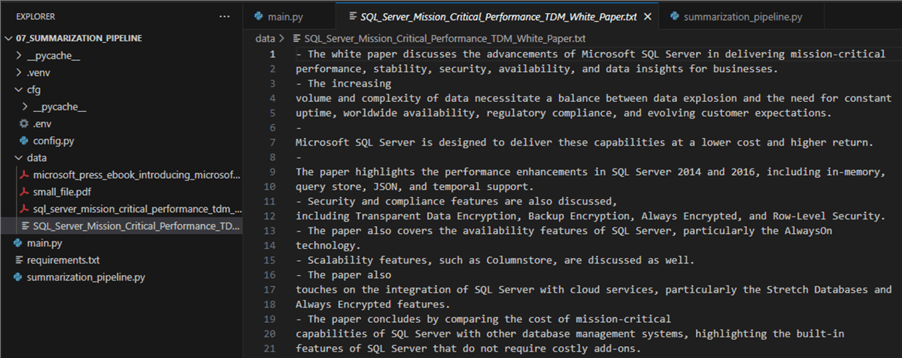
I have the file SQL_Server_Mission_Critical_Performance_TDM_White_Paper.pdf. If you google for it, you will find it in one of Microsoft’s download sections. Let us use it as a source file for our pipeline:
- The program split the source text into four chunks of 11 662 tokens in total length. Here is the output after the pipeline needed 19 seconds to summarize the text:

- Additionally, the program saved the output in the data directory:
Conclusion
Using the most up-to-date technologies, GPT-4 and Python Langchain, we designed a document summarization pipeline capable of summarizing long PDF documents. The code presented here can be used in chatbots, line of business applications, or automated with an Azure function.
Next Steps
- Langchain chains
- Langchain recursive splitter
- Large Language Models with Azure AI Search and Python for OpenAI RAG
- Build Chatbot with Large Language Model (LLM) and Azure SQL Database

Hristo Hristov is a seasoned data professional with 10+ years of experience spanning the intersection of data engineering and smart manufacturing solutions. Since 2017, he has specialized in implementing advanced analytics solutions for bridging the IT/OT gap.
A technical writer with over 80 published articles on data and AI technologies, Python development, and cloud solutions. Passionate about transforming complex data into business value through innovative applications of Azure Data Platform, Python, IoT solutions, databases, and other cloud technologies.
Currently applying Industry 4.0 best practices, focusing on IoT connectivity, and implementing data and AI systems in manufacturing. Hristo holds a degree in Data Science and several Microsoft certifications covering SQL Server, Power BI, and related technologies.
- MSSQLTips Awards
- Achiever Award (75+ tips) – 2026
- Rookie of the Year – 2021
- Author Contender – 2022/2023/2024/2025