Problem
Data can be in the form of text, numbers, multimedia, models, programming languages, and other special formats depending on the field. Also, information may be analog or digital, as well as quantitative, nominal, ordinal, or continuous. And now, in this digital era, the challenge is: how should we store and consume data to gain value from it? Let’s take a look at different database management systems.
Solution
Databases are the heart of digital life. They are the structured locations to store, manage, and retrieve data/information. However, to support the different data structures and use cases, multiple databases have been created.
We will cover the following:
- The ACID Model in Databases
- A Taxonomy of Database Systems
- Relational/SQL Databases
- NoSQL Database
- Key-Value Store
- Document Databases
- Graph Database
- Wide-Column Stores
- In-Memory Databases
- Time-Series Databases
- Object-Oriented Databases
- Text Search Databases
- Blob Datastore
- Spatial Databases
- Vector Databases
Database – The Digital Backbone
Databases are used for keeping the data uniform so that it can be readily accessed and changed by the users and applications. Databases are indispensable for any business and data science. Specifically, data science projects depend on using big data to draw conclusions, predict, or make a decision.
Data gets larger and more complex over time and would be inefficient and error-prone if databases did not manage it. They allow data to be stored in a controlled environment with integrity, security, and availability.
Consider, for example, Walmart (a retailer). They track day/hour/week/monthly sales, exchanges, inventory, and supplier reports. In this scenario, the database becomes the site for the business. It is a data-driven business decision support platform via data-based insight by predicting trends, forecasting demand, estimating stock, delivering better customer experience, etc.
The ACID Model in Databases
Database Management System (DBMS) ACID property is the set of four main properties that make a transaction in DBMS consistent and reliable. These properties ensure that a list of database calls, all part of a transaction, keep the database current even if they make a mistake. A transaction is the one logical block of work that retrieves and possibly updates a database. Transactions read/write to data.

ACID is an acronym for:
- Atomicity – Also known as the “All or Nothing Rule.” This makes database transactions one object. Each or none of them is written to the database in case there is any type of failure during any part of the transaction. It involves two operations:
- Abort: If a transaction fails, there is nothing to do on the database.
- Commit: Upon committing a transaction, it is rendered in front of you.
- Consistency – Be sure the database is in stable state and then out of stable state after a transaction is completed. Databases have to satisfy some set of integrity constraints before and after transactions.
- Isolation – This attribute will prevent multiple transactions at the same time from conflicting. Separation doesn’t get in the way of trades and keeps them transparent.
- Durability – This feature means that after a transaction is performed, it is irreversible on the database. Data can still be downloaded even when the survivor system crashes or the power cuts.
Pros/Cons of Following ACID Fundamentals
Advantages
- Data Uniformity – It is related to more consistency and isolation.
- Data Integrity – Includes both consistency and durability.
- Concurrency Control – When we have two transactions together, the effects of one are not visible to other concurrent transactions until the first transaction is fully committed.
- Recovery – Salvaging data in case of failure through log files.
Disadvantages
- Performance: Added performance due to processing requirements.
- Scalability: Problems in big distributed systems, where more than one transaction is running at once.
- Complexity: Makes the system even more complicated and takes massive resources and expertise to build.
A Taxonomy of Database Systems
Databases are the heart of modern applications. Databases are the basis of all applications that can store and manage enormous amounts of data. The type of database depends on the data, data volume, special case, and use-case needs. It’s a question of structure, access, scalability, consistency, and performance when deciding which database to select.
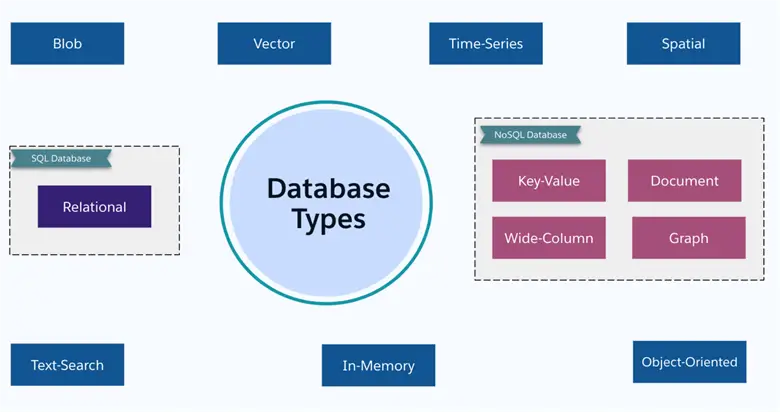
Databases of various kinds serve different data structures and applications. Here are the most popular types:
- Relational/SQL Database: Having structured, support relationships in tables using primary, foreign keys.
- NoSQL: Supports unstructured or semi-structured data. It means supporting flexible data models.
- Key-Value Stores
- Document Databases
- Wide-Column Stores
- Graph Databases
- Other Database Category
- Object Oriented Databases
- Time-Series Databases
- Blob Databases
- Spatial Databases
- Vector Databases
- Text Search
- In-Memory
Database selection is dependent on several variables:
- Data Pipeline: How clean is your data?
- Query Styles: What types of queries are you going to run?
- Scalability: How many records are you going to store, and how fast will they grow?
- Speed: How fast do you want your system to be — how long is the latency?
- Cost: How much hardware, software, and maintenance would you like to pay?
Relational/SQL Databases

For more standard business applications, you need structured data that is easy to map into tables with predefined schemas. They are called relational because by joining two or more tables, related data becomes flexible.
It also maintains ACID attributes. This makes database updates trustworthy and predictable.
With SQL databases, the relational model is the concept that helps to manage data as structured in connected tables. This is consistent in the relational model with two kinds of keys:
- Primary keys: Uniquely identify each record.
- Foreign keys: Responsible for forming relations between tables.
And SQL databases have schemas and tables:
- Schema: The database structure, like tables, fields, data type, values, and relationships.
- Tables: The simplest component of a database, and they represent entities (customers, transactions, etc.) with rows having records for each entity (customer) and columns having properties of the entity (customer name, email).
SQL gives us an inherited command line to configure, query, update, and manipulate RDBMS data.
Key SQL Operations
- SELECT (querying data): Select CustId, Name, Age, Address From Customer
- INSERT (adding new records): Insert Into Customer (CustId, Name, Age, Address) Values (‘1001’, ‘Shekhar’, ‘45’, ‘Tampa’)
- UPDATE (modifying existing records): Update Customer Set Address = ‘New Jersey’ Where CustId = ‘1001’
- DELETE (removing records): Delete From Customer Where CustId = ‘1001’
In a database table, data is stored in rows and columns in a structured way. Rows hold a record, and columns hold one property of the record. These data are accessible using Structured Query Language (SQL).
Features
- It follows ACID properties
- Uses SQL to interact with relational tables and other database objects
- Data is stored in a structured way. Tables having rows store records and columns represent attributes
- Maintains data integrity with the help of Primary and Foreign Keys constraints.
Best Fit
Relational databases come in handy when we need:
- High consistency – Seeing the same data at all times for all users.
- Complex queries – Joining data across tables to learn.
- ACID security – Maintaining scalability in transaction processing on critical applications.
Relational databases are not good for Unstructured data. Dealing with information that can’t be neatly sorted into a table (e.g., social feeds, sensors). These databases are vertically scalable, but are unsuitable for horizontally scaling your application over multiple servers.
Use Cases
- Banks and Financial Services – Manage accounts, transactions, and user data with ACID properties guaranteeing the stability and stability of the financial transactions.
- Online Sales – Catalogue, orders, payments, advanced query, and payments.
- Enterprise Applications – Customer, stock, employee data, and financial records, where integrity and correlation are important.
NoSQL Database
Legacy relational databases can’t handle the immense amounts of unstructured and semi-structured data common in the big data environment. NoSQL databases are an easier and more scalable option than relational databases.
They are used with unstructured or semi-structured data, not bound to any single schema, i.e., we don’t need to create an encapsulated format for data such as JSON, key value, or graphs. NoSQL databases have the ability to scale over multiple servers and clusters. So, it’s ideal for data storage in distributed systems. They cache different types of data, scale well with high data volumes, and split across multiple servers.
NoSQL databases use dynamic schemas and data models depending on your application requirements. Fields are not the same across multiple records of the same database.
Although NoSQL databases focus on flexibility and scalability, they tend to remove some of the ACID features of relational databases.
Features
- Horizontal scalability and elasticity.
- Automatic sharding and load balancing.
- Schema flexibility.
- Handling unstructured and semi-structured data types.
Best Fit
NoSQL databases are useful when applications need:
- Handle larger data sets – Provided scalability in the form of horizontal scaling and elasticity. This is what makes them ideal for workloads that are increasing or fluctuating.
- Data model needs to be flexible – NoSQL Database schema is flexible to handle unstructured and semi-structured as well
- Performance and availability – These databases support distributed architectures, meaning databases are distributed to two or more servers. It makes it highly available and fault-tolerant.
Use Cases
- Big Data Applications – It is useful in storing large amounts of content like text, documents, images, and videos. Analytics can be run.
- Devices (IOT-Internet of Things) – It can store huge sensor data from connected devices and analysis can be done on those data.
- Real-Time Analytics – Streams of data can be stored in these databases. Then it can be processed and analysts can perform analytics on those data.
Key-Value Store

They are NoSQL databases in which data are stored in the form of key-value pairs. It enables quick search of values by key. It has excellent scalability, availability, and throughput.
These databases are not ideal for a service with complex queries, relationships, or high consistency guarantees.
Features
- Key-value pairs type of data storage method.
- Key lookup of data which results in fast access.
- Can be used where caching and session storage is required.
Best Fit
These Key-Value Store databases are good when you need:
- Data Caching – Storing frequently accessed data in memory for faster retrieval.
- Session Management – Maintaining state in response across multiple requests by storing session information.
- Stacks – Restoring and sorting high scores or stats.
- Stream-Based Analytics – Analyzing time-series data and storing it.
- Content Delivery Networks (CDNs) – Storing and serving static content.
Use Cases
- Real-time Analytics/Event Processing/Message Queue – Key-value stores store and read the data instantly for real-time analytics, event processing, or messaging queues.
- Storage of Session – Storing session information like user profile, cart, or authentication tokens in an application.
- Caching – With caching, we can accelerate web applications. This can be done by storing the information that is most frequently read in memory so that it’s available at any time.
Document Databases

These databases are of NoSQL type. It stores, processes, and reads documents. They store data in semi-structured forms like JSON, XML, or BSON. So, they are less constrained in their schema than the classic relational databases.
They are useful for handling complex, hierarchical data and support dynamic schemas. The most common applications where they are employed include content management systems, e-commerce platforms, and real-time applications.
These databases are an ideal choice for applications that need to model the data dynamically, scale, and handle complex data structures.
Features
- Fast read and write performance.
- Store data in document-like structure.
- Document-oriented BSON format.
- Schema less or no schema design.
- Easily changeable data model.
- Ideal for Content Management System.
- Sharding horizontal scaling.
Best Fit
- To store and access semi-structured or unstructured hierarchical data.
- For applications that deal with data structures that can’t be adequately captured in a conventional relational database.
Use Cases
- Used as Content Management Systems – For articles, user accounts, and comments, all your content can be archived as a document.
- Web Stores – Store catalogs with multiple product attributes, user reviews, inventory numbers, and other product details to dynamically present product information.
- Analytics and IoT – Encapsulating multiple data structures from IoT devices and enabling real-time analytics on these data.
Graph Database

These databases are another NoSQL database designed for the storage, query, and orchestration of massive networks of related data. These databases store the relation between data objects. They store data as graphs – comprising nodes (things), edges (things’ relations), and properties (data of nodes and edges).
This type of database leverages the graph model to traverse, query, and process network data efficiently. They are especially helpful when relational data is involved—in social networks, fraud detection, or recommendation engines.
Features
- Data are stored using nodes and edges.
- Best fit for complex relational queries.
- Able to handle network and social graph analysis.
- Data relationships.
Best Fit
- Social Networks – Role-playing between individuals and institutions.
- Recommendation Systems – Offering recommendations or content in accordance with the user’s interests and behavior.
- Knowledge Graphs – Describe and query knowledge in an organized manner.
- Fraud Monitoring – Finding anomalies in financial or other data.
- Network Analysis – Understanding network structure and dynamics.
But, they aren’t necessarily suitable for basic data stores, relational databases, or massive data warehouses.
Use Cases
- Knowledge Graphs – Generating clouds of homogenous data for semantic searches, data access, and decision support.
- Social Media – Organizing profiles and friends, adding friends, and social graphs.
- Engines for Recommendation – Based on customer preferences, inventory, and prior purchases to provide customized product/content recommendations.
Wide-Column Stores

It has a distributed design that offers horizontal scaling and fault-tolerance by distributing data across multiple servers. They’re comfortable with large datasets. These NoSQL databases are ideal for large amounts of structured, but unstructured data. Wide-Column databases are best suited to store and query huge data on multiple machines.
They aggregate data into tables with dynamically-positioned columns. Thanks to their column model, extensibility model, and eventual consistency model, they are well-suited for high write throughput, real-time processing applications. They are mostly suitable for analytic and Online Analytical Processing (OLAP) platforms.
These types of databases are not good for use cases that need a complex join, strong consistency, or strict ACID transactions.
Features
- Distributed architecture offers horizontal scaling and fault tolerance.
- Wide-column format.
- Tuned for reading/writing columns of data.
- Data are compressed so that it can be accessed faster.
Best Fit
- Time-Series Data – Archiving and visualizing data that is periodically generated such as sensor data, stock prices, or website traffic.
- Log Files – Collecting and storing log files from apps and infrastructure.
- Analytics in Real-time – Dealing with and exploring data at the moment of production, like clickstream data or transaction data.
Use Cases
- IoT (Internet of Things) – Receives and shows information from sensors and other devices.
- Web Analytics/User Tracking – Collects and analyzes event information on a real-time basis, such as web analytics, user activity dashboards, and network analysis.
Other Database Category
- In-Memory Database – Stores data in main memory that is RAM (Random Access Memory). It is super fast.
- Time-Series Databases – Suited for storing and querying time-stamped types of data.
- Object Oriented Databases – Stores data as objects and objects have properties and methods.
- Text Search Database – Designed to store and perform searches on large amounts of semi-structured text data.
- Blob Databases – BLODB for images, audio, videos, documents, and unstructured data.
- Spatial Databases – Publish, host, and visualize spatial information (features of space).
- Vector Databases – Store and retrieve data represented as numerical vectors. Used for Machine Learning and AI.
In-Memory Databases

These in-memory databases are handy for a lot of real data such as analytics and trading platforms. Data for such databases are deposited directly on the computer’s main memory (RAM) instead of on disk. These types of databases are meant for a high-speed transactional, low-latency, real-time blockchain platform. They are engineered to provide fast and low-latency data access while omitting disk I/O.
In-memory databases work well for high-performance transactions, real-time processing, and very fast and low-latency data storage.
Features
- Data is stored in RAM which is helpful in speed.
- Able to do data processing very fast.
- Made for real-time data or analytics.
- Capability to support changing or persistent storage options.
Best Fit
- Analytics – Graphing and converting massive amounts of data in real-time, e.g. financial information, IoT sensor data, or visits.
- Caching – Preserving the data that is most used in memory to save the database load.
- Session Management – Store session information in memory for better performance and scalability.
Use Cases
- High-Quality Trading – Performing financial transactions in the second with low latency.
- Gaming – Managing sessions and state of the game in real-time for fast and smooth game play.
Time-Series Databases
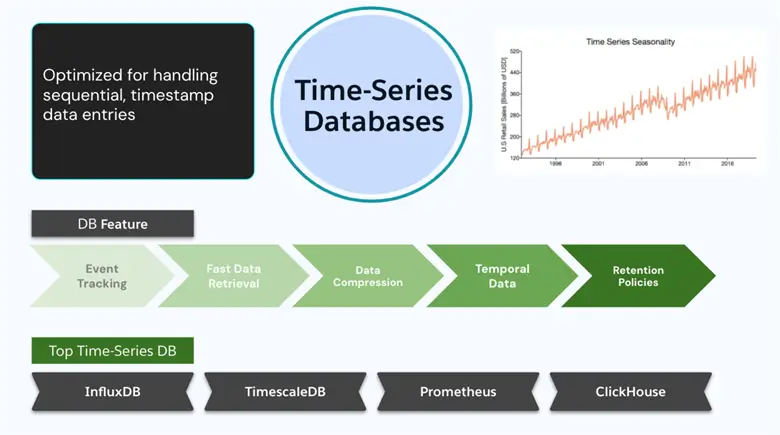
These types of databases were built for time-stamped data. They’re experts in big data ingestion and time-heavy querying of data points. These tables contain timestamped records, and store, fetch, and process timestamped/time-series data. Time-series databases are mostly deployed in time series creation and time series analysis tools like monitoring applications, sensor networks, financial markets, and IoT devices.
They provide performance, scale, and features needed to deal with time-series specialness.
Features
- Supports metrics and event tracking.
- Efficient data aggregation over time.
- Temporal data.
- Best for monitoring application logs.
Best Fit
- Time Queries – Supports advanced queries with time ranges, aggregations, and trends.
- Compression – Optimizes storage by resuming history.
- Retention Rules – Automatically enforces data retention in time or size.
- Rapid – Processes lots of data points quickly.
- Scalability – Responds to increasing volumes of data and queries.
Use Cases
- Financial Trading Platforms – Track stock prices, volume, and market data over time to use for trend and algorithm trading.
- Data Mining of Sensors/IoT – Taking data from sensors and IOT to make smart home, industrial automation, and environmental monitoring.
- Game Play Online – Keep sessions and the state of the game current in real-time for quick and smooth play.
- Performance Monitoring – IT/ network management, monitor system information (CPU, memory, traffic) over time, forecast capacity, and anomalies.
Object-Oriented Databases
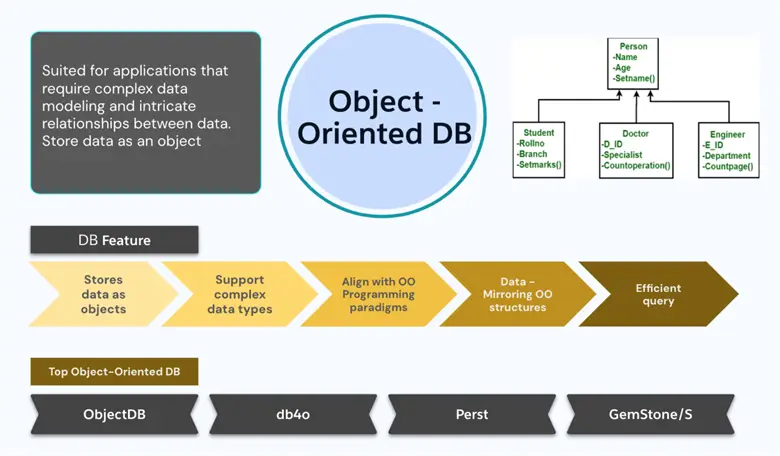
If you are dealing with object-oriented database (OODB), instead of a table, it will be an object with attributes and methods:
class student
{
char Name[20];
int roll_no;
----
----
public:
void search();
Void update();
}
Object databases are fantastic for those applications that require big data and object relationships. OODB is a data object storage and query database. These objects are an instance of classes and can hold data (attributes) and actions (methods), just like object-oriented languages like Java, C++, and Python.
By exposing objects directly in the database, OODBs help speed up development and provide a natural and better way to interact with big data structures and relationships.
Features
- Direct compatibility with object-oriented languages.
- High performance for object-oriented workloads.
- Good for big data models.
Best Fit
- Complex Data Modeling – OODBs can be used directly to represent complex data structures without normalization or the impact of impedance mismatches.
- Simple Queries – They are based on query languages that can work in relational object hierarchies.
- Lower Development Cost – Because OODBs conform to object-oriented programming styles, the development process can be simplified and the time to market reduced.
Bad Fit
- Ad-hoc Queries and Transactions. The relational database is probably better for small data structures and smaller queries. There’s also not enough adoption and community.
- Batch Queries and Transactions. A relational database might work better for the smaller data models and simple queries. Also, there is not much adoption and support.
Use Cases
- CAD/CAM Systems – Manages complex geometrical elements and relationships. Manages design data and engineering plans.
- GIS – Processes spatial information such as maps, features, and attributes. Performing spatial queries and analysis.
- Multimedia Databases – Stores images, audio, and video files. These have attributes like resolution, color, and date as metadata, which is stored as object-oriented.
Text Search Databases

Such databases are built to store and query massive volumes of textual information. They’re built for full-text search so you can easily search for the relevant content in a document, article, or other text.
These databases manage massive amounts of unstructured or semi-structured text and index it. They provide fast and scalable search and allow the user to search and extract the information required from massive quantities of documents, web pages, or any textual resource.
Features
- Full-text search
- Complex text queries
- Fuzzy search
- Semi-structured and unstructured data support
Best Fit
- Full-Text Indexing – Such databases index the text, so you can easily search for keywords and phrases.
- Relevance Ranking – They can also rank search results by relevance, making sure that the most relevant information is shown first.
- Fuzzy Search – They enable fuzzy search, meaning the matches can be very close, even if they are “misspelled” or “misspelled” is the search term.
- Stemming and Lemmatization – These algorithms optimize search results by inferring the word forms (run, running, ran).
- Stop Word Filtering – They can remove ordinary words (such as the, and, and of) to speed up searches.
Worst Fit
- Structured relational databases.
- Real-Time Transaction Processing (OLTP).
Use Cases
- Web Search Engines – Making search engines crawlable such as DuckDuckGo, Google, Bing, etc.
- Log Analysis – Useful in indexing and performing searches in huge log data (application/system logs). It can be useful for troubleshooting, analytics, and monitoring.
- Enterprise Search – Searching for internal documents, emails, and knowledge bases.
- Cloud Management Platforms (CMPS) – Finding specific content in document cloud storages.
Blob Datastore

Binary Large Object (Blob) data stores store, process, and query massive amounts of unstructured data, like images, audio, videos, and documents, in a modular, highly available, fast, and inexpensive way. These accommodate extremely large, messy data blocks that cannot be contained in a standard database schema.
Features
- Managing blocks of unstructured data
- Providing cost-efficient storage
Best Fit
- Media Storage and Delivery – Saves and distributes images to websites, applications, and other digital media.
- Archiving and Backup – Restoring data for compliance or historical purposes.
- Log File Management – Storing application logs and scaling incremental storage.
- Big Data Storage – Storing big amounts of data for analytics and machine learning.
Use Cases
- Backup and Archive – Provides cost-effective backup which can scale, archive, and store long-term data.
- Content Delivery Networks (CDNs) – Distributed large media items like videos and images.
Spatial Databases
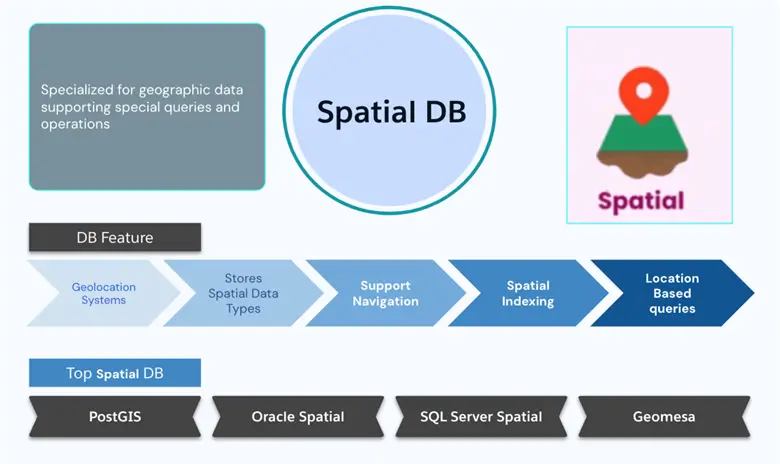
It’s a database engine that can store and process spatial information. They are based on classic database tools and features. It uses high-level spatial entities (points, lines, polygons, etc.) with attributes and relationships. Databases that are spatial in nature use high-performance indexing (R-trees or quadtrees) for fast spatial queries.
These types of databases are suitable for GPS and traffic monitoring. Its main use is in geo-applications such as route maps.
Features
- Spatial data types like points, lines, and polygon.
- Help in accelerating spatial queries using indexing spatial data based on spatial relationships. Some of the common spatial indexes include R-trees, Quadtrees, and Grid Indexes.
- Spatial analysis to perform tasks like buffer analysis, overlay analysis, and network analysis.
Best Fit
- City Development and Ecological Tracking – Tracking of use, traffic, and density.
- Communications and Utilities – Creating and operating telecoms and utility networks.
- Disaster Tracking – Monitoring and responding to disasters and emergencies.
- Cartography and Visualization – Create maps and visualizations of geographic entities (GIS).
Use Cases
- Location Based Services (LBS) – Offer services based on the location of the user.
- Logistics and Transportation – Used to map routes, track traffic, and monitor traffic.
- Geographic Information System (GIS) – To build, extract, and store data of planet points for making a town, etc.
Vector Databases

Vector databases are programs developed for AI and machine learning (ML) algorithms. Data from data sources are accepted and stored as numbers vectors. These vectors (often computed by ML) are intended to contain semantic and syntactic content of a text, image, or data. After vector databases store and query those vectors, similarity search and recommendation engines emerge.
Vector databases focus on the management of vector embeddings that represent data such as text, images, or audio through numerical formats. Vector databases perform exceptionally well in executing similarity searches and nearest neighbor tasks to enable rapid discovery of objects that closely resemble a specific query vector. Due to this capability vector databases become perfect choices for applications including image recognition recommendation engines and natural language processing. The advanced indexing systems used by vector databases facilitate fast retrieval of similar vectors under varied distance metrics.
Features
- Vector / High Dimensional Vector – Stores high-dimensional vectors with efficiency.
- Similarity Search – Analyzes in a single call the vectors most similar to the query vector.
- Indexing – Establishes indexes for better search results.
- Filtering and Ranking – Allows filtering and ranking results by criteria.
- Concurrent Use with ML Models – Plugs in directly with ML models to create and execute vectors.
Best Fit
- Similarity Search is Key – Apps such as image recognition or recommendation.
- High Dimensional Data is Involved – No benefit for conventional databases.
- Real-time Execution – AI such as recommender applications.
Use Cases
- Find the Anomalies – Accurately identify anomalies by comparing new points of data with the previous normal samples and detecting the anomalies from these differences.
- Image and Video Search — Image and video searches can be rich by the databases by storing them as vectors.
- System of Recommendation – Model users and products, movies, etc. as vectors. Vector databases are able to find and suggest objects based on the user’s interests, in real time.
Summary and Conclusion
Throughout this tip, we have explored many different databases, all having different relations with data. The metadata of relational databases, the portability of NoSQL, the massiveness of the cloud, and the savvy of vector databases—we have seen all of these aspects of data management as we know it today. Databases are critical and you must understand which database should be used for different data. You can also analyze your requirements and limitations to see which database gives the most power to your data-driven applications and projects.
Next Steps
More details related to API Strategy and effective micro-service architecture can be found in the articles below.
- SQL and NoSQL Database Features and Differences
- SQL Server Data Type Consistency
- Query SQL Server sys.objects for Database Objects Information
- Types of Databases
- Understanding Different Database Types: A Complete Overview

Shekhar Jha has 23+ years IT leader in integration, data, & cloud architecture. Expertise: enterprise integration, cloud applications, middleware, event systems, databases, Java. Proven ability to develop IT standards, manage teams, mentor architects, lead POCs. Executed multi-country programs (banking, finance, market research), specializing in migrations. Adept in pre/post-sales, integrating banking services. Holds AWS, Azure, PMP, ITIL certifications.