Problem
I am learning the Microsoft Fabric architecture and still have questions. Can you provide answers to frequently asked questions (FAQ) for Microsoft Fabric?
Solution
Learn about the Microsoft Fabric architecture from these frequently asked questions and check out existing tips with more detailed explanations and demos.
Microsoft Fabric is a unified, SaaS-based data analytics platform. It builds upon the foundations set by the Power BI service and expands the capabilities of that service to data engineering, data science & machine learning, AI data agents etc. All data (with some exceptions) is stored in OneLake (a logical unified data lake) as delta tables (these are Parquet files combined with a transaction layer so they can behave like tables in a relational database). One of the main principles in Fabric is that the different workloads (data warehouse, lakehouse, KQL database), can read the data from each other, either directly or through shortcuts.
The Fabric warehouse is a scalable enterprise relational data warehouse. Even though it’s relational (which means data is stored in tables), the underlying storage uses Parquet files with the delta transaction layer. This means the data is open and can be accessed by any tool that can read Parquet files, unlike other SQL Server products such as SQL Server itself or Azure Synapse Dedicated SQL Pools. Due to the use of Parquet files and a brand-new execution engine, the warehouse can achieve great performance over high volumes of data. Important to note is that the warehouse uses T-SQL (not everything is supported though) so for teams with a SQL Server background the Fabric warehouse is probably the most logical choice. You can learn more about the warehouse in the tip Using Microsoft Fabric to Build a Data Warehouse.
OneLake is the storage layer for Microsoft Fabric. Almost every type of workloads stores their data as Delta tables (which are Parquet file with a transaction layer on top) in OneLake. This means Fabric is an open ecosystem, since every tool that can read Parquet files can read data from OneLake. Behind the scenes OneLake uses Azure Data Lake Storage, but it behaves as one logical central data lake with only one endpoint. The following screenshot (from the tip Learn about Microsoft Fabric and OneLake Single Logical Data Lake) shows data stored in OneLake when viewed using Azure Data Explorer.
The goal for OneLake is that it becomes the “OneDrive of your data”.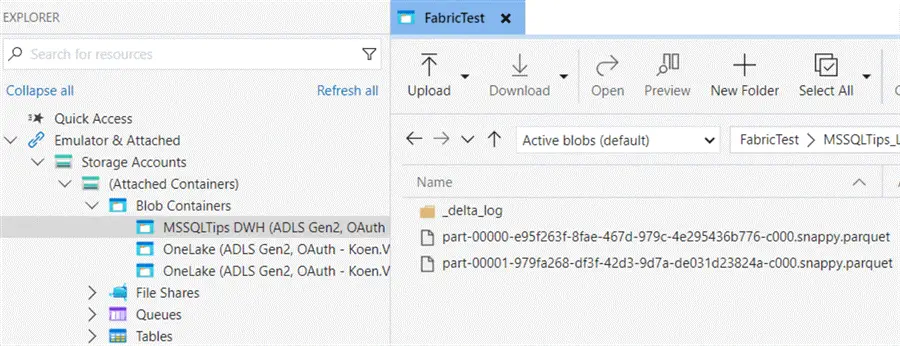
A data lake is a scalable data storage layer that can store large amounts of data of various formats. In Microsoft Fabric, the role of the data lake is implemented by OneLake. Data is stored as Parquet files using the Delta table format, and the different types of workloads (such as the Lakehouse or the Warehouse) use the OneLake data layer to store and retrieve data. A common problem with data lakes is that they lack certain capabilities that a relational database has, such as transactions or consistency.
The Fabric lakehouse is Microsoft’s implementation of a data lakehouse, which is the combination of two concepts: a data lake (scalable storage layer for storing massive amounts of data of various formats) and the data warehouse (a relational database that stores and models data for analytical use). By combining these two, the best of both worlds is achieved: the scalability of the data lake with the reliability of the warehouse. The lakehouse is typically more code-heavy and other programming languages besides SQL can be used. In Fabric, you can create notebooks using Spark (either Scala, PySpark, SparkR or SparkSQL) or pure Python. Fabric also offers the read-only SQL Analytics Endpoint, which allows you to write T-SQL queries over the lakehouse data. You can find more information the lakehouse in the tip Create a Data Lakehouse in Microsoft Fabric.
No. Power BI has become a part of Fabric and is one of the workload types, responsible for reporting/dashboarding. The Fabric service itself is built on top of the Power BI service. Licensing-wise, Power BI Premium SKUs will be replaced with licensing through Fabric capacities, but Power BI Premium per User and Power BI Pro remain the same. Read more about this subject in the tip Microsoft Fabric vs Power BI.
Azure is Microsoft’s public cloud computing platform with over 200 different services, while Microsoft Fabric is a SaaS (software-as-a-service) data analytics platform offering. Azure goes much wider than Fabric and offers PaaS (platform-as-a-service), IaaS (infrastructure-as-a-service) and SaaS services. Fabric uses a couple of Azure services behind the scenes, but you can state that its scope is much narrower since it focuses on data and AI.
No, since the scope of Fabric is much narrower than the one of Azure. Fabric uses certain Azure services behind the scenes. Fabric also caters to both business users as technical developers, while Azure is typically used by more technical people.
Officially, no. Or maybe not yet. At the time of writing, ADF still remains a separate product but it’s noticeable that more new features are added to Fabric than to ADF. There are still many customers using ADF, so Microsoft might keep the service around for a while. There’s also still a bit of a feature gap between the two services, but this becomes more and more narrower each month. Microsoft is offering migration scenarios from ADF to Fabric.
Officially, no. But over the past years it’s remarkable how much effort and marketing goes into Fabric, and only a tiny fraction goes to Synapse Analytics. Most features of Synapse or either available in Fabric, or they are replaced by newer and better engines. For new projects, I probably won’t choose Synapse Analytics anymore.
Yes and no. Both platforms try offer a complete environment for all your data needs, but generally speaking Databricks is a bit more code-heavy and more difficult to set up correctly, while Fabric is a bit easier in use since it’s more SaaS-focused. Databricks is more mature though because it has been around for much longer.
Not exactly. Fabric is a complete data analytics platform offering, while Tableau focuses more on dashboarding and data visualization. Tableau does have a light-weight ETL tool called Tableau prep, but Fabric has much more offerings for managing data pipelines (Dataflows, data pipelines, notebooks, Spark jobs etc.). Comparing Power BI with Tableau would make more sense. Tableau has a hybrid offering (both cloud and on-premises servers), while Fabric is cloud-only.
Yes and no. Both platforms are similar in the sense that they are modern, cloud-based data platforms for analytics, engineering and AI. However, Fabric is much wider in scope since it also includes workloads like Power BI, while the core of Snowflake is data warehousing. Both Snowflake and Fabric focus on a user-friendly interface that makes working with data easier.
Next Steps
- Do you have Microsoft Fabric questions that are not mentioned here? Let us know in the comments!
- You can find an overview of all Microsoft Fabric tips in this overview and a list of all Power BI tips here.

Koen Verbeeck is a seasoned business intelligence consultant with over a decade of experience with the Microsoft Data Platform. He holds several certifications, including Azure Data Engineer. He’s a prolific writer, with over 375 articles on technologies such as Microsoft Fabric, SSIS, ADF, SSAS, SSRS, MDS, Power BI, Snowflake and Azure services. He has spoken at various events such as PASS, SQLBits, dataMinds Connect and many others. He frequently delivers educational webinars on MSSQLTips.com. For his efforts, Koen has been awarded the Microsoft MVP data platform award for many years.
- MSSQLTips Awards:
- Leadership Award (200+ Tips) – 2021
- Author of the Year – 2014/2020/2022
- Author Contender – 2024/2025