Problem
We are building a large warehouse in Microsoft Fabric using the warehouse. Our biggest fact tables have some performance issues when we are running our analytical queries, and it seems we cannot use indexes in the Fabric Warehouse. Is there some way to improve performance?
Solution
Microsoft Fabric is a cloud-based SaaS data analytics platform and the Fabric Warehouse is their implementation of an enterprise scale relational data warehouse, based upon a lakehouse architecture. The biggest difference with SQL Server itself is that data is stored as Delta tables (with Parquet files as the underlying storage). This means that the stored data itself is open and open to be queried by any tool that can read Delta transaction logs and/or Parquet files, unlike the mdf files of SQL Server which are proprietary storage.
The traditional performance tuning techniques from SQL Server don’t always apply in the Fabric Warehouse. For example, there are no indexes. As the warehouse is a SaaS product, there’s little control over the Parquet files. The following two tips explain in more detail what the Fabric Warehouse does to improve performance:
- Microsoft Fabric Table Maintenance – Checkpoint and Statistics
- Automate Delta Tables Maintenance in a Microsoft Fabric Warehouse
Recently a new feature has been added to the arsenal of the warehouse developer: clustering.
In this tip we’ll explain to you what clustering entails and how you can use it to improve query performance on your biggest warehouse tables.
Data Clustering in the Fabric Data Warehouse
The data in a Fabric Warehouse is stored inside Parquet files and depending on the size of the tables this number can grow quite big. Since there are no traditional indexes, when data is requested from the table it’s possible a large number of files need to be scanned. With data clustering, we can instruct the database engine to store rows with similar values together.
Let’s illustrate the concept with the following table, where similar rows have the same color:
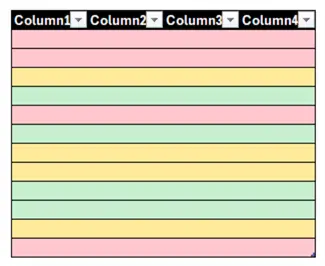
When we apply clustering to one or more columns, the clustering algorithm will physically put similar rows together in the same Parquet file:
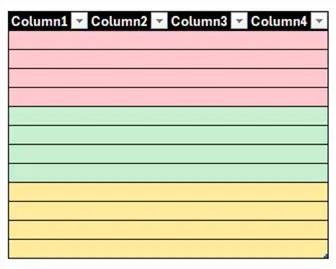
Data clustering in the Fabric warehouse is similar (but not the same) as a clustered index in a relational database, in the sense that the data is grouped according to the clustering column. The traditional clustered index uses lexicographical ordering, while the Fabric warehouse uses an algorithm to group similar values together during ingestion, even when multiple clustering columns are used.
Data Clustering Benefits
The benefit of data clustering is that files can be skipped – thanks to clustering metadata that is included in the manifests – during query execution when predicates are used.
Data clustering is best used when:
- Queries have WHERE clauses with high-cardinality filters (meaning they filter out a large percentage of the table) on one or more of the clustering columns
- The table is large enough. For smaller tables, the overhead of data clustering during ingestion is better than the small performance gain during query time. The query performance might be fast enough without data clustering.
- The clustering columns have high cardinality (meaning they have many distinct values), as this will make queries more selective. It doesn’t make sense for example to cluster on product category as there are only a handful of possible values resulting in just a few Parquet files.
Keep in mind that clustering data has a performance impact on the creation of a table (when using CREATE TABLE AS SELECT) or when data is inserted into the table. Ideally large batch inserts of at least one million rows are used.
Syntax
A table with data clustering can be created with the following syntax:
--MSSQLTips.com
CREATE TABLE myschema.mytable
(
    columnlist
) WITH (CLUSTER BY(column1, column2, ...));
Or when using the CTAS syntax:
--MSSQLTips.com
CREATE TABLE myschema.mytable
WITH (CLUSTER BY(column1, column2, ...))
AS
SELECT statement;
At least one column needs to be specified for clustering, with a maximum of 4 columns. Data clustering can only be specified during the creation of the table (SELECT INTO is not supported), so you cannot cluster an existing table. Not all data types are supported. For a list of the data types that are currently supported, check out the documentation.
Example
Let’s illustrate the concepts using a table in the Fabric warehouse with the NY Taxi sample data. You can read how to get this sample data in the tip Automate Delta Tables Maintenance in a Microsoft Fabric Warehouse.
A new table is created with a new column called pickupdate which holds the date portion of the tpepPickupDateTime column:
--MSSQLTips.com
CREATE TABLE dbo.nyctaxi_nonclustered AS
SELECT *
    ,pickupdate = CONVERT(DATE,tpepPickupDateTime)
FROM dbo.nyctaxi_test;
This table holds about 46 million rows. The same table is created again, but now with the data clustered on this new column:
--MSSQLTips.com
CREATE TABLE dbo.nyctaxi_clustered
WITH(CLUSTER BY (pickupdate)) AS
SELECT *
    ,pickupdate = CONVERT(DATE,tpepPickupDateTime)
FROM dbo.nyctaxi_test;
If we look at the actual files that are created in OneLake, we see that the first table has 23 Parquet files with an average size of about 50MB.
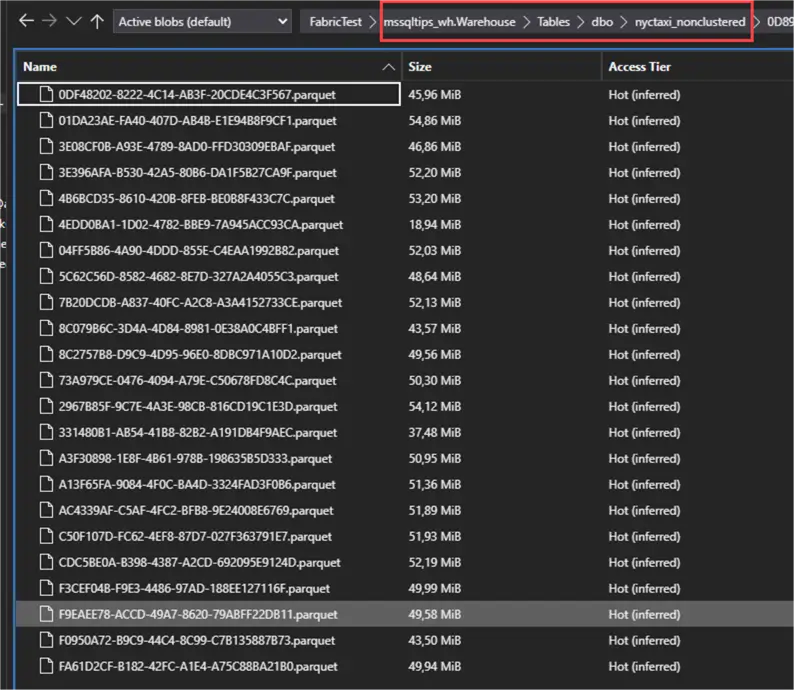 e
e
The clustered table on the other hand, has 93 Parquet files with an average size of around 11MB:
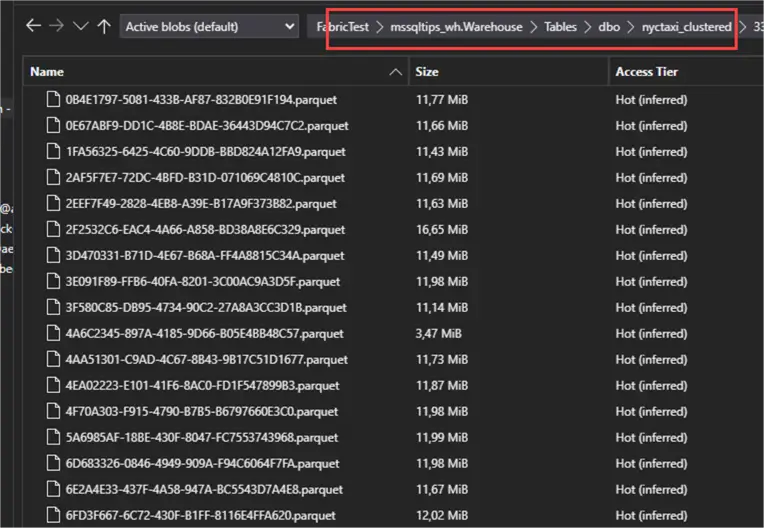
This means more and smaller files were created for the clustered table. If you have a query looking for just a couple of rows, this is good because only one small file needs to be scanned. However, queries returning more rows might need to read more files in the clustered table than the other table, which might slow things down. This is why it’s recommended to only enable clustering for large tables otherwise the benefits don’t outweigh the costs.
Query Comparisons
Let’s query the original table with the following query:
--MSSQLTips.com
SELECT *
FROM dbo.nyctaxi_nonclustered
WHERE pickupdate = '2016-01-05'
OPTION (USE HINT ('DISABLE_RESULT_SET_CACHE'));
A query hint is used to disable the result set cache, otherwise we get distorted results if we run the same query multiple times. The results are returned in about 12 seconds:
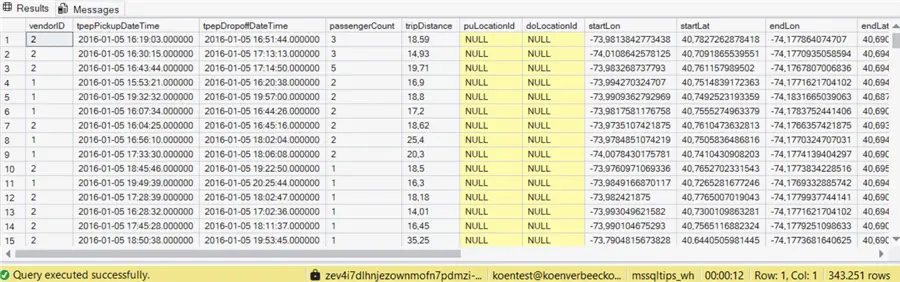
When we run the same query on the clustered table, we get similar results:
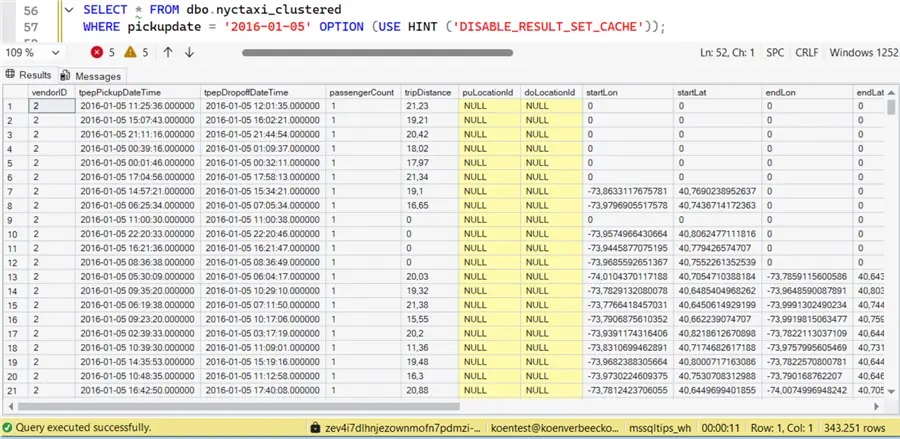
Even with 46 million rows, clustering didn’t provide a clear benefit for this query.
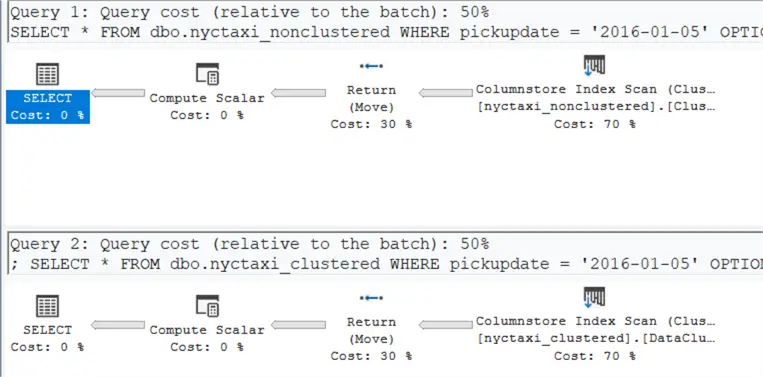
The estimated execution plans are also exactly the same:
Using queryinsights for more info
We cannot use SET STATISTICS IO or SET STATISTICS TIME in the Fabric Warehouse as these are not supported, so how can we check if clustering actually did something? In the Fabric Warehouse, we can use the queryinsights views to get more information about the queries we’ve been running.

Keep in mind there can be a bit of delay between executing a query and it showing up in the view results. Using the exec_requests_history view, we can find the performance metrics for our two queries:
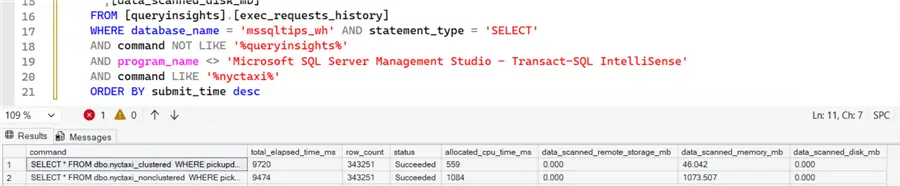
We can see the clustered table did have less CPU time and had to read only 46MB instead of 1GB for the first query, but in the end total duration was the same.
The problem might be that the pickup date column which we used for clustering is not selective enough.
More Selective Example
Let’s create a new table, but this time we’re clustering on the tpepPickupDateTime column.
--MSSQLTips.com
CREATE TABLE dbo.nyctaxi_clustered_PickupDateTime
WITH(CLUSTER BY (tpepPickupDateTime)) AS
SELECT *
FROM dbo.nyctaxi_test;
We get about the same number of Parquet files with again an average file size of about 11MB:
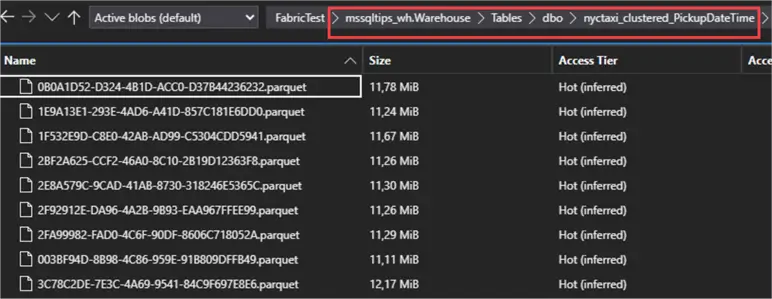
The following query will do a range scan along this date time column:
--MSSQLTips.com
SELECT COUNT(1)
FROM dbo.nyctaxi_nonclustered
WHERE tpepPickupDateTime BETWEEN '2016-01-01' AND '2016-01-05'
OPTION (USE HINT ('DISABLE_RESULT_SET_CACHE'));
On the table without data clustering, the query takes about 2 seconds, but on the clustered table the result is returned immediately:

In the query insights, we can see that the query on the clustered table uses far less CPU, and it also had to read only 9.8MB instead of 307.5MB. This time, the total elapsed time is significantly lower (around 7.5% of the original query):

Summary
We can conclude that data clustering should be a conscious design decision. The data volume should be high enough, and the clustering columns should be highly selective. Furthermore, queries should use these columns in their WHERE clauses to make advantage of the clustering.
Next Steps
- Try it out yourself! You can get a free trial and start experimenting with the provided sample data.
- In the Microsoft Fabric Lakehouse, you have more control over the generated Parquet files with the VACUUM and OPTIMIZE commands. Learn more about them in the tip Microsoft Fabric Lakehouse OPTIMIZE and VACUUM for Table Maintenance.
- You can find all Microsoft Fabric tips in this overview.
- Check out the documentation for more information about the limitations of data clustering.

Koen Verbeeck is a seasoned business intelligence consultant with over a decade of experience with the Microsoft Data Platform. He holds several certifications, including Azure Data Engineer. He’s a prolific writer, with over 375 articles on technologies such as Microsoft Fabric, SSIS, ADF, SSAS, SSRS, MDS, Power BI, Snowflake and Azure services. He has spoken at various events such as PASS, SQLBits, dataMinds Connect and many others. He frequently delivers educational webinars on MSSQLTips.com. For his efforts, Koen has been awarded the Microsoft MVP data platform award for many years.
- MSSQLTips Awards:
- Leadership Award (200+ Tips) – 2021
- Author of the Year – 2014/2020/2022
- Author Contender – 2024/2025