Problem
In the article SQL Temp Table vs. Table Variable Join and Performance Issues, I explained why table variables should be avoided in join operators. This issue can become more complex when a table-valued parameter is used in a join within a stored procedure. This is because another issue called Parameter Sniffing is introduced. If you are interested in learning how to solve these issues, keep reading to learn more.
Solution
Many developers pass a data table from the application to a stored procedure. Then they use it in a join operator to filter results. Stored procedures can receive this data as an input parameter by using a table-valued parameter (TVP). To send multiple rows by using a TVP, you must define a user-defined table type. You can learn more about it in Use table-valued parameters (Database Engine).
Set Up Test Environment
For this demo I will use SQL Server 2025 and StackOverflow database. StackOverflow database is an open-source database from StackOverflow.com.
I set its compatibility level to 170 using this command:
/* mssqltips.com (T-SQL) */
Use StackOverflow
GO

Alter Database Current Set Compatibility_Level = 170
GO
The Stack Overflow database includes a Users table to store user information like DisplayName, Location, Reputation, etc. There is a clustered primary key on the Id column, and I created a nonclustered index on the Reputation column:
/* mssqltips.com (T-SQL) */
Create Index IX_Reputation On dbo.Users (Reputation)
With (Data_Compression = Page)
GO
So, let’s say we need to show the information of users who have a reputation of 2 or 3. To do this, I create a table variable as shown below and insert the values 2 and 3 into it. Then I join it with the Users table on the Reputation column:
/* mssqltips.com (T-SQL) */
Declare @Reputation AS TABLE
(
   [Reputation] [int] NOT NULL,
   PRIMARY KEY CLUSTERED
(
   [Reputation] ASC
)
)

Insert Into @Reputation Values (2), (3)
Select u.* From dbo.Users u
Inner Join @Reputation r
 On r.Reputation = u.Reputation
Order By CreationDate Desc
GO
The above query filters users to find those who have a Reputation of 2 or 3. Then sorts the results by CreationDate in descending order.
Let’s examine its execution plan:

SQL Server performed a nonclustered index seek followed by key lookups and as shown in the above image, there is a large difference between the estimated and actual number of rows. SQL Server estimated that only 877 users have a reputation of 2 or 3, but in reality, more than 200,000 users have those reputations. This discrepancy results in an inaccurate memory grant, causing a spill to disk, which is a costly operation:

As shown in the above image, there is a warning on the Sort operator when I hover my mouse over the operator, a tooltip appears and tells us:

SQL Server wrote nearly 3000 pages to tempdb and read them from there. This is a spill to disk and it usually reduces query performance.
What’s the solution?
To solve the problem, I replace the table variable with a temporary table:
/* mssqltips.com (T-SQL) */
Drop Table If Exists #Reputation
GO

Create TABLE #Reputation
(
   [Reputation] [int] NOT NULL,
   PRIMARY KEY CLUSTERED
(
   [Reputation] ASC
)
)
GO

Insert Into #Reputation Values (2), (3)
GO

Select u.* From dbo.Users u
Inner Join #Reputation r
 On r.Reputation = u.Reputation
Order By CreationDate Desc
GO
The query execution plan has changed: SQL Server scanned the entire table, and there is no warning on the Sort operator.

One of the main differences between table variables and temporary tables is that the former lacks statistics while the latter has them. As I said earlier, if I wrap the query in a stored procedure, another problem called Parameter Sniffing may be introduced.
Before I put the query in a stored procedure, I need to create a table type:
/* mssqltips.com (T-SQL) */
Drop Type If Exists [dbo].[Reputations]
GO

CREATE TYPE [dbo].[Reputations] AS TABLE
(
   [Reputation] [int] NOT NULL,
   PRIMARY KEY CLUSTERED
(
   [Reputation] ASC
)
)
GO

Create Or Alter Procedure USP_FindPeopleByReputation
(@Reputation Reputations ReadOnly)
AS
Select * Into #Reputation From @Reputation
Select u.* From dbo.Users u
Inner Join #Reputation r
 On r.Reputation = u.Reputation
Order By CreationDate Desc
GO
The created procedure receives a list of reputations as an input parameter and inserts them into a temporary table using a SELECT … INTO statement. It then joins the temporary table to the Users table.
Parameter Sniffing Issue
Everything seems fine; however, I will show how the parameter sniffing issue can reduce query performance and how it can be resolved.
SQL Server creates an execution plan based on the first parameter value supplied to a stored procedure, and this plan may not be suitable for other parameter values passed to the procedure. This causes parameter sniffing. First, I call the procedure to retrieve information about users who have a reputation of 2000 or 3000.
/* mssqltips.com (T-SQL) */
Declare @Reputation Reputations;
Insert Into @Reputation Values (2000), (3000)

Exec USP_FindPeopleByReputation @Reputation = @Reputation;
GO
Now I pass the values 2 and 3 to the stored procedure and examine the execution plan:
/* mssqltips.com (T-SQL) */
Declare @Reputation Reputations;
Insert Into @Reputation Values (2), (3)
Exec USP_FindPeopleByReputation @Reputation = @Reputation;
GO
SQL Server estimated that only 64 records will be returned from the table, which is a very low estimate:

This low estimate causes a spill to disk, as shown in the below image:
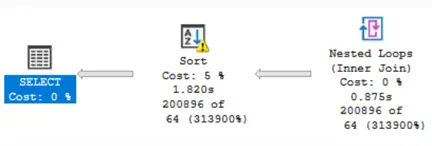
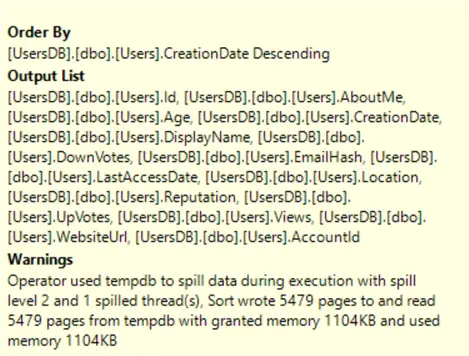
This time, SQL Server wrote nearly 5,500 pages to tempdb and read them back:
To deal with this problem, I modified the procedure and added OPTION (RECOMPILE) to the statement that inserts values into the temporary table.
/* mssqltips.com (T-SQL) */
Create Or Alter Procedure USP_FindPeopleByReputation
(@Reputation Reputations ReadOnly)
AS
Select * Into #Reputation From @Reputation
Option (Recompile)
Select u.* From dbo.Users u
Inner Join #Reputation r
 On r.Reputation = u.Reputation
Order By CreationDate Desc
GO
Now I repeat the test once more:
Declare @Reputation Reputations;
Insert Into @Reputation Values (2000), (3000)
Exec USP_FindPeopleByReputation @Reputation = @Reputation;
GO

Declare @Reputation Reputations;
Insert Into @Reputation Values (2), (3)
Exec USP_FindPeopleByReputation @Reputation = @Reputation;
GO
The latest image shows that SQL Server scanned the entire table and there is no warning on the Sort operator, which means a spill to disk did not occur.

Summary
Because table variables and TVPs lack statistics, we should avoid using them in join operators. As shown in this article, joining them with a permanent table can produce an inefficient execution plan. The issue is further complicated when a TVP is joined inside a stored procedure, because parameter sniffing may occur. The article provides solutions to address these problems.
Next Steps
- Parameter Sniffing with Temporary Tables in SQL Server 2022
- Date Range SQL Server Query Performance Issues with Parameter Sniffing
- SQL Parameter Sniffing Fix with a Covering Index

Mehdi Ghapanvari is an SQL Server database administrator with 6+ years of experience. His main area of expertise is improving database performance. He is skilled at managing high-performance servers that can handle several terabytes of data and hundreds of queries per second, ensuring their availability and reliability. To enhance the performance of the database, he has implemented various performance-tuning techniques, including query optimization and index tuning. He has also developed backup and recovery strategies to protect critical data in case of disasters. Mehdi currently manages the SQL Server databases for a large organization. Mehdi is actively seeking new opportunities to apply his expertise and contribute to impactful projects. You can reach him at SQLDBA.Mehdi@Gmail.com.
- MSSQLTips Awards: Rookie of the Year – 2023
- MSSQLTips Trendsetter Award: 2026