Problem
I have a large table with millions of historical records. I was asked to remove millions of old records from this table, but this table is accessed by our system 24×7, so there isn’t a good time to do massive deletes without impacting the system. In this tip I will show you an unconventional way of doing massive deletes.
Solution
We as database specialists know that deleting or updating records from a table are operations that cause the most blocking. When performing a DELETE, the Database Engine needs to hold a lock on the rows being deleted in order to maintain data consistency. But when you delete a considerable amount of data the row locking escalates into a page or even a table lock which causes blocking issues.
When I was asked to remove historical data from a 120 GB unpartitioned table for an online payment service I tried different approaches, all with the same basic idea of limiting blocking issues. In this tip, we will look at different options for doing this and my final solution that I used.
Test Environment
For the purpose of this tip I used the PurchaseOrderDetail table of the AdventureWorks database and inserted a lot of data.
First we create a database.
USE [master]
GO
CREATE DATABASE [TestDB]
 CONTAINMENT = NONE
 ON  PRIMARY
( NAME = N'TestDB_file1',
   FILENAME = N'E:\MSSQL\TestDB_1.mdf',
   SIZE = 128MB ,
   MAXSIZE = UNLIMITED,
   FILEGROWTH = 64MB)
 LOG ON
( NAME = N'TestDB_log_file1',
    FILENAME = N'E:\MSSQL\TestDB_1.ldf',
    SIZE = 64MB,
    MAXSIZE = 2048GB,
    FILEGROWTH = 32MB)
GO
The next script will create our sample table.
USE TestDB
GO
CREATE TABLE[PurchaseOrderDetail]
(
[PurchaseOrderID] [int] NOT NULL,
[PurchaseOrderDetailID] [int] NOT NULL IDENTITY(1, 1),
[DueDate] [datetime] NOT NULL,
[OrderQty] [smallint] NOT NULL,
[ProductID] [int] NOT NULL,
[UnitPrice] [money] NOT NULL,
[LineTotal] AS (isnull([OrderQty]*[UnitPrice],(0.00))),
[ReceivedQty] [decimal] (8, 2) NOT NULL,
[RejectedQty] [decimal] (8, 2) NOT NULL,
[StockedQty] AS (isnull([ReceivedQty]-[RejectedQty],(0.00))),
[ModifiedDate] [datetime] NOT NULL CONSTRAINT [DF_PurchaseOrderDetail_ModifiedDate] DEFAULT (getdate())
) ON [PRIMARY]
GO
ALTER TABLE [PurchaseOrderDetail] ADD CONSTRAINT [CK_PurchaseOrderDetail_OrderQty] CHECK (([OrderQty]>(0)))
GO
ALTER TABLE [PurchaseOrderDetail] ADD CONSTRAINT [CK_PurchaseOrderDetail_ReceivedQty] CHECK (([ReceivedQty]>=(0.00)))
GO
ALTER TABLE [PurchaseOrderDetail] ADD CONSTRAINT [CK_PurchaseOrderDetail_RejectedQty] CHECK (([RejectedQty]>=(0.00)))
GO
ALTER TABLE [PurchaseOrderDetail] ADD CONSTRAINT [CK_PurchaseOrderDetail_UnitPrice] CHECK (([UnitPrice]>=(0.00)))
GO
ALTER TABLE [PurchaseOrderDetail] ADD CONSTRAINT [PK_PurchaseOrderDetail_PurchaseOrderID_PurchaseOrderDetailID] PRIMARY KEY CLUSTERED  ([PurchaseOrderID], [PurchaseOrderDetailID]) ON [PRIMARY]
GO
CREATE NONCLUSTERED INDEX [IX_PurchaseOrderDetail_ProductID] ON [PurchaseOrderDetail] ([ProductID]) ON [PRIMARY]
GO
Now we can fill our test table with data. By using CROSS JOIN we can quickly create a table with millions of records.
USE TestDB;
GO
INSERT INTO dbo.PurchaseOrderDetail
        ( PurchaseOrderID ,
          DueDate ,
          OrderQty ,
          ProductID ,
          UnitPrice ,
          ReceivedQty ,
          RejectedQty ,
          ModifiedDate
        )
SELECT PurchaseOrderID ,
       DATEADD( YEAR, 6,DueDate) ,
       OrderQty ,
       ProductID ,
       UnitPrice ,
       ReceivedQty ,
       RejectedQty ,
       ModifiedDate
    FROM AdventureWorks2012.Purchasing.PurchaseOrderDetail a
    CROSS JOIN sys.objects b
    CROSS JOIN  sys.objects c
Simple DELETE
Suppose we need to delete rows from PurchaseOrderDetail for any record that has a DueDate prior to January 1, 2014. At first you may be tempted to execute the following statement. Since there is so much data to delete, this will cause a lot of blocking and also take a long time to complete. The other issue is that this will be done in one giant operation and will cause the transaction log to get very large.
DELETE FROM dbo.PurchaseOrderDetail
WHERE DueDate < '20140101'
By running the above statement, you will create a lot of locking as you can see from the Performance Dashboard report image below.

Options to Delete the Data
Using TOP Clause
Another approach is to use a TOP clause with a DELETE statement to limit the number of rows deleted as shown below. The problem with this approach is that there is no an index on the DueDate which will cause SQL Server to scan the table to find the data. This will take the transaction longer to complete and could cause blocking issues. We can modify the TOP value from 1 to N for our needs.
USE TestDB
GO
DELETE TOP ( 5000 )
FROM    PurchaseOrderDetail
WHERE   DueDate < '20140101'
A variant of the above method is to DELETE the records based on the primary key as shown below. The primary key is based on PurchaseOrderID and PurchaseOrderDetailID and this query is deleting based on the primary key.
USE TestDB
GO
DELETE  FROM PurchaseOrderDetail
WHERE   PurchaseOrderDetailID IN ( SELECT TOP 5000
                                            PurchaseOrderDetailID
                                   FROM     PurchaseOrderDetail
                                   WHERE    DueDate < '20140101'
                                   ORDER BY DueDate ASC )
AND PurchaseOrderID   IN ( SELECT TOP 5000
                                            PurchaseOrderID
                                   FROM     PurchaseOrderDetail
                                   WHERE    DueDate < '20140101'
                                   ORDER BY DueDate ASC );
In the previous two scripts we are deleting 5000 rows at a time, but in some cases that won’t avoid blocking issues.
Using ROWCOUNT property
Setting the ROWCOUNT property to a value other than 0 will cause the query to stop executing when the rows affected reach its value. I must warn you that in a future release of SQL Server this property will not affect the delete statement. You can read more about this in Books Online: SET ROWCOUNT (Transact-SQL).
USE TestDB
GO
SET ROWCOUNT 5000;
DELETE FROM PurchaseOrderDetail
WHERE DueDate < '20140101'
Options to Delete all of the Data
At this point we have seen different options to delete small amounts of data at a time, but we need to figure out a way to accomplish this task without the need to be in front of the computer the entire time.
Using a Cursor
Don’t even think about using a cursor. If you perform the delete inside a cursor your transaction log could grow disproportionally, even if your database is using the simple recovery model. The reason behind this behavior is that SQL Server needs to perform a checkpoint in order to truncate the log, but the checkpoint process cannot be done in the middle of a transaction. And guess what; the affected rows will be locked until the cursor completes. Even if the database recovery model is set to SIMPLE or you do frequent transaction log backups the transaction log will continue to grow until the entire operation is complete.
Using a While Loop
This may seem to be the way to go, but it has the same drawbacks of a cursor in regards to blocking and transaction log grow.
Using GO with a count
You can use the GO batch terminator with a value to have the statement run over and over again as shown below, but you will need to know how many times the batch needs to execute to delete the data. Also, since there is not an index on DueDate this can cause blocking issues while this runs. In this example it is deleting 5000 rows of data and will run 10000 times.
USE TestDB
GO
DELETE TOP (5000)
FROM PurchaseOrderDetail
WHERE DueDate < '20140101'
GO 10000
Deleting Row by Row with the Primary Key
The best way to delete the historical data without blocking issues is to delete row by row using the Primary Key. In this solution, I am generating DELETE statements for each row to delete based on the Primary Key and then executing these statements using SQLCMD.
Generating the DELETE Statements
To create the script all we need to do is build a select query with the DELETE statement enclosed as text and concatenate it with the primary key of the rows we want to delete casted as text. Take a look at the next script. If you have created dynamic SQL before, it will look familiar.
USE TestDB
GO
SET NOCOUNT ON
SELECT   'DELETE FROM PurchaseOrderDetail WHERE PurchaseOrderID = '
        + CAST(PurchaseOrderID AS VARCHAR(50))
        + ' AND PurchaseOrderDetailID = '
        + CAST(PurchaseOrderDetailID AS VARCHAR(50)) + ';' + CHAR(13)
        + CHAR(10) + 'GO'
FROM    PurchaseOrderDetail
WHERE   DueDate < '20140101'
The previous query contains a few things that will allow us to execute all the generated delete statements directly using the SQLCMD utility. The semicolon (;) is used as the statement terminator, it marks the end of the statement. The CHAR(13) + CHAR(10) will write the output to a new line. And finally the GO is used as the batch terminator. This will have SQLCMD send one DELETE statement at a time and therefore will minimize the locking. The next image explains the parts of the previous query.

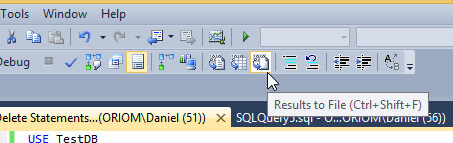
In order to generate a text file with the DELETE statements we need to select the option in Management Studio to save the query results to file as shown below. You will be prompted for a file name and a location to save the results.
Executing the File using SQLCMD
This is the final step; we are going to execute our previously generated text file using the SQLCMD utility. You can use the following command to do so.
sqlcmd -S [Instance Name] -E -d [Database] -i [Script]

After you hit enter you will see something similar to the next image in the Command Prompt window.

Minimizing Transaction Log Growth
To minimize the growth of the transaction log you can set your database recovery model to SIMPLE, this way the transaction log will not grow out of control when the statements are running, because the log truncates on every checkpoint. The other option is to run frequent transaction log backups while this process is running to minimize the growth of the transaction log.
Next Steps
- If you are new to the SQLCMD utility take a look at this tip: Connecting to SQL Server Using SQLCMD Utility.
- If you want to get a blocking report like the one on this tip image, here is a guide on how to Install SQL Server 2012 Performance Dashboard Reports. .
- These two tips Understanding SQL Server Blocking and Understanding SQL Server Locking are a good starting point if you don’t know very much about Blocking and Locking issues.
- If you are new to Dynamic SQL this video is a good introduction: SQL Server Video Creating Dynamic SQL Commands.
- Also check out Validate the contents of large dynamic SQL strings in SQL Server.

Daniel Farina was born in Buenos Aires, Argentina. Self-educated, since childhood he showed a passion for learning. He studied at Universidad de Buenos Aires. Daniel started working as a programmer at a young age. Over the years he specialized in databases, particularly SQL Server and Oracle. Now with 30 years of age, his work experience includes working with various technologies like VB, C, .NET, web development, Windows and Linux systems. He likes to read about science, psychology, philosophy and many other things. In his spare time, he trains powerlifting aiming to compete.
- MSSQLTips Awards: Author of the Year – 2018 | Champion (100+ tips) – 2018 | Author Contender – 2015-2017, 2019
Interesting
will a cursor create an implicit transaction?
Hi Jim or anyone,
how do I replace
DECLARE @dtPurgeDate DATETIME = GETDATE() – @iPurgeDays
to
WHERE DueDate < ‘20130101’
Another word, instead of GETDATE() – @iPurgeDays, I like to replace whole condition with
DELETE FROM PurchaseOrderDetail WHERE DueDate < ‘20130101’