Problem
The goal of modernizing a SQL Server architecture is often the topic of discussion for organizations. This is especially true at year-end when budgets, resources, and planning discussions are ripe. A modern data platform yields significant strategic value coupled with cost savings due to low storage costs and pay-as-you-go compute. Traditional SQL Server architectures have been the bedrock of data stability and scalability for decades. Through the years, however, these traditional appliances have experienced their limitations. The call for modern data Lakehouse and virtualization approaches has become not just strategic imperative, but a need for smooth daily operations. This is to prevent continued traditional data challenges, such as resource contention and compute and storage restrictions.
Key Takeaways
- Organizations seek to modernize their SQL Server architecture to improve performance and reduce costs.
- Microsoft Fabric offers a SaaS solution that enhances scalability and integrates with Azure tools, unlike traditional PaaS options.
- Migrating to Fabric prevents resource contention and simplifies ETL processes, making data handling more efficient.
- Fabric has limitations, such as unsupported SQL features and data types, but these are less relevant in a Lakehouse model.
- A structured project plan is essential for migrating SQL Server databases to Fabric, ensuring a smooth transition.
Solution
Lakehouse architectures have been around for several years and have demonstrated success and value for organizations across the globe. On the Azure platform, Microsoft Fabric has been a new entrant to the modern data platform landscape. Fabric offers similar capabilities and features as Databricks. Fabric is unique in that it is Software as a Service (SaaS) vs. Platform as a Service (PaaS). PaaS has historically dominated this space.
This article uncovers some of the benefits of modernizing a traditional SQL Server architecture with Fabric. We will also cover its current limitations. You will learn:
- What a modern Fabric architecture could look like
- How you could possibly blend it with your current traditional SQL Server architecture for a hybrid approach
- How you could possibly build a project plan to take actionable steps to implement it.
Benefits of a SaaS Data Platform
Before we dive into the benefits of a SaaS platform, let us understand some of the use cases and reasons why the PaaS model has been so successful for such a long time. A PaaS data platform, like Databricks, provides more flexibility for building and managing custom data and AI environments. PaaS gives developers more control over the infrastructure. This can be great for an organization that is looking for this custom flexibility and control. Databricks has been a pioneer of the Lakehouse model. Databricks has matured to a point where deployment is across several cloud vendors. These includes AWS, GCP, and Azure for large-scale data operations and advanced AI/ML tasks.
Historically, Infrastructure as a Service (IaaS) successfully transitioned to higher PaaS adoption rates. We are now seeing the evolution and growth of SaaS-based data platforms. Fabric can add benefits to the vast majority of modern businesses that are looking for a fully managed platform. Microsoft manages the Fabric platform. They handle all maintenance and updates, making it simple for organizations with minimal IT involvement. It is a user-friendly platform with integrated tools. This makes it easier for business stakeholders to use without needing extensive technical expertise. This SaaS model leads to greater cost-effectiveness, quicker deployments, and end user accessibility.
Fabric’s strong integration into the Microsoft Azure ecosystem makes it great for businesses already using tools like Power BI and Excel. Additionally, any capability gaps in Fabric can be bridged by seamlessly integrating other tools on the Azure stack. This includes Machine Learning, AI services (Vision, GenAI, Document Intelligence), and more.
Fabric Data Architecture
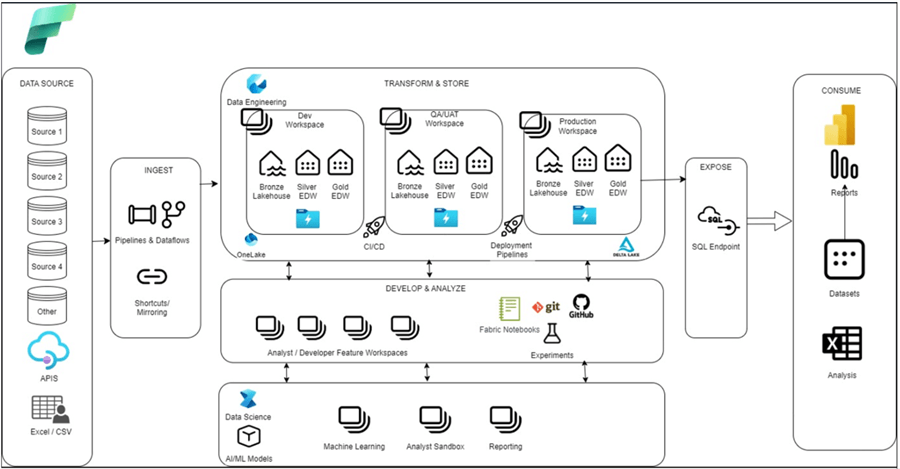
Microsoft Fabric brings a unified Data, AI, and Analytics platform with integrated capabilities for real-time intelligence, lake houses, warehouses, data science, data engineering, etc. The illustration below shows a well architected Fabric Data platform that builds out a multi-environment Medallion (Bronze, Silver, Gold) architecture utilizing deployment (CI/CD) pipelines.
Fundamentally, when deployed, Fabric will reside on a tenant and utilize capacities that are divided into Stock Keeping Units (SKUs). Each SKU represents a specific amount of compute power, measured in Capacity Units (CUs). The SKUs range from smaller capacities like F2 (2 CUs) to larger ones like F2048 (2048 CUs). These SKUs help organizations allocate the right amount of resources based on their needs, ensuring efficient and scalable performance. Finally, one or many workspaces are created and assigned capacities. A variety of methods ingest data sources including:
- GUI-driven ETL pipelines and dataflows
- Shortcut connections to virtualized data sources
- Mirroring change data capture (CDC) data into Fabric
In the SaaS data platform realm, the concept of workspaces can be related to a typical PaaS platform resource such as an Azure Data Factory (ADF). For CI/CD deployments in Fabric, this will be completed at workspace level rather than building Azure DevOps (ADO) pipelines. Fabric deployment pipelines (Dev to UAT to Prod workspaces) would be used to promote lakehouses, warehouses, notebooks, or pipelines, as shown in the following image.
Microsoft Fabric Workspaces
Workspaces are versatile containers that serve multiple purposes:
- Separate environments.
- Split Power BI reports by business unit.
- Allow developers to connect to repositories and collaborate on branching strategies.
- Contain ML/AI experiments and models.
- Analyst sandbox environments.
There are a few storage options in Fabric, including Lakehouses and Warehouses. Both use OneLake as the unified storage layer. Data is stored in Delta Lake format (Parquet files with ACID transactions). This allows read and write operations, ensures data integrity, and supports complex operations. Additionally, both Lakehouses and Warehouses provide SQL Analytics endpoints that allow read-only SQL querying of Delta tables using T-SQL, Power BI, or Excel.
Schema support is available in both a Lakehouse and a Warehouse. A Lakehouse could be best for a Bronze or Silver layer for both structured and unstructured data, with the trade-off of read-only SQL endpoints. A Warehouse could be a solution for traditional data warehousing with structured data accessed with T-SQL code and ACID compliance. Warehouses also bring advanced capabilities for security and monitoring features that you might be familiar with in traditional SQL Servers. This includes dynamic data masking, row/column-level security, granular T-SQL permissions, dynamic data management views (DMVs), and query insights.
Fabric also supports notebooks with multiple languages like Python, SQL, and PySpark, and integrating with Apache Spark. The notebooks handle various data formats and provide rich visualizations for interactive data exploration and advanced analytics.
Limitations
Fabric Data Warehouses are optimized for scalability and performance in the cloud with distributed computing and storage. Traditional SQL Server architecture features not supported in a Microsoft Fabric data warehouse include:
- Constraints, such as identity columns, primary keys, and foreign keys, are not supported across distributed nodes because enforcing these constraints can impact performance.
- Clustered and nonclustered indexes are not supported as the underlying storage engine uses columnar storage and distributed processing to improve data access.
- Data types, like tinyint, NVARCHAR, and datetime, are not supported due to the need for consistency and compatibility with the distributed architecture.
- The truncation of VARCHAR(max) to VARCHAR(8000) is a design choice to ensure efficient storage and retrieval across the distributed system.
- SHOWPLAN_XML and sp_addextendedproperty are not supported because the execution plans and metadata management in a distributed environment differ from those in a traditional SQL Server setup.
- Temporal tables are not supported as the versioning and history tracking mechanisms are different in a distributed system.
- Case sensitivity enforcement is a design decision to maintain consistency across the distributed nodes, ensuring that data comparisons and sorting are handled uniformly.
Lakehouse Architecture – Data Lakes and Data Warehouses
In contrast, a Lakehouse architecture, which combines the benefits of data lakes and data warehouses, can handle both structured and unstructured data more flexibly. It doesn’t rely on traditional relational database constraints and can leverage distributed storage and processing more effectively. This makes some of the limitations in Fabric Data Warehouse less relevant in a Lakehouse model, where the focus is on scalability, flexibility, and handling diverse data types.
These limitations are important to understand as they reflect the trade-offs made to achieve scalability and performance. However, some of these limitations might be less of an issue if flexibility and scalability of a Lakehouse architecture is your primary need.
There may also be other noticeable limitations with lakehouses or Fabric:
- SQL Endpoint in slow to reflect changes.
- Fabric Mirroring for SQL Managed Instance in not available.
- Lineage view for DW is not available.
- Dynamic content support on Deployment Pipelines is not available.
Benefits of Migrating from SQL Server to Fabric
Migrating from a traditional SQL Server, such as Managed Instance, to Microsoft Fabric offers several benefits.
Prevention of Resource Contention
With Microsoft Fabric’s distributed architecture, it can handle concurrent workloads efficiently preventing resource contention. For instance, a retail company experiencing slowdowns during peak shopping seasons can benefit from Fabric’s ability to manage high query loads without performance degradation.
Reduced Costs with Lake-Based Storage
Microsoft Fabric leverages OneLake, which is a scalable and cost-effective data lake. This can substantially reduce storage costs compared to traditional SQL Server storage. For example, a financial services firm can store vast amounts of historical transaction data in OneLake at a fraction of the cost, while still being able to perform analytics on this data.
Enhanced Data Integration and Real-Time Analytics
Fabric’s mirroring capabilities allow for continuous data replication from SQL Server to OneLake, enabling real-time analytics. A healthcare provider can use this feature to keep patient records up-to-date across multiple systems, ensuring that analytics and reporting are always based on the latest data.
Simplified Extract, Transform, Load (ETL) Processes
Traditional ETL processes can be complex and time-consuming. Microsoft Fabric simplifies this by providing integrated tools for data ingestion, transformation, and loading. For instance, a logistics company can streamline its data pipeline, reducing the time and effort required to prepare data for analysis.
Scalability and Flexibility
Microsoft Fabric is designed to scale with your data needs. Whether you’re dealing with terabytes or petabytes of data, Fabric can handle it. A media company with rapidly growing data from streaming services can scale its storage and compute resources seamlessly, ensuring that performance remains consistent as data volumes increase.
These benefits make Microsoft Fabric a compelling choice for organizations looking to modernize their data infrastructure and improve performance, cost-efficiency, and scalability.
Fabric Implementation Project Plan
When designing and implementing Fabric, as a pre-requisite, you will need time to prep and setup your environment which could take up to a few months and could be considered Phase 0. From there, an actionable multi-phase plan could be devised over a one-year time to tackle the migration of certain databases on your SQL Server to Fabric. This could be achieved by refactoring the pipelines to Fabric, pointing the reporting and existing data mart references to Fabric, and onboarding customers that need to use these refactored data source to Fabric. This would also include retiring the existing refactored SQL Server databases and tables. The illustration below depicts how this plan can be outlined for multiple database migration candidates as actionable epics and stories in a JIRA timeline.

Next Steps
- Learn more about Microsoft Fabric Concepts and Licenses.
- Lakehouse vs Data Warehouse vs Real-Time Analytics/KQL Database: Deep Dive into Use Cases, Differences, and Architecture Designs | Microsoft Fabric Blog | Microsoft Fabric
- Please see my other tip on Fabric: Microsoft Fabric Monitoring with Metrics App and Data Activator (mssqltips.com)

Ron C. L’Esteve is a Data and AI Leader and professional Author residing in Chicago, IL, USA. He is well-known for his impactful books and article publications on Azure Data & AI Architecture, Engineering, and Leadership. Ron holds a Master of Business Administration (M.B.A.) and Master of Science in Corporate Finance (M.S.F.) from Loyola University Chicago. Ron possesses deep technical skills and experience in designing, implementing, leading, and delivering modern Azure Data & AI projects for numerous clients around the world. He is a Motorola Certified Six Sigma Green Belt, a Microsoft Global Challenger, and also holds numerous additional Microsoft, Snowflake, and Databricks professional certifications in Big Data Engineering, Artificial Intelligence, Apache Spark and Data Platform Architecture.
- MSSQLTips Awards: Champion (100+ tips) – 2023 | Author of the Year – 2020-2021 | Rookie of the Year – 2019