Overview
To start development, we need to create a new SSAS project using Business Intelligence Development Studio. After creating the new project, we need to create a data source that points to the AdventureWorks DW 2008 R2 database.
Explanation
Open Business Intelligence Development Studio (BIDS). Create a new SSAS Project, by selecting New Project from the File menu. Name this project “MyOLAPProject”. As soon as the new project opens up, you should find a list of folders in the explorer tab. Right-click on the data sources folder and select New DataSource. A Data Source wizard will open with a Welcome screen, select Next and you should find a screen to define your connection. We need to define a new connection, so select “New” and a screen should appear as shown below. Point the connection to the AdventureWorksDW2008R2 database and click OK. 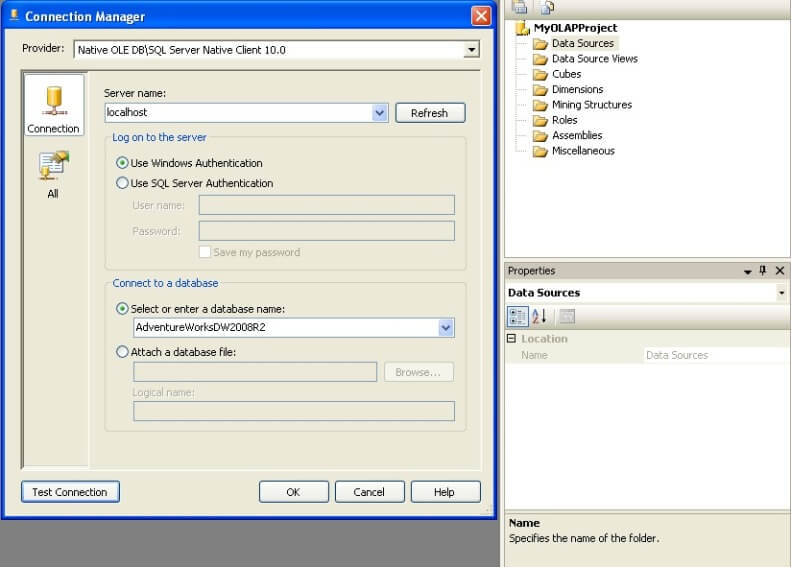
After this, you need to specify the impersonation information for the data source. This information is used to specify how the solution will connect to the SSAS instance using the credentials specified. Every time you deploy or process the solution, this connection information will be used. So keep in mind that the account you use should have sufficient privileges. If you are not sure which account to use, it is suggested that you use an account with administrator privileges on your development machine. Please keep in mind that this is not recommended and should not be done in production environments. This is just suggested to quickly get you started with cube design and development.
After specifying this information, click “Next”. This should take you to the final screen where you need to name the data source. Name it something appropriate and click OK, which should create your data source.

Siddharth has more than 14 years of experience in the IT Industry, with more than a decade of experience in Business Intelligence and Analytics, for clients banking, logistics, government, Media Entertainment, products, life sciences and other domains. He has been a lead architect for a portfolio of 40+ apps, containing apps in web, mobile, BI, Analytics, data warehousing, reporting, collaboration, CMS, NoSQL and other technologies. He has several certifications and is a published author for online and print-media publications, as well as the MSDN Library.
In his present role, he remains responsible for architecture design, technology stack selection, infrastructure design, 3rd party products evaluation and procurement, and performance engineering. These applications use technologies like Elasticsearch / Lucene, MongoDB, SharePoint 2013 and 2010, jQuery-based framework like Highcharts and GoJS, SQL Server and the Microsoft Business Intelligence stack (SSIS, SSAS, SSRS, MDX, PowerPivot, PowerView), jQueryMobile, Bootstrap, iOS xCode framework, and many others.
- MSSQLTips Awards: Champion (100+ tips) – 2018 | Author of the Year – 2017 | Author Contender – 2016, 2018-2019