Problem
In Part One, we saw that simple scalar user-defined functions (UDFs) perform as well as inline code in a Fabric warehouse. But with a more complex UDF, does performance change? If it drops, is the code-reuse convenience worth the price?
Solution
In this article, we’ll revisit scalar UDFs, but add more complexity. What makes a scalar UDF complex? How do complex UDFs perform compared to inline code? Is there a general rule of thumb for when we should avoid UDFs and use their inline equivalents? These are just three of the questions we’ll explore in the upcoming sections. Starting this experiment, I’m unsure if there’s a performance difference, so let’s find out together.
Complex Scalar UDFs
I won’t review all the details about scalar UDFs again; for that, see Part One. I’ll clarify what makes a UDF complex to me. The term “complex” is subjective; what’s complex to me might be simple for others. For example, my bench press max is someone else’s warm-up, but it’s still hard for me.
Something I consider complex is the Levenshtein distance algorithm, which Sebastiao Pereira wrote about in his article, “Fuzzy String Matching Algorithms in SQL Server.” While that function can be useful, it scores a 10/10 on my UDF complexity scale. I want something closer to 4-6. Besides, it contains a WHILE loop, which means it’s not inlinable. Remember, inlining allows SQL to embed a UDF’s code into the query, so the UDF operator doesn’t run for each row. Most row-by-row operations perform terribly against large rowsets.
Perhaps a better term than ‘complex’ is ‘busy,’ so I’ll use it moving forward.
Two busy scalar UDF examples we’ll explore in this article are:
- A
CASEexpression with multiple conditions. - An aggregate function.
Before we look at these examples, let’s build our demo environment.
Demo Environment
This demo setup is similar to the one we created in Part One. The code below creates three tables:
- BigTable1 contains 10 million rows and four columns.
- BigTable2 contains 1 million rows and three columns.
- The Number table is a distributed temporary table I’m using to populate the other two tables.
Before running this code, ensure you have a Fabric warehouse set up in a test subscription.
/*
* MSSQLTips.com
*/
DROP TABLE IF EXISTS dbo.BigTable1;
DROP TABLE IF EXISTS dbo.BigTable2;
GO
DROP TABLE IF EXISTS #Numbers;
GO
CREATE TABLE #Numbers (
Number INT NOT NULL
) WITH (DISTRIBUTION=ROUND_ROBIN);
GO
/*
Source: https://www.cathrinewilhelmsen.net/using-a-numbers-table-in-sql-server-to-insert-test-data/
*/
;WITH
    L0   AS (SELECT 1 AS n UNION ALL SELECT 1),
    L1   AS (SELECT 1 AS n FROM L0 AS a CROSS JOIN L0 AS b),
    L2   AS (SELECT 1 AS n FROM L1 AS a CROSS JOIN L1 AS b),
    L3   AS (SELECT 1 AS n FROM L2 AS a CROSS JOIN L2 AS b),
    L4   AS (SELECT 1 AS n FROM L3 AS a CROSS JOIN L3 AS b),
    L5   AS (SELECT 1 AS n FROM L4 AS a CROSS JOIN L4 AS b),
    Numbers AS (SELECT ROW_NUMBER() OVER (ORDER BY (SELECT NULL)) AS n FROM L5)
INSERT INTO #Numbers
(
    Number
)
SELECT TOP (10000000)
    n AS Number
FROM Numbers ORDER BY Number ASC;
GO
/*
* Let's create our tables.
*/
CREATE TABLE dbo.BigTable1
(
    Id INT NOT NULL,
    RandomNumber1 INT NOT NULL,
    RandomNumber2 INT NOT NULL,
    RandomDate1 DATE NOT NULL
);
GO
CREATE TABLE dbo.BigTable2
(
    Id INT NOT NULL,
    RandomNumber1 INT NOT NULL,
    RandomDate2 DATE NOT NULL
);
GO
/*
* Let's populate the tables now.
*/
INSERT INTO dbo.BigTable1 (Id, RandomNumber1, RandomNumber2, RandomDate1)
SELECT TOP (10000000)
    Number AS Id,
    (ABS(CHECKSUM(NEWID())) % 100000 + 1) AS RandomNumber1,
    (ABS(CHECKSUM(NEWID())) % 100 + 1) AS RandomNumber2,
    CAST(DATEADD(DAY, (ABS(CHECKSUM(NEWID())) % 5845), '1980-01-01') AS DATE) AS RandomDate
FROM #Numbers n ORDER BY n.Number ASC;
GO
/*
* Let's populate the tables now.
*/
INSERT INTO dbo.BigTable2 (Id, RandomNumber1, RandomDate2)
SELECT TOP (1000000)
    Number AS Id,
    (ABS(CHECKSUM(NEWID())) % 100 + 1) AS RandomNumber1,
    CAST(DATEADD(DAY, (ABS(CHECKSUM(NEWID())) % 5845), '1980-01-01') AS DATE) AS RandomDate
FROM #Numbers n ORDER BY n.Number ASC;
GO
With an F2 Fabric capacity, the code above runs in about one minute. Let’s start with a busy CASE expression.
Busy CASE Expression
A scalar UDF often includes a CASE expression—don’t call it a statement unless you want the SQL community’s wrath. A CASE expression allows you to return different values based on equality conditions. Often, you see only one condition, but adding multiple makes it more complex. I’m sure you’ve seen a CASE expression before, but here is one that’s more complex than the standard variety. This can also be expressed through a series of IF statements.
/*
* MSSQLTips.com
*/
SELECT TOP 100000
    t1.Id,
    t2.Id,
    CASE
        WHEN t1.RandomNumber1 = 1
             AND t2.RandomNumber1 = 2
             AND t1.RandomDate1 >= '1980-12-01' THEN
            'Important Message 1'
        WHEN t1.RandomNumber2 > 90
             AND t2.RandomNumber1 > 5
             AND t1.RandomDate1 <= '1992-12-31' THEN
            'Important Message 2'
        WHEN t1.RandomNumber2 = 2
             AND t2.RandomNumber1 > 90
             AND t1.RandomDate1 <= '1991-01-02' THEN
            'Important Message 3'
        ELSE
            'No Message for you!'
    END AS DailyMessage
FROM dbo.BigTable1 t1
    INNER JOIN dbo.BigTable2 t2
        ON t1.Id = t2.Id;
GO
Remember, each WHEN clause is evaluated from top to bottom, so the first one that meets the condition wins. For example, in the code below, what color is returned?
/*
* MSSQLTips.com
*/
SELECT CASE
           WHEN 1 = 2 THEN
               'Yellow'
           WHEN 1 = 3 THEN
               'Purple'
           WHEN 1 = 1 THEN
               'Red'
           WHEN 2 = 2 THEN
               'Green'
       END AS FavoriteColor;
GO
If no ELSE clause is defined, SQL returns NULL. I don’t like that because I always want to control the output.
I didn’t include a nested CASE for this experiment (a CASE within a CASE) because it complicates things and reduces readability. However, feel free to get creative and use one yourself.
Aggregate Functions
Common aggregates include SUM, MIN, MAX, and AVG—sorry if I didn’t list your favorite. Before SQL Server 2019, UDFs were not inlineable, and aggregates were a big factor in poor query performance. When you think about an aggregate query being executed 100s or even 1000s of times, you can imagine why.
In the example below, I’m using a CASE expression with MAX.
/*
* MSSQLTips.com
*/
SELECT t1.Id,
       t2.Id,
       CASE
           WHEN t1.RandomNumber1 > 50 THEN
           (
               SELECT MAX(RandomNumber1)FROM dbo.BigTable2
           )
           ELSE
               0
       END AS ImportantCalculation
FROM dbo.BigTable1 t1
    JOIN dbo.BigTable2 t2
        ON t1.Id = t2.Id
WHERE t1.Id < 100001;
Create the Functions.
We have the inline queries, but we need to convert them to scalar UDFs. The code below creates two functions.
/*
* MSSQLTips.com
*/
CREATE OR ALTER FUNCTION dbo.udf_GetDailyMessage
(
    @randomNumber1T1 INT,
    @randomNumber2T1 INT,
    @randomNumber1T2 INT,
    @randomDate1T1 DATE
)
RETURNS VARCHAR(100)
AS
BEGIN
    RETURN CASE
               WHEN @randomNumber1T1 = 1
                    AND @randomNumber1T2 = 2
                    AND @randomDate1T1 >= '1980-12-01' THEN
                   'Important Message 1'
               WHEN @randomNumber2T1 > 90
                    AND @randomNumber1T2 > 5
                    AND @randomDate1T1 <= '1992-12-31' THEN
                   'Important Message 2'
               WHEN @randomNumber2T1 = 2
                    AND @randomNumber1T2 > 90
                    AND @randomDate1T1 <= '1991-01-02' THEN
                   'Important Message 3'
               ELSE
                   'No Message for you!'
           END;
END;
GO
CREATE OR ALTER FUNCTION dbo.udf_ImportantCalculation
(
    @randomNumberT1 INT
)
RETURNS INT
AS
BEGIN
    DECLARE @results INT;
    DECLARE @max INT;
    SELECT @max = MAX(RandomNumber1)
    FROM dbo.BigTable2;
    SELECT @results = CASE
                          WHEN @randomNumberT1 > 50 THEN
                              @max
                          ELSE
                              0
                      END;
    RETURN @results;
END;
GO
I want to ensure they are both inlineable, and the query below will confirm this.
/*
* MSSQLTips.com
*/
SELECT SCHEMA_NAME(o.schema_id) as function_schema,
       OBJECT_NAME(m.object_id) as function_name,
       m.is_inlineable,
       o.type
FROM sys.sql_modules as m
   INNER JOIN sys.objects as o
        on m.object_id = o.object_id
WHERE o.type = 'FN';
GO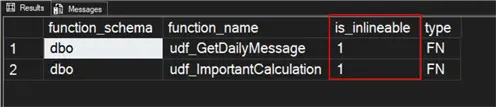
The results look good to me. Now that we have our demo environment and functions in place, let’s proceed with the test.
Performance Test
Speed is the universal measure of performance—how quickly something gets done. The number of page reads correlates with performance, but no one has ever told me, “Hey, my query is really fast, but it reads a lot of pages.”
To test performance, I’ll run each query 100 times, once with the scalar UDF and once with inline code. The LABEL OPTION makes finding the query easier in the DMV queryinsights.exec_requests_history. I’m running these statements in SQL Server Management Studio 21 with dark mode enabled. If you haven’t downloaded it yet, give it a try.
Let’s start with the CASE expression. Additionally, I used a Python script to execute each query in a for loop, since the DMV doesn’t distinguish between queries run in a WHILE loop in SQL. I may outline the Python script in a future article.
/*
* MSSQLTips.com
*/
SELECT TOP 100000
    t1.Id,
    t2.Id,
    CASE
        WHEN t1.RandomNumber1 = 1
             AND t2.RandomNumber1 = 2
             AND t1.RandomDate1 >= '1980-12-01' THEN
            'Important Message 1'
        WHEN t1.RandomNumber2 > 90
             AND t2.RandomNumber1 > 5
             AND t1.RandomDate1 <= '1992-12-31' THEN
            'Important Message 2'
        WHEN t1.RandomNumber2 = 2
             AND t2.RandomNumber1 > 90
             AND t1.RandomDate1 <= '1991-01-02' THEN
            'Important Message 3'
        ELSE
            'No Message for you!'
    END AS DailyMessage
FROM dbo.BigTable1 t1
    INNER JOIN dbo.BigTable2 t2
        ON t1.Id = t2.Id
        OPTION (LABEL = 'Inline_CASE');
GO
SELECT TOP 100000
    t1.Id,
    t2.Id,
    dbo.udf_GetDailyMessage(
        t1.RandomNumber1,
        t1.RandomNumber2,
        t2.RandomNumber1,
        t1.RandomDate1
    ) AS DailyMessage
FROM dbo.BigTable1 t1
INNER JOIN dbo.BigTable2 t2
    ON t1.Id = t2.Id
OPTION (LABEL = 'UDF_CASE');
GO
With those numbers recorded, let’s move on to the aggregate.
/*
* MSSQLTips.com
*/
SELECT t1.Id,
       t2.Id,
       CASE
           WHEN t1.RandomNumber1 > 50 THEN
           (
               SELECT MAX(RandomNumber1)FROM dbo.BigTable2
           )
           ELSE
               0
       END AS ImportantCalculation
FROM dbo.BigTable1 t1
    JOIN dbo.BigTable2 t2
        ON t1.Id = t2.Id
WHERE t1.Id < 100001
OPTION (LABEL = 'Inline_Aggregate');
GO
SELECT t1.Id,
       t2.Id,
       dbo.udf_ImportantCalculation(t1.RandomNumber1) AS ImportantCalculation
FROM dbo.BigTable1 t1
    JOIN dbo.BigTable2 t2
        ON t1.Id = t2.Id
WHERE t1.Id < 100001
OPTION (LABEL = 'UDF_Aggregate');
GO
I tabulated results using the query below. Results appear in the DMV within 2-5 minutes. I exclude the first execution as data might not be cached.
/*
* MSSQLTips.com
*/
WITH TopQueries
AS (SELECT
        r.total_elapsed_time_ms,
        r.label,
        ROW_NUMBER() OVER (PARTITION BY r.label ORDER BY r.start_time ASC) rn
    FROM queryinsights.exec_requests_history AS r
    WHERE
   r.label <> ''
          AND
          r.start_time >= DATEADD(MINUTE, -40, GETUTCDATE())
   )
SELECT
       AVG(t.total_elapsed_time_ms) AS avg_elapsed_time,
       t.label
FROM TopQueries AS t
WHERE t.rn > 1
GROUP BY t.label;
GO
Performance Summary
Now that we have the performance query results, the table below shows the average elapsed time in milliseconds.
| Type | Execution Count | Average Time in Milliseconds |
|---|---|---|
| Inline – CASE | 100 | 219 |
| UDF – CASE | 100 | 202 |
| Inline – Aggregate | 100 | 138 |
| UDF – Aggregate | 100 | 127 |
Starting the experiment, I expected the inline and scalar UDF CASE expressions to perform equally, which they did. I predicted the aggregate UDF would be slower than the inline query, but the results surprised me.
My test results slightly favored the UDF in both cases. I conducted another experiment, running both types, and it appeared that the UDF slightly outperformed the inline code in over 1000 executions. Based on these results, I recommend using complex scalar UDFs for Fabric Warehouses.
I’m sure we could create a scalar UDF that performs poorly, but the same could be said for any SQL flavor. I’m interested in hearing more about your results. If you reached a different conclusion through testing, let me know in the comments below.
Next Steps
- Not specifically for Fabric warehouses, but Aaron Bertrand wrote “Four ways to improve scalar function performance in SQL Server”, which is worth reading or bookmarking for later.
- As a DBA or data engineer, something you must be aware of is how concurrency works in a Fabric warehouse. To help you understand the topic better, I wrote the article “Understanding Concurrency Limits of Microsoft Fabric Data Warehouses.”
- To stay updated with all the latest Fabric news, consider following the Fabric Community. You can check out the newest blog posts and forums for each workload.

Jared Westover is a SQL Server specialist with two decades of industry experience covering T-SQL development, performance tuning, administration and Microsoft Fabric. He is currently a software architect at Crowe, an author at Pluralsight and primary contributor at sqlhabits.com. On MSSQLTips.com, Jared is a respected award-winning author for his clever T-SQL solutions and bringing to light new real-world solutions to age-old development problems.
- MSSQLTips Awards
- Achiever Award (75+ tips) – 2026
- Author of the Year – 2023
- Author Contender – 2024/2025