Overview
Finally we are ready to consume SSRS mobile reports after connecting the Power BI Mobile App with the SSRS server. Deploying a SSRS Mobile report from SSRS Mobile Report publisher is as simple as saving the report on the report server. In this chapter we will look at how to save the report on the SSRS server and how dashboards will look in the Power BI Mobile app post deployment.
Explanation
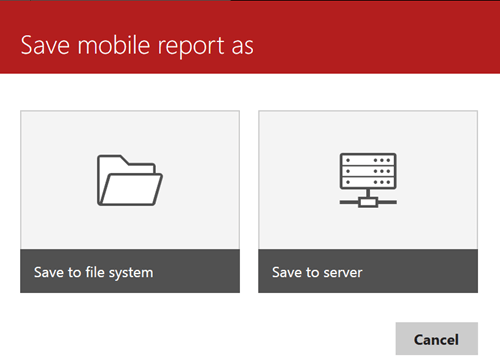
After you have completed authoring a mobile report in mobile report publisher, just click on the save icon in the toolbar. This should bring up a pop-up as shown below. You can save the report on the file system (i.e. on your disk) or on a SSRS server. Since we have the Power BI Mobile app connected to a SSRS server, we will save the report on the SSRS server. Click on Save to server.
This should bring up a pop-up as shown below. Provide the report name and location on the server where you wish to save the report and the report will get deployed.

After deploying your dashboards, you can connect to your SSRS server from the mobile app. You should be able to preview your mobile dashboards as shown below. Clicking on the dashboard would execute the mobile report and the report will be available for user interaction depending on your report design.
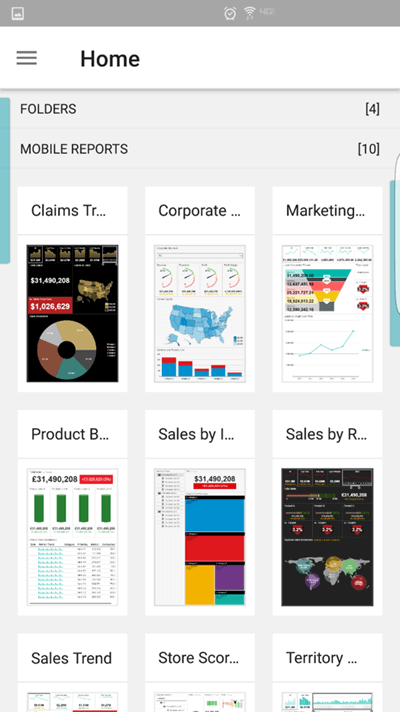
This completes the deployment as well as consumption of the mobile report authored in Mobile Report Publisher.
Additional Information
- Consider developing and deploying a few mobile reports to preview and execute in the Power BI Mobile App.

Siddharth has more than 14 years of experience in the IT Industry, with more than a decade of experience in Business Intelligence and Analytics, for clients banking, logistics, government, Media Entertainment, products, life sciences and other domains. He has been a lead architect for a portfolio of 40+ apps, containing apps in web, mobile, BI, Analytics, data warehousing, reporting, collaboration, CMS, NoSQL and other technologies. He has several certifications and is a published author for online and print-media publications, as well as the MSDN Library.
In his present role, he remains responsible for architecture design, technology stack selection, infrastructure design, 3rd party products evaluation and procurement, and performance engineering. These applications use technologies like Elasticsearch / Lucene, MongoDB, SharePoint 2013 and 2010, jQuery-based framework like Highcharts and GoJS, SQL Server and the Microsoft Business Intelligence stack (SSIS, SSAS, SSRS, MDX, PowerPivot, PowerView), jQueryMobile, Bootstrap, iOS xCode framework, and many others.
- MSSQLTips Awards: Champion (100+ tips) – 2018 | Author of the Year – 2017 | Author Contender – 2016, 2018-2019