Problem
Data is usually the most important asset in organizations, but only SQL developers can frequently access that data. Technical teams often write queries for non-technical users. This restricts agility, slows decision-making, and creates a bottleneck in data accessibility. One possible remedy is natural language processing (NLP), which enables users to ask questions in simple English and receive answers without knowing any code. Still, the majority of NLP-to-SQL solutions are cloud-based, which raises issues with cost and privacy.
Solution
We can create an entirely offline natural language to SQL Server queries converter using the Ollama platform that runs large language models locally. This solution keeps the entire workflow local and secure while enabling non-technical users to interact with structured data using natural language.
Get Things Ready
We require a local language model (LLM) that can produce SQL queries to begin interacting with the data. Running models directly on your computer without needing an internet connection, Ollama makes this feasible.
First, open a web browser and navigate to https://ollama.com and download the OllamaSetup.exe file.
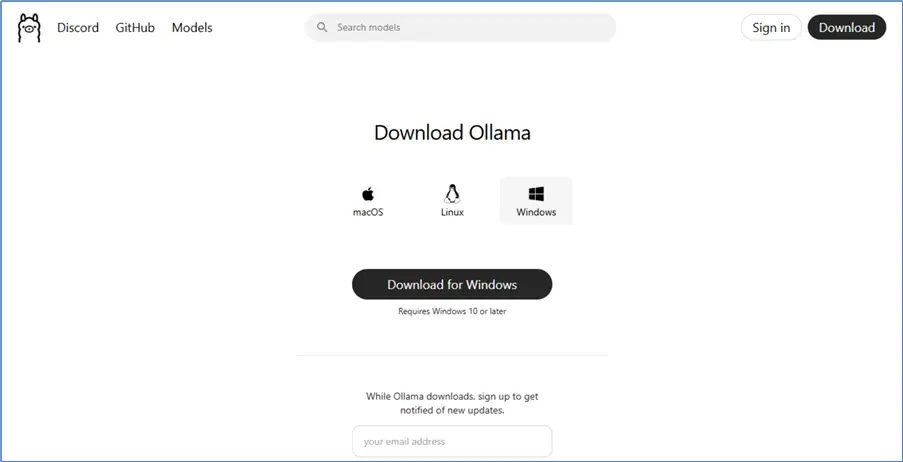
After downloading OllamaSetup.exe, open it manually. If you want to specify the installation directory, use the following terminal command:
--MSSQLTips.com (cmd)
Ollamasetup.exe /DIR=<the installation directory>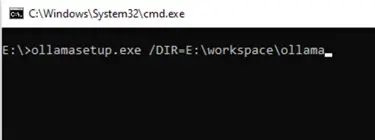
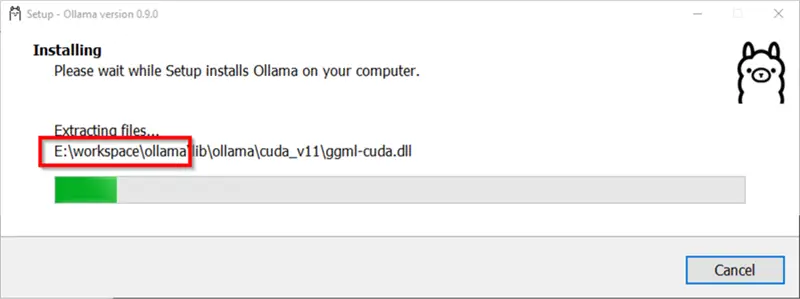
During the installation, the specified destination should be mentioned as shown below.
The next step is to pull the LLM from the Ollama repository. For instance, we can use a model from the deepseek-coder or codellama family, such as deepseek-code:1.3b.
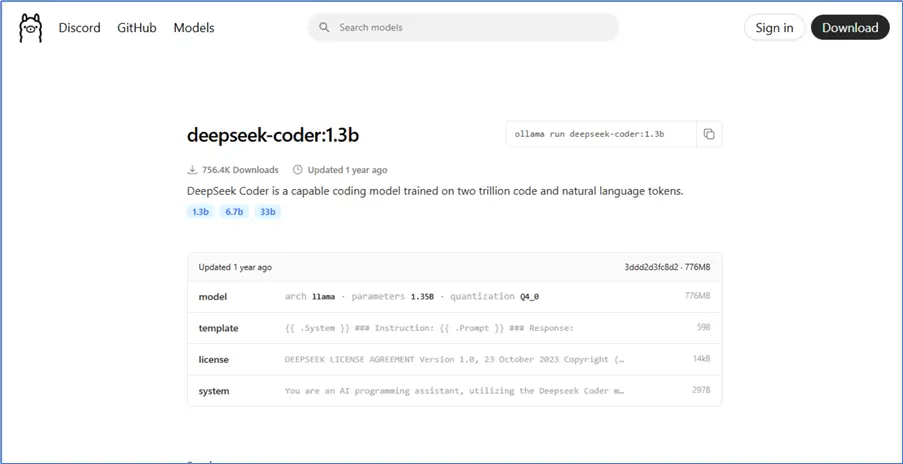
Next, run the pull command from the command prompt:
--MSSQLTips.com (cmd)
ollama pull deepseek-coder:1.3b
By default, Ollama downloads the models into the system drive (C). To change this directory, add an environment variable OLLAMA_MODELS and specify the new directory.
It’s critical to balance accuracy and performance when choosing a model for natural language to SQL generation. Although larger models, such as deepseek-coder:33b or codellama:13b, typically generate more precise and context-aware queries, they have higher resource requirements, requiring a lot more memory and possibly adding latency, particularly in real-time applications. Conversely, smaller models are considerably quicker and require fewer resources, but they might produce queries that are less accurate or comprehensive. The complexity of the anticipated questions, the hardware capacity available, and the overall performance requirements of your system must be taken into account when selecting the best model for your use case.
To ensure the Ollama service is listening locally, you can start the service using the serve command:
--MSSQLTips.com (cmd)
ollama serve
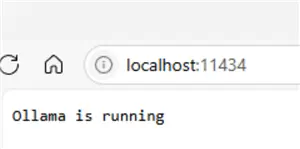
Then, to check that it started successfully, navigate to the following URL via a web browser: http://localhost:11434.
Enabling xp_cmdshell
xp_cmdshell is an extended stored procedure that allows SQL Server to run command-line instructions. Enabling it is required to call the Ollama REST API using PowerShell.
--MSSQLTips.com (SQL)
EXEC sp_configure 'show advanced options', 1;
RECONFIGURE;
EXEC sp_configure 'xp_cmdshell', 1;
RECONFIGURE;
Creating the Procedure
Now, let’s define a stored procedure in SQL Server that takes a natural language question, sends it to the Ollama model, retrieves the generated SQL, and executes it. We added the following sentence to the prompt to instruct the LLM not to return any text and to generate the query based on the popular AdventureWorks2017 sample database:
“Convert this natural language question into a SQL Server query for AdventureWorks2017 database. Return ONLY the SQL code, with no explanations or any text.”
--MSSQLTips.com (SQL)
CREATE OR ALTER PROCEDURE [dbo].[CallOllama]
    @Question VARCHAR(8000),
    @Model VARCHAR(100) = 'deepseek-coder:6.7b',
    @OutputQuery VARCHAR(4000) OUTPUT
AS
BEGIN
    SET NOCOUNT ON;

    DECLARE @Prompt NVARCHAR(MAX) =
        'Convert this natural language question into a SQL server query for AdventureWorks2017 database. Return ONLY the SQL code, with no explanations or any text. ' +
        'Question: ' + @Question;

    SET @Prompt = REPLACE(REPLACE(@Prompt, '"', '\"'), '''', '''''');

    DECLARE @Command VARCHAR(8000) =
        'powershell.exe -command "' +
        'try {' +
        '    $response = Invoke-RestMethod -Uri ''http://localhost:11434/api/generate'' ' +
        '    -Method Post ' +
        '    -Body ''{\"model\":\"' + @Model + '\",\"prompt\":\"' + @Prompt + '\",\"stream\":false}'' ' +
        '    -ContentType ''application/json''; ' +
        '    if ($response -ne $null) { $response.response } ' +
        '    else { ''No response from Ollama'' } ' +
        '} catch { ''Error: '' + $_.Exception.Message }"';

    DECLARE @Result TABLE (LineText VARCHAR(MAX));
    INSERT INTO @Result EXEC xp_cmdshell @Command;

    DECLARE @Output VARCHAR(MAX) = '';
    SELECT @Output = @Output + LineText + CHAR(13) + CHAR(10)
    FROM @Result
    WHERE LineText IS NOT NULL;

    SELECT LTRIM(RTRIM(@Output)) AS OllamaResponse;
END
Ollama provides a local REST API that allows you to interact with on-premise language models using standard HTTP requests. To generate a response from a model, send a POST request to the endpoint: http://localhost:11434/api/generate
This endpoint expects a JSON body with key parameters, like the name of the model to use (e.g., “deepseek-coder:6.7b”), the instruction, or prompt you want the model to respond to. And you should specify if you want the full response returned all at once.
Use of PowerShell
In our SQL Server procedure, this request is issued using PowerShell. Let’s break down the following command:
--MSSQLTips.com (cmd)
'powershell.exe -command "' +
'try {' +
'    $response = Invoke-RestMethod -Uri ''http://localhost:11434/api/generate'' ' +
'    -Method Post ' +
'    -Body ''{\"model\":\"' + @Model + '\",\"prompt\":\"' + @Prompt + '\",\"stream\":false}'' ' +
'    -ContentType ''application/json''; ' +
'    if ($response -ne $null) { $response.response } ' +
'    else { ''No response from Ollama'' } ' +
'} catch { ''Error: '' + $_.Exception.Message }"';
Here’s what’s happening in the process:
PowerShell is first launched from within SQL Server using xp_cmdshell. A try-catch block is then used to ensure that any errors during execution are caught and returned as readable messages. Inside the block, the Invoke-RestMethod cmdlet is called to send the HTTP request. It specifies the Ollama endpoint (http://localhost:11434/api/generate) through the -Uri parameter, sets the request method to POST, and builds a JSON body that includes the chosen model (@Model), the prompt (@Prompt), and “stream”: false for non-streaming responses. The content type is defined as application/json to indicate the format of the request.
Once the request is sent, the response is validated: if it’s not null, the actual model-generated text is extracted from the .response property of the JSON object. If no output is received, a fallback message stating “No response from Ollama” is returned. Finally, if an error occurs at any stage—such as the API not running—the catch block provides a descriptive error message.
This entire PowerShell command is dynamically constructed in SQL Server and passed to xp_cmdshell, allowing the stored procedure to communicate with the Ollama model and retrieve the generated SQL query on the fly.
Testing the Procedure
Let’s test the entire system with an example.
--MSSQLTips.com (SQL)
DECLARE @return_value INT;
DECLARE @strQuery VARCHAR(8000);

EXEC @return_value = [dbo].[CallOllama]
    @Question = N'List all customers from Canada who purchased more than 3 bikes',
    @Model = N'deepseek-coder:6.7b',
    @OutputQuery = @strQuery OUTPUT;

EXEC(@strQuery);
This should ask the model to generate the appropriate query. Then, it captures and assigns it to @strQuery variable. Finally, it executes the SQL dynamically.
In our example, the following SQL code was generated:
--MSSQLTips.com (SQL)
SELECT
    c.CustomerID,
    p.FirstName,
    p.LastName,
    COUNT(DISTINCT sod.SalesOrderID) AS BikePurchaseCount
FROM
    Sales.Customer c
JOIN
    Person.Person p ON c.PersonID = p.BusinessEntityID
JOIN
    Sales.SalesOrderHeader soh ON c.CustomerID = soh.CustomerID
JOIN
    Sales.SalesOrderDetail sod ON soh.SalesOrderID = sod.SalesOrderID
JOIN
    Production.Product pr ON sod.ProductID = pr.ProductID
JOIN
    Production.ProductSubcategory psc ON pr.ProductSubcategoryID = psc.ProductSubcategoryID
JOIN
    Production.ProductCategory pc ON psc.ProductCategoryID = pc.ProductCategoryID
JOIN
    Person.Address a ON soh.ShipToAddressID = a.AddressID
JOIN
    Person.StateProvince sp ON a.StateProvinceID = sp.StateProvinceID
JOIN
    Person.CountryRegion cr ON sp.CountryRegionCode = cr.CountryRegionCode
WHERE
    pc.Name = 'Bikes'
    AND cr.Name = 'Canada'
GROUP BY
    c.CustomerID,
    p.FirstName,
    p.LastName
HAVING
    COUNT(DISTINCT sod.SalesOrderID) > 3
ORDER BY
    BikePurchaseCount DESC;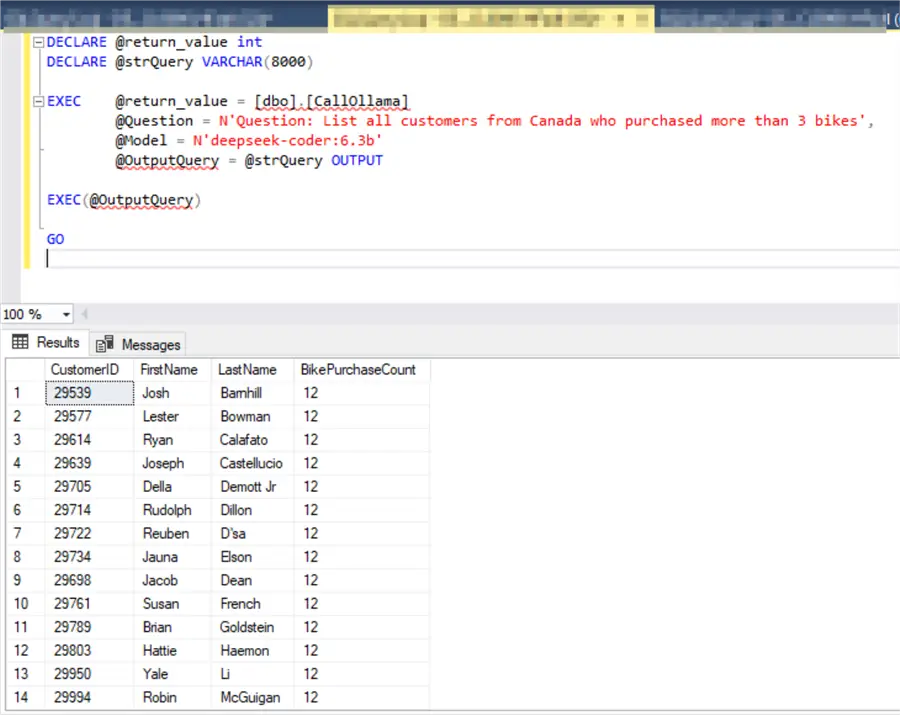
Again, make sure the accuracy of the chosen model is acceptable.
Conclusion
By combining SQL Server with Ollama, you can create a natural language interface to your structured data without relying on cloud APIs or exposing sensitive information. This solution empowers non-technical users to self-serve data, and organizations to maintain complete control over their data processing.
I believe this solution requires optimization and error handling, but it is an eye-opening glimpse into the potential of AI in the relational databases era.
Frequently Asked Questions
For a demo it is fine. For real work I would be careful. I prefer showing the generated SQL first and letting someone review it before running it. This gives you a chance to catch a bad join or a query that returns too much data.
I would not start with production. Test the idea on AdventureWorks or another sample database first. Then try it on a copy of your real database. Once you understand the risks you can decide how far to take it. Honestly, I do not recommend using this approach with queries that affects the data or objects in a production database, you need a post validation process to make sure that the generated query is safe and reliable.
The model needs some idea of the tables and columns. Without that it may guess names that do not exist. A simple schema description can make the generated query much better. This is especially important when the database is not a public sample database.
Yes, but the result depends on the schema and the model. A clean schema with good table names is easier for the model to understand. I would start with a few common business questions and improve the prompt from there. On the other hand, it is good to learn about using Consistent SQL Server Naming Conventions.
I would be very careful because xp_cmdshell gives SQL Server a way to run operating system commands. If you do not need it then leave it disabled. If you do enable it then limit who can use it and document why it is needed. This tip is useful: Is disabling xp_cmdshell in SQL Server really secure.
The procedure will not get a useful response if the local Ollama service is stopped. I would check the Ollama service first. Then check the local API address. If the browser cannot reach the local endpoint then SQL Server will not reach it either. For another local Ollama example see Using local Large Language Model OLLAMA with SQL Server.
Start with a small model if you only want to test the idea. It will usually run faster and need less memory. Choosing a larger may not be a better choice all the time. I believe testing different models’ family and size is the better approach to decide which model you should use.
Give the model more context. Try to explain the relationships and their meaning.
I would add better error handling first. Then add logging. After that I would add a review step before executing the generated SQL. If the tool will be used by others, then permissions and auditing should also be reviewed before moving forward.
Make the prompt stricter. Tell it to return only SQL code. Then test again.
No. It can help users ask questions faster, but it does not replace review and validation. Someone still needs to understand the data. Someone also needs to check that the query is correct and safe. I see it more as an assistant than a replacement.
Yes. Logging the question and the generated SQL is a good idea. It helps you review bad answers and improve the prompt. It also helps you see what users are really asking. This becomes important once more people start using the tool.
The biggest concern is letting a generated query run with too much permission. Keep the SQL login limited. Avoid giving access to tables the user should not see. Also, think about SQL injection and dynamic SQL risks. This article is worth reviewing: Protecting Yourself from SQL Injection in SQL Server Part 1.
Yes, when possible. Parameters make the code cleaner and safer than building everything as a text string. They also make the stored procedure easier to reuse. For more background see Using Parameters for SQL Server Queries and Stored Procedures.
Next Steps
- Check out these additional tips:

Hadi Fadlallah is an SQL Server professional with more than 10 years of experience. His main expertise is in data integration. He’s one of Stackoverflow.com’s top ETL and SQL Server Integration Services contributors. Also, he is a university lecturer and writes scientific and technical articles on several blogs. On the academic level, he holds a Ph.D. degree in data science focusing on context-aware big data quality and two master’s degrees in computer science and business computing.
- MSSQLTips Awards: Trendsetter (25+ tips) – 2025 | Author of the Year Contender – 2023 | Rookie of the Year – 2022



Nice article. Is it correct to assume the DeepSeek model knew the adventureworks schema? To provide so many joins it had to know the data tables structure and relationships. To use this on client databases I would expect you need to give entire schemas as context for the correct sql generation and even the SQL flavor (Oracle, MSSQL, Postgres etc). How would you approach new schemas?
And how well would this method work against a client’s database? You know, one that hasn’t had its schema plastered across the web for the last 20(?) years!
If would be helpful to show how we can use LLMs to crawl through any database’s schema and work out how to build a query when only half the tables have RI implemented, the other half are just heaps and no-one has updated stats since deployment! :D
To be fair, though, handy starter for getting the connection in place.
Thanks for your post shared, I gone through this, my query is, is it needs to define some input data for this which are entities are used for what or it will check automatic and so we can apply this to any databases. it would be appreciable if you explore on this, bahubaliadadande@gmail.com I had checked getting some issues like….ollama 405 method not allowed. Error: Unable to connect to the remote server
Does Ollama have to be trained specifically on each SQL database? Is the model referenced trained on the specific SQL Database? Or does it connect to the database, review the dictionary and figures out the relationships?