Problem
Microsoft Fabric is a cloud based data analytics platform from Microsoft. How do you know if Microsoft Fabric is the right solution for your data analytics needs? Take a look at these Microsoft Fabric FAQs to get the answers you need.
Solution
In this article we’ll answer many frequently asked questions regarding the Microsoft Fabric data platform and refer to existing articles which contain more deep-dive information.
Microsoft Fabric FAQs
Microsoft Fabric is a Software-as-a-Service (SaaS) data platform that bundles a set of features and capabilities into one big centralized, AI-powered data analytics toolkit.
You can use Fabric to build data warehouses, lakehouses, data integration pipelines, real-time event streams, Power BI reports and so on. All data is stored as delta tables (Parquet files with a transaction layer) in a logical data lake called OneLake, Microsoft Purview can be integrated for more advanced data governance and there’s Copilot integration in every layer.
Microsoft Fabric is mainly used as a data platform for data analytics. It brings together many different capabilities for working with data. Data engineers can build data warehouses and lakehouses, they can build complex data integration pipelines using Spark or Python notebooks. Analytics engineers can write T-SQL and create semantic models in Power BI.
Data scientists can write advanced machine learning and AI code in notebooks, while “citizen developers” can integrate data using Dataflows and create reports in Power BI. No matter the technical skill level or the requirements, there’s a feature in Microsoft Fabric that can be used to build your use case. While Fabric started out as a pure data analytics platform, over the years additional features have been added such as mirroring or hosting of transactional databases. Using the words of a top Microsoft executive: “Microsoft Fabric is the Office of data”.
At the time of writing – because Fabric is updated each month, so it evolves rapidly – there are a couple of core workloads. Data Factory (this includes data pipelines like Azure Data Factory, but also dataflows and copy jobs), Real-time intelligence (event streaming like Azure Event Hubs and event storage in KQL databases), Databases (the SQL Database, Cosmos Database and mirrored databases), Analytics (data warehouse, lakehouse & notebooks) and Power BI.
There are also Industry Solutions which serve as a template, 3rd party Partner solutions and a couple of supporting features such as Copilot, OneLake and Microsoft Purview.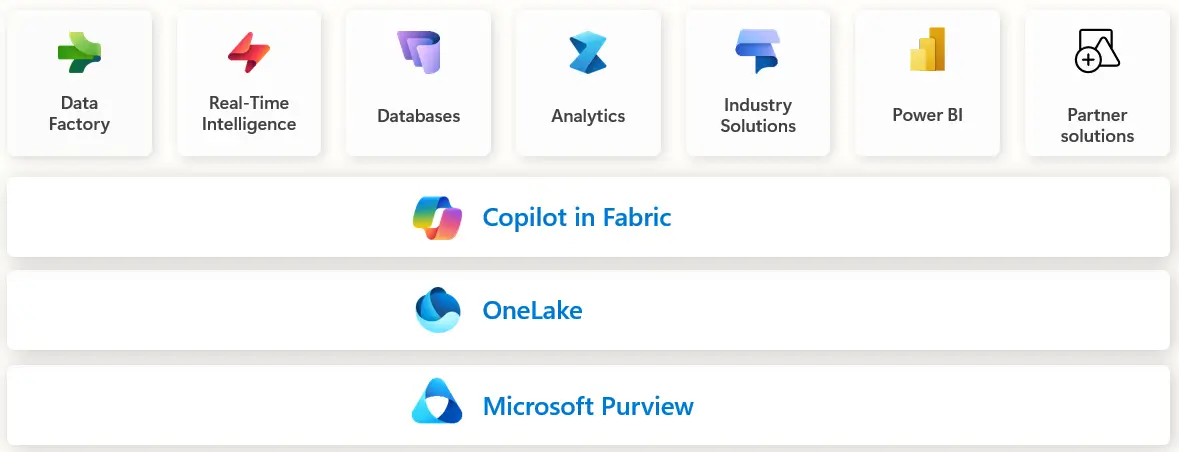
Microsoft Fabric was announced at Microsoft Build 2023 (which took place in May 2023) and went officially in general availability in November 2023 during Microsoft Ignite.
This means Fabric is still quite a young product, but many building blocks of the platform have been around for a while (such as Azure Data Factory, Azure SQL Database, Azure Data Lake etc).
Anyone who needs to work with data. The audience can differ depending on the component. The warehouse is for a technical audience who like to build analytical data products using T-SQL, while the lakehouse has an audience that like to write code using Spark and Python. The data pipelines in Data Factory can be used by a technical audience, but Dataflows are well-suited to a non-technical audience due to its graphical nature.
Microsoft Fabric can serve the whole spectrum between “very technical” (e.g. building advanced AI products) and “totally not technical” (e.g. a manager who needs to view a sales report).
At the time of writing, there are two Fabric certifications. The first one is Microsoft Certified: Fabric Analytics Engineer Associate which focuses more on designing and creating data analytics solutions (Power BI, Dataflows, designing a data warehouse).
The other one is Microsoft Certified: Fabric Data Engineer Associate which focuses more on the engineering side of Fabric and is more technical.
Learning the basics is not that hard. There are free online courses from Microsoft Learn (DP-600 and DP-700) and there are plenty of free resources from the community. With a bit of real-life experience, following some courses and playing around with the service getting the two certifications is certainly doable.
However, becoming a “Fabric expert” in all of Fabric is hard. This would entail that you are a Power BI expert (this domain alone is already huge), data engineer expert (both T-SQL and Spark/Python), real-time intelligence expert (KQL and Eventstreams) and so on. To not overwhelm yourself, try starting with the basics of most workloads and then deepen your knowledge in one or two areas.
It depends. Due to the ease-of-use of some components (like Dataflows for example) proof-of-concepts can be delivered in just a few hours and small projects can take a couple of days.
Bigger projects that tackle many data sources, have complex business logic and have more intricate security requirements can take months or even more, but some of the development (like writing SQL or Python) can be sped up using AI-assisted coding. In general, you might expect that using Fabric might shorten the total duration a bit since it’s a centralized SaaS product so there’s less integration required between components.
When you create a workspace in Fabric, you link it to a Fabric capacity which is created in Azure. This means that you are billed through your Azure bill. The capacity will run all your workloads from that workspace and you either pay for each second that the capacity is running (you have the option to pause and resume it), or you reserve a capacity for one or three years for a discounted price.
Aside from the capacity (which runs the compute), you also pay for OneLake storage. You can learn more about capacities in this tip.
There are two factors that determine cost: your Fabric capacities and storage of data in OneLake. The storage has fixed prices per Gigabyte per type of storage, and you can check these in the price calculator. On average, you pay about $23 per Terabyte per month.
The price of a capacity depends on its size, how long the capacity runs each month (with pay-as-you-go pricing) or if you have reserved pricing (about 41% discount). Running a pay-as-you-go F2 capacity for a whole month costs about $262 and the price doubles each time you scale the capacity to a higher tier.
Yes. You can register for a free trial capacity. This grants you a F64 capacity for 60 days. When you create a workspace, you need to link it to this trail capacity.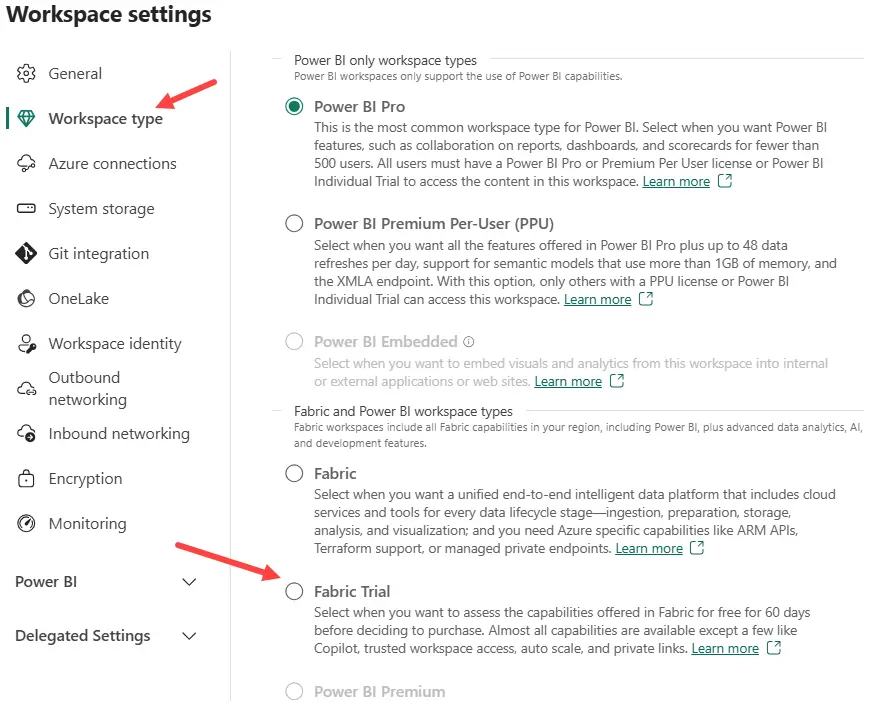
Since Fabric is a SaaS (software-as-a-service) product, it is always up to date. You don’t have to manage updates or bug fixes.
New features or preview features are rolled out by region though, so it’s possible that you have to wait a bit before a change becomes available in your region.
Next Steps
- Do you have Microsoft Fabric questions that are not mentioned here? Let us know in the comments!
- You can find an overview of all Microsoft Fabric tips in this overview and a list of all Power BI tips here.

Koen Verbeeck is a seasoned business intelligence consultant with over a decade of experience with the Microsoft Data Platform. He holds several certifications, including Azure Data Engineer. He’s a prolific writer, with over 375 articles on technologies such as Microsoft Fabric, SSIS, ADF, SSAS, SSRS, MDS, Power BI, Snowflake and Azure services. He has spoken at various events such as PASS, SQLBits, dataMinds Connect and many others. He frequently delivers educational webinars on MSSQLTips.com. For his efforts, Koen has been awarded the Microsoft MVP data platform award for many years.
- MSSQLTips Awards:
- Leadership Award (200+ Tips) – 2021
- Author of the Year – 2014/2020/2022
- Author Contender – 2024/2025